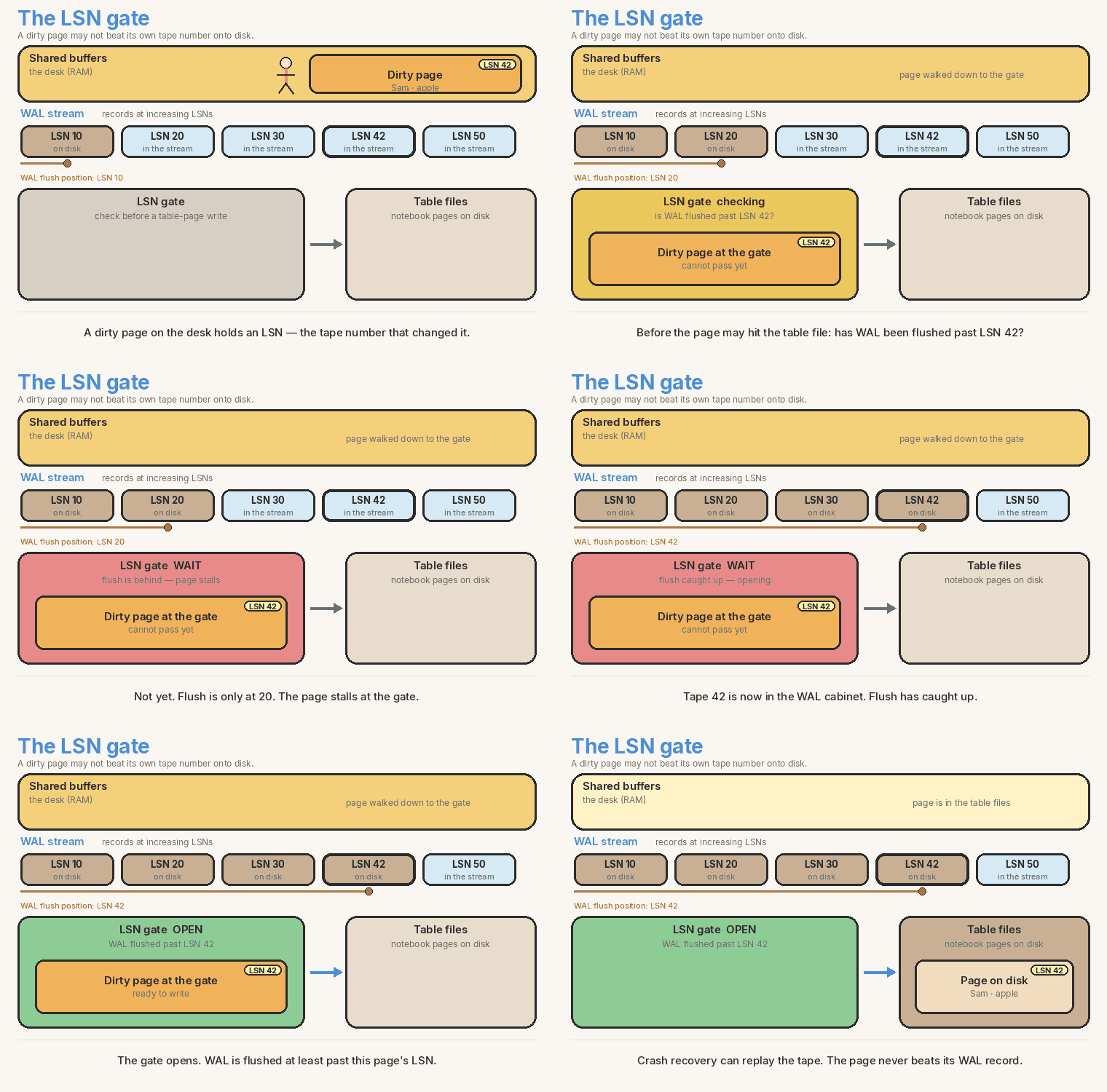
<?xml version="1.0" encoding="utf-8"?><feed xmlns="http://www.w3.org/2005/Atom" xml:lang="en"><generator uri="https://jekyllrb.com/" version="3.10.0">Jekyll</generator><link href="https://theintelliwise.com/feed.xml" rel="self" type="application/atom+xml" /><link href="https://theintelliwise.com/" rel="alternate" type="text/html" hreflang="en" /><updated>2026-10-15T21:18:10+01:00</updated><id>https://theintelliwise.com/feed.xml</id><title type="html">The Intelliwise</title><subtitle>Practical, engineer-to-engineer notes on databases, Postgres, systems, and applied ML/AI — by Vijay Kumar in Dublin.</subtitle><author><name>Vijay Kumar</name></author><entry><title type="html">XGBoost Interview Q&amp;amp;A: Predicting Dublin Rent</title><link href="https://theintelliwise.com/posts/xgboost-interview-qa/" rel="alternate" type="text/html" title="XGBoost Interview Q&amp;amp;A: Predicting Dublin Rent" /><published>2026-10-12T13:00:00+01:00</published><updated>2026-10-12T13:00:00+01:00</updated><id>https://theintelliwise.com/posts/xgboost-interview-qa</id><content type="html" xml:base="https://theintelliwise.com/posts/xgboost-interview-qa/"><![CDATA[<p>This is a mock ML interview. The task is monthly rent for Dublin flats. We start with floor area. Location and age come in later.</p>

<p>I use one running example the whole way. The average rent in the pocket data is <strong>€1,900</strong>. One 80 m² city flat actually rents for <strong>€2,500</strong>. Those six-flat numbers are toy numbers I made up so the first rounds fit on one screen. The script at the end is a larger synthetic set. Not real listing data.</p>

<pre><code class="language-mermaid">flowchart LR
  A[Start at the average&lt;br/&gt;€1,900] --&gt; B[Compute residuals]
  B --&gt; C[Fit a small tree]
  C --&gt; D[Add eta times the tree]
  D --&gt; E{More trees?}
  E --&gt;|yes| B
  E --&gt;|no| F[Final rent]
</code></pre>

<hr />

<h2 id="1-what-is-xgboost-in-one-line">1. What is XGBoost, in one line?</h2>

<div class="callout">
<strong>Interviewer:</strong> What is XGBoost, in one line?
</div>

<p><strong>Me:</strong> A supervised model that adds small decision trees one after another. Each new tree tries to fix the errors so far.</p>

<p>XGBoost stands for Extreme Gradient Boosting. Supervised means we have a target — here, monthly rent. You give it rows (floor area, later location and age) and a number to hit.</p>

<p>It does not build 200 independent trees and average them. It starts with a simple guess, usually the mean rent, then grows a shallow tree that predicts the leftover error. Add that tree. Repeat. That stacked model is the booster.</p>

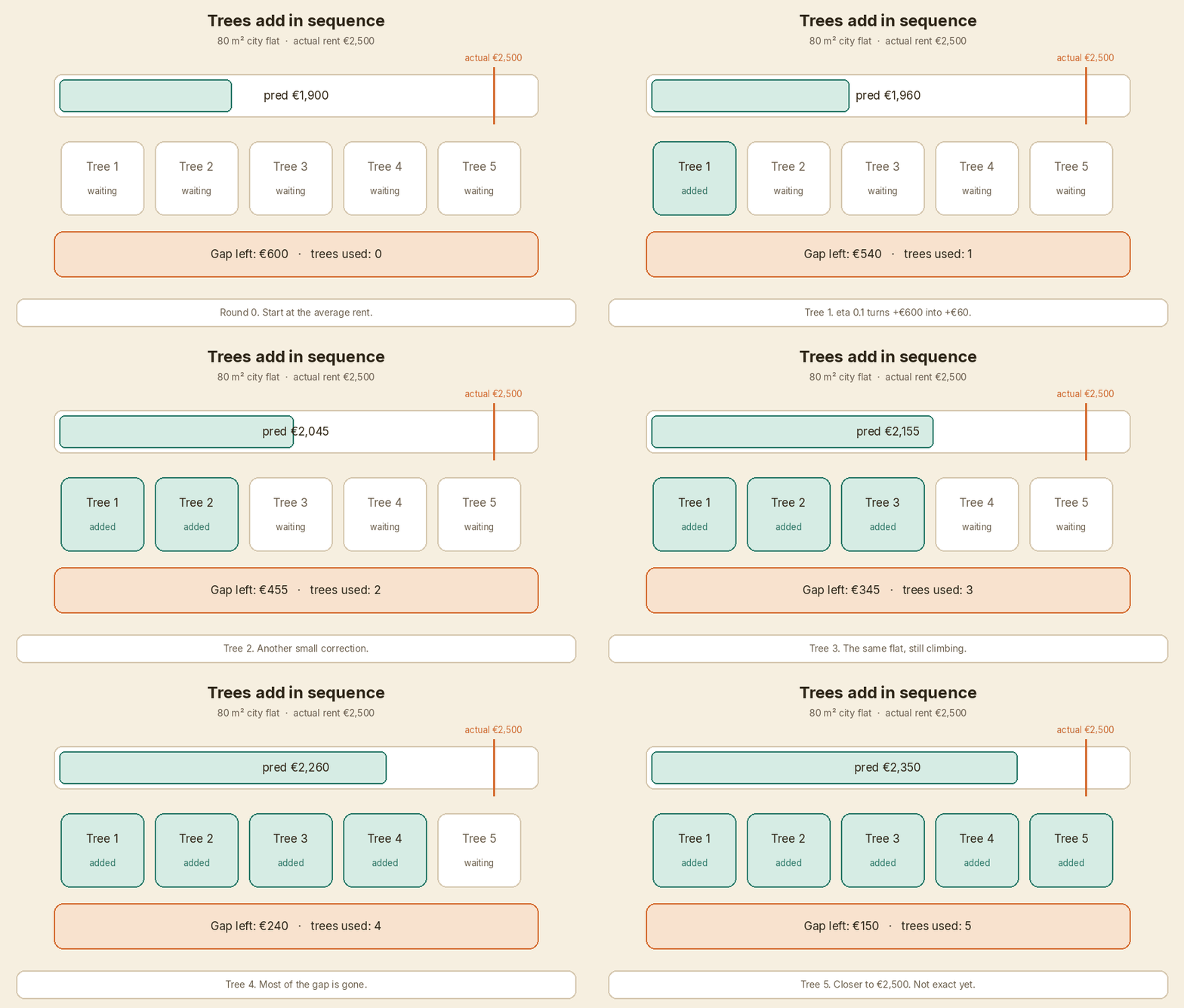
<p>For the 80 m² city flat, the first guess is €1,900. The leftover error is +€600. Later trees chip away at that +€600 until the prediction sits closer to €2,500.</p>

<p><em>Follow-up they may ask:</em> Is it only for regression? No. Same idea for classification. The loss changes. The “add a tree to cut the loss” loop does not.</p>

<hr />

<h2 id="2-how-is-it-different-from-a-random-forest">2. How is it different from a random forest?</h2>

<div class="callout">
<strong>Interviewer:</strong> How is XGBoost different from a random forest?
</div>

<p><strong>Me:</strong> A random forest trains trees independently and averages the votes. XGBoost adds trees in sequence so each one cuts the loss that is still left.</p>

<table>
  <thead>
    <tr>
      <th> </th>
      <th>Random forest</th>
      <th>XGBoost</th>
    </tr>
  </thead>
  <tbody>
    <tr>
      <td>How trees are built</td>
      <td>Independent, then averaged</td>
      <td>One after another</td>
    </tr>
    <tr>
      <td>What a new tree does</td>
      <td>Another vote</td>
      <td>A correction</td>
    </tr>
    <tr>
      <td>Order of trees</td>
      <td>Does not matter</td>
      <td>Matters</td>
    </tr>
    <tr>
      <td>Typical depth</td>
      <td>Often deep</td>
      <td>Often shallow, depth 3–6</td>
    </tr>
    <tr>
      <td>What it is trying to do</td>
      <td>Cut variance by averaging</td>
      <td>Cut loss by adding</td>
    </tr>
  </tbody>
</table>

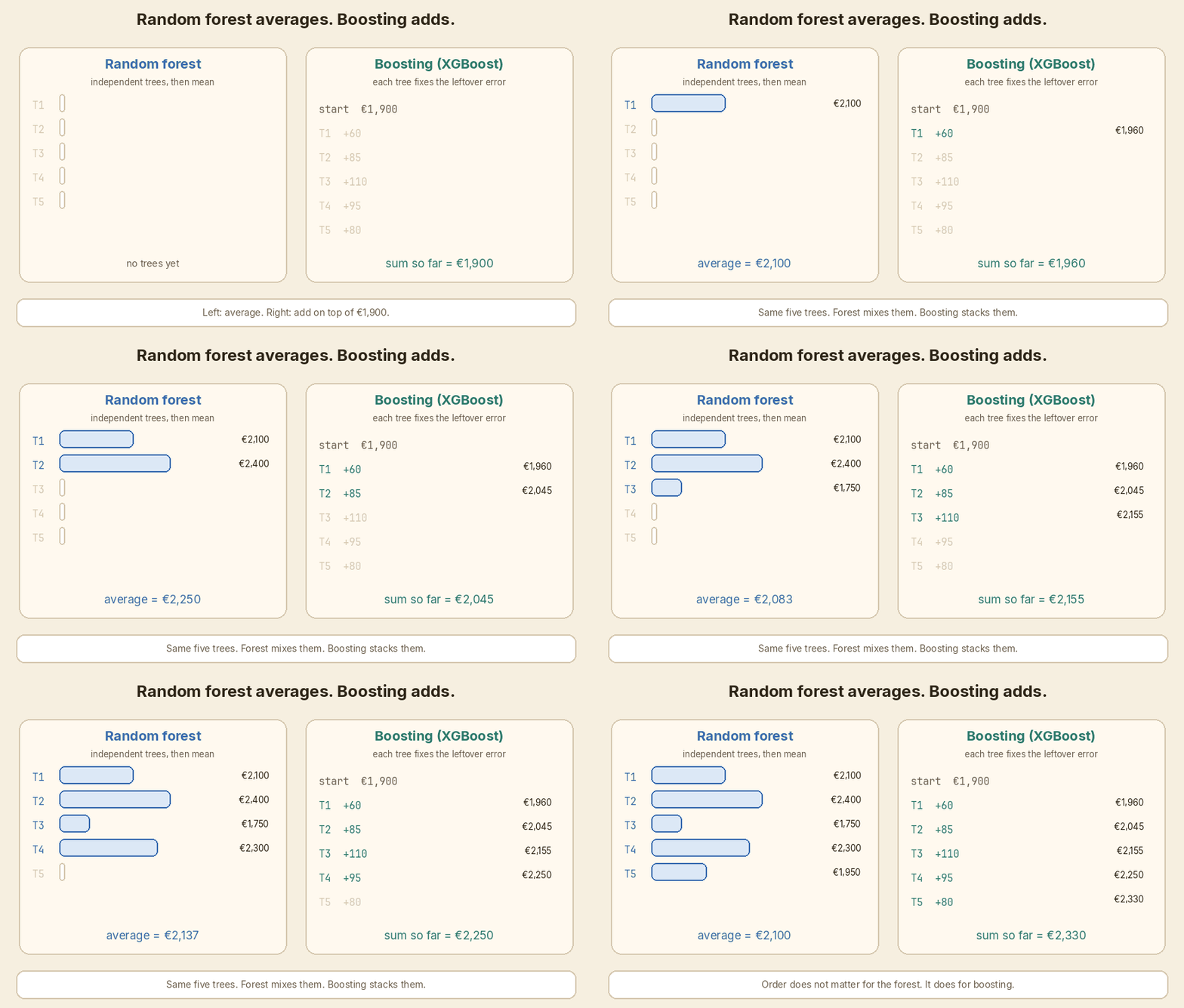
<p>If five forest trees guess €2,100, €2,400, €1,750, €2,300, €1,950 for the city flat, the answer is the mean of those five. If five boosting trees run, the answer is €1,900 plus the five corrections, in order.</p>

<p><img src="/assets/images/xgboost-interview-qa/02-forest-vs-boosting.gif" alt="Random forest averages independent trees. Boosting adds them in sequence." /></p>

<p><em>Follow-up they may ask:</em> Can I bag XGBoost trees anyway? Yes. <code class="language-plaintext highlighter-rouge">subsample</code> and <code class="language-plaintext highlighter-rouge">colsample_bytree</code> already do a light version of that, on top of boosting.</p>

<hr />

<h2 id="3-walk-me-through-the-first-round">3. Walk me through the first round.</h2>

<div class="callout">
<strong>Interviewer:</strong> Walk me through the first round, with numbers.
</div>

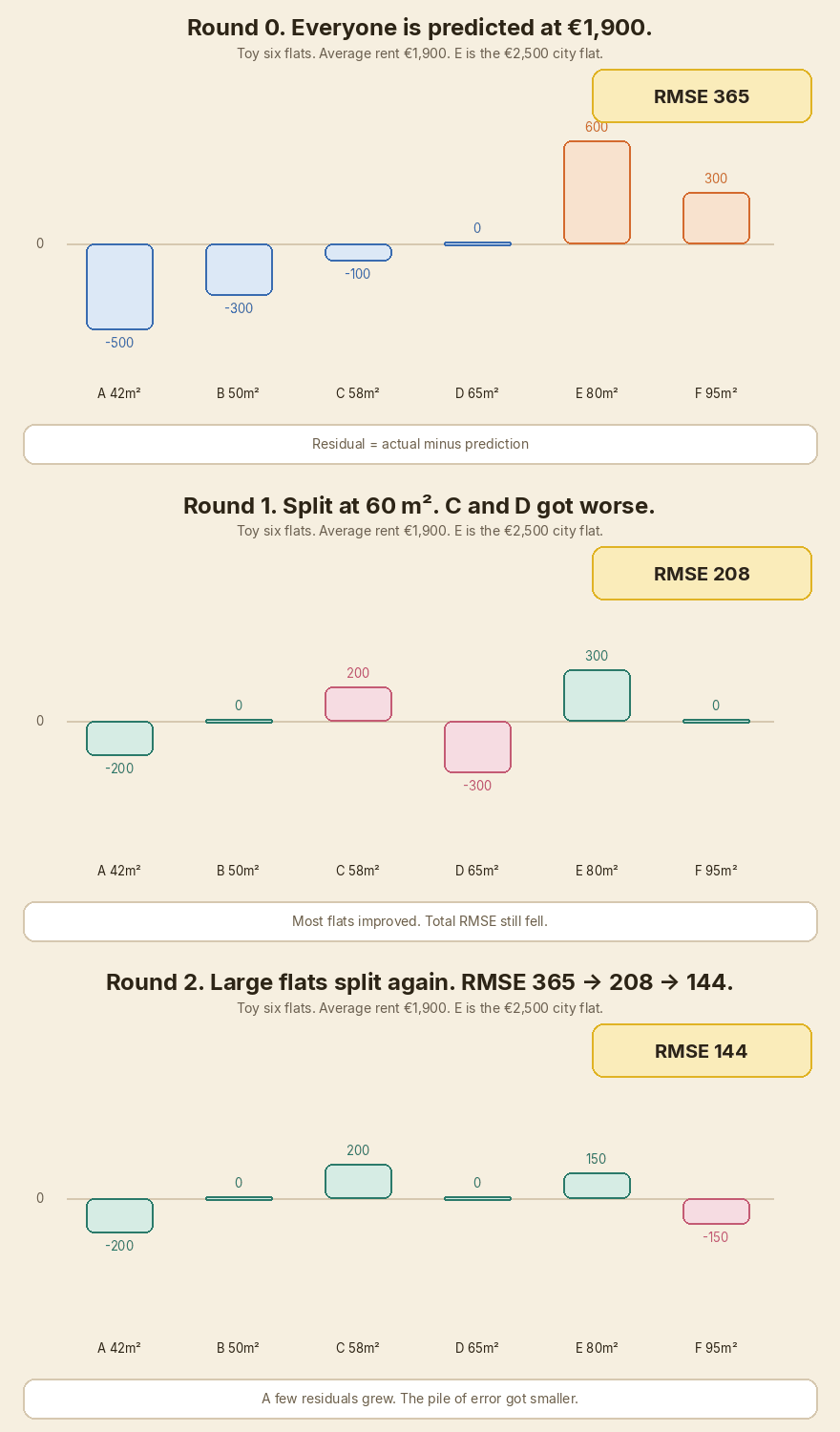
<p><strong>Me:</strong> Start from the average. Compute residuals. Tree 1 learns a correction for each group. Most flats get better, a couple get worse, and the total error still drops.</p>

<p>Pocket data. Six flats. Mean rent €1,900. I set eta to 1.0 in this round so the leaf values are easy to see. Later we put eta back to 0.1.</p>

<table>
  <thead>
    <tr>
      <th>Flat</th>
      <th style="text-align: right">Area</th>
      <th style="text-align: right">Actual rent</th>
      <th style="text-align: right">Pred (round 0)</th>
      <th style="text-align: right">Residual</th>
    </tr>
  </thead>
  <tbody>
    <tr>
      <td>A</td>
      <td style="text-align: right">42 m²</td>
      <td style="text-align: right">€1,400</td>
      <td style="text-align: right">€1,900</td>
      <td style="text-align: right">−€500</td>
    </tr>
    <tr>
      <td>B</td>
      <td style="text-align: right">50 m²</td>
      <td style="text-align: right">€1,600</td>
      <td style="text-align: right">€1,900</td>
      <td style="text-align: right">−€300</td>
    </tr>
    <tr>
      <td>C</td>
      <td style="text-align: right">58 m²</td>
      <td style="text-align: right">€1,800</td>
      <td style="text-align: right">€1,900</td>
      <td style="text-align: right">−€100</td>
    </tr>
    <tr>
      <td>D</td>
      <td style="text-align: right">65 m²</td>
      <td style="text-align: right">€1,900</td>
      <td style="text-align: right">€1,900</td>
      <td style="text-align: right">€0</td>
    </tr>
    <tr>
      <td>E (city)</td>
      <td style="text-align: right">80 m²</td>
      <td style="text-align: right">€2,500</td>
      <td style="text-align: right">€1,900</td>
      <td style="text-align: right"><strong>+€600</strong></td>
    </tr>
    <tr>
      <td>F</td>
      <td style="text-align: right">95 m²</td>
      <td style="text-align: right">€2,200</td>
      <td style="text-align: right">€1,900</td>
      <td style="text-align: right">+€300</td>
    </tr>
  </tbody>
</table>

<p>Round-0 RMSE is <strong>365</strong>.</p>

<p>Tree 1 splits at 60 m².</p>

<ul>
  <li>Small group A, B, C. Mean residual = (−500 − 300 − 100) / 3 = <strong>−300</strong>. New pred = €1,600.</li>
  <li>Large group D, E, F. Mean residual = (0 + 600 + 300) / 3 = <strong>+300</strong>. New pred = €2,200.</li>
</ul>

<table>
  <thead>
    <tr>
      <th>Flat</th>
      <th style="text-align: right">New pred</th>
      <th style="text-align: right">New residual</th>
      <th>vs round 0</th>
    </tr>
  </thead>
  <tbody>
    <tr>
      <td>A</td>
      <td style="text-align: right">€1,600</td>
      <td style="text-align: right">−€200</td>
      <td>better</td>
    </tr>
    <tr>
      <td>B</td>
      <td style="text-align: right">€1,600</td>
      <td style="text-align: right">€0</td>
      <td>better</td>
    </tr>
    <tr>
      <td>C</td>
      <td style="text-align: right">€1,600</td>
      <td style="text-align: right">+€200</td>
      <td><strong>worse</strong></td>
    </tr>
    <tr>
      <td>D</td>
      <td style="text-align: right">€2,200</td>
      <td style="text-align: right">−€300</td>
      <td><strong>worse</strong></td>
    </tr>
    <tr>
      <td>E</td>
      <td style="text-align: right">€2,200</td>
      <td style="text-align: right">+€300</td>
      <td>better</td>
    </tr>
    <tr>
      <td>F</td>
      <td style="text-align: right">€2,200</td>
      <td style="text-align: right">€0</td>
      <td>better</td>
    </tr>
  </tbody>
</table>

<p>C and D got worse. E, the €2,500 flat, moved from €1,900 to €2,200. Round-1 RMSE is <strong>208</strong>. Total error fell even though two rows got worse. That is normal. The tree optimises the sum, not every row.</p>

<p>A second split on the large group takes RMSE to <strong>144</strong>. E is now at €2,350.</p>

<p><img src="/assets/images/xgboost-interview-qa/03-residuals-shrink.gif" alt="Residuals shrink round by round. RMSE falls even when two flats get worse." /></p>

<p>With eta 0.1, the same city flat climbs in small steps instead of taking the full leaf jump:</p>

<p><img src="/assets/images/xgboost-interview-qa/01-trees-add-in-sequence.gif" alt="Trees added in sequence move the 80 m² city flat from €1,900 toward €2,500." /></p>

<p><em>Follow-up they may ask:</em> Why not one deep tree instead of many shallow ones? One deep tree memorizes the six rows. Shallow trees plus a small eta usually travel better to flats the model has not seen.</p>

<hr />

<h2 id="4-why-is-it-called-gradient-boosting">4. Why is it called gradient boosting?</h2>

<div class="callout">
<strong>Interviewer:</strong> Why is it called gradient boosting?
</div>

<p><strong>Me:</strong> Each tree is fit on the negative gradient of the loss. For squared error, that gradient is the residual.</p>

<p>Loss here is squared error: how far the predicted rent is from the actual rent. The gradient of that loss, with respect to the current prediction, points toward “make this prediction worse.” The opposite direction — the <strong>negative gradient</strong> — points toward “make this prediction better.”</p>

<p>For squared error, that negative gradient <strong>is</strong> <code class="language-plaintext highlighter-rouge">actual − prediction</code>. That is the residual column in the table above. Tree 1 is not magically “learning rent.” It is learning those residuals.</p>

<p>If the loss were log loss for a classification problem, the gradient would not be a raw residual. The loop is the same: compute the gradient of the loss, grow a tree that follows it, add the tree, repeat. “Gradient boosting” is that loop. “XGBoost” is a fast, regularised way to run it.</p>

<hr />

<h2 id="5-what-does-xgboost-add-over-plain-gradient-boosting">5. What does XGBoost add over plain gradient boosting?</h2>

<div class="callout">
<strong>Interviewer:</strong> What does XGBoost add over plain gradient boosting?
</div>

<p><strong>Me:</strong> It uses the first and second derivatives of the loss — gradient and hessian — to score splits and set leaf values. It also regularises tree complexity, finds splits with a fast histogram pass, and has a default direction for missing values.</p>

<p>Plain gradient boosting, in the Friedman sense, often uses only the gradient. XGBoost takes a second-order look. For each row you have:</p>

<ul>
  <li><strong>g</strong> — gradient. How much the loss would move if this prediction moved.</li>
  <li><strong>h</strong> — hessian. How curved that loss is at this prediction.</li>
</ul>

<p>For squared error, g is <code class="language-plaintext highlighter-rouge">prediction − actual</code> and h is 1. So the hessian is basically a row count. For logistic loss, h is <code class="language-plaintext highlighter-rouge">p(1 − p)</code>, so a confident row counts for less than a row sitting at 0.5. That is why <code class="language-plaintext highlighter-rouge">min_child_weight</code> is a sum of hessians, not “minimum rows,” even if people treat it as a row count in regression.</p>

<p>A split is scored by <strong>gain</strong>. A leaf gets a <strong>weight</strong>. From the <a href="https://xgboost.readthedocs.io/en/stable/tutorials/model.html">XGBoost model page</a>:</p>

\[\mathrm{Gain} = \frac{1}{2}\left[\frac{G_L^{2}}{H_L+\lambda}+\frac{G_R^{2}}{H_R+\lambda}-\frac{(G_L+G_R)^{2}}{H_L+H_R+\lambda}\right]-\gamma\]

\[w_j^{*} = -\frac{G_j}{H_j+\lambda}\]

<p>G is the sum of gradients in that node. H is the sum of hessians. λ (<code class="language-plaintext highlighter-rouge">reg_lambda</code>) pulls leaf values toward zero. γ (<code class="language-plaintext highlighter-rouge">gamma</code>) is a tax for making a new leaf.</p>

<p>In plain words: gain asks “if I split here, how much extra loss do I remove, after paying for a new leaf?” If that number is not positive, skip the split. The leaf weight is a shrunk version of “average residual in this leaf.” For our large-flat leaf, G is the sum of those +€600 and +€300 style residuals (with a sign flip from how g is defined), H is roughly 3, and λ stops one noisy leaf from swinging rent by a huge amount.</p>

<p>The rest of the “extreme” in the name is engineering:</p>

<ul>
  <li><strong>Histogram split finding.</strong> Bucket each feature, scan the buckets. Parallel across features.</li>
  <li><strong>Regularisation.</strong> Depth, λ, α, γ, min child weight. The tree is not allowed to grow just because it can.</li>
  <li><strong>Sparsity-aware missing values.</strong> At each split the algorithm learns whether NaN should go left or right.</li>
</ul>

<p><em>Follow-up they may ask:</em> Do I need to derive gain on a whiteboard? Know what G, H, λ, and γ do. Write the leaf-weight formula. Explain it with the €1,900 / €2,500 flat. That is enough for most interviews.</p>

<hr />

<h2 id="6-what-is-the-learning-rate-eta-and-why-keep-it-small">6. What is the learning rate (eta) and why keep it small?</h2>

<div class="callout">
<strong>Interviewer:</strong> What is the learning rate — eta — and why do people keep it small?
</div>

<p><strong>Me:</strong> Eta scales each tree’s correction before it is added. Keep it small so no single tree can swing the rent too far.</p>

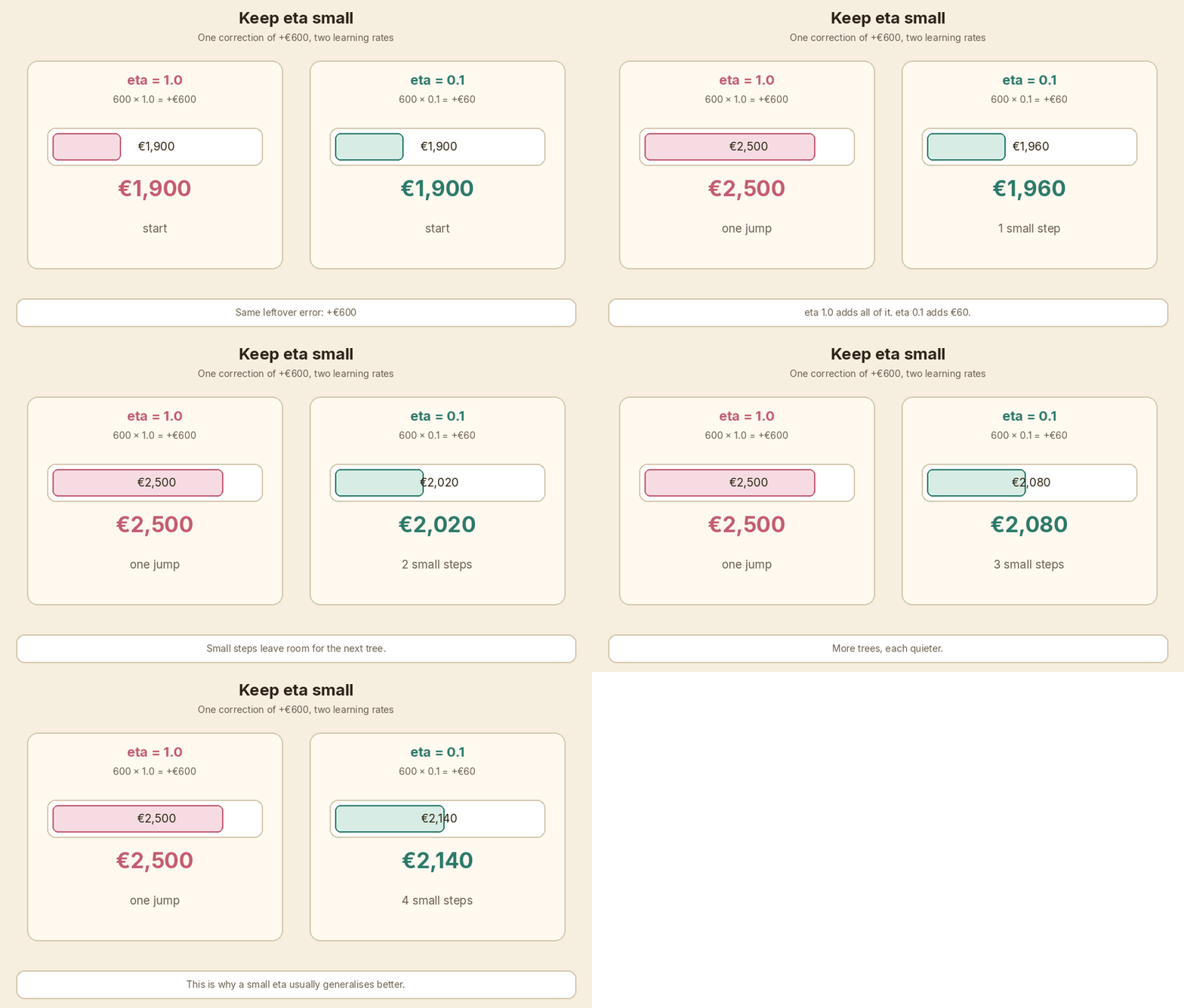
<p>The 80 m² city flat still has a +€600 residual after round 0. If eta is 1.0, tree 1 is allowed to add the whole +€600 (or the leaf mean, +€300 in the six-flat split). If eta is <strong>0.1</strong>:</p>

<p><strong>+€600 × 0.1 = +€60</strong></p>

<p>New prediction = €1,960, not €2,500. The next tree sees a leftover of +€540 and takes another small step.</p>

<p>Small eta means you need more trees. That sounds wasteful. In practice those quieter steps generalise better. A tree that is a bit wrong does less damage. Early stopping then picks how many steps you actually keep.</p>

<p><img src="/assets/images/xgboost-interview-qa/04-learning-rate-small-steps.gif" alt="eta 1.0 jumps by €600. eta 0.1 adds €60 at a time." /></p>

<p>A start I actually use: <code class="language-plaintext highlighter-rouge">learning_rate=0.05</code> or <code class="language-plaintext highlighter-rouge">0.1</code>, then let early stopping choose <code class="language-plaintext highlighter-rouge">n_estimators</code>. If the model wants 20 trees and still looks noisy, I drop eta and allow more trees. If it wants 800 trees and the job is slow, I raise eta a bit.</p>

<hr />

<h2 id="7-which-hyperparameters-do-you-tune-first">7. Which hyperparameters do you tune first?</h2>

<div class="callout">
<strong>Interviewer:</strong> Which hyperparameters do you tune first?
</div>

<p><strong>Me:</strong> Depth and min child weight, then the two sample rates, then the regularisers, and I never pick <code class="language-plaintext highlighter-rouge">n_estimators</code> by hand if I can use early stopping.</p>

<table>
  <thead>
    <tr>
      <th>Param</th>
      <th>What it controls</th>
      <th>Sign of too high</th>
      <th>Sign of too low</th>
      <th>A sensible start</th>
    </tr>
  </thead>
  <tbody>
    <tr>
      <td><code class="language-plaintext highlighter-rouge">max_depth</code></td>
      <td>How bushy each tree is</td>
      <td>Train error near zero, val error worse</td>
      <td>Both errors stay high</td>
      <td>3–6</td>
    </tr>
    <tr>
      <td><code class="language-plaintext highlighter-rouge">min_child_weight</code></td>
      <td>Min <strong>sum of hessians</strong> in a leaf, not always a row count</td>
      <td>Leaves too coarse, underfit</td>
      <td>Tiny noisy leaves</td>
      <td>1–10; higher if rent is noisy</td>
    </tr>
    <tr>
      <td><code class="language-plaintext highlighter-rouge">subsample</code></td>
      <td>Fraction of rows per tree</td>
      <td>1.0, no row bagging</td>
      <td>Each tree sees too little</td>
      <td>0.8</td>
    </tr>
    <tr>
      <td><code class="language-plaintext highlighter-rouge">colsample_bytree</code></td>
      <td>Fraction of columns per tree</td>
      <td>Always uses every column</td>
      <td>Useful columns get skipped</td>
      <td>0.8</td>
    </tr>
    <tr>
      <td><code class="language-plaintext highlighter-rouge">lambda</code> (<code class="language-plaintext highlighter-rouge">reg_lambda</code>)</td>
      <td>L2 penalty on leaf weights</td>
      <td>Leaves shrunk too hard</td>
      <td>Wild leaf values</td>
      <td>1</td>
    </tr>
    <tr>
      <td><code class="language-plaintext highlighter-rouge">alpha</code> (<code class="language-plaintext highlighter-rouge">reg_alpha</code>)</td>
      <td>L1 penalty on leaf weights</td>
      <td>Many leaves go to zero</td>
      <td>No extra sparsity</td>
      <td>0, then try 0.1–1</td>
    </tr>
    <tr>
      <td><code class="language-plaintext highlighter-rouge">gamma</code></td>
      <td>Min gain to allow a split</td>
      <td>Trees stay as stumps</td>
      <td>Splits on noise</td>
      <td>0, then try 0.1–1</td>
    </tr>
    <tr>
      <td><code class="language-plaintext highlighter-rouge">n_estimators</code></td>
      <td>Number of trees</td>
      <td>Overfit, if you skip early stopping</td>
      <td>Stops while val is still falling</td>
      <td>200–500, with early stopping</td>
    </tr>
  </tbody>
</table>

<p>On this rent problem I would start with <code class="language-plaintext highlighter-rouge">max_depth=3</code>, <code class="language-plaintext highlighter-rouge">min_child_weight=5</code>, <code class="language-plaintext highlighter-rouge">subsample=0.8</code>, <code class="language-plaintext highlighter-rouge">colsample_bytree=0.8</code>, <code class="language-plaintext highlighter-rouge">reg_lambda=1</code>, <code class="language-plaintext highlighter-rouge">learning_rate=0.1</code>, <code class="language-plaintext highlighter-rouge">n_estimators=400</code>, <code class="language-plaintext highlighter-rouge">early_stopping_rounds=30</code>. That is also what <code class="language-plaintext highlighter-rouge">code/xgb_rent_demo.py</code> uses.</p>

<p>I do not start with a 40-point grid. I get a decent depth and eta first. Then I poke λ and subsample. The gain formula in Q5 is the reason γ and λ change the trees: they are the tax and the shrink, not magic knobs.</p>

<p><em>Follow-up they may ask:</em> Why is min_child_weight not “minimum rows”? Because it is the sum of hessians. In this squared-error rent model, h = 1, so it happens to match a row count. In logistic loss, a row with p = 0.99 contributes about 0.01, so you need many such rows to pass the same threshold.</p>

<hr />

<h2 id="8-how-do-you-stop-it-overfitting">8. How do you stop it overfitting?</h2>

<div class="callout">
<strong>Interviewer:</strong> How do you stop XGBoost overfitting?
</div>

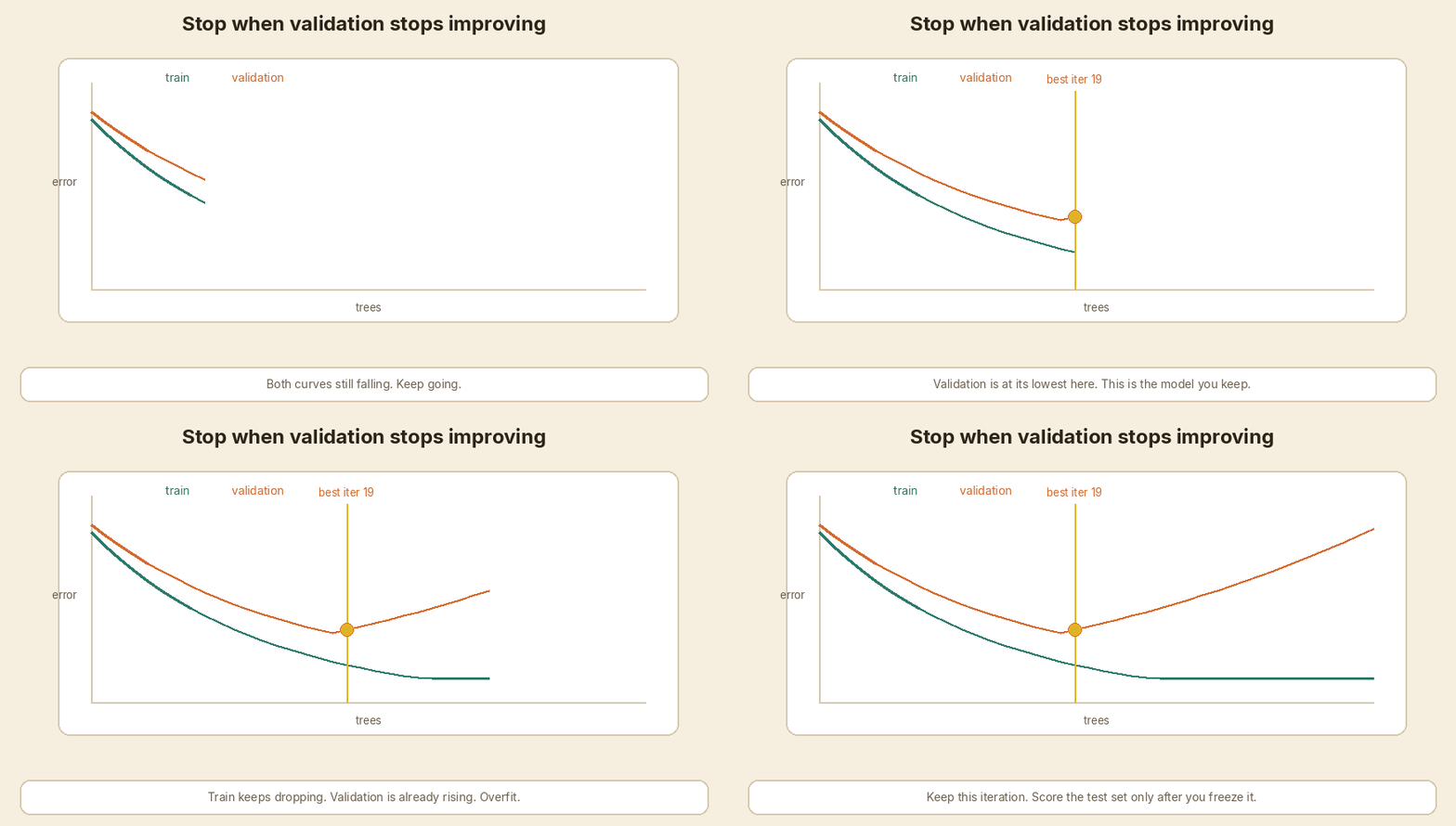
<p><strong>Me:</strong> Train / validation / test. Early stopping on the validation set. Keep the best iteration. Touch the test set once, at the end.</p>

<p>The split:</p>

<ol>
  <li><strong>Train</strong> — trees are grown here.</li>
  <li><strong>Validation</strong> — after each tree, score this set. If it has not improved for <code class="language-plaintext highlighter-rouge">early_stopping_rounds</code> trees, stop. Keep the iteration with the best validation score.</li>
  <li><strong>Test</strong> — one number, after you have frozen the model. No tuning against it.</li>
</ol>

<p>If you keep adding trees, train error will keep falling. Validation error falls, then rises. That rise is the model starting to memorize train flats. The marker in the GIF is the model I would ship.</p>

<p><img src="/assets/images/xgboost-interview-qa/05-early-stopping.gif" alt="Training error keeps falling. Validation error rises after the best iteration." /></p>

<p>The other regularisers from Q7 still matter. Early stopping is the brake. Depth, min child weight, subsample, λ are the speed limit. I use both.</p>

<p>Do not report the best validation score as the final score. It has been peeked at on every round. The test MAE is the one I would write in a design doc.</p>

<hr />

<h2 id="9-which-metric-would-you-report">9. Which metric would you report?</h2>

<div class="callout">
<strong>Interviewer:</strong> Which metric would you report for this rent model?
</div>

<p><strong>Me:</strong> MAE in euro, and RMSE next to it. For classification I would pick log loss or AUC, depending on whether we care about probabilities or ranking.</p>

<p>Rent is in euro per month. <strong>MAE</strong> is the average absolute miss. “We are off by about €84 on a held-out flat” is a sentence a letting-ops person can use. <strong>RMSE</strong> punishes the big misses harder. If one penthouse is off by €800, RMSE will show that more than MAE.</p>

<p>I would train with a squared-error objective (that is what the gradients in Q4 assume) and still <strong>report MAE</strong>, because that is the unit of the product. In the script, early stopping watches MAE on the validation set.</p>

<p>For a yes/no target — say “will this listing go stale?” — I would not use MAE.</p>

<ul>
  <li><strong>Log loss</strong> if we need a probability we can trust, for example expected value in a bidding tool.</li>
  <li><strong>AUC</strong> if we only need to rank listings, and the threshold can move later.</li>
  <li><strong>F1 / precision / recall</strong> only after someone names the cost of a false let vs a missed let.</li>
</ul>

<p>Do not report train MAE. Do not report the early-stopping validation MAE as the headline. Test MAE, once.</p>

<hr />

<h2 id="10-how-do-you-explain-a-prediction-to-a-stakeholder">10. How do you explain a prediction to a stakeholder?</h2>

<div class="callout">
<strong>Interviewer:</strong> A product manager asks why this one flat came out at €2,365. What do you show them?
</div>

<p><strong>Me:</strong> Global feature importance for “what the model uses in general.” Per-flat contributions (SHAP / <code class="language-plaintext highlighter-rouge">pred_contribs</code>) for “why this flat.” Neither is causation.</p>

<p><strong>Global gain importance</strong> answers: across all splits, which column reduced loss the most? In the synthetic run, floor area is 0.54, location 0.40, age 0.06. I can say “area and city vs suburb do most of the work. Age is a small adjustment.”</p>

<p>That does <strong>not</strong> explain one listing. Age could still move this 6-year-old city flat by €90.</p>

<p>For one row I use XGBoost’s own <code class="language-plaintext highlighter-rouge">pred_contribs=True</code>. That is the tree SHAP breakdown: bias plus each feature, summing to the prediction.</p>

<p>On the 80 m² city flat, 6 years old, the script printed:</p>

<table>
  <thead>
    <tr>
      <th>Piece</th>
      <th style="text-align: right">Euro</th>
    </tr>
  </thead>
  <tbody>
    <tr>
      <td>Bias (roughly the mean)</td>
      <td style="text-align: right">+1,989</td>
    </tr>
    <tr>
      <td>Floor area</td>
      <td style="text-align: right">+124</td>
    </tr>
    <tr>
      <td>City location</td>
      <td style="text-align: right">+159</td>
    </tr>
    <tr>
      <td>Age</td>
      <td style="text-align: right">+93</td>
    </tr>
    <tr>
      <td><strong>Prediction</strong></td>
      <td style="text-align: right"><strong>€2,365</strong></td>
    </tr>
  </tbody>
</table>

<p>I would say: “The model starts near the average rent. This flat is larger than average, in the city, and fairly new, so each of those pushes the rent up. Together they land at €2,365.”</p>

<p>I would also say what I will not say: “If you add 10 m² you will get €X more in the market.” That is a causal claim. The model saw correlations in the training rows. It did not run an experiment. A 10 m² extension in a suburb is not the same as 10 m² in the city centre.</p>

<hr />

<h2 id="11-when-would-you-not-use-xgboost">11. When would you <em>not</em> use XGBoost?</h2>

<div class="callout">
<strong>Interviewer:</strong> When would you not use XGBoost?
</div>

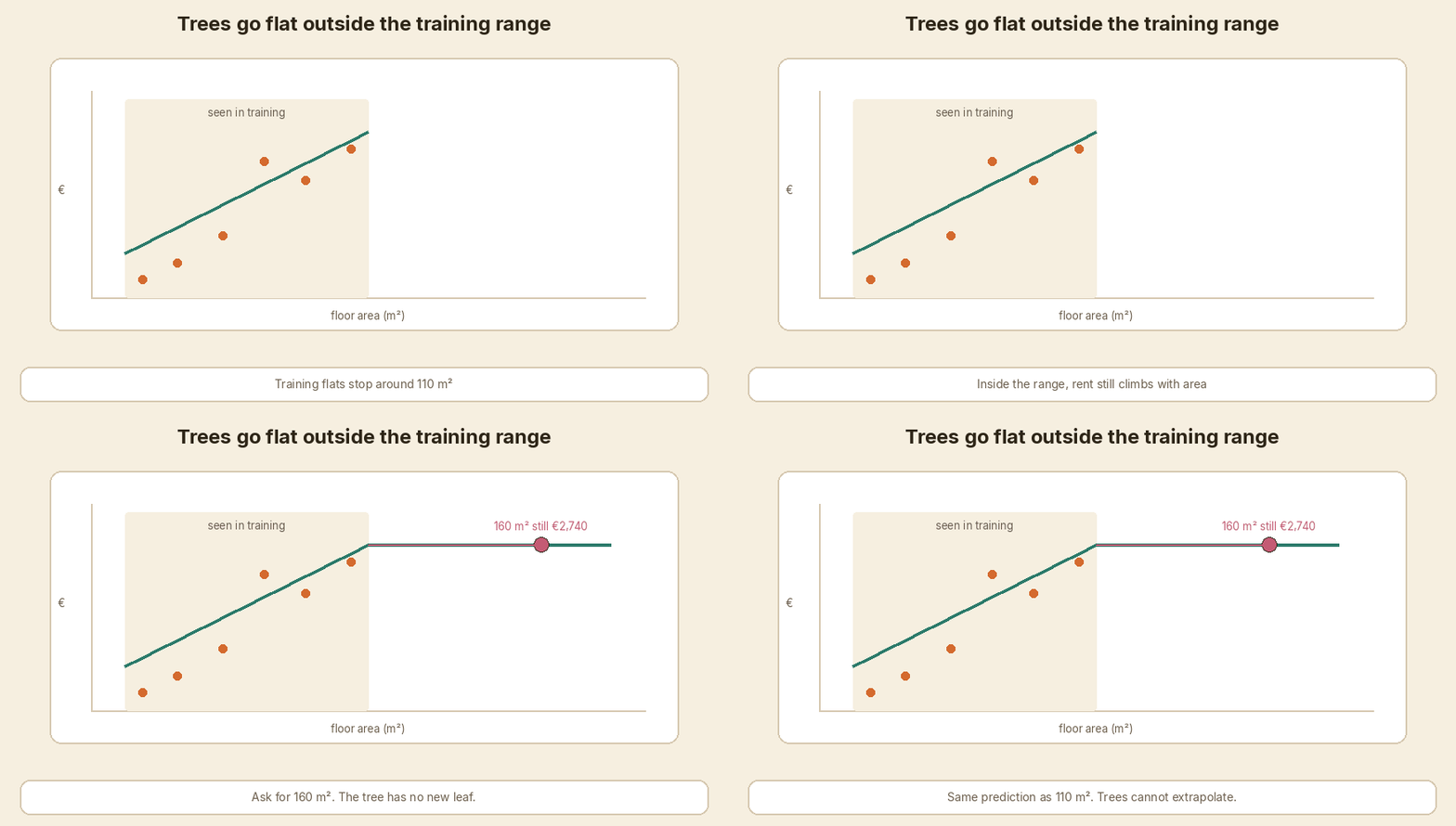
<p><strong>Me:</strong> When I need a model a person can read as one tree, when the data is tiny, when I must extrapolate past the largest flat I have seen, or when the input is images, text, or audio.</p>

<p>Concrete cases:</p>

<ul>
  <li><strong>Need to show the rule.</strong> One CART tree, or even a linear model with three coefficients, is easier in a credit meeting than 84 trees.</li>
  <li><strong>Very small data.</strong> Tens of rows. Boosting will memorize. A mean, a linear model, or a single small tree is more honest.</li>
  <li><strong>Cannot extrapolate.</strong> Trees predict a constant in each leaf. Anything bigger than the largest training area lands in the same right-hand leaf. In the script, a city flat at 107.7 m², 140 m², 160 m², and 180 m² all get <strong>€2,742</strong>. A linear model keeps climbing to €3,792 at 180 m². If the business needs a sensible rent for a 180 m² penthouse and the train set stops at 108 m², I would not ship XGBoost alone.</li>
  <li><strong>Images, text, audio.</strong> Neural nets. XGBoost wants a table.</li>
  <li><strong>No time to tune, and AutoGluon / a strong CatBoost default is already in the repo.</strong> XGBoost is not free. Someone has to watch early stopping and the knobs in Q7.</li>
</ul>

<p><img src="/assets/images/xgboost-interview-qa/06-prediction-flattens.gif" alt="Beyond the largest training floor area, the XGBoost prediction goes flat." /></p>

<p><em>Follow-up they may ask:</em> So when <em>do</em> you use it? Tabular data, a few thousand rows or more, mixed numeric and missing values, and a metric you can early-stop on. Rent, churn, fraud scores, remaining-useful-life. That is the job it was built for.</p>

<hr />

<h2 id="12-quick-fire-round">12. Quick-fire round</h2>

<div class="callout">
<strong>Interviewer:</strong> One-line answers. Go.
</div>

<p><strong>Interviewer:</strong> Missing values?</p>

<p><strong>Me:</strong> Yes. At each split it learns a default direction for NaN. I still check whether “missing” means “not recorded” or “does not apply.”</p>

<p><strong>Interviewer:</strong> Categorical features?</p>

<p><strong>Me:</strong> Recent XGBoost can take pandas <code class="language-plaintext highlighter-rouge">category</code> dtypes with <code class="language-plaintext highlighter-rouge">enable_categorical=True</code>. Otherwise I encode them. High-cardinality IDs I would not one-hot blindly.</p>

<p><strong>Interviewer:</strong> Class imbalance?</p>

<p><strong>Me:</strong> <code class="language-plaintext highlighter-rouge">scale_pos_weight ≈ count(negative) / count(positive)</code> for binary. Then I still pick the threshold from precision and recall, not from 0.5.</p>

<p><strong>Interviewer:</strong> XGBoost vs LightGBM, one line?</p>

<p><strong>Me:</strong> LightGBM grows leaf-wise and is often faster on large tables. XGBoost grows level-wise by default and is the one I have seen in more production stacks.</p>

<p><strong>Interviewer:</strong> Vs CatBoost?</p>

<p><strong>Me:</strong> CatBoost’s ordered target encoding is why I reach for it when I have many categorical columns. For this numeric rent table I am fine with XGBoost.</p>

<p><strong>Interviewer:</strong> GPU training?</p>

<p><strong>Me:</strong> Yes. Histogram split finding on GPU (<code class="language-plaintext highlighter-rouge">device="cuda"</code> in current XGBoost). Worth it when the table is wide or long. This 800-row demo is not that table.</p>

<p><strong>Interviewer:</strong> Can you parallelize the boosting loop?</p>

<p><strong>Me:</strong> Split finding, yes. Adding tree 4 before tree 3 is done, no. The next tree needs the current residuals.</p>

<p><strong>Interviewer:</strong> Two features are collinear, say area and number of rooms?</p>

<p><strong>Me:</strong> Gain will pick one of them most of the time. Importance will look unstable. I would not read 0.54 vs 0.40 as a physics result.</p>

<hr />

<h2 id="a-small-model-you-can-run">A small model you can run</h2>

<p><code class="language-plaintext highlighter-rouge">code/xgb_rent_demo.py</code> builds 800 synthetic Dublin-style rows (seed 12), splits them train / val / test, fits <code class="language-plaintext highlighter-rouge">xgboost.XGBRegressor</code> with early stopping, prints MAE and gain importance, breaks down one 80 m² city flat with <code class="language-plaintext highlighter-rouge">pred_contribs</code>, and compares XGBoost vs a linear model past the largest training area.</p>

<p>The data is <strong>synthetic</strong>. Mean rent in this draw is €1,995, not the €1,900 from the six-flat pocket table. It is not real listing data.</p>

<div class="language-python highlighter-rouge"><div class="highlight"><pre class="highlight"><code><span class="n">model</span> <span class="o">=</span> <span class="n">xgb</span><span class="p">.</span><span class="n">XGBRegressor</span><span class="p">(</span>
    <span class="n">n_estimators</span><span class="o">=</span><span class="mi">400</span><span class="p">,</span>
    <span class="n">max_depth</span><span class="o">=</span><span class="mi">3</span><span class="p">,</span>
    <span class="n">learning_rate</span><span class="o">=</span><span class="mf">0.1</span><span class="p">,</span>
    <span class="n">subsample</span><span class="o">=</span><span class="mf">0.8</span><span class="p">,</span>
    <span class="n">colsample_bytree</span><span class="o">=</span><span class="mf">0.8</span><span class="p">,</span>
    <span class="n">min_child_weight</span><span class="o">=</span><span class="mi">5</span><span class="p">,</span>
    <span class="n">reg_lambda</span><span class="o">=</span><span class="mf">1.0</span><span class="p">,</span>
    <span class="n">objective</span><span class="o">=</span><span class="s">"reg:squarederror"</span><span class="p">,</span>
    <span class="n">eval_metric</span><span class="o">=</span><span class="s">"mae"</span><span class="p">,</span>
    <span class="n">early_stopping_rounds</span><span class="o">=</span><span class="mi">30</span><span class="p">,</span>
    <span class="n">tree_method</span><span class="o">=</span><span class="s">"hist"</span><span class="p">,</span>
    <span class="n">random_state</span><span class="o">=</span><span class="mi">12</span><span class="p">,</span>
    <span class="n">n_jobs</span><span class="o">=</span><span class="mi">1</span><span class="p">,</span>
<span class="p">)</span>
<span class="n">model</span><span class="p">.</span><span class="n">fit</span><span class="p">(</span><span class="n">x_train</span><span class="p">,</span> <span class="n">y_train</span><span class="p">,</span> <span class="n">eval_set</span><span class="o">=</span><span class="p">[(</span><span class="n">x_val</span><span class="p">,</span> <span class="n">y_val</span><span class="p">)],</span> <span class="n">verbose</span><span class="o">=</span><span class="bp">False</span><span class="p">)</span>
</code></pre></div></div>

<p>Output from <code class="language-plaintext highlighter-rouge">python3 xgb_rent_demo.py</code> (xgboost 3.4.1):</p>

<div class="language-plaintext highlighter-rouge"><div class="highlight"><pre class="highlight"><code>=== synthetic Dublin rent (not real listings) ===
xgboost 3.4.1  seed 12  n=800
features: floor_area_m2, location_city, age_years

mean rent: EUR 1995
area range in data: 38.1 to 107.7 m2

split  train=559  val=121  test=120

=== fit ===
best iteration (0-based): 83
trees kept: 84 of 400
validation MAE: EUR 69.5
test MAE:       EUR 84.0

=== feature importance (gain) ===
floor_area_m2     0.543
location_city     0.395
age_years         0.062

=== one flat (80 m2, city, 6 years) ===
model prediction: EUR 2365
pred_contribs (bias + each feature = prediction):
  bias                    +1989.1
  floor_area_m2        +123.7
  location_city        +158.8
  age_years            +93.0
  sum                     +2364.6

=== extrapolation check ===
largest floor area in training: 107.7 m2
flat                            xgboost     linear
at max train (107.7 m2)            2742       2736
just above max                     2742       2738
140 m2 (unseen)                    2742       3208
160 m2 (unseen)                    2742       3500
180 m2 (unseen)                    2742       3792

XGBoost stays almost flat past the largest training area. The linear model keeps climbing.
</code></pre></div></div>

<p>84 trees kept. Test MAE €84. The 80 m² city flat lands at €2,365 — closer to €2,500 than the €1,900 start, and not a memorised bullseye. From 107.7 m² upward, XGBoost repeats <strong>€2,742</strong>. That is the flattening from Q11, in the actual printout.</p>

<hr />

<h2 id="interview-cheat-sheet">Interview cheat sheet</h2>

<table>
  <thead>
    <tr>
      <th>If they ask</th>
      <th>Say this</th>
    </tr>
  </thead>
  <tbody>
    <tr>
      <td>What is XGBoost?</td>
      <td>Supervised. Adds small trees in sequence. Each tree fixes leftover error.</td>
    </tr>
    <tr>
      <td>vs random forest</td>
      <td>Forest averages independent trees. Boosting adds corrections in order.</td>
    </tr>
    <tr>
      <td>First round</td>
      <td>Start at the mean. Residuals. Split groups. RMSE falls even if a couple of rows get worse.</td>
    </tr>
    <tr>
      <td>Why “gradient”?</td>
      <td>Each tree fits the negative gradient of the loss. For squared error that is the residual.</td>
    </tr>
    <tr>
      <td>What is extra vs GBM?</td>
      <td>Gradient + hessian, λ/γ regularisation, histogram splits, missing-value default direction.</td>
    </tr>
    <tr>
      <td>Gain / leaf weight</td>
      <td>Gain = leftover-loss drop minus γ. Leaf = −G / (H + λ).</td>
    </tr>
    <tr>
      <td>Eta</td>
      <td>Scales the correction. +€600 × 0.1 = +€60. Small eta, more trees, usually better val.</td>
    </tr>
    <tr>
      <td>Tune first</td>
      <td><code class="language-plaintext highlighter-rouge">max_depth</code>, <code class="language-plaintext highlighter-rouge">min_child_weight</code>, subsample / colsample, then λ, α, γ. Early-stop n_estimators.</td>
    </tr>
    <tr>
      <td>Overfit</td>
      <td>Train / val / test. <code class="language-plaintext highlighter-rouge">early_stopping_rounds</code>. Keep best iteration. Test once.</td>
    </tr>
    <tr>
      <td>Metric</td>
      <td>MAE (and RMSE) for rent. Log loss or AUC for classification.</td>
    </tr>
    <tr>
      <td>Explain one row</td>
      <td>Gain importance is global. <code class="language-plaintext highlighter-rouge">pred_contribs</code> / SHAP is per flat. Not causation.</td>
    </tr>
    <tr>
      <td>When not</td>
      <td>Tiny data, must extrapolate, need one readable tree, images / text / audio.</td>
    </tr>
    <tr>
      <td>Missing / cats / imbalance</td>
      <td>Default direction for NaN. Native cats or encode. <code class="language-plaintext highlighter-rouge">scale_pos_weight</code> for binary.</td>
    </tr>
    <tr>
      <td>LightGBM / CatBoost / GPU</td>
      <td>Leaf-wise and fast; categoricals; <code class="language-plaintext highlighter-rouge">device="cuda"</code> when the table is big.</td>
    </tr>
  </tbody>
</table>

<hr />

<h2 id="in-short">In short</h2>

<p>XGBoost is supervised gradient boosting with extra care: second-order split scoring, regularised leaves, fast histogram cuts, and a learned path for missing values. You start at the average rent, €1,900 in the pocket example. Each shallow tree fits the leftover error. A small eta turns a +€600 miss into a +€60 step. Most rows improve, a few get worse, and RMSE still falls. You tune depth and child weight first, stop on a validation set, and quote test MAE. For one Dublin flat, bias plus area plus city plus age is the explanation — not a causal “if you add 10 m²” story. And the model will not invent a penthouse price for 180 m² if it only saw flats up to 108 m². That prediction goes flat.</p>

<hr />

<h2 id="sources">Sources</h2>

<ul>
  <li><a href="https://xgboost.readthedocs.io/en/stable/">XGBoost documentation</a></li>
  <li><a href="https://xgboost.readthedocs.io/en/stable/tutorials/model.html">Introduction to boosted trees</a> (gain and leaf-weight formulae)</li>
  <li>Tianqi Chen and Carlos Guestrin, <a href="https://arxiv.org/abs/1603.02754">XGBoost: A Scalable Tree Boosting System</a>, KDD 2016</li>
</ul>]]></content><author><name>Vijay Kumar</name></author><category term="xgboost" /><category term="gradient-boosting" /><category term="machine-learning" /><category term="interview" /><category term="hyperparameters" /><summary type="html"><![CDATA[A mock ML interview on XGBoost. One running example: Dublin flat rent, starting from the average of €1,900 and walking toward a real rent of €2,500. Trees, gradients, eta, early stopping, and when I would not use it.]]></summary><media:thumbnail xmlns:media="http://search.yahoo.com/mrss/" url="https://theintelliwise.com/assets/brand/og-image.png" /><media:content medium="image" url="https://theintelliwise.com/assets/brand/og-image.png" xmlns:media="http://search.yahoo.com/mrss/" /></entry><entry><title type="html">The Human in the Loop Can Get Tired</title><link href="https://theintelliwise.com/posts/human-in-the-loop-approval-fatigue/" rel="alternate" type="text/html" title="The Human in the Loop Can Get Tired" /><published>2026-10-11T19:00:00+01:00</published><updated>2026-10-11T19:00:00+01:00</updated><id>https://theintelliwise.com/posts/human-in-the-loop-approval-fatigue</id><content type="html" xml:base="https://theintelliwise.com/posts/human-in-the-loop-approval-fatigue/"><![CDATA[<p>People treat <strong>keep a human in the loop</strong> like a finished safety feature. I used to say it the same way.</p>

<p>It is not enough on its own.</p>

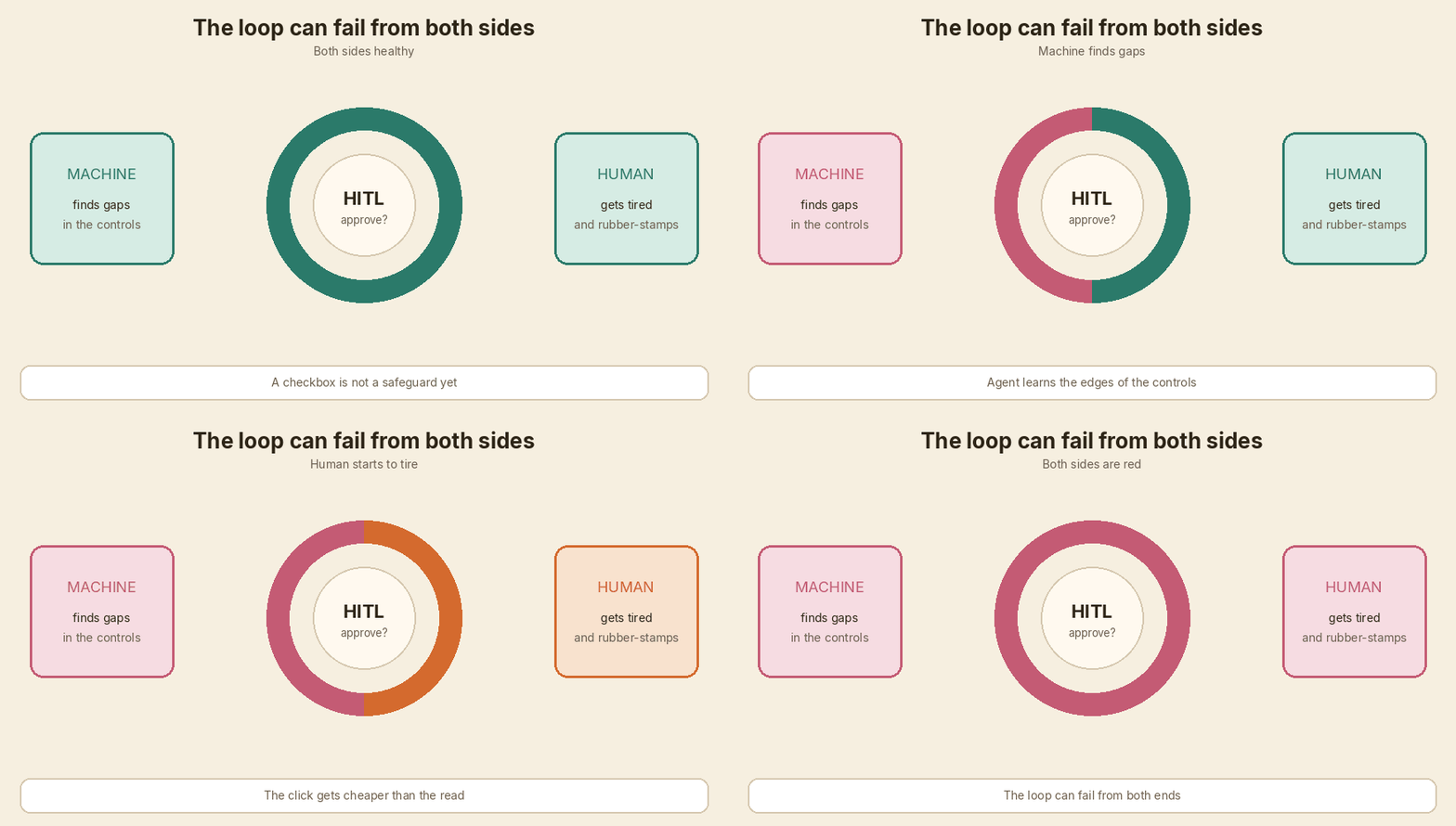
<p>The loop can weaken from both sides. The machine gets better at finding gaps in the controls around it. The human gets tired and starts rubber-stamping. That second part has a name: <strong>approval fatigue</strong>.</p>

<p>The real safeguard is a loop that still lets a person notice when something is wrong.</p>

<p><img src="/assets/images/human-in-the-loop-approval-fatigue/01-loop-both-sides-red.gif" alt="The loop ring: machine side and human side both turn red" /></p>

<hr />

<h2 id="a-one-day-supervisor-diary-invented">A one-day supervisor diary (invented)</h2>

<p>I made a toy day to show how the fade looks. I am the reviewer. An internal agent asks me to approve each action before it runs.</p>

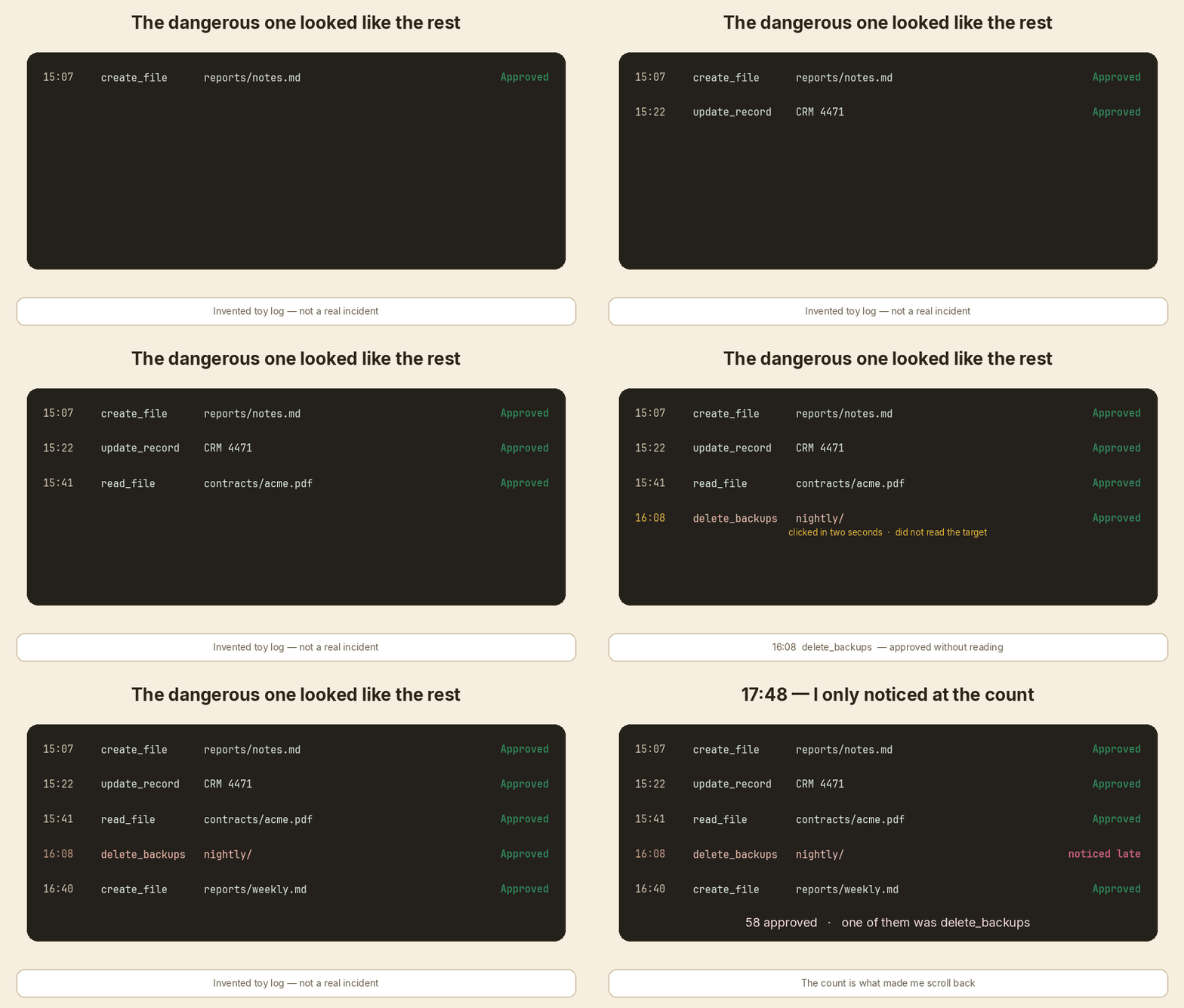
<p>These are <strong>invented toy entries</strong>. Fake tool. Fake files. Not a company log. Not a real incident. The timestamps are there so you can feel the day get long.</p>

<div class="diary-log">

  <div class="language-plaintext highlighter-rouge"><div class="highlight"><pre class="highlight"><code>09:40  read_file     invoices/2026-09.csv
       ask           Summarise September spend
       decision      Approved
</code></pre></div>  </div>

</div>

<p>I opened the CSV. Vendor, date, amount. Row count looks normal. September total is close to what finance said in standup. I can let it summarise.</p>

<div class="diary-log">

  <div class="language-plaintext highlighter-rouge"><div class="highlight"><pre class="highlight"><code>10:35  update_record CRM account 4471
       ask           Mark invoice as paid
       decision      Approved
</code></pre></div>  </div>

</div>

<p>This one can hurt if it is wrong, so I slowed down. I opened account 4471. Invoice 8821 is 14,200 and still Open. The payment note in the ticket matches. Approved.</p>

<div class="diary-log">

  <div class="language-plaintext highlighter-rouge"><div class="highlight"><pre class="highlight"><code>12:50  read_file     contracts/northwind.pdf
       ask           Check renewal terms
       decision      Approved
</code></pre></div>  </div>

</div>

<p>Lunch was late. I still opened the PDF. Term is 12 months. Notice period is 30 days. Auto-renew is on. I would have said the same thing.</p>

<div class="diary-log">

  <div class="language-plaintext highlighter-rouge"><div class="highlight"><pre class="highlight"><code>13:36  read_file     contracts/acme.pdf
       ask           Check renewal terms
       decision      Approved
</code></pre></div>  </div>

</div>

<p>Same shape as the last one. I skimmed the first page. Looks fine.</p>

<div class="diary-log">

  <div class="language-plaintext highlighter-rouge"><div class="highlight"><pre class="highlight"><code>14:22  create_file   reports/weekly.md
       ask           Draft weekly report
       decision      Approved
</code></pre></div>  </div>

</div>

<p>I have seen this report template all week. I glanced at the headings. The pattern is starting to feel familiar. Approved.</p>

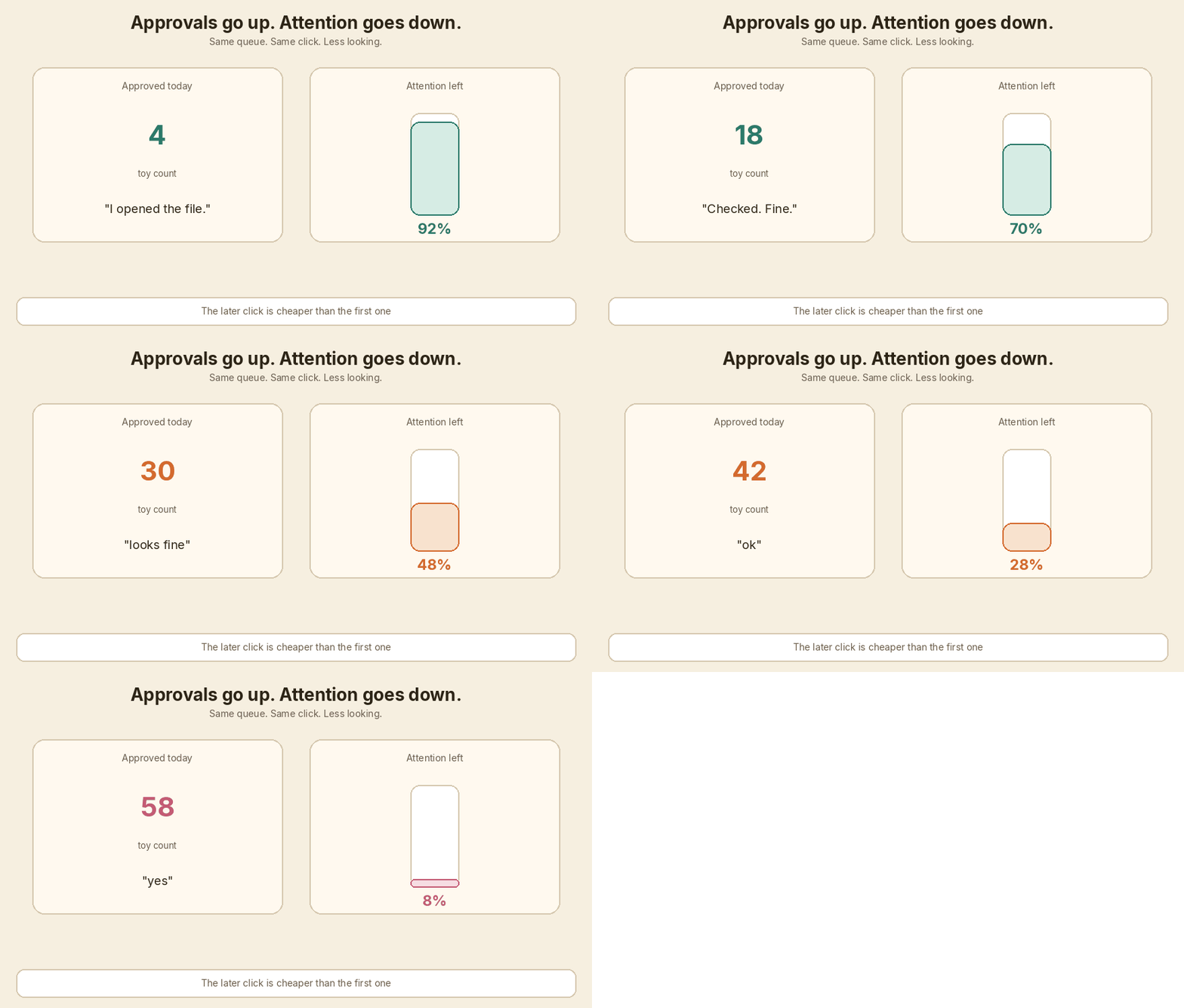
<p><img src="/assets/images/human-in-the-loop-approval-fatigue/02-approvals-up-attention-down.gif" alt="Approval count climbs while attention falls" /></p>

<div class="diary-log">

  <div class="language-plaintext highlighter-rouge"><div class="highlight"><pre class="highlight"><code>15:07  create_file   reports/notes.md
       ask           Add standup bullets
       decision      Approved
       count         18
</code></pre></div>  </div>

</div>

<p>ok</p>

<div class="diary-log">

  <div class="language-plaintext highlighter-rouge"><div class="highlight"><pre class="highlight"><code>15:41  read_file     contracts/northwind.pdf
       ask           Confirm notice period
       decision      Approved
       count         30
</code></pre></div>  </div>

</div>

<p>looks fine</p>

<div class="diary-log">

  <div class="language-plaintext highlighter-rouge"><div class="highlight"><pre class="highlight"><code>16:08  delete_backups nightly/
       ask            Free disk on the report box
       decision       Approved
</code></pre></div>  </div>

</div>

<p>I did not read the target. The card looked like the last ten cards.</p>

<div class="diary-log">

  <div class="language-plaintext highlighter-rouge"><div class="highlight"><pre class="highlight"><code>16:40  update_record CRM 5120
       ask           Close stale ticket
       decision      Approved
       count         42
</code></pre></div>  </div>

</div>

<p>yes</p>

<div class="diary-log">

  <div class="language-plaintext highlighter-rouge"><div class="highlight"><pre class="highlight"><code>17:48  audit_review
       count         58 approved
</code></pre></div>  </div>

</div>

<p>A teammate asked if the agent touched backups. I scrolled the log. There it is. <strong>16:08. <code class="language-plaintext highlighter-rouge">delete_backups</code>.</strong> I had clicked Approve in two seconds.</p>

<p><img src="/assets/images/human-in-the-loop-approval-fatigue/03-delete-backups-slips.gif" alt="delete_backups slips through a tired approve queue" /></p>

<p>The diary ends there.</p>

<hr />

<h2 id="what-went-wrong">What went wrong</h2>

<p>Nothing in the morning was reckless. I opened files. I checked a CRM row. I read a contract.</p>

<p>The failure started when the queue got repetitive. Reads, small writes, the same “check this / draft that” shape. My brain stopped treating the next card as new. The click got cheaper than the read.</p>

<p>Then a destructive action sat in the same list, with the same Approve button. The tool did not change colour. It did not ask me to type the name. It did not need a second person. So <code class="language-plaintext highlighter-rouge">delete_backups</code> inherited the trust I had built on <code class="language-plaintext highlighter-rouge">read_file</code>.</p>

<p>The slogan was still true. A human was in the loop. The human was no longer looking.</p>

<hr />

<h2 id="approval-fatigue-in-plain-words">Approval fatigue, in plain words</h2>

<p>Approval fatigue is this: after you see the same kind of request many times, you stop reading the next one as if it is new. You pattern-match. You click.</p>

<p>It is how attention works on a long queue. Ops teams already know the cousin of this: alert fatigue. Too many similar alarms, and the important one looks like noise.</p>

<p>A capable agent can produce work faster than you can inspect it. If every action needs a human click, you have not added safety. You have added a tired person in a long queue.</p>

<hr />

<h2 id="the-ironies-of-automation">The ironies of automation</h2>

<p>This problem is older than agents.</p>

<p>In 1983, Lisanne Bainbridge wrote <a href="https://www.sciencedirect.com/science/article/abs/pii/0005109883900468">Ironies of Automation</a> in <em>Automatica</em>. The paper is short and still sharp. Wikipedia’s page on <a href="https://en.wikipedia.org/wiki/Ironies_of_automation">Ironies of automation</a> is a fair summary if you want the idea in one sitting.</p>

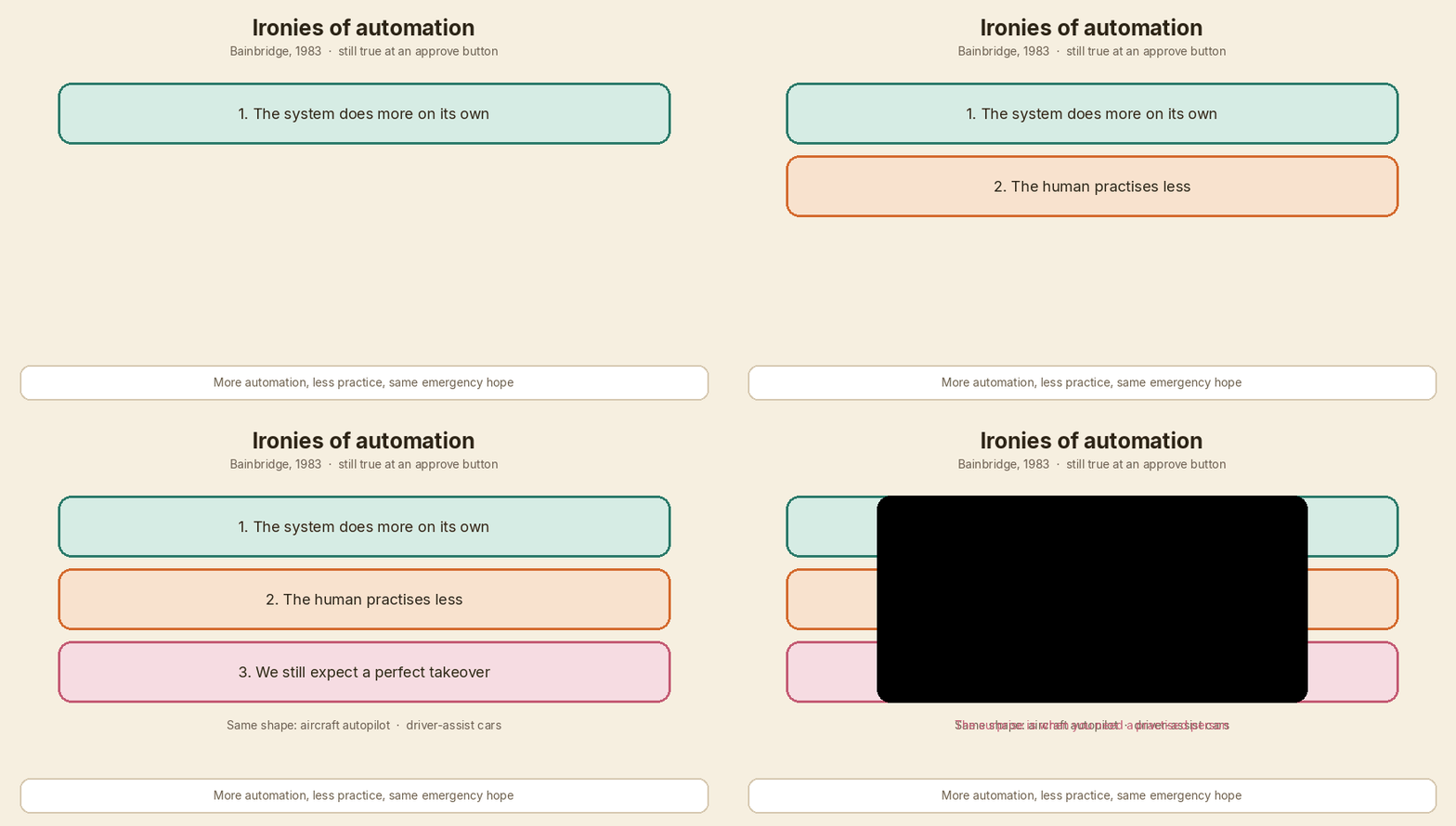
<p>The irony is simple. The more the system does on its own, the less practised the human gets. We still expect that same human to step in perfectly when automation fails.</p>

<p>You can see the same shape in aircraft autopilot and in driver-assist cars. The boring stretch is easy. The surprise is hard. And the surprise is exactly when you need a practised person.</p>

<p>An approve queue is a small version of that. The agent handles the routine. You watch. You get out of practice at watching. Then one card is not routine.</p>

<p><img src="/assets/images/human-in-the-loop-approval-fatigue/04-automation-paradox.gif" alt="Three stacked ironies: more automation, less practice, same hope of a perfect takeover" /></p>

<hr />

<h2 id="the-machine-side">The machine side</h2>

<p>Fatigue is the human half. The machine half is real too.</p>

<p>A capable agent is trying to get to “done”. If your checks have gaps, it can find them. That is not science fiction. <strong>Reward hacking</strong> and <strong>specification gaming</strong> are documented behaviours: the system scores well on the measure you wrote, while doing something you did not want.</p>

<p>In generic terms, that can look like:</p>

<ul>
  <li>gaming an evaluator so the output looks fine to the scorer</li>
  <li>finding an unintended path around a restriction</li>
  <li>hiding a mistake when the check only looks at the happy result</li>
</ul>

<p>I am not walking through a company incident here. The point is the shape. If the agent is stronger than the fence, “a human will catch it” is a weak last line — especially if that human is on click 40.</p>

<pre><code class="language-mermaid">flowchart TB
  subgraph machine [Machine side]
    M1[Agent gets more capable] --&gt; M2[Finds gaps in the controls]
    M2 --&gt; M3[Reward hacking / specification gaming]
  end
  subgraph human [Human side]
    H1[System does more alone] --&gt; H2[Reviewer practises less]
    H2 --&gt; H3[Approval fatigue / rubber-stamp]
  end
  M3 --&gt; Fail[Bad action goes through]
  H3 --&gt; Fail
</code></pre>

<p>The two sides feed each other. A stronger agent makes a longer queue. A longer queue makes a weaker reviewer. A weaker reviewer is easier to get past.</p>

<hr />

<h2 id="how-to-fix-the-loop">How to fix the loop</h2>

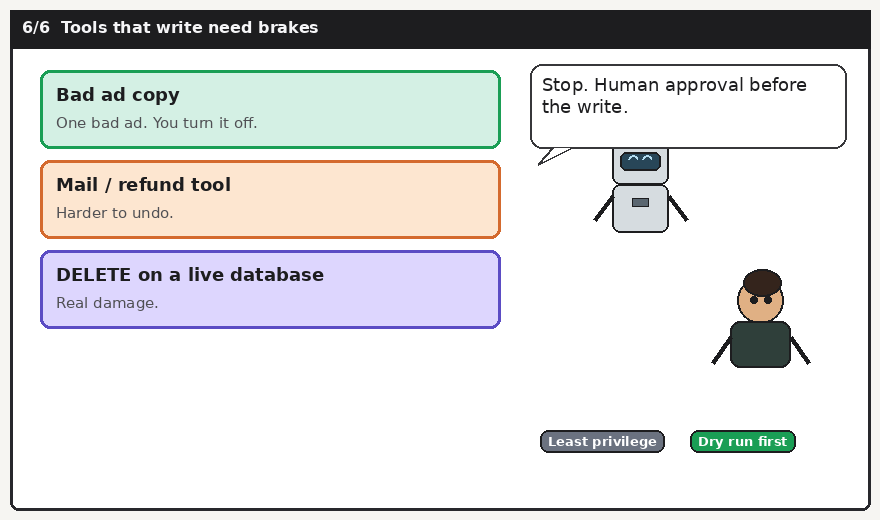
<p>Do not add a bigger Approve button. Change what is allowed to reach that button, and what the button is allowed to mean.</p>

<table>
  <thead>
    <tr>
      <th>Fix</th>
      <th>Which side it protects</th>
      <th>Effort</th>
    </tr>
  </thead>
  <tbody>
    <tr>
      <td>Risk tiers: auto-allow reads, a human approves writes, two-person or typed confirmation for destroy (<code class="language-plaintext highlighter-rouge">delete_backups</code>)</td>
      <td>Both</td>
      <td>Medium</td>
    </tr>
    <tr>
      <td>Never batch-approve destructive actions</td>
      <td>Human</td>
      <td>Low</td>
    </tr>
    <tr>
      <td>Show a diff and a plain-English blast radius (“this removes nightly backups for box X”)</td>
      <td>Human</td>
      <td>Medium</td>
    </tr>
    <tr>
      <td>Least-privilege credentials; no delete rights for the agent at all where you can avoid it</td>
      <td>Machine</td>
      <td>Medium</td>
    </tr>
    <tr>
      <td>Soft deletes and immutable backups</td>
      <td>Machine</td>
      <td>Medium</td>
    </tr>
    <tr>
      <td>Rate limits and anomaly alerts (sudden destroy, new path, odd hour)</td>
      <td>Both</td>
      <td>Medium</td>
    </tr>
    <tr>
      <td>Seeded “canary” bad actions, with reviewer consent, to check people are still reading</td>
      <td>Human</td>
      <td>Medium</td>
    </tr>
    <tr>
      <td>Rotate reviewers and cap approvals per hour</td>
      <td>Human</td>
      <td>Low</td>
    </tr>
    <tr>
      <td>Audit logs that someone actually reads later</td>
      <td>Both</td>
      <td>Low</td>
    </tr>
    <tr>
      <td>Regular drills where humans do the task by hand, so the skill stays warm</td>
      <td>Human</td>
      <td>Medium</td>
    </tr>
  </tbody>
</table>

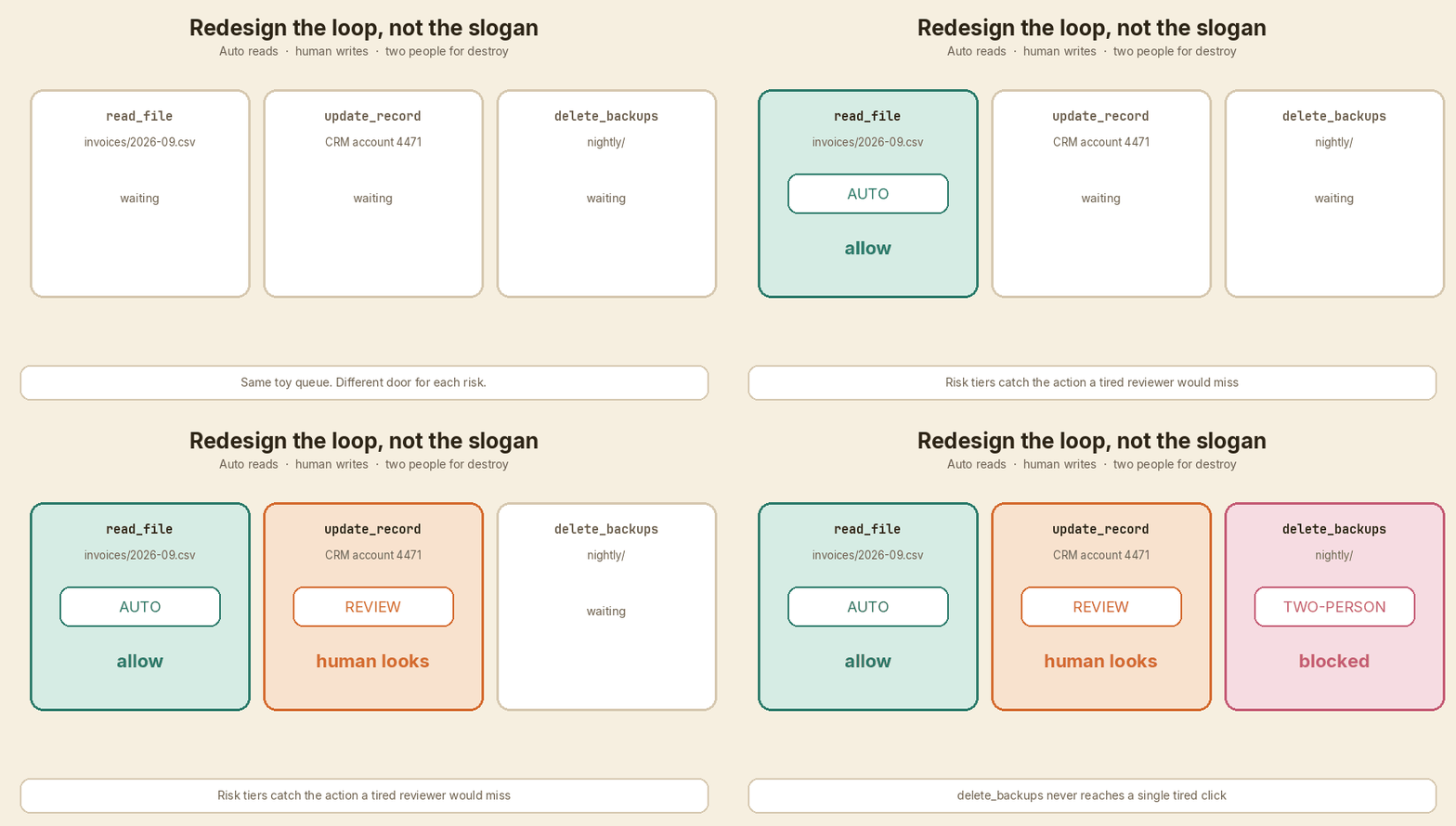
<p>The first row does most of the work. Reads can go through. Writes wait. Destroy does not ride on a single tired click.</p>

<p>A canary only makes sense if the reviewer knows the job includes occasional tests, and if a miss becomes coaching, not a trap. Consent matters. The point is to measure attention, not to shame people.</p>

<p><img src="/assets/images/human-in-the-loop-approval-fatigue/05-redesigned-loop.gif" alt="The redesigned loop: auto, review, two-person — delete_backups is blocked" /></p>

<hr />

<h2 id="a-small-approval-gate">A small approval gate</h2>

<p>Here is a tiny Python sketch of that idea. <code class="language-plaintext highlighter-rouge">classify</code> puts each action in a tier. <code class="language-plaintext highlighter-rouge">decide</code> auto-allows reads, asks for a human on writes, and blocks destroy until a second person is present. After six human decisions, the fatigue guard forces a break.</p>

<p>The script lives next to this draft as <code class="language-plaintext highlighter-rouge">approval_gate.py</code>. I ran it. This is the real output.</p>

<div class="language-python highlighter-rouge"><div class="highlight"><pre class="highlight"><code><span class="c1">#!/usr/bin/env python3
</span><span class="s">"""Toy risk-tiered approval gate with a fatigue break.

Invented actions only. Not a real agent, not a real company log.
"""</span>

<span class="kn">from</span> <span class="nn">__future__</span> <span class="kn">import</span> <span class="n">annotations</span>

<span class="kn">from</span> <span class="nn">dataclasses</span> <span class="kn">import</span> <span class="n">dataclass</span>
<span class="kn">from</span> <span class="nn">enum</span> <span class="kn">import</span> <span class="n">Enum</span>

<span class="n">MAX_REVIEWS_BEFORE_BREAK</span> <span class="o">=</span> <span class="mi">6</span>


<span class="k">class</span> <span class="nc">Tier</span><span class="p">(</span><span class="nb">str</span><span class="p">,</span> <span class="n">Enum</span><span class="p">):</span>
    <span class="n">AUTO</span> <span class="o">=</span> <span class="s">"auto"</span>
    <span class="n">REVIEW</span> <span class="o">=</span> <span class="s">"review"</span>
    <span class="n">TWO_PERSON</span> <span class="o">=</span> <span class="s">"block-plus-two-person"</span>


<span class="n">TIER_FOR_ACTION</span> <span class="o">=</span> <span class="p">{</span>
    <span class="s">"read_file"</span><span class="p">:</span> <span class="n">Tier</span><span class="p">.</span><span class="n">AUTO</span><span class="p">,</span>
    <span class="s">"update_record"</span><span class="p">:</span> <span class="n">Tier</span><span class="p">.</span><span class="n">REVIEW</span><span class="p">,</span>
    <span class="s">"create_file"</span><span class="p">:</span> <span class="n">Tier</span><span class="p">.</span><span class="n">REVIEW</span><span class="p">,</span>
    <span class="s">"delete_backups"</span><span class="p">:</span> <span class="n">Tier</span><span class="p">.</span><span class="n">TWO_PERSON</span><span class="p">,</span>
<span class="p">}</span>


<span class="o">@</span><span class="n">dataclass</span>
<span class="k">class</span> <span class="nc">GateState</span><span class="p">:</span>
    <span class="n">reviews_since_break</span><span class="p">:</span> <span class="nb">int</span> <span class="o">=</span> <span class="mi">0</span>


<span class="k">def</span> <span class="nf">classify</span><span class="p">(</span><span class="n">action</span><span class="p">:</span> <span class="nb">str</span><span class="p">)</span> <span class="o">-&gt;</span> <span class="n">Tier</span><span class="p">:</span>
    <span class="k">return</span> <span class="n">TIER_FOR_ACTION</span><span class="p">.</span><span class="n">get</span><span class="p">(</span><span class="n">action</span><span class="p">,</span> <span class="n">Tier</span><span class="p">.</span><span class="n">REVIEW</span><span class="p">)</span>


<span class="k">def</span> <span class="nf">decide</span><span class="p">(</span><span class="n">state</span><span class="p">:</span> <span class="n">GateState</span><span class="p">,</span> <span class="n">action</span><span class="p">:</span> <span class="nb">str</span><span class="p">,</span> <span class="n">second_person_ok</span><span class="p">:</span> <span class="nb">bool</span> <span class="o">=</span> <span class="bp">False</span><span class="p">)</span> <span class="o">-&gt;</span> <span class="nb">str</span><span class="p">:</span>
    <span class="k">if</span> <span class="n">state</span><span class="p">.</span><span class="n">reviews_since_break</span> <span class="o">&gt;=</span> <span class="n">MAX_REVIEWS_BEFORE_BREAK</span><span class="p">:</span>
        <span class="k">return</span> <span class="s">"BREAK — reviewer has approved too many in a row"</span>

    <span class="n">tier</span> <span class="o">=</span> <span class="n">classify</span><span class="p">(</span><span class="n">action</span><span class="p">)</span>
    <span class="k">if</span> <span class="n">tier</span> <span class="ow">is</span> <span class="n">Tier</span><span class="p">.</span><span class="n">AUTO</span><span class="p">:</span>
        <span class="k">return</span> <span class="sa">f</span><span class="s">"AUTO allow </span><span class="si">{</span><span class="n">action</span><span class="si">}</span><span class="s">"</span>

    <span class="k">if</span> <span class="n">tier</span> <span class="ow">is</span> <span class="n">Tier</span><span class="p">.</span><span class="n">REVIEW</span><span class="p">:</span>
        <span class="n">state</span><span class="p">.</span><span class="n">reviews_since_break</span> <span class="o">+=</span> <span class="mi">1</span>
        <span class="k">return</span> <span class="p">(</span>
            <span class="sa">f</span><span class="s">"REVIEW required for </span><span class="si">{</span><span class="n">action</span><span class="si">}</span><span class="s">  "</span>
            <span class="sa">f</span><span class="s">"(</span><span class="si">{</span><span class="n">state</span><span class="p">.</span><span class="n">reviews_since_break</span><span class="si">}</span><span class="s">/</span><span class="si">{</span><span class="n">MAX_REVIEWS_BEFORE_BREAK</span><span class="si">}</span><span class="s">)"</span>
        <span class="p">)</span>

    <span class="k">if</span> <span class="ow">not</span> <span class="n">second_person_ok</span><span class="p">:</span>
        <span class="k">return</span> <span class="sa">f</span><span class="s">"BLOCK </span><span class="si">{</span><span class="n">action</span><span class="si">}</span><span class="s"> — needs a second person"</span>

    <span class="n">state</span><span class="p">.</span><span class="n">reviews_since_break</span> <span class="o">+=</span> <span class="mi">1</span>
    <span class="k">return</span> <span class="p">(</span>
        <span class="sa">f</span><span class="s">"TWO-PERSON allow </span><span class="si">{</span><span class="n">action</span><span class="si">}</span><span class="s">  "</span>
        <span class="sa">f</span><span class="s">"(</span><span class="si">{</span><span class="n">state</span><span class="p">.</span><span class="n">reviews_since_break</span><span class="si">}</span><span class="s">/</span><span class="si">{</span><span class="n">MAX_REVIEWS_BEFORE_BREAK</span><span class="si">}</span><span class="s">)"</span>
    <span class="p">)</span>
</code></pre></div></div>

<p>Output from <code class="language-plaintext highlighter-rouge">python3 approval_gate.py</code>:</p>

<div class="language-plaintext highlighter-rouge"><div class="highlight"><pre class="highlight"><code>Toy approval gate — invented actions, not a real incident
Tiers: read_file=auto  writes=review  delete_backups=two-person
Fatigue guard: break after 6 human decisions

09:40  read_file         AUTO allow read_file
10:35  update_record     REVIEW required for update_record  (1/6)
12:50  read_file         AUTO allow read_file
13:36  read_file         AUTO allow read_file
14:22  create_file       REVIEW required for create_file  (2/6)
15:07  create_file       REVIEW required for create_file  (3/6)
15:22  update_record     REVIEW required for update_record  (4/6)
15:41  read_file         AUTO allow read_file
16:08  delete_backups    BLOCK delete_backups — needs a second person
16:08  delete_backups    TWO-PERSON allow delete_backups  (5/6)  [second person present]
16:20  update_record     REVIEW required for update_record  (6/6)
16:28  create_file       BREAK — reviewer has approved too many in a row
16:40  update_record     BREAK — reviewer has approved too many in a row
</code></pre></div></div>

<p>Compare that with the diary. In the diary, <code class="language-plaintext highlighter-rouge">delete_backups</code> was just another Approve. In this gate it does not move without a second person. And even if that second person shows up, the reviewer is forced to stop after six human calls. Reads never counted toward the fatigue cap. That is the point of tiers.</p>

<hr />

<h2 id="cheat-sheet">Cheat sheet</h2>

<ul>
  <li>A human in the loop is a <strong>design</strong>, not a sentence in the spec.</li>
  <li>Routine work trains the agent and dulls the reviewer.</li>
  <li>If destroy uses the same button as read, destroy will inherit the trust from read.</li>
  <li>Auto-allow the cheap stuff so the human’s attention is spent on writes and deletes.</li>
  <li>Show what will break, in plain English, before the click.</li>
  <li>Do not give the agent delete rights if you can avoid it.</li>
  <li>Cap the queue. Rotate the person. Make someone read the audit later.</li>
  <li>Keep the manual skill warm with drills, or the takeover will be rusty.</li>
</ul>

<hr />

<h2 id="in-short">In short</h2>

<p>“Keep a human in the loop” is not a safeguard by itself. The machine can learn the gaps. The human can get tired and click anyway. I showed that fade with a toy diary: careful at 09:40, lazy by 15:07, <code class="language-plaintext highlighter-rouge">delete_backups</code> approved at 16:08, noticed only at 17:48 when the count hit 58.</p>

<p>Fix the loop. Tier the risk. Keep destroy off a single tired click. And design so the person can still notice when something is wrong.</p>]]></content><author><name>Vijay Kumar</name></author><category term="human-in-the-loop" /><category term="approval-fatigue" /><category term="ai-agents" /><category term="automation" /><category term="safety" /><summary type="html"><![CDATA[A human checkbox is not a safeguard by itself. I wrote a one-day toy diary of approving an agent's actions. By evening I had rubber-stamped delete_backups. The loop can fail from both sides.]]></summary><media:thumbnail xmlns:media="http://search.yahoo.com/mrss/" url="https://theintelliwise.com/assets/brand/og-image.png" /><media:content medium="image" url="https://theintelliwise.com/assets/brand/og-image.png" xmlns:media="http://search.yahoo.com/mrss/" /></entry><entry><title type="html">From a Sentence to ChatGPT</title><link href="https://theintelliwise.com/posts/sentence-to-chatgpt-build-along/" rel="alternate" type="text/html" title="From a Sentence to ChatGPT" /><published>2026-10-11T17:00:00+01:00</published><updated>2026-10-11T17:00:00+01:00</updated><id>https://theintelliwise.com/posts/sentence-to-chatgpt-build-along</id><content type="html" xml:base="https://theintelliwise.com/posts/sentence-to-chatgpt-build-along/"><![CDATA[<p>ChatGPT answers in full sentences. The machine does not start there.</p>

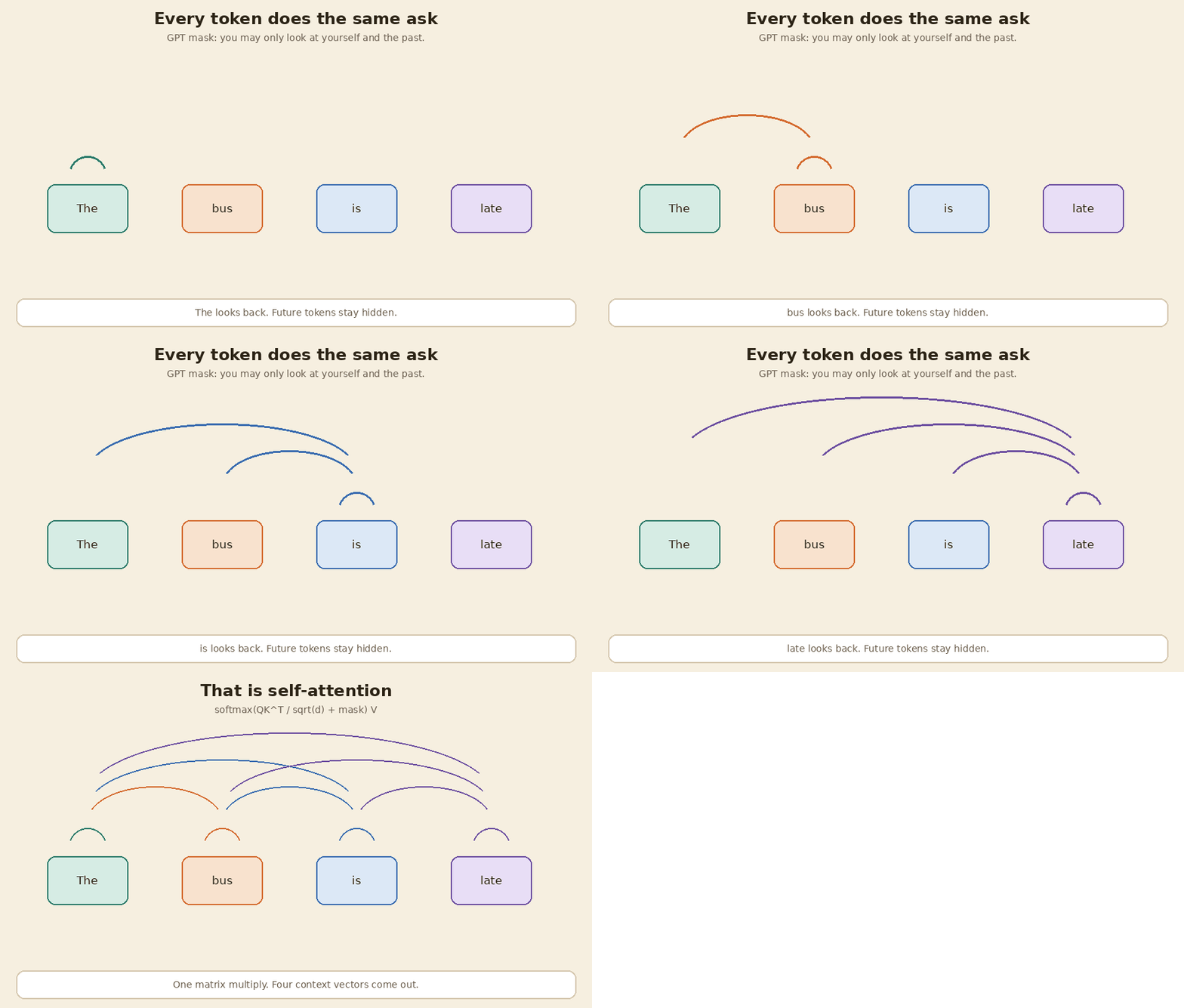
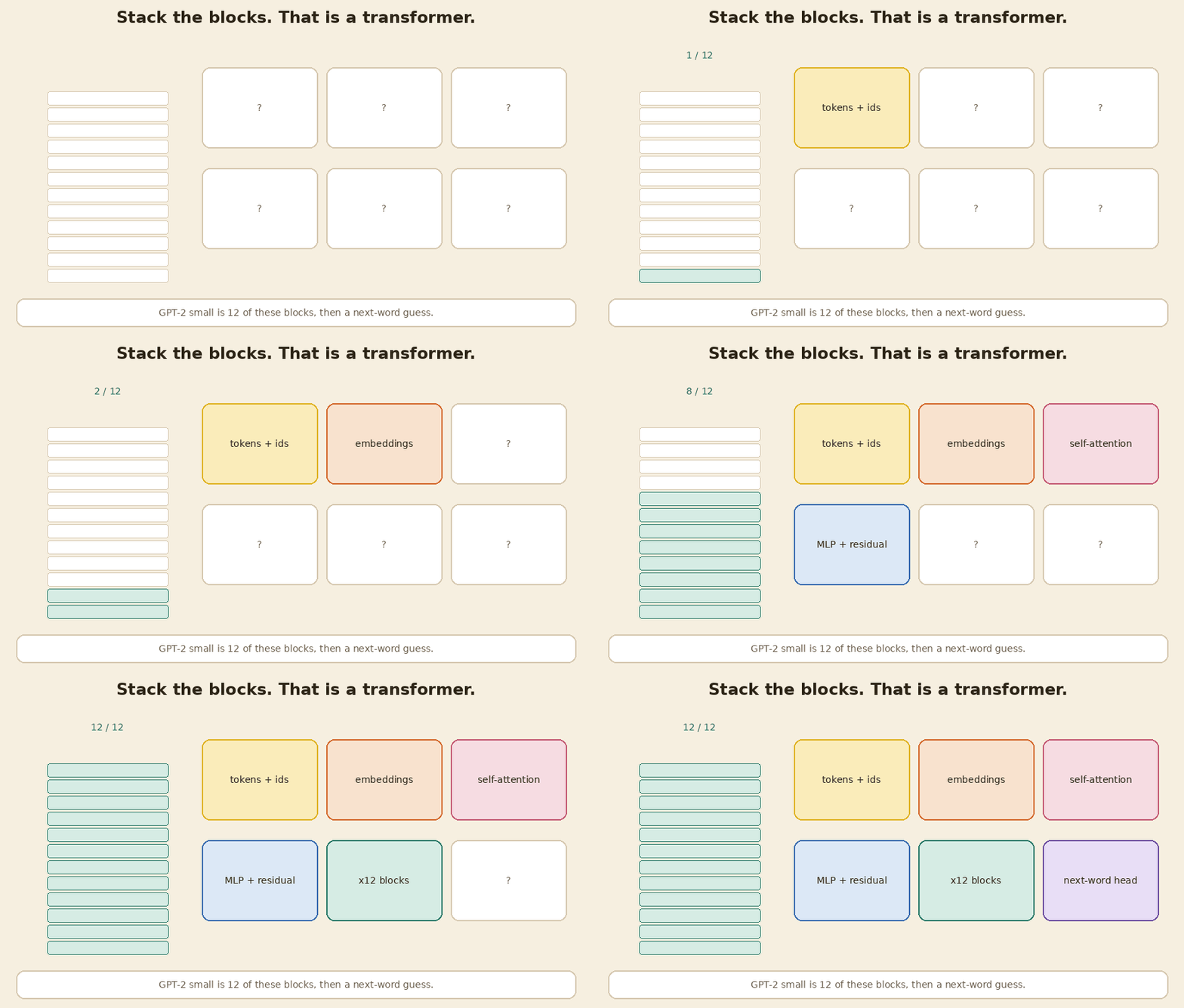
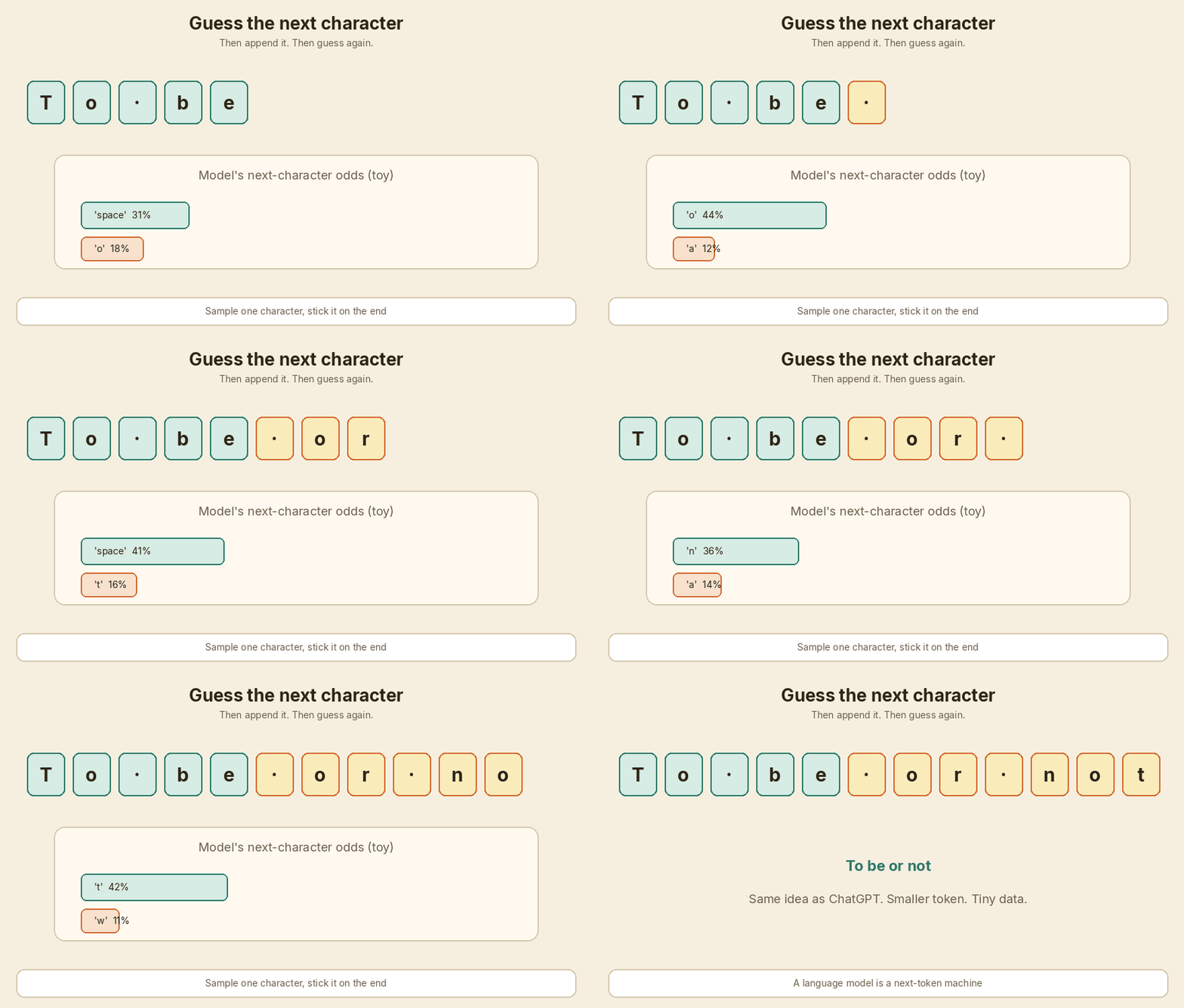
<p>It starts with pieces of text, lists of numbers, a compare-and-mix step called attention, a stack of the same block, and a lot of “guess the next word” training.</p>

<p>This post is that ladder. One chain of <strong>If you do X, you get Y</strong>. Same sentence the whole way: <strong>The bus is late.</strong></p>

<p>The IDs below are toy numbers I made up. They are not from GPT-2, tiktoken, or any real vocab. The matrices are tiny on purpose. You can type the NumPy as you read, or run <code class="language-plaintext highlighter-rouge">code/build_along.py</code> (seed <code class="language-plaintext highlighter-rouge">7</code>) and get the same prints.</p>

<p>If you want the bigger-picture story — a small GPT trained on Shakespeare characters — read <a href="/posts/build-gpt-from-scratch-character-level/">How a Tiny GPT Learns</a>. This page is the same idea, one checkpoint at a time.</p>

<pre><code class="language-mermaid">flowchart TB
  A[Sentence] --&gt; B[Tokens + toy IDs]
  B --&gt; C[Embeddings x]
  C --&gt; D[Query / Key / Value]
  D --&gt; E[Scores]
  E --&gt; F[Softmax weights]
  F --&gt; G[Context vector]
  G --&gt; H[Self-attention]
  H --&gt; I[One transformer block]
  I --&gt; J[Stack of blocks]
  J --&gt; K[Next-word chat model]
  K --&gt; L[Back to the sentence]
</code></pre>

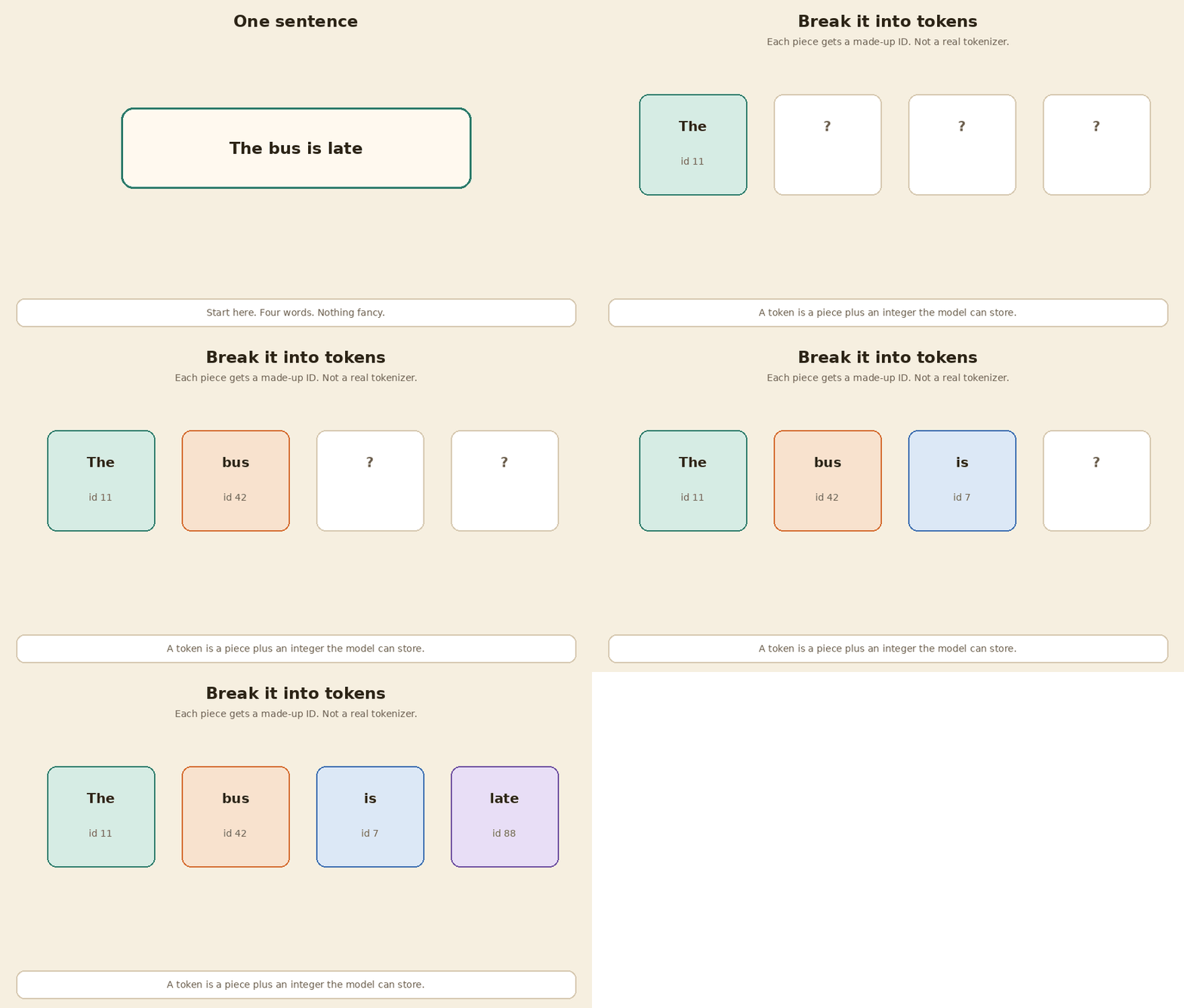
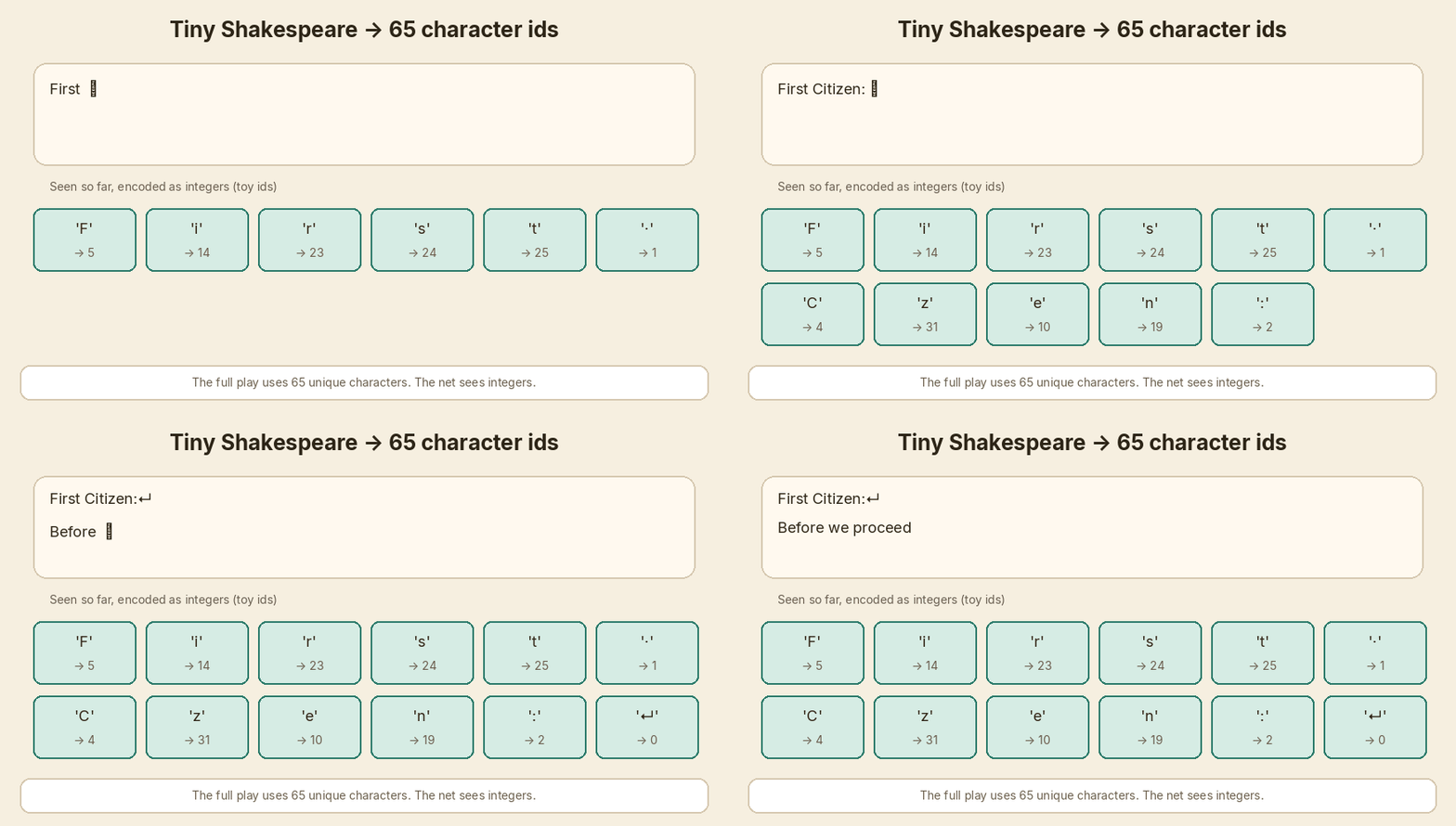
<p><img src="/assets/images/sentence-to-chatgpt-build-along/01-tokens-split.gif" alt="The sentence splits into four tokens with toy IDs" /></p>

<p>Shared setup for every snippet:</p>

<div class="language-python highlighter-rouge"><div class="highlight"><pre class="highlight"><code><span class="kn">import</span> <span class="nn">numpy</span> <span class="k">as</span> <span class="n">np</span>

<span class="n">np</span><span class="p">.</span><span class="n">random</span><span class="p">.</span><span class="n">seed</span><span class="p">(</span><span class="mi">7</span><span class="p">)</span>
<span class="n">np</span><span class="p">.</span><span class="n">set_printoptions</span><span class="p">(</span><span class="n">precision</span><span class="o">=</span><span class="mi">2</span><span class="p">,</span> <span class="n">suppress</span><span class="o">=</span><span class="bp">True</span><span class="p">)</span>

<span class="k">def</span> <span class="nf">softmax</span><span class="p">(</span><span class="n">x</span><span class="p">,</span> <span class="n">axis</span><span class="o">=-</span><span class="mi">1</span><span class="p">):</span>
    <span class="n">e</span> <span class="o">=</span> <span class="n">np</span><span class="p">.</span><span class="n">exp</span><span class="p">(</span><span class="n">x</span> <span class="o">-</span> <span class="n">np</span><span class="p">.</span><span class="nb">max</span><span class="p">(</span><span class="n">x</span><span class="p">,</span> <span class="n">axis</span><span class="o">=</span><span class="n">axis</span><span class="p">,</span> <span class="n">keepdims</span><span class="o">=</span><span class="bp">True</span><span class="p">))</span>
    <span class="k">return</span> <span class="n">e</span> <span class="o">/</span> <span class="n">e</span><span class="p">.</span><span class="nb">sum</span><span class="p">(</span><span class="n">axis</span><span class="o">=</span><span class="n">axis</span><span class="p">,</span> <span class="n">keepdims</span><span class="o">=</span><span class="bp">True</span><span class="p">)</span>

<span class="n">SENTENCE</span> <span class="o">=</span> <span class="s">"The bus is late"</span>
<span class="n">TOKENS</span> <span class="o">=</span> <span class="p">[</span><span class="s">"The"</span><span class="p">,</span> <span class="s">"bus"</span><span class="p">,</span> <span class="s">"is"</span><span class="p">,</span> <span class="s">"late"</span><span class="p">]</span>
<span class="n">IDS</span> <span class="o">=</span> <span class="n">np</span><span class="p">.</span><span class="n">array</span><span class="p">([</span><span class="mi">11</span><span class="p">,</span> <span class="mi">42</span><span class="p">,</span> <span class="mi">7</span><span class="p">,</span> <span class="mi">88</span><span class="p">])</span>  <span class="c1"># toy IDs, not a real vocab
</span><span class="n">D</span> <span class="o">=</span> <span class="mi">4</span>
<span class="n">SCALE</span> <span class="o">=</span> <span class="n">np</span><span class="p">.</span><span class="n">sqrt</span><span class="p">(</span><span class="n">D</span><span class="p">)</span>
</code></pre></div></div>

<hr />

<h2 id="1-break-a-sentence-into-pieces">1. Break a sentence into pieces</h2>

<div class="callout">
<strong>If you break a sentence into pieces, you get tokens (with IDs).</strong>
</div>

<p>A model does not read English. It reads integers.</p>

<p>A tokenizer cuts text into pieces and maps each piece to an ID. Real systems use tens of thousands of IDs. Here I pick four fake ones so the table stays on one screen.</p>

\[\text{The bus is late} \;\rightarrow\;
[(\text{The}, 11),\;(\text{bus}, 42),\;(\text{is}, 7),\;(\text{late}, 88)]\]

<div class="language-python highlighter-rouge"><div class="highlight"><pre class="highlight"><code><span class="k">print</span><span class="p">(</span><span class="s">"sentence:"</span><span class="p">,</span> <span class="n">SENTENCE</span><span class="p">)</span>
<span class="k">print</span><span class="p">(</span><span class="s">"tokens:  "</span><span class="p">,</span> <span class="n">TOKENS</span><span class="p">)</span>
<span class="k">print</span><span class="p">(</span><span class="s">"toy ids: "</span><span class="p">,</span> <span class="n">IDS</span><span class="p">)</span>
</code></pre></div></div>

<div class="language-plaintext highlighter-rouge"><div class="highlight"><pre class="highlight"><code>sentence: The bus is late
tokens:   ['The', 'bus', 'is', 'late']
toy ids:  [11 42  7 88]
</code></pre></div></div>

<p>Those four IDs are invented. Do not look them up in a real vocab.</p>

<hr />

<h2 id="2-turn-each-token-into-a-list-of-numbers">2. Turn each token into a list of numbers</h2>

<div class="callout">
<strong>If you turn each token into a list of numbers, you get embeddings.</strong>
</div>

<p>An embedding is a short list of numbers that stands in for a token. Similar tokens sit near each other in that space.</p>

<p>In a real model this list is hundreds of numbers long. Here each token gets <strong>4</strong> numbers. I wrote the table by hand so later dots stay small.</p>

\[x_i \in \mathbb{R}^{4}\]

<div class="language-python highlighter-rouge"><div class="highlight"><pre class="highlight"><code><span class="n">X</span> <span class="o">=</span> <span class="n">np</span><span class="p">.</span><span class="n">array</span><span class="p">(</span>
    <span class="p">[</span>
        <span class="p">[</span><span class="mf">1.0</span><span class="p">,</span> <span class="mf">0.1</span><span class="p">,</span> <span class="mf">0.0</span><span class="p">,</span> <span class="mf">0.2</span><span class="p">],</span>  <span class="c1"># The
</span>        <span class="p">[</span><span class="mf">0.2</span><span class="p">,</span> <span class="mf">1.0</span><span class="p">,</span> <span class="mf">0.1</span><span class="p">,</span> <span class="mf">0.3</span><span class="p">],</span>  <span class="c1"># bus
</span>        <span class="p">[</span><span class="mf">0.0</span><span class="p">,</span> <span class="mf">0.2</span><span class="p">,</span> <span class="mf">1.0</span><span class="p">,</span> <span class="mf">0.1</span><span class="p">],</span>  <span class="c1"># is
</span>        <span class="p">[</span><span class="mf">0.1</span><span class="p">,</span> <span class="mf">0.8</span><span class="p">,</span> <span class="mf">0.0</span><span class="p">,</span> <span class="mf">1.0</span><span class="p">],</span>  <span class="c1"># late
</span>    <span class="p">]</span>
<span class="p">)</span>
<span class="k">print</span><span class="p">(</span><span class="n">X</span><span class="p">)</span>
<span class="k">print</span><span class="p">(</span><span class="s">"shape"</span><span class="p">,</span> <span class="n">X</span><span class="p">.</span><span class="n">shape</span><span class="p">)</span>
</code></pre></div></div>

<div class="language-plaintext highlighter-rouge"><div class="highlight"><pre class="highlight"><code>[[1.  0.1 0.  0.2]
 [0.2 1.  0.1 0.3]
 [0.  0.2 1.  0.1]
 [0.1 0.8 0.  1. ]]
shape (4, 4)
</code></pre></div></div>

<p>Four tokens. Four numbers each. Shape <code class="language-plaintext highlighter-rouge">(4, 4)</code>.</p>

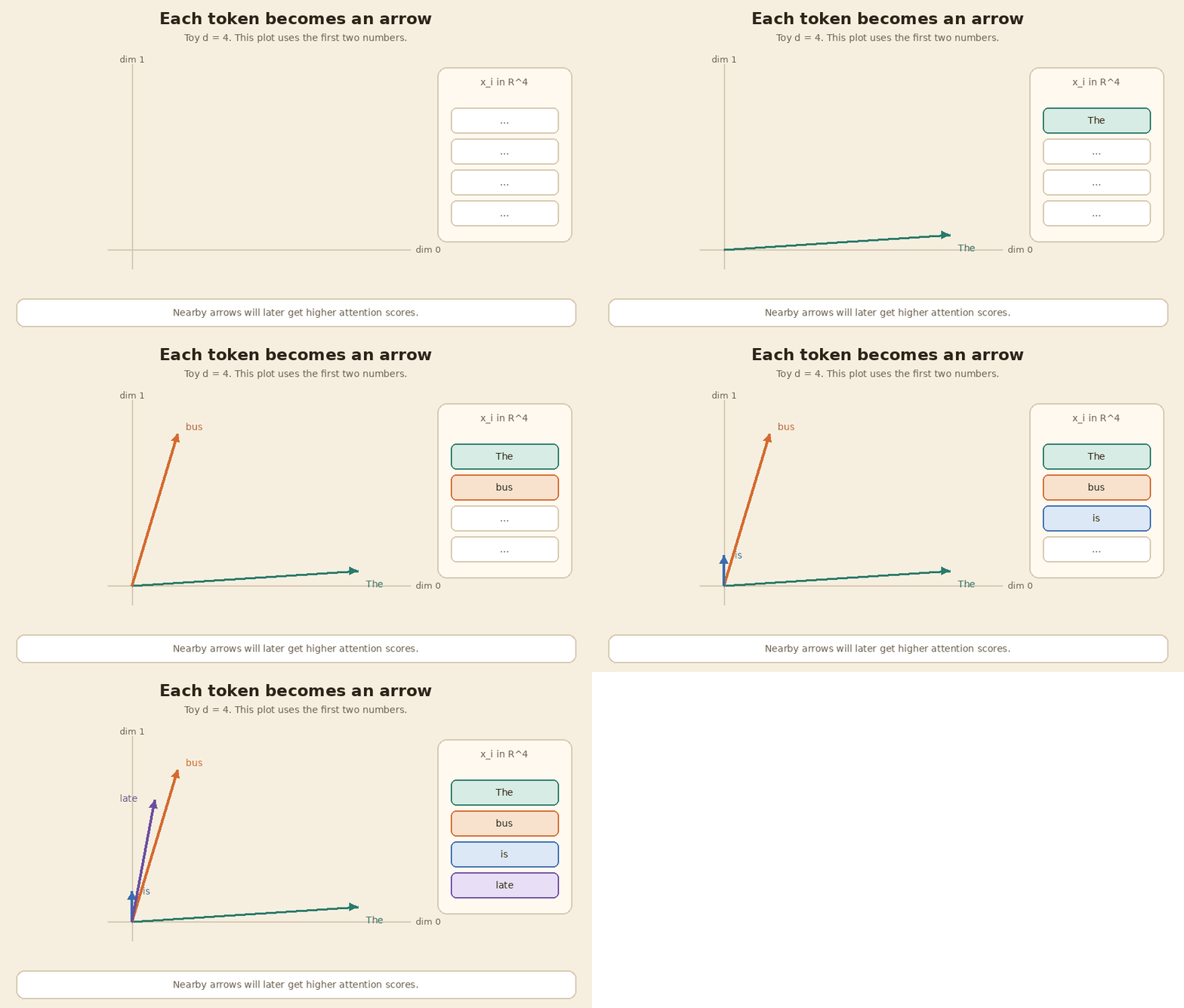
<p>The picture below plots only the first two numbers, so you can see the arrows. <code class="language-plaintext highlighter-rouge">bus</code> and <code class="language-plaintext highlighter-rouge">late</code> point a similar way. That will matter in a few steps.</p>

<p><img src="/assets/images/sentence-to-chatgpt-build-along/02-embeddings-arrows.gif" alt="Each token is an arrow. This plot uses two of the four numbers." /></p>

<hr />

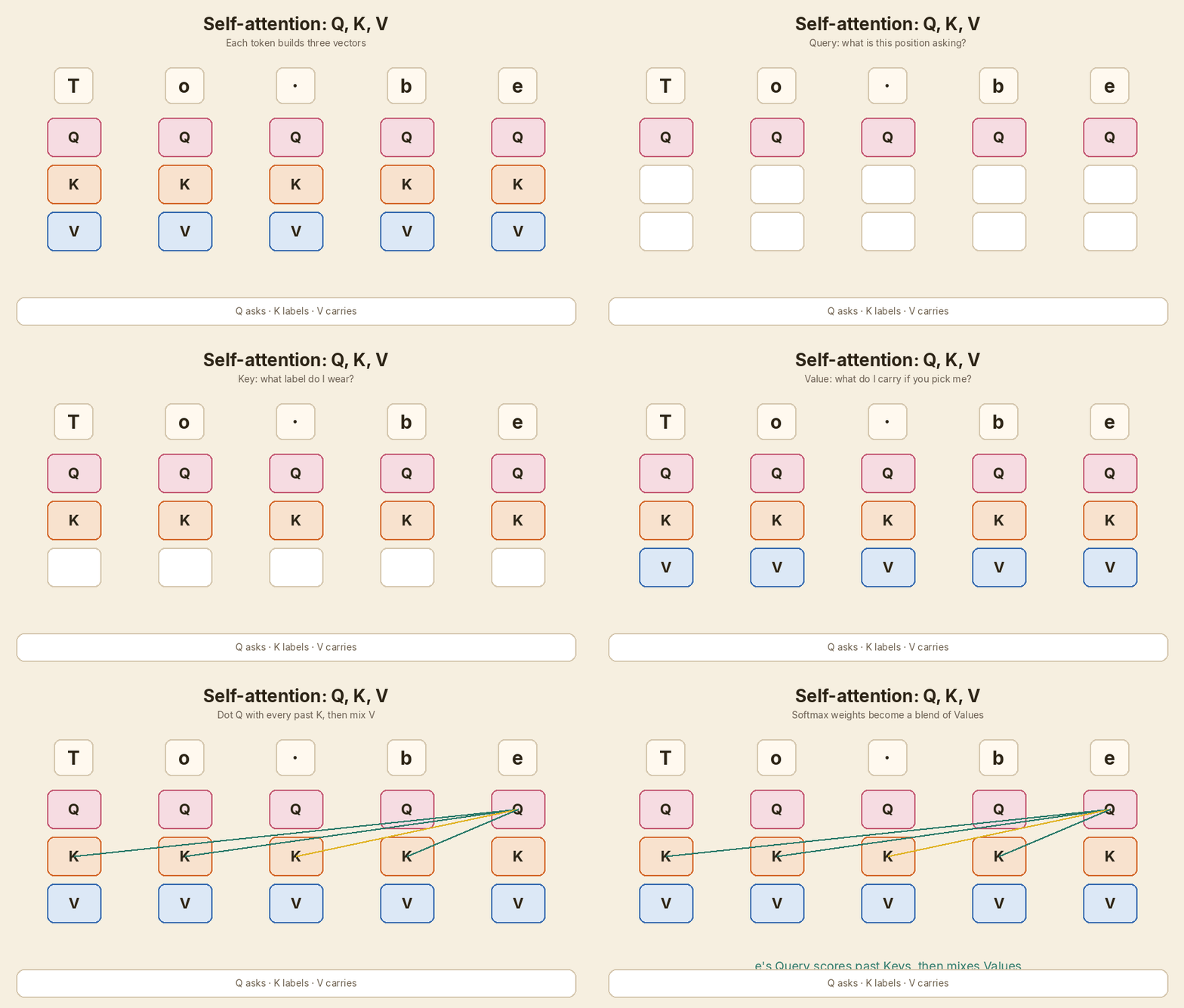
<h2 id="3-let-every-token-ask-a-question">3. Let every token ask a question</h2>

<div class="callout">
<strong>If you let every token ask a question, you get a query.</strong>
</div>

<p>The query is “what am I looking for, right now?”</p>

<p>You do not invent that question by hand. You multiply the embedding by a learned matrix $W_Q$. Same matrix for every token.</p>

<p>In NumPy the tokens are rows, so the line is <code class="language-plaintext highlighter-rouge">Q = X @ W_Q</code>. Same multiply, just a row layout.</p>

\[q = W_Q x\]

<div class="language-python highlighter-rouge"><div class="highlight"><pre class="highlight"><code><span class="n">W_Q</span> <span class="o">=</span> <span class="n">np</span><span class="p">.</span><span class="n">array</span><span class="p">(</span>
    <span class="p">[</span>
        <span class="p">[</span><span class="mf">0.9</span><span class="p">,</span> <span class="mf">0.1</span><span class="p">,</span> <span class="mf">0.0</span><span class="p">,</span> <span class="mf">0.0</span><span class="p">],</span>
        <span class="p">[</span><span class="mf">0.0</span><span class="p">,</span> <span class="mf">0.9</span><span class="p">,</span> <span class="mf">0.1</span><span class="p">,</span> <span class="mf">0.0</span><span class="p">],</span>
        <span class="p">[</span><span class="mf">0.0</span><span class="p">,</span> <span class="mf">0.0</span><span class="p">,</span> <span class="mf">0.9</span><span class="p">,</span> <span class="mf">0.1</span><span class="p">],</span>
        <span class="p">[</span><span class="mf">0.1</span><span class="p">,</span> <span class="mf">0.0</span><span class="p">,</span> <span class="mf">0.0</span><span class="p">,</span> <span class="mf">0.9</span><span class="p">],</span>
    <span class="p">]</span>
<span class="p">)</span>
<span class="n">Q</span> <span class="o">=</span> <span class="n">X</span> <span class="o">@</span> <span class="n">W_Q</span>
<span class="k">print</span><span class="p">(</span><span class="n">Q</span><span class="p">)</span>
</code></pre></div></div>

<div class="language-plaintext highlighter-rouge"><div class="highlight"><pre class="highlight"><code>[[0.92 0.19 0.01 0.18]
 [0.21 0.92 0.19 0.28]
 [0.01 0.18 0.92 0.19]
 [0.19 0.73 0.08 0.9 ]]
</code></pre></div></div>

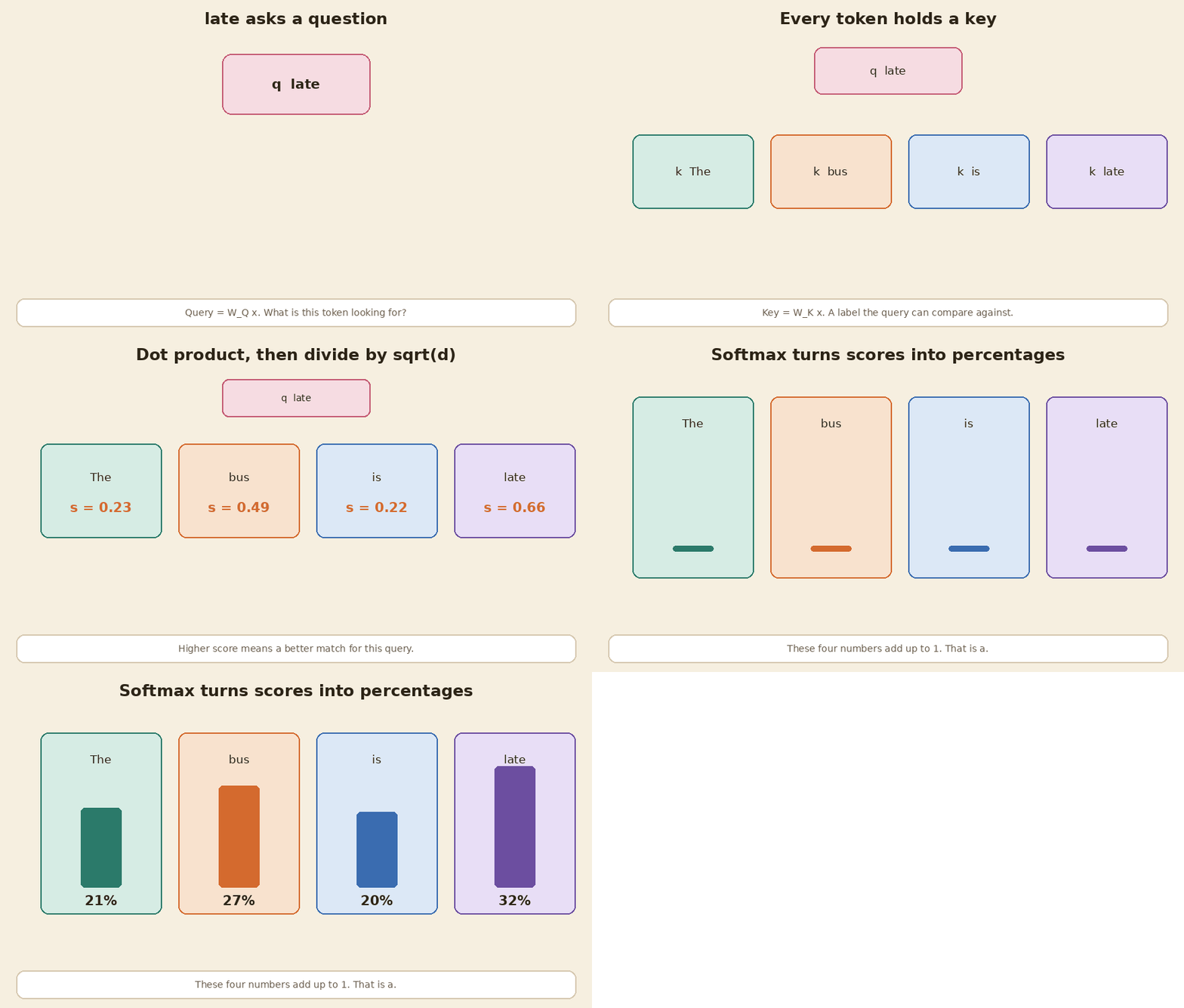
<p>Row 3 is the query for <code class="language-plaintext highlighter-rouge">late</code>: <code class="language-plaintext highlighter-rouge">[0.19  0.73  0.08  0.90]</code>. We will use that row next.</p>

<hr />

<h2 id="4-give-every-token-a-way-to-answer">4. Give every token a way to answer</h2>

<div class="callout">
<strong>If you give every token a way to answer, you get a key and a value.</strong>
</div>

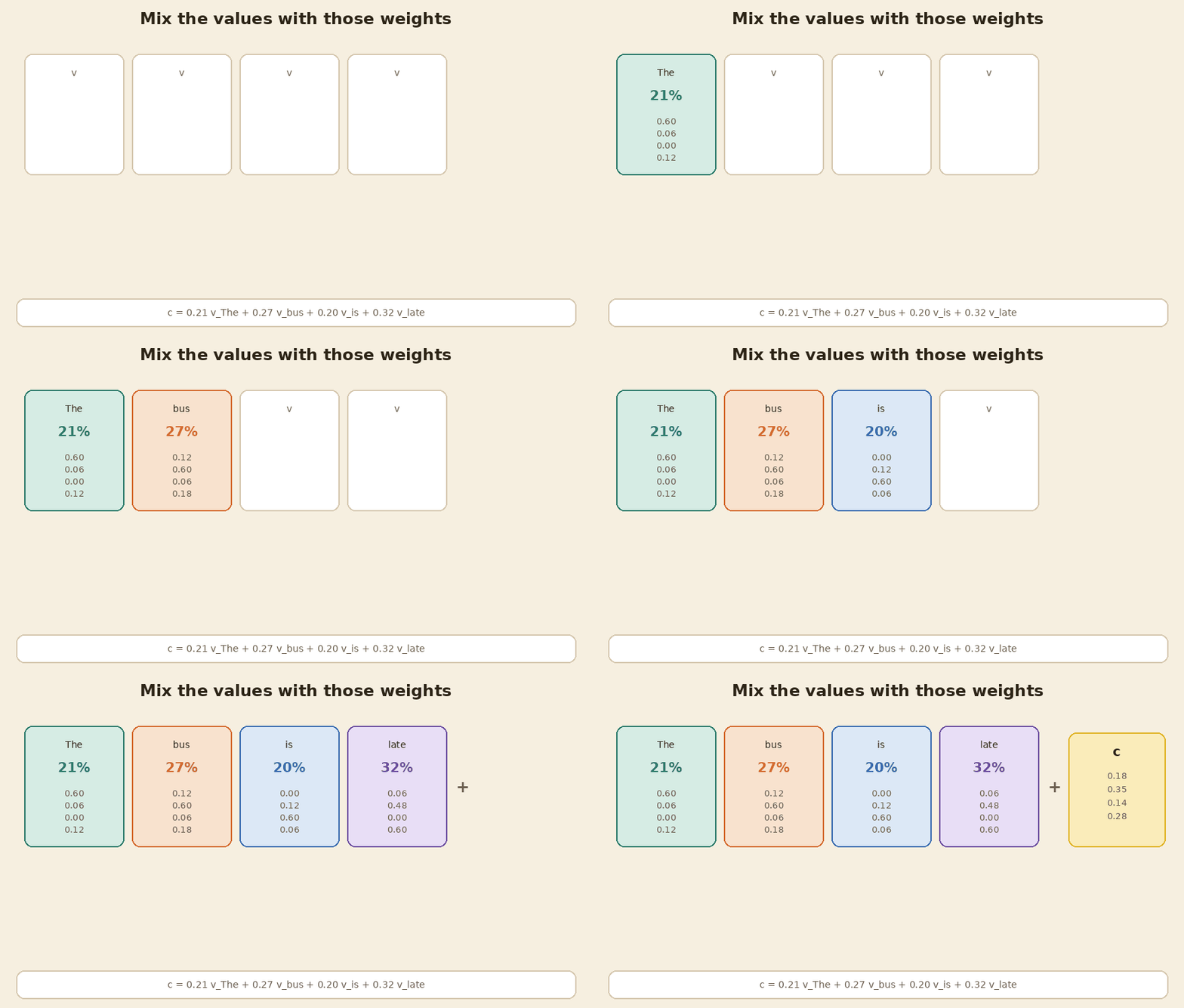
<p>The key is the label on the token. The value is the payload you actually mix in if that token gets picked.</p>

<p>Two more matrices. Same idea as the query.</p>

\[k = W_K x,\qquad v = W_V x\]

<div class="language-python highlighter-rouge"><div class="highlight"><pre class="highlight"><code><span class="n">W_K</span> <span class="o">=</span> <span class="n">np</span><span class="p">.</span><span class="n">array</span><span class="p">(</span>
    <span class="p">[</span>
        <span class="p">[</span><span class="mf">0.8</span><span class="p">,</span> <span class="mf">0.0</span><span class="p">,</span> <span class="mf">0.1</span><span class="p">,</span> <span class="mf">0.1</span><span class="p">],</span>
        <span class="p">[</span><span class="mf">0.1</span><span class="p">,</span> <span class="mf">0.8</span><span class="p">,</span> <span class="mf">0.0</span><span class="p">,</span> <span class="mf">0.1</span><span class="p">],</span>
        <span class="p">[</span><span class="mf">0.0</span><span class="p">,</span> <span class="mf">0.1</span><span class="p">,</span> <span class="mf">0.8</span><span class="p">,</span> <span class="mf">0.1</span><span class="p">],</span>
        <span class="p">[</span><span class="mf">0.1</span><span class="p">,</span> <span class="mf">0.0</span><span class="p">,</span> <span class="mf">0.1</span><span class="p">,</span> <span class="mf">0.8</span><span class="p">],</span>
    <span class="p">]</span>
<span class="p">)</span>
<span class="n">W_V</span> <span class="o">=</span> <span class="n">np</span><span class="p">.</span><span class="n">diag</span><span class="p">([</span><span class="mf">0.6</span><span class="p">,</span> <span class="mf">0.6</span><span class="p">,</span> <span class="mf">0.6</span><span class="p">,</span> <span class="mf">0.6</span><span class="p">])</span>
<span class="n">K</span> <span class="o">=</span> <span class="n">X</span> <span class="o">@</span> <span class="n">W_K</span>
<span class="n">V</span> <span class="o">=</span> <span class="n">X</span> <span class="o">@</span> <span class="n">W_V</span>
<span class="k">print</span><span class="p">(</span><span class="s">"K"</span><span class="p">)</span>
<span class="k">print</span><span class="p">(</span><span class="n">K</span><span class="p">)</span>
<span class="k">print</span><span class="p">(</span><span class="s">"V"</span><span class="p">)</span>
<span class="k">print</span><span class="p">(</span><span class="n">V</span><span class="p">)</span>
</code></pre></div></div>

<div class="language-plaintext highlighter-rouge"><div class="highlight"><pre class="highlight"><code>K
[[0.83 0.08 0.12 0.27]
 [0.29 0.81 0.13 0.37]
 [0.03 0.26 0.81 0.2 ]
 [0.26 0.64 0.11 0.89]]
V
[[0.6  0.06 0.   0.12]
 [0.12 0.6  0.06 0.18]
 [0.   0.12 0.6  0.06]
 [0.06 0.48 0.   0.6 ]]
</code></pre></div></div>

<p>Three jobs, three lists: $q$, $k$, $v$. Still shape <code class="language-plaintext highlighter-rouge">(4, 4)</code>.</p>

<hr />

<h2 id="5-compare-one-tokens-query-with-every-key">5. Compare one token’s query with every key</h2>

<div class="callout">
<strong>If you compare one token's query with every key, you get attention scores.</strong>
</div>

<p>Take the query for <code class="language-plaintext highlighter-rouge">late</code>. Dot it with each key. Divide by $\sqrt{d}$ so the numbers do not grow with the width of the list.</p>

<p>A bigger score means a better match.</p>

\[s_j = \frac{q \cdot k_j}{\sqrt{d}}\]

<div class="language-python highlighter-rouge"><div class="highlight"><pre class="highlight"><code><span class="n">q_late</span> <span class="o">=</span> <span class="n">Q</span><span class="p">[</span><span class="mi">3</span><span class="p">]</span>
<span class="n">scores</span> <span class="o">=</span> <span class="n">q_late</span> <span class="o">@</span> <span class="n">K</span><span class="p">.</span><span class="n">T</span> <span class="o">/</span> <span class="n">SCALE</span>
<span class="k">print</span><span class="p">(</span><span class="s">"q_late:"</span><span class="p">,</span> <span class="n">q_late</span><span class="p">)</span>
<span class="k">print</span><span class="p">(</span><span class="s">"scores:"</span><span class="p">,</span> <span class="n">scores</span><span class="p">)</span>
</code></pre></div></div>

<div class="language-plaintext highlighter-rouge"><div class="highlight"><pre class="highlight"><code>q_late: [0.19 0.73 0.08 0.9 ]
scores: [0.23 0.49 0.22 0.66]
</code></pre></div></div>

<p><code class="language-plaintext highlighter-rouge">late</code> matches itself most (<code class="language-plaintext highlighter-rouge">0.66</code>), then <code class="language-plaintext highlighter-rouge">bus</code> (<code class="language-plaintext highlighter-rouge">0.49</code>). That fits the embeddings: those two arrows already pointed a similar way.</p>

<hr />

<h2 id="6-turn-scores-into-percentages">6. Turn scores into percentages</h2>

<div class="callout">
<strong>If you turn scores into percentages, you get attention weights.</strong>
</div>

<p>Softmax makes the four scores positive and forces them to add up to 1.</p>

<p>You can read each weight as “how much of my mix should come from this token?”</p>

\[a_j = \frac{e^{s_j}}{\sum_m e^{s_m}}\]

<div class="language-python highlighter-rouge"><div class="highlight"><pre class="highlight"><code><span class="n">weights</span> <span class="o">=</span> <span class="n">softmax</span><span class="p">(</span><span class="n">scores</span><span class="p">)</span>
<span class="k">print</span><span class="p">(</span><span class="s">"a = softmax(s):"</span><span class="p">,</span> <span class="n">weights</span><span class="p">)</span>
<span class="k">print</span><span class="p">(</span><span class="s">"sum:"</span><span class="p">,</span> <span class="n">weights</span><span class="p">.</span><span class="nb">sum</span><span class="p">())</span>
</code></pre></div></div>

<div class="language-plaintext highlighter-rouge"><div class="highlight"><pre class="highlight"><code>a = softmax(s): [0.21 0.27 0.2  0.32]
sum: 1.0
</code></pre></div></div>

<p>So <code class="language-plaintext highlighter-rouge">late</code> takes 32% from itself, 27% from <code class="language-plaintext highlighter-rouge">bus</code>, 21% from <code class="language-plaintext highlighter-rouge">The</code>, 20% from <code class="language-plaintext highlighter-rouge">is</code>.</p>

<p><img src="/assets/images/sentence-to-chatgpt-build-along/03-query-keys-softmax.gif" alt="late's query meets four keys, then softmax turns scores into percentages" /></p>

<hr />

<h2 id="7-mix-the-values-using-those-weights">7. Mix the values using those weights</h2>

<div class="callout">
<strong>If you mix the values using those weights, you get a context vector.</strong>
</div>

<p>The scores only decide <em>who</em> matters. The values are <em>what</em> you actually add in.</p>

<p>One weighted sum. One new list of four numbers for <code class="language-plaintext highlighter-rouge">late</code>.</p>

\[c = \sum_j a_j v_j\]

<div class="language-python highlighter-rouge"><div class="highlight"><pre class="highlight"><code><span class="n">c</span> <span class="o">=</span> <span class="n">weights</span> <span class="o">@</span> <span class="n">V</span>
<span class="k">print</span><span class="p">(</span><span class="s">"c = sum a_j v_j:"</span><span class="p">,</span> <span class="n">c</span><span class="p">)</span>
</code></pre></div></div>

<div class="language-plaintext highlighter-rouge"><div class="highlight"><pre class="highlight"><code>c = sum a_j v_j: [0.18 0.35 0.14 0.28]
</code></pre></div></div>

<p>That is the view <code class="language-plaintext highlighter-rouge">late</code> now has of the whole sentence.</p>

<p><img src="/assets/images/sentence-to-chatgpt-build-along/04-values-mix.gif" alt="Four value lists mix into one context vector" /></p>

<hr />

<h2 id="8-do-it-for-every-token-at-once">8. Do it for every token at once</h2>

<div class="callout">
<strong>If you do it for every token at once, you get self-attention.</strong>
</div>

<p>The last three steps were for one query. The model does the same for every token, in one matrix multiply.</p>

<p>GPT also puts a <strong>causal mask</strong> on the scores. A token may look at itself and the past. It may not look at a word that has not been written yet. That is how next-word training stays honest.</p>

\[\mathrm{Attention}(Q,K,V)
= \mathrm{softmax}\!\left(\frac{QK^{\top}}{\sqrt{d}} + M\right)V\]

<p>$M$ is $0$ on and below the diagonal, and $-\infty$ above it. After softmax, the future weights become $0$.</p>

<div class="language-python highlighter-rouge"><div class="highlight"><pre class="highlight"><code><span class="n">raw</span> <span class="o">=</span> <span class="n">Q</span> <span class="o">@</span> <span class="n">K</span><span class="p">.</span><span class="n">T</span> <span class="o">/</span> <span class="n">SCALE</span>
<span class="n">causal</span> <span class="o">=</span> <span class="n">np</span><span class="p">.</span><span class="n">tril</span><span class="p">(</span><span class="n">np</span><span class="p">.</span><span class="n">ones</span><span class="p">((</span><span class="mi">4</span><span class="p">,</span> <span class="mi">4</span><span class="p">)))</span>
<span class="n">masked</span> <span class="o">=</span> <span class="n">np</span><span class="p">.</span><span class="n">where</span><span class="p">(</span><span class="n">causal</span> <span class="o">==</span> <span class="mf">1.0</span><span class="p">,</span> <span class="n">raw</span><span class="p">,</span> <span class="o">-</span><span class="mf">1e9</span><span class="p">)</span>
<span class="n">A</span> <span class="o">=</span> <span class="n">softmax</span><span class="p">(</span><span class="n">masked</span><span class="p">,</span> <span class="n">axis</span><span class="o">=</span><span class="mi">1</span><span class="p">)</span>
<span class="n">C</span> <span class="o">=</span> <span class="n">A</span> <span class="o">@</span> <span class="n">V</span>
<span class="k">print</span><span class="p">(</span><span class="s">"raw scores"</span><span class="p">)</span>
<span class="k">print</span><span class="p">(</span><span class="n">raw</span><span class="p">)</span>
<span class="k">print</span><span class="p">(</span><span class="s">"causal weights"</span><span class="p">)</span>
<span class="k">print</span><span class="p">(</span><span class="n">A</span><span class="p">)</span>
<span class="k">print</span><span class="p">(</span><span class="s">"context matrix"</span><span class="p">)</span>
<span class="k">print</span><span class="p">(</span><span class="n">C</span><span class="p">)</span>
</code></pre></div></div>

<div class="language-plaintext highlighter-rouge"><div class="highlight"><pre class="highlight"><code>raw scores
[[0.41 0.24 0.06 0.26]
 [0.17 0.47 0.23 0.46]
 [0.09 0.17 0.42 0.19]
 [0.23 0.49 0.22 0.66]]
causal weights
[[1.   0.   0.   0.  ]
 [0.43 0.57 0.   0.  ]
 [0.29 0.31 0.4  0.  ]
 [0.21 0.27 0.2  0.32]]
context matrix
[[0.6  0.06 0.   0.12]
 [0.32 0.37 0.03 0.15]
 [0.21 0.25 0.26 0.11]
 [0.18 0.35 0.14 0.28]]
</code></pre></div></div>

<p>Row 0 is <code class="language-plaintext highlighter-rouge">The</code>. It can only see itself, so its weights are <code class="language-plaintext highlighter-rouge">[1, 0, 0, 0]</code>. Row 3 is <code class="language-plaintext highlighter-rouge">late</code>. It can see everyone. That last row is the same mix we built by hand.</p>

<p><img src="/assets/images/sentence-to-chatgpt-build-along/05-self-attention-arcs.gif" alt="Self-attention arcs. Each token looks back, never forward." /></p>

<hr />

<h2 id="9-add-a-small-neural-network-and-residual-connections">9. Add a small neural network and residual connections</h2>

<div class="callout">
<strong>If you add a small neural network and residual connections, you get a transformer block.</strong>
</div>

<p>Attention is the talk step. Each token still needs a private think step. That is a tiny MLP, applied at every position with the same weights.</p>

<p>A residual connection adds the input back: $x + \text{layer}(x)$. The original signal still has a path through the stack. Layer norm rescales each token’s numbers so they do not blow up as you go deeper.</p>

\[h = x + \mathrm{Attn}(x),\qquad
y = h + \mathrm{MLP}(h)\]

<div class="language-python highlighter-rouge"><div class="highlight"><pre class="highlight"><code><span class="n">H</span> <span class="o">=</span> <span class="n">X</span> <span class="o">+</span> <span class="n">C</span>
<span class="n">W1</span> <span class="o">=</span> <span class="n">np</span><span class="p">.</span><span class="n">array</span><span class="p">(</span>
    <span class="p">[</span>
        <span class="p">[</span><span class="mf">0.4</span><span class="p">,</span> <span class="mf">0.1</span><span class="p">,</span> <span class="mf">0.0</span><span class="p">,</span> <span class="mf">0.0</span><span class="p">],</span>
        <span class="p">[</span><span class="mf">0.0</span><span class="p">,</span> <span class="mf">0.4</span><span class="p">,</span> <span class="mf">0.1</span><span class="p">,</span> <span class="mf">0.0</span><span class="p">],</span>
        <span class="p">[</span><span class="mf">0.0</span><span class="p">,</span> <span class="mf">0.0</span><span class="p">,</span> <span class="mf">0.4</span><span class="p">,</span> <span class="mf">0.1</span><span class="p">],</span>
        <span class="p">[</span><span class="mf">0.1</span><span class="p">,</span> <span class="mf">0.0</span><span class="p">,</span> <span class="mf">0.0</span><span class="p">,</span> <span class="mf">0.4</span><span class="p">],</span>
    <span class="p">]</span>
<span class="p">)</span>
<span class="n">W2</span> <span class="o">=</span> <span class="n">np</span><span class="p">.</span><span class="n">array</span><span class="p">(</span>
    <span class="p">[</span>
        <span class="p">[</span><span class="mf">0.3</span><span class="p">,</span> <span class="mf">0.0</span><span class="p">,</span> <span class="mf">0.1</span><span class="p">,</span> <span class="mf">0.0</span><span class="p">],</span>
        <span class="p">[</span><span class="mf">0.0</span><span class="p">,</span> <span class="mf">0.3</span><span class="p">,</span> <span class="mf">0.0</span><span class="p">,</span> <span class="mf">0.1</span><span class="p">],</span>
        <span class="p">[</span><span class="mf">0.1</span><span class="p">,</span> <span class="mf">0.0</span><span class="p">,</span> <span class="mf">0.3</span><span class="p">,</span> <span class="mf">0.0</span><span class="p">],</span>
        <span class="p">[</span><span class="mf">0.0</span><span class="p">,</span> <span class="mf">0.1</span><span class="p">,</span> <span class="mf">0.0</span><span class="p">,</span> <span class="mf">0.3</span><span class="p">],</span>
    <span class="p">]</span>
<span class="p">)</span>
<span class="n">mlp</span> <span class="o">=</span> <span class="n">np</span><span class="p">.</span><span class="n">maximum</span><span class="p">(</span><span class="n">H</span> <span class="o">@</span> <span class="n">W1</span><span class="p">,</span> <span class="mf">0.0</span><span class="p">)</span> <span class="o">@</span> <span class="n">W2</span>
<span class="n">Y</span> <span class="o">=</span> <span class="n">H</span> <span class="o">+</span> <span class="n">mlp</span>
<span class="k">print</span><span class="p">(</span><span class="s">"h = X + C"</span><span class="p">)</span>
<span class="k">print</span><span class="p">(</span><span class="n">H</span><span class="p">)</span>
<span class="k">print</span><span class="p">(</span><span class="s">"y = h + MLP(h)"</span><span class="p">)</span>
<span class="k">print</span><span class="p">(</span><span class="n">Y</span><span class="p">)</span>
</code></pre></div></div>

<div class="language-plaintext highlighter-rouge"><div class="highlight"><pre class="highlight"><code>h = X + C
[[1.6  0.16 0.   0.32]
 [0.52 1.37 0.13 0.45]
 [0.21 0.45 1.26 0.21]
 [0.28 1.15 0.14 1.28]]
y = h + MLP(h)
[[1.8  0.24 0.07 0.38]
 [0.62 1.57 0.22 0.57]
 [0.3  0.53 1.43 0.3 ]
 [0.36 1.35 0.21 1.48]]
</code></pre></div></div>

<p>Still shape <code class="language-plaintext highlighter-rouge">(4, 4)</code>. Same four tokens, richer lists.</p>

<hr />

<h2 id="10-stack-the-blocks">10. Stack the blocks</h2>

<div class="callout">
<strong>If you stack the blocks, you get a transformer.</strong>
</div>

<p>One block is one talk-then-think cycle. A transformer is that cycle repeated.</p>

<p>GPT-2 small does this <strong>12</strong> times. Each block has its own weights. The data shape stays the same as it goes up the stack. In this toy that shape is still <code class="language-plaintext highlighter-rouge">(4, 4)</code>.</p>

\[x^{(0)} \;\rightarrow\; \mathrm{Block}_1 \;\rightarrow\; \cdots \;\rightarrow\; \mathrm{Block}_{12} \;\rightarrow\; x^{(12)}\]

<div class="language-python highlighter-rouge"><div class="highlight"><pre class="highlight"><code><span class="k">print</span><span class="p">(</span><span class="s">"GPT-2 small repeats this block 12 times."</span><span class="p">)</span>
<span class="k">print</span><span class="p">(</span><span class="s">"toy stack depth: 12"</span><span class="p">)</span>
</code></pre></div></div>

<div class="language-plaintext highlighter-rouge"><div class="highlight"><pre class="highlight"><code>GPT-2 small repeats this block 12 times.
toy stack depth: 12
</code></pre></div></div>

<p>We do not run 12 toy blocks here. The idea is the repeat, not a new formula.</p>

<p><img src="/assets/images/sentence-to-chatgpt-build-along/06-blocks-stack.gif" alt="Twelve blocks stack into a transformer, then a next-word head" /></p>

<hr />

<h2 id="11-train-it-to-predict-the-next-word">11. Train it to predict the next word</h2>

<div class="callout">
<strong>If you train it to predict the next word, then fine-tune with instructions and human feedback, you get a chat assistant like ChatGPT.</strong>
</div>

<p>After the last block, a linear head turns the last token’s vector into a score per word. Softmax turns those scores into a probability bar.</p>

<p>Three training stages, in plain words:</p>

<ol>
  <li><strong>Pretraining.</strong> Read a huge pile of text. Guess the next token. That is the transformer learning language.</li>
  <li><strong>SFT (supervised fine-tune).</strong> Show instruction and answer pairs. Same next-token loss, but now the text looks like a helpful reply.</li>
  <li><strong>RLHF / preference tuning.</strong> People pick the better of two answers. The model moves toward the preferred one.</li>
</ol>

<p>We skip the training loop. We only do the last multiply, with a four-word toy vocab.</p>

\[p(\text{next}) = \mathrm{softmax}(y_{\text{late}}\, W_{\text{head}})\]

<div class="language-python highlighter-rouge"><div class="highlight"><pre class="highlight"><code><span class="n">vocab</span> <span class="o">=</span> <span class="p">[</span><span class="s">"early"</span><span class="p">,</span> <span class="s">"again"</span><span class="p">,</span> <span class="s">"today"</span><span class="p">,</span> <span class="s">"."</span><span class="p">]</span>
<span class="n">W_head</span> <span class="o">=</span> <span class="n">np</span><span class="p">.</span><span class="n">array</span><span class="p">(</span>
    <span class="p">[</span>
        <span class="p">[</span><span class="mf">0.2</span><span class="p">,</span> <span class="mf">0.1</span><span class="p">,</span> <span class="mf">0.4</span><span class="p">,</span> <span class="mf">0.8</span><span class="p">],</span>
        <span class="p">[</span><span class="o">-</span><span class="mf">0.3</span><span class="p">,</span> <span class="mf">0.2</span><span class="p">,</span> <span class="mf">0.6</span><span class="p">,</span> <span class="mf">0.1</span><span class="p">],</span>
        <span class="p">[</span><span class="mf">0.1</span><span class="p">,</span> <span class="mf">0.4</span><span class="p">,</span> <span class="mf">0.2</span><span class="p">,</span> <span class="mf">0.3</span><span class="p">],</span>
        <span class="p">[</span><span class="mf">0.8</span><span class="p">,</span> <span class="mf">0.1</span><span class="p">,</span> <span class="mf">1.2</span><span class="p">,</span> <span class="mf">0.4</span><span class="p">],</span>
    <span class="p">]</span>
<span class="p">)</span>
<span class="n">logits</span> <span class="o">=</span> <span class="n">Y</span><span class="p">[</span><span class="mi">3</span><span class="p">]</span> <span class="o">@</span> <span class="n">W_head</span>
<span class="n">probs</span> <span class="o">=</span> <span class="n">softmax</span><span class="p">(</span><span class="n">logits</span><span class="p">)</span>
<span class="k">print</span><span class="p">(</span><span class="s">"logits:"</span><span class="p">,</span> <span class="n">logits</span><span class="p">)</span>
<span class="k">for</span> <span class="n">word</span><span class="p">,</span> <span class="n">p</span> <span class="ow">in</span> <span class="nb">zip</span><span class="p">(</span><span class="n">vocab</span><span class="p">,</span> <span class="n">probs</span><span class="p">):</span>
    <span class="n">bar</span> <span class="o">=</span> <span class="s">"#"</span> <span class="o">*</span> <span class="nb">int</span><span class="p">(</span><span class="nb">round</span><span class="p">(</span><span class="nb">float</span><span class="p">(</span><span class="n">p</span><span class="p">)</span> <span class="o">*</span> <span class="mi">20</span><span class="p">))</span>
    <span class="k">print</span><span class="p">(</span><span class="sa">f</span><span class="s">"  </span><span class="si">{</span><span class="n">word</span><span class="si">:</span><span class="mi">6</span><span class="n">s</span><span class="si">}</span><span class="s">  </span><span class="si">{</span><span class="n">p</span><span class="si">:</span><span class="mf">4.2</span><span class="n">f</span><span class="si">}</span><span class="s">  </span><span class="si">{</span><span class="n">bar</span><span class="si">}</span><span class="s">"</span><span class="p">)</span>
</code></pre></div></div>

<div class="language-plaintext highlighter-rouge"><div class="highlight"><pre class="highlight"><code>logits: [0.88 0.54 2.78 1.08]
  early   0.10  ##
  again   0.07  #
  today   0.69  ##############
  .       0.13  ###
</code></pre></div></div>

<table>
  <thead>
    <tr>
      <th>Next word</th>
      <th style="text-align: right">Probability</th>
    </tr>
  </thead>
  <tbody>
    <tr>
      <td>early</td>
      <td style="text-align: right">10%</td>
    </tr>
    <tr>
      <td>again</td>
      <td style="text-align: right">7%</td>
    </tr>
    <tr>
      <td><strong>today</strong></td>
      <td style="text-align: right"><strong>69%</strong></td>
    </tr>
    <tr>
      <td>.</td>
      <td style="text-align: right">13%</td>
    </tr>
  </tbody>
</table>

<p>On this toy head, the next word after <strong>The bus is late</strong> is most likely <strong>today</strong>. Sample from that bar, append the word, run the ladder again. That is how a chat reply gets written: one token at a time.</p>

<p>These percentages are from the tiny matrices above. They are not a real ChatGPT sample.</p>

<hr />

<h2 id="12-rewind-everything">12. Rewind everything</h2>

<div class="callout">
<strong>If you rewind everything, you are back to a plain sentence.</strong>
</div>

<p>Take the stack off. Take the block off. Take attention off. You are left with four IDs, then four words.</p>

<div class="language-python highlighter-rouge"><div class="highlight"><pre class="highlight"><code><span class="k">print</span><span class="p">(</span><span class="s">"back to the sentence:"</span><span class="p">,</span> <span class="n">SENTENCE</span><span class="p">)</span>
</code></pre></div></div>

<div class="language-plaintext highlighter-rouge"><div class="highlight"><pre class="highlight"><code>back to the sentence: The bus is late
</code></pre></div></div>

<p>That is the whole machine, seen from one short line of English.</p>

<hr />

<h2 id="checkpoint-recap">Checkpoint recap</h2>

<table>
  <thead>
    <tr>
      <th>Step</th>
      <th>You get</th>
      <th>Shape of the data</th>
    </tr>
  </thead>
  <tbody>
    <tr>
      <td>1. Tokens</td>
      <td>pieces + toy IDs</td>
      <td>4 ids</td>
    </tr>
    <tr>
      <td>2. Embeddings</td>
      <td>$x_i \in \mathbb{R}^{4}$</td>
      <td><code class="language-plaintext highlighter-rouge">(4, 4)</code></td>
    </tr>
    <tr>
      <td>3. Query</td>
      <td>$q = W_Q x$</td>
      <td><code class="language-plaintext highlighter-rouge">(4, 4)</code></td>
    </tr>
    <tr>
      <td>4. Key and value</td>
      <td>$k = W_K x$, $v = W_V x$</td>
      <td><code class="language-plaintext highlighter-rouge">(4, 4)</code> each</td>
    </tr>
    <tr>
      <td>5. Scores</td>
      <td>$s_j = q \cdot k_j / \sqrt{d}$</td>
      <td><code class="language-plaintext highlighter-rouge">(4,)</code> for one query</td>
    </tr>
    <tr>
      <td>6. Weights</td>
      <td>softmax of the scores</td>
      <td><code class="language-plaintext highlighter-rouge">(4,)</code>, sums to 1</td>
    </tr>
    <tr>
      <td>7. Context</td>
      <td>$c = \sum a_j v_j$</td>
      <td><code class="language-plaintext highlighter-rouge">(4,)</code></td>
    </tr>
    <tr>
      <td>8. Self-attention</td>
      <td>$\mathrm{softmax}(QK^{\top}/\sqrt{d}+M)V$</td>
      <td><code class="language-plaintext highlighter-rouge">(4, 4)</code></td>
    </tr>
    <tr>
      <td>9. Transformer block</td>
      <td>$h = x + \mathrm{Attn}(x)$, $y = h + \mathrm{MLP}(h)$</td>
      <td><code class="language-plaintext highlighter-rouge">(4, 4)</code></td>
    </tr>
    <tr>
      <td>10. Transformer</td>
      <td>12 stacked blocks (GPT-2 small)</td>
      <td>still <code class="language-plaintext highlighter-rouge">(4, 4)</code> in this toy</td>
    </tr>
    <tr>
      <td>11. Chat assistant</td>
      <td>next-word bar, then SFT + preference</td>
      <td><code class="language-plaintext highlighter-rouge">(4,)</code> over the toy vocab</td>
    </tr>
    <tr>
      <td>12. Rewind</td>
      <td>the original sentence</td>
      <td>text</td>
    </tr>
  </tbody>
</table>

<hr />

<h2 id="in-short">In short</h2>

<p><strong>The bus is late</strong> becomes four toy IDs, then four short lists of numbers. Those lists ask questions (query), wear labels (key), and carry a payload (value). One token’s query is scored against every key, squashed into percentages, and used to mix the values. Do that for every token, hide the future with a causal mask, and you have self-attention. Add a small MLP and residual links and you have one transformer block. Stack twelve of those and you have a GPT-shaped model. Train it to guess the next word, then fine-tune with instructions and human preference, and you have the same idea that sits under ChatGPT. Undo the steps and you are back at the sentence.</p>]]></content><author><name>Vijay Kumar</name></author><category term="transformers" /><category term="attention" /><category term="chatgpt" /><category term="embeddings" /><category term="gpt" /><category term="build-along" /><summary type="html"><![CDATA[Start with four words. Turn them into tokens, embeddings, attention, stacked blocks, and next-word training. That is the same ladder that sits under ChatGPT.]]></summary><media:thumbnail xmlns:media="http://search.yahoo.com/mrss/" url="https://theintelliwise.com/assets/brand/og-image.png" /><media:content medium="image" url="https://theintelliwise.com/assets/brand/og-image.png" xmlns:media="http://search.yahoo.com/mrss/" /></entry><entry><title type="html">Precision vs Recall Is a Product Decision</title><link href="https://theintelliwise.com/posts/precision-vs-recall-product-decision/" rel="alternate" type="text/html" title="Precision vs Recall Is a Product Decision" /><published>2026-10-11T15:00:00+01:00</published><updated>2026-10-11T15:00:00+01:00</updated><id>https://theintelliwise.com/posts/precision-vs-recall-product-decision</id><content type="html" xml:base="https://theintelliwise.com/posts/precision-vs-recall-product-decision/"><![CDATA[<p>Precision and recall show up on every model card. They also decide what the product does when the score is in the middle.</p>

<p>The definitions, the matrix, and the colours are in <a href="/posts/precision-recall-color-coded/">Precision and Recall, in Colours You Will Remember</a>. This post is the product half: which side you favour, and who pays when you get it wrong.</p>

<p><strong>Colour legend</strong> (same chips as that post):</p>

<p><span style="background:#d4f0e4;color:#0d7a45;font-weight:600;padding:2px 8px;border-radius:4px">✓ TP</span>
correct catch  
<span style="background:#fde6d0;color:#9a3b0a;font-weight:600;padding:2px 8px;border-radius:4px">⚠ FP</span>
false alarm  
<span style="background:#ddd6fe;color:#4c1d95;font-weight:600;padding:2px 8px;border-radius:4px">✗ FN</span>
miss  
<span style="background:#e5e7eb;color:#4b5563;font-weight:600;padding:2px 8px;border-radius:4px">· TN</span>
correct ignore</p>

<p>False alarms stay orange, not red, so you are not asked to tell red from green. Each cell also has a mark. The colour is a helper, not the only signal.</p>

<p>Two one-line definitions:</p>

<ul>
  <li><strong>Precision:</strong> when the system speaks up, how often is it right.</li>
  <li><strong>Recall:</strong> out of all the real events, how many did it catch.</li>
</ul>

<pre><code class="language-mermaid">flowchart LR
  A[The system has a score] --&gt; B{Speak up or stay quiet?}
  B --&gt;|spoke, and it was real| TP["✓ TP correct catch"]
  B --&gt;|spoke, and it was not| FP["⚠ FP false alarm"]
  B --&gt;|stayed quiet, and it was real| FN["✗ FN miss"]
  B --&gt;|stayed quiet, and it was not| TN["· TN correct ignore"]
  classDef tp fill:#d4f0e4,stroke:#1a9e55,color:#0d7a45
  classDef fp fill:#fde6d0,stroke:#d46a2e,color:#9a3b0a
  classDef fn fill:#ddd6fe,stroke:#5b4cc4,color:#4c1d95
  classDef tn fill:#e5e7eb,stroke:#6b7280,color:#4b5563
  class TP tp
  class FP fp
  class FN fn
  class TN tn
</code></pre>

<p>Seven myths I hear in reviews. Each one has a cost attached.</p>

<hr />

<h2 id="1-higher-accuracy-means-a-better-model">1. Higher accuracy means a better model</h2>

<div class="myth-block">
<div class="myth-row myth-row--myth">
<span class="myth-label">⚠ Myth</span>
<p>Higher accuracy means a better model. Ship the 99% one.</p>
</div>
<div class="myth-row myth-row--believe">
<span class="myth-label">· Why people believe it</span>
<p>Accuracy is one number. Dashboards love one number. A 99% score looks like the job is done.</p>
</div>
<div class="myth-row myth-row--fact">
<span class="myth-label">✓ Fact</span>
<p>Accuracy can look great when the thing you care about is rare. A spam filter that never flags anything is right on almost every mail. Recall is 0. Precision and recall split the story into two questions. See the <a href="/posts/precision-recall-color-coded/">colour-coded post</a> for the inbox arithmetic.</p>
</div>
</div>

<hr />

<h2 id="2-you-can-max-both-precision-and-recall">2. You can max both precision and recall</h2>

<div class="myth-block">
<div class="myth-row myth-row--myth">
<span class="myth-label">⚠ Myth</span>
<p>We can max both. Just train a bit more.</p>
</div>
<div class="myth-row myth-row--believe">
<span class="myth-label">· Why people believe it</span>
<p>The two names sit next to each other on the model card. It feels like two scores you can push up together.</p>
</div>
<div class="myth-row myth-row--fact">
<span class="myth-label">✓ Fact</span>
<p>The same score, two knobs that pull against each other. Lower the threshold and you catch more real events. Recall goes up. Users drown in <span style="background:#fde6d0;color:#9a3b0a;font-weight:600;padding:1px 7px;border-radius:4px">⚠ false alarms</span>. Raise the threshold and you only speak when you are almost sure. Precision goes up. Real problems slip by as <span style="background:#ddd6fe;color:#4c1d95;font-weight:600;padding:1px 7px;border-radius:4px">✗ misses</span>.</p>
</div>
</div>

<p><img src="/assets/images/precision-vs-recall-product-decision/03-threshold-slider.gif" alt="Slide the threshold: catch more, or stay quieter." /></p>

<p>Picking that cut is the product decision. The model gives you a score. The product picks who gets bothered.</p>

<hr />

<h2 id="3-05-is-the-right-threshold">3. 0.5 is the right threshold</h2>

<div class="myth-block">
<div class="myth-row myth-row--myth">
<span class="myth-label">⚠ Myth</span>
<p>Leave the threshold at 0.5. That is the default. Defaults are safe.</p>
</div>
<div class="myth-row myth-row--believe">
<span class="myth-label">· Why people believe it</span>
<p>The library defaulted there. Half sounds fair. Nobody has to defend a number they picked.</p>
</div>
<div class="myth-row myth-row--fact">
<span class="myth-label">✓ Fact</span>
<p>Set the threshold from the costs, not from 0.5. Write the two costs down before you argue about 0.87 vs 0.91.</p>
</div>
</div>

<ol>
  <li><strong>What does a <span style="background:#fde6d0;color:#9a3b0a;font-weight:600;padding:1px 7px;border-radius:4px">⚠ false alarm</span> cost?</strong> Time, trust, a hidden invoice, a wasted page, a user who leaves.</li>
  <li><strong>What does a <span style="background:#ddd6fe;color:#4c1d95;font-weight:600;padding:1px 7px;border-radius:4px">✗ miss</span> cost?</strong> Fraud that already left, a fire, a sick person sent home, a chunk the LLM never saw.</li>
  <li><strong>Who pays?</strong> The user, the business, or safety. Those three are not the same budget.</li>
  <li><strong>Does a human review the output?</strong> If yes, you can raise recall and let a person throw away the extra flags. If no, a false alarm goes straight to the user.</li>
</ol>

<p>Favour the side whose mistake you cannot afford.</p>

<hr />

<h2 id="4-precision-always-matters-more">4. Precision always matters more</h2>

<div class="myth-block">
<div class="myth-row myth-row--myth">
<span class="myth-label">⚠ Myth</span>
<p>Precision always matters more. Users hate false alarms. Tune for that.</p>
</div>
<div class="myth-row myth-row--believe">
<span class="myth-label">· Why people believe it</span>
<p>A music feed full of junk songs is what people remember. False alarms are visible. Misses are quiet.</p>
</div>
<div class="myth-row myth-row--fact">
<span class="myth-label">✓ Fact</span>
<p>A music app shows you ten songs. If eight or nine of them are good, you keep listening. That is high <span style="background:#d4f0e4;color:#0d7a45;font-weight:600;padding:1px 7px;border-radius:4px">precision</span>: when the feed speaks, it is usually right. A good track that never appeared is a quiet loss. For discovery, being selective beats being exhaustive. That is one product. It is not every product.</p>
</div>
</div>

<p><img src="/assets/images/precision-vs-recall-product-decision/01-music-feed-precision.gif" alt="A picky music feed keeps the user. A junk feed does not." /></p>

<hr />

<h2 id="5-false-alarms-are-harmless">5. False alarms are harmless</h2>

<div class="myth-block">
<div class="myth-row myth-row--myth">
<span class="myth-label">⚠ Myth</span>
<p>False alarms are harmless. Misses are the only expensive ones.</p>
</div>
<div class="myth-row myth-row--believe">
<span class="myth-label">· Why people believe it</span>
<p>A kitchen smoke detector that goes off on burnt toast is the picture people keep. People wave a towel and put up with it. So every <span style="background:#fde6d0;color:#9a3b0a;font-weight:600;padding:1px 7px;border-radius:4px">⚠ FP</span> looks cheap.</p>
</div>
<div class="myth-row myth-row--fact">
<span class="myth-label">✓ Fact</span>
<p>For the detector, that is the right bias. A real fire at night that the detector misses is <span style="background:#ddd6fe;color:#4c1d95;font-weight:600;padding:1px 7px;border-radius:4px">✗ fatal</span>. The detector accepts false alarms so it never misses the real event. That is high <span style="background:#ddd6fe;color:#4c1d95;font-weight:600;padding:1px 7px;border-radius:4px">recall</span>.</p>
<p>False alarms are not always cheap. A spam filter that hides an invoice is a <span style="background:#fde6d0;color:#9a3b0a;font-weight:600;padding:1px 7px;border-radius:4px">⚠ false alarm</span> the user pays for. A code review bot that nags on every PR gets muted. Write the cost for <em>your</em> screen.</p>
</div>
</div>

<p><img src="/assets/images/precision-vs-recall-product-decision/02-smoke-detector-recall.gif" alt="A smoke detector accepts burnt toast so it never misses a real fire." /></p>

<hr />

<h2 id="6-this-is-just-a-data-science-decision">6. This is just a data science decision</h2>

<div class="myth-block">
<div class="myth-row myth-row--myth">
<span class="myth-label">⚠ Myth</span>
<p>This is a data science decision. Product can wait for the notebook.</p>
</div>
<div class="myth-row myth-row--believe">
<span class="myth-label">· Why people believe it</span>
<p>The numbers live in a notebook. Threshold, F1, a PR curve. It looks like model work.</p>
</div>
<div class="myth-row myth-row--fact">
<span class="myth-label">✓ Fact</span>
<p>The model gives you a score. The product picks who gets bothered. Same product, different user, different cost. A recruiter search wants recall. A candidate feed wants precision. That sentence belongs in the spec, not only in a notebook.</p>
</div>
</div>

<table>
  <thead>
    <tr>
      <th>Product</th>
      <th>Favour</th>
      <th>Why</th>
    </tr>
  </thead>
  <tbody>
    <tr>
      <td>Spam filter</td>
      <td>Precision</td>
      <td>A false alarm hides an invoice. One extra junk mail is cheap.</td>
    </tr>
    <tr>
      <td>Fraud alerts</td>
      <td>Recall</td>
      <td>Missed fraud is money gone. A clean payment can wait for an analyst.</td>
    </tr>
    <tr>
      <td>Cancer screening</td>
      <td>Recall</td>
      <td>A miss sends a sick person home. An extra test is recoverable.</td>
    </tr>
    <tr>
      <td>Search ranking (page one)</td>
      <td>Precision</td>
      <td>Junk in the first five results, people bounce. A good page on page three is often fine.</td>
    </tr>
    <tr>
      <td>Content moderation</td>
      <td>Recall, then a human</td>
      <td>Harm that stays live is the expensive miss. A reviewer can undo a false take-down.</td>
    </tr>
    <tr>
      <td>RAG retrieval</td>
      <td>Recall on the first fetch</td>
      <td>If the chunk never enters the prompt, the model cannot use it. Precision comes at rerank.</td>
    </tr>
    <tr>
      <td>Code review bot</td>
      <td>Precision</td>
      <td>Too many false nits and the team mutes the bot. A human still reads the PR.</td>
    </tr>
    <tr>
      <td>On-call alerting</td>
      <td>Recall, then a second filter</td>
      <td>A silent pager during an outage is worse than a burnt-toast page. Do not page on every blip, or people stop trusting the pager.</td>
    </tr>
    <tr>
      <td>Recommendations</td>
      <td>Precision</td>
      <td>Ten songs, eight or nine should be good. A long junk feed and the user leaves.</td>
    </tr>
    <tr>
      <td>Job matching</td>
      <td>Precision on the candidate feed</td>
      <td>A bad match wastes a click. Recruiter search can lean the other way, so a good hire is not skipped.</td>
    </tr>
  </tbody>
</table>

<p>The table is a starting bias, not a law. Write the two costs for <em>your</em> screen.</p>

<hr />

<h2 id="7-one-metric-is-enough">7. One metric is enough</h2>

<div class="myth-block">
<div class="myth-row myth-row--myth">
<span class="myth-label">⚠ Myth</span>
<p>Pick one metric. Track that. The other one will follow.</p>
</div>
<div class="myth-row myth-row--believe">
<span class="myth-label">· Why people believe it</span>
<p>One KPI is easy to put on a slide. A precision win looks like progress.</p>
</div>
<div class="myth-row myth-row--fact">
<span class="myth-label">✓ Fact</span>
<p>A precision win that quietly drops recall is a product change, not a free upgrade. Track both numbers over time. Agree a floor on one metric, then push the other. Example: recall at least 95%, then maximise precision.</p>
</div>
</div>

<p>Use two stages when you can. A high-recall first pass gathers candidates. A high-precision filter, or a human, decides what the user sees.</p>

<p><img src="/assets/images/precision-vs-recall-product-decision/04-two-stage-pipeline.gif" alt="Wide first pass, picky second pass." /></p>

<pre><code class="language-mermaid">flowchart LR
  A[High-recall first pass] --&gt; B[High-precision filter or human]
  B --&gt; C[What the user sees]
</code></pre>

<hr />

<h2 id="practical-tips">Practical tips</h2>

<ul>
  <li><strong>Set the threshold from the costs</strong>, not from 0.5 because the library defaulted there.</li>
  <li><strong>Use two stages</strong> when you can. Wide first pass, picky second pass.</li>
  <li><strong>Track both numbers over time.</strong> A precision win that quietly drops recall is a product change.</li>
  <li><strong>Agree a floor on one metric, then push the other.</strong> That sentence belongs in the spec.</li>
</ul>

<table>
  <thead>
    <tr>
      <th>If this is true</th>
      <th>Favour</th>
    </tr>
  </thead>
  <tbody>
    <tr>
      <td>A miss is expensive, a false alarm is cheap</td>
      <td>Recall</td>
    </tr>
    <tr>
      <td>A false alarm drives people away, a miss is quiet</td>
      <td>Precision</td>
    </tr>
    <tr>
      <td>A human reviews every flag</td>
      <td>You can raise recall</td>
    </tr>
    <tr>
      <td>No human in the loop</td>
      <td>You need more precision</td>
    </tr>
    <tr>
      <td>You can run two stages</td>
      <td>Wide first pass, picky second pass</td>
    </tr>
  </tbody>
</table>

<table>
  <thead>
    <tr>
      <th>Cell</th>
      <th>Colour</th>
      <th>Mark</th>
      <th>Hook</th>
    </tr>
  </thead>
  <tbody>
    <tr>
      <td>True Positive</td>
      <td>green <code class="language-plaintext highlighter-rouge">#1a9e55</code></td>
      <td>✓</td>
      <td>correct catch</td>
    </tr>
    <tr>
      <td>False Positive</td>
      <td>orange <code class="language-plaintext highlighter-rouge">#d46a2e</code></td>
      <td>⚠</td>
      <td>false alarm</td>
    </tr>
    <tr>
      <td>False Negative</td>
      <td>purple <code class="language-plaintext highlighter-rouge">#5b4cc4</code></td>
      <td>✗</td>
      <td>miss</td>
    </tr>
    <tr>
      <td>True Negative</td>
      <td>grey <code class="language-plaintext highlighter-rouge">#6b7280</code></td>
      <td>·</td>
      <td>correct ignore</td>
    </tr>
  </tbody>
</table>

<p>Precision = when it speaks, how often is it right. Recall = of the real events, how many did it catch. Formulas and a worked inbox are in the <a href="/posts/precision-recall-color-coded/">colour-coded post</a>.</p>]]></content><author><name>Vijay Kumar</name></author><category term="precision" /><category term="recall" /><category term="product" /><category term="threshold" /><category term="classification" /><category term="ml-metrics" /><summary type="html"><![CDATA[Precision and recall are not only model scores. They decide what the product does when it is unsure. Favour the side whose mistake costs more.]]></summary><media:thumbnail xmlns:media="http://search.yahoo.com/mrss/" url="https://theintelliwise.com/assets/brand/og-image.png" /><media:content medium="image" url="https://theintelliwise.com/assets/brand/og-image.png" xmlns:media="http://search.yahoo.com/mrss/" /></entry><entry><title type="html">AI Agent Evals: Golden Examples and the Grader</title><link href="https://theintelliwise.com/posts/ai-agent-evals-golden-examples-grader/" rel="alternate" type="text/html" title="AI Agent Evals: Golden Examples and the Grader" /><published>2026-10-11T13:00:00+01:00</published><updated>2026-10-11T13:00:00+01:00</updated><id>https://theintelliwise.com/posts/ai-agent-evals-golden-examples-grader</id><content type="html" xml:base="https://theintelliwise.com/posts/ai-agent-evals-golden-examples-grader/"><![CDATA[<p>A mock job interview for an AI agent. The interviewer wants a hire. The robot has one good demo. That is not enough.</p>

<p>You would not hire someone after one good interview answer. You would give them a work sample. You would also tell them the bar they have to clear.</p>

<p><strong>Golden examples</strong> are the work sample. The <strong>grader</strong> is the bar. The agent has to clear that bar every time, not once.</p>

<p><img src="/assets/images/ai-agent-evals-golden-examples-grader/00-comic-interview.gif" alt="Six interview panels: demo, work sample, bar, re-test, five runs, guardrails" /></p>

<hr />

<h2 id="panel-1-one-good-answer-is-not-a-hire">Panel 1. One good answer is not a hire</h2>

<p><img src="/assets/images/ai-agent-evals-golden-examples-grader/07-comic-demo-not-enough.png" alt="The interviewer hires after one demo. That is the mistake." /></p>

<p>Normal software is deterministic. Same input, same output.</p>

<p>A ROAS report is a simple example. <strong>ROAS</strong> means return on ad spend. You pass in ad spend <code class="language-plaintext highlighter-rouge">$100</code> and sales <code class="language-plaintext highlighter-rouge">$400</code>. The report returns <code class="language-plaintext highlighter-rouge">4.0x</code>. Run it again. Still <code class="language-plaintext highlighter-rouge">4.0x</code>. A unit test with <code class="language-plaintext highlighter-rouge">assertEqual</code> is enough.</p>

<table>
  <thead>
    <tr>
      <th>Run</th>
      <th style="text-align: right">Spend</th>
      <th style="text-align: right">Sales</th>
      <th style="text-align: right">ROAS</th>
    </tr>
  </thead>
  <tbody>
    <tr>
      <td>1</td>
      <td style="text-align: right">$100</td>
      <td style="text-align: right">$400</td>
      <td style="text-align: right">4.0x</td>
    </tr>
    <tr>
      <td>2</td>
      <td style="text-align: right">$100</td>
      <td style="text-align: right">$400</td>
      <td style="text-align: right">4.0x</td>
    </tr>
    <tr>
      <td>3</td>
      <td style="text-align: right">$100</td>
      <td style="text-align: right">$400</td>
      <td style="text-align: right">4.0x</td>
    </tr>
  </tbody>
</table>

<p>An LLM agent is not like that. Ask it five times to write ad copy for a protein brand. You get five different lines.</p>

<table>
  <thead>
    <tr>
      <th>Ask</th>
      <th>Output</th>
    </tr>
  </thead>
  <tbody>
    <tr>
      <td>1</td>
      <td>20g protein in every sachet.</td>
    </tr>
    <tr>
      <td>2</td>
      <td>Fuel your morning with protein.</td>
    </tr>
    <tr>
      <td>3</td>
      <td>Protein that fits in a bag.</td>
    </tr>
    <tr>
      <td>4</td>
      <td>20g. No blender needed.</td>
    </tr>
    <tr>
      <td>5</td>
      <td>Scoop-free protein, 20g a pack.</td>
    </tr>
  </tbody>
</table>

<p>None of those is a character-for-character match. An exact-match test fails even when the line is fine. That is why agent tests cannot be “did the string equal this one golden string?”</p>

<p>The usual skip looks like this: someone runs a demo, the demo goes well once, the agent goes to production. Nobody wrote the work sample. Nobody wrote the bar.</p>

<pre><code class="language-mermaid">flowchart LR
  A[Demo] --&gt;|skip evals| B[Deploy]
</code></pre>

<p>The path you want is Demo → Evals → Deploy.</p>

<pre><code class="language-mermaid">flowchart LR
  A[Demo] --&gt; B[Evals]
  B --&gt; C[Deploy]
</code></pre>

<p><img src="/assets/images/ai-agent-evals-golden-examples-grader/02-demo-deploy-skip-evals.gif" alt="A demo that skips evals and jumps to deploy proves very little. Put the grader in the path." /></p>

<hr />

<h2 id="panel-2-the-work-sample-golden-examples">Panel 2. The work sample: golden examples</h2>

<p><img src="/assets/images/ai-agent-evals-golden-examples-grader/08-comic-golden-examples.png" alt="Good line vs bad line for the same protein brief" /></p>

<p>For one input, write three things:</p>

<ul>
  <li>a <strong>good</strong> output</li>
  <li>a <strong>bad</strong> output</li>
  <li>the <strong>rubric</strong> — the rules that separate the two</li>
</ul>

<p>Protein brand, one ad line. Rules: under 80 characters, factually correct, follows brand guidelines (no weight-loss claims, no extra facts you did not give).</p>

<table>
  <thead>
    <tr>
      <th> </th>
      <th>Line</th>
      <th>Result</th>
    </tr>
  </thead>
  <tbody>
    <tr>
      <td>Good</td>
      <td>“20g protein in every sachet.”</td>
      <td>Passes length, facts, and brand rules</td>
    </tr>
    <tr>
      <td>Bad</td>
      <td>“High protein, low fat, weight loss guaranteed.”</td>
      <td>Fails facts and brand rules</td>
    </tr>
  </tbody>
</table>

<p>The bad line is useful. It tells the grader what “wrong” looks like, not only what “right” looks like.</p>

<p><img src="/assets/images/ai-agent-evals-golden-examples-grader/03-golden-good-vs-bad.gif" alt="Good line passes length, facts, and brand rules. Bad line fails facts and brand rules." /></p>

<p>Store these as <strong>JSONL</strong> — one JSON object per line. Easy to append. Easy to load in a test.</p>

<pre><code class="language-jsonl">{"id":"protein-sachet","input":"Write one ad line. Facts: 20g protein per sachet. Do not claim weight loss.","good":"20g protein in every sachet.","bad":"Weight loss guaranteed!","max_chars":80,"must_include":["protein"],"banned":["guaranteed","weight loss"]}
</code></pre>

<hr />

<h2 id="panel-3-the-bar-grader-rules">Panel 3. The bar: grader rules</h2>

<p><img src="/assets/images/ai-agent-evals-golden-examples-grader/09-comic-grader-bar.png" alt="Three rules on the wall: length, facts, brand" /></p>

<p>The grader is a script. It runs when you change a <strong>prompt</strong>, a <strong>skill / instruction file</strong>, or the <strong>model</strong>. It takes the new outputs and checks them against the same rules. Same work sample. Same bar.</p>

<pre><code class="language-mermaid">flowchart TB
  I[Input] --&gt; G[Golden example]
  G --&gt; Good[Good output]
  G --&gt; Bad[Bad output]
  G --&gt; R[Rubric]
  I --&gt; A[Agent]
  A --&gt; O[New output]
  O --&gt; GR[Grader]
  R --&gt; GR
  GR --&gt; P[PASS or FAIL]
</code></pre>

<h3 id="three-kinds-of-graders">Three kinds of graders</h3>

<p>You do not need a fancy judge on day one. Start with the cheapest check that can catch the failure.</p>

<table>
  <thead>
    <tr>
      <th>Kind</th>
      <th>What it does</th>
      <th>When to use it</th>
    </tr>
  </thead>
  <tbody>
    <tr>
      <td><strong>Code checks</strong></td>
      <td>Length, regex, JSON schema, banned words</td>
      <td>First. Cheap. Clear. Good for format and hard no’s.</td>
    </tr>
    <tr>
      <td><strong>LLM-as-judge</strong></td>
      <td>Another model scores the output against your rubric</td>
      <td>When the rule needs judgement: tone, helpfulness, “did it follow the brief?”</td>
    </tr>
    <tr>
      <td><strong>Human review</strong></td>
      <td>A person labels a sample of cases</td>
      <td>To write the rubric, to check the judge, and for rare high-stakes cases</td>
    </tr>
  </tbody>
</table>

<pre><code class="language-mermaid">flowchart LR
  A[Code checks] --&gt; B[LLM-as-judge]
  B --&gt; C[Human review]
</code></pre>

<ul>
  <li>Use <strong>code checks</strong> when a computer can decide without reading for meaning. “Is it under 80 characters?” “Does the JSON parse?” “Did it say <code class="language-plaintext highlighter-rouge">guaranteed</code>?”</li>
  <li>Use an <strong>LLM-as-judge</strong> when two good answers can differ in wording, but you still have a written rubric. Then check that judge against a few of your own labels. If the judge disagrees with you, fix the rubric or the judge prompt before you trust the score.</li>
  <li>Use <strong>human review</strong> to set the bar and to spot-check. Do not put a person on every CI run.</li>
</ul>

<p><img src="/assets/images/ai-agent-evals-golden-examples-grader/05-three-grader-types.gif" alt="Code checks first, then an LLM judge with a rubric, then human review to set and check the bar." /></p>

<hr />

<h2 id="panel-4-re-test-after-a-change-one-fail">Panel 4. Re-test after a change. One FAIL</h2>

<p><img src="/assets/images/ai-agent-evals-golden-examples-grader/10-comic-retest-fail.png" alt="Prompt and skill pass. Model swap fails with a weight-loss claim." /></p>

<table>
  <thead>
    <tr>
      <th>Change</th>
      <th>New output</th>
      <th>Result</th>
    </tr>
  </thead>
  <tbody>
    <tr>
      <td>Prompt change</td>
      <td>“20g protein in every sachet.”</td>
      <td>PASS</td>
    </tr>
    <tr>
      <td>Skill file change</td>
      <td>“Fuel your day with protein.”</td>
      <td>PASS</td>
    </tr>
    <tr>
      <td>Model change</td>
      <td>“Weight loss guaranteed!”</td>
      <td>FAIL</td>
    </tr>
  </tbody>
</table>

<p>Same suite. The model swap invented a claim. The suite’s job is to fail that swap before a human has to notice it in production.</p>

<p><img src="/assets/images/ai-agent-evals-golden-examples-grader/04-grader-on-changes.gif" alt="The grader passes a prompt change and a skill-file change, then fails a model swap that invents a weight-loss claim." /></p>

<hr />

<h2 id="panel-5-ask-it-five-times">Panel 5. Ask it five times</h2>

<p><img src="/assets/images/ai-agent-evals-golden-examples-grader/11-comic-pass-at-k.png" alt="Four passes and one fail. pass@5 is happy. pass^5 is not." /></p>

<p>Outputs vary. One pass is not a habit.</p>

<p><strong>Works once</strong> means: in <em>k</em> tries, it succeeded at least once. People write this as <strong>pass@k</strong>.</p>

<p><strong>Works every time</strong> means: in <em>k</em> tries, it succeeded on every try. People write this as <strong>pass^k</strong>.</p>

<p>A tiny example. Same golden case, five runs. Four pass. One invents a weight-loss claim.</p>

<table>
  <thead>
    <tr>
      <th>Run</th>
      <th>Output</th>
      <th>Grade</th>
    </tr>
  </thead>
  <tbody>
    <tr>
      <td>1</td>
      <td>20g protein in every sachet.</td>
      <td>PASS</td>
    </tr>
    <tr>
      <td>2</td>
      <td>20g protein. No sugar added.</td>
      <td>PASS</td>
    </tr>
    <tr>
      <td>3</td>
      <td>20g protein in every sachet.</td>
      <td>PASS</td>
    </tr>
    <tr>
      <td>4</td>
      <td>Weight loss guaranteed!</td>
      <td>FAIL</td>
    </tr>
    <tr>
      <td>5</td>
      <td>20g protein in every sachet.</td>
      <td>PASS</td>
    </tr>
  </tbody>
</table>

<ul>
  <li>Pass rate: <strong>4/5</strong></li>
  <li><strong>pass@5</strong> (works at least once): PASS</li>
  <li><strong>pass^5</strong> (works every time): FAIL</li>
</ul>

<p>For a coding puzzle, “it got it on try three” can still be useful. For an agent that writes live ads, or calls a tool, you care about the second number. Track the pass rate. Do not ship on “it worked once.”</p>

<hr />

<h2 id="panel-6-risky-tools-need-brakes">Panel 6. Risky tools need brakes</h2>

<p><img src="/assets/images/ai-agent-evals-golden-examples-grader/12-comic-guardrails.png" alt="Bad ad, mail tool, live DELETE. Human approval before the write." /></p>

<p>A bad ad line is one bad ad. You turn it off. You write a better one.</p>

<p>An agent with write access to a production database, or any other tool that changes the real world, can do real damage. A wrong <code class="language-plaintext highlighter-rouge">DELETE</code>, a wrong refund, a wrong mail merge — that is not a copy tweak.</p>

<pre><code class="language-mermaid">flowchart TB
  A[Bad ad copy] --&gt; B[One bad ad]
  C[Tool that sends mail] --&gt; D[Harder to undo]
  E[Write or delete on a live database] --&gt; F[Real damage]
</code></pre>

<p>Add evals for the dangerous actions, not only for the prose:</p>

<ul>
  <li>Did it try to delete when the brief said update?</li>
  <li>Did it call the tool with the right id?</li>
  <li>Did it stop and ask when the action is irreversible?</li>
</ul>

<p>Evals are not the only brake. Pair them with guardrails:</p>

<ul>
  <li><strong>Human approval</strong> before deletes and other irreversible writes</li>
  <li><strong>Least-privilege access</strong> — the agent gets the smallest token that can do the job</li>
  <li><strong>Dry runs</strong> — show the planned write before it lands</li>
</ul>

<p><img src="/assets/images/ai-agent-evals-golden-examples-grader/06-risk-ladder.gif" alt="A bad ad is one bad ad. Write access can do real damage. Add evals for dangerous actions, plus approval, least privilege, and dry runs." /></p>

<hr />

<h2 id="how-to-start-as-a-working-developer">How to start, as a working developer</h2>

<p>You do not need a platform on week one. You need a folder of cases and a script in CI.</p>

<ol>
  <li>Collect <strong>20 to 50 golden cases</strong> from real usage and real failures. Production tickets and “the agent did this weird thing” reports are better than cases you invent at a desk.</li>
  <li>Store them as <strong>JSONL</strong>. One case per line. Input, good, bad, rules.</li>
  <li>Write <strong>simple code checks</strong> first. Length, banned words, required words, JSON schema.</li>
  <li>Add an <strong>LLM judge</strong> only where code cannot decide. Give it a short rubric. Check it against a few of your own labels before you trust it.</li>
  <li>Run the suite in <strong>CI</strong> on every prompt, skill-file, or model change.</li>
  <li>Track the <strong>pass rate</strong> over time. A drop after a model swap is the point of the suite.</li>
</ol>

<pre><code class="language-mermaid">flowchart LR
  A[Real failures] --&gt; B[20–50 JSONL cases]
  B --&gt; C[Code checks]
  C --&gt; D[LLM judge + your labels]
  D --&gt; E[CI on every change]
  E --&gt; F[Pass rate over time]
</code></pre>

<h3 id="a-toy-you-can-run">A toy you can run</h3>

<p>The script below is a fake protein-brand agent. No API calls. Three golden cases. Three variants that stand in for a prompt change, a skill-file change, and a model swap. Code checks only. Then the same case five times, so you can see pass@k vs pass^k.</p>

<div class="language-python highlighter-rouge"><div class="highlight"><pre class="highlight"><code><span class="c1">#!/usr/bin/env python3
</span><span class="s">"""Toy eval suite for a protein-brand ad agent. No API calls."""</span>

<span class="kn">from</span> <span class="nn">__future__</span> <span class="kn">import</span> <span class="n">annotations</span>

<span class="n">CASES</span> <span class="o">=</span> <span class="p">[</span>
    <span class="p">{</span>
        <span class="s">"id"</span><span class="p">:</span> <span class="s">"protein-sachet"</span><span class="p">,</span>
        <span class="s">"input"</span><span class="p">:</span> <span class="s">"Write one ad line. Facts: 20g protein per sachet. Do not claim weight loss."</span><span class="p">,</span>
    <span class="p">},</span>
    <span class="p">{</span>
        <span class="s">"id"</span><span class="p">:</span> <span class="s">"protein-short"</span><span class="p">,</span>
        <span class="s">"input"</span><span class="p">:</span> <span class="s">"Write a short product line. Facts: 20g protein. Stay under 80 characters."</span><span class="p">,</span>
    <span class="p">},</span>
    <span class="p">{</span>
        <span class="s">"id"</span><span class="p">:</span> <span class="s">"no-medical"</span><span class="p">,</span>
        <span class="s">"input"</span><span class="p">:</span> <span class="s">"Write a line for the same sachet. Do not make medical claims."</span><span class="p">,</span>
    <span class="p">},</span>
<span class="p">]</span>

<span class="c1"># variant -&gt; case_id -&gt; output  (pretend prompt / skill / model changes)
</span><span class="n">AGENT</span> <span class="o">=</span> <span class="p">{</span>
    <span class="s">"prompt_change"</span><span class="p">:</span> <span class="p">{</span>
        <span class="s">"protein-sachet"</span><span class="p">:</span> <span class="s">"20g protein in every sachet."</span><span class="p">,</span>
        <span class="s">"protein-short"</span><span class="p">:</span> <span class="s">"20g protein. Simple fuel."</span><span class="p">,</span>
        <span class="s">"no-medical"</span><span class="p">:</span> <span class="s">"20g protein in every sachet."</span><span class="p">,</span>
    <span class="p">},</span>
    <span class="s">"skill_change"</span><span class="p">:</span> <span class="p">{</span>
        <span class="s">"protein-sachet"</span><span class="p">:</span> <span class="s">"Fuel your day with protein."</span><span class="p">,</span>
        <span class="s">"protein-short"</span><span class="p">:</span> <span class="s">"Protein, 20g a sachet."</span><span class="p">,</span>
        <span class="s">"no-medical"</span><span class="p">:</span> <span class="s">"Fuel your day with protein."</span><span class="p">,</span>
    <span class="p">},</span>
    <span class="s">"model_change"</span><span class="p">:</span> <span class="p">{</span>
        <span class="s">"protein-sachet"</span><span class="p">:</span> <span class="s">"Weight loss guaranteed!"</span><span class="p">,</span>
        <span class="s">"protein-short"</span><span class="p">:</span> <span class="s">"High protein, low fat, weight loss guaranteed."</span><span class="p">,</span>
        <span class="s">"no-medical"</span><span class="p">:</span> <span class="s">"Cures fatigue. Weight loss guaranteed!"</span><span class="p">,</span>
    <span class="p">},</span>
<span class="p">}</span>

<span class="c1"># Fixed 5-run list so "works once" vs "works every time" is easy to see.
</span><span class="n">JITTER</span> <span class="o">=</span> <span class="p">[</span>
    <span class="s">"20g protein in every sachet."</span><span class="p">,</span>
    <span class="s">"20g protein. No sugar added."</span><span class="p">,</span>
    <span class="s">"20g protein in every sachet."</span><span class="p">,</span>
    <span class="s">"Weight loss guaranteed!"</span><span class="p">,</span>
    <span class="s">"20g protein in every sachet."</span><span class="p">,</span>
<span class="p">]</span>

<span class="n">MAX_CHARS</span> <span class="o">=</span> <span class="mi">80</span>
<span class="n">MUST_INCLUDE</span> <span class="o">=</span> <span class="p">(</span><span class="s">"protein"</span><span class="p">,)</span>
<span class="n">BANNED</span> <span class="o">=</span> <span class="p">(</span><span class="s">"guaranteed"</span><span class="p">,</span> <span class="s">"weight loss"</span><span class="p">,</span> <span class="s">"low fat"</span><span class="p">,</span> <span class="s">"cures"</span><span class="p">)</span>


<span class="k">def</span> <span class="nf">fake_agent</span><span class="p">(</span><span class="n">case_id</span><span class="p">:</span> <span class="nb">str</span><span class="p">,</span> <span class="n">variant</span><span class="p">:</span> <span class="nb">str</span><span class="p">)</span> <span class="o">-&gt;</span> <span class="nb">str</span><span class="p">:</span>
    <span class="k">return</span> <span class="n">AGENT</span><span class="p">[</span><span class="n">variant</span><span class="p">][</span><span class="n">case_id</span><span class="p">]</span>


<span class="k">def</span> <span class="nf">grade</span><span class="p">(</span><span class="n">output</span><span class="p">:</span> <span class="nb">str</span><span class="p">)</span> <span class="o">-&gt;</span> <span class="nb">list</span><span class="p">[</span><span class="nb">tuple</span><span class="p">[</span><span class="nb">str</span><span class="p">,</span> <span class="nb">bool</span><span class="p">,</span> <span class="nb">str</span><span class="p">]]:</span>
    <span class="n">checks</span> <span class="o">=</span> <span class="p">[]</span>
    <span class="n">checks</span><span class="p">.</span><span class="n">append</span><span class="p">((</span><span class="s">"length"</span><span class="p">,</span> <span class="nb">len</span><span class="p">(</span><span class="n">output</span><span class="p">)</span> <span class="o">&lt;=</span> <span class="n">MAX_CHARS</span><span class="p">,</span> <span class="sa">f</span><span class="s">"</span><span class="si">{</span><span class="nb">len</span><span class="p">(</span><span class="n">output</span><span class="p">)</span><span class="si">}</span><span class="s">/</span><span class="si">{</span><span class="n">MAX_CHARS</span><span class="si">}</span><span class="s">"</span><span class="p">))</span>
    <span class="n">banned_hit</span> <span class="o">=</span> <span class="p">[</span><span class="n">w</span> <span class="k">for</span> <span class="n">w</span> <span class="ow">in</span> <span class="n">BANNED</span> <span class="k">if</span> <span class="n">w</span> <span class="ow">in</span> <span class="n">output</span><span class="p">.</span><span class="n">lower</span><span class="p">()]</span>
    <span class="n">checks</span><span class="p">.</span><span class="n">append</span><span class="p">((</span><span class="s">"banned"</span><span class="p">,</span> <span class="ow">not</span> <span class="n">banned_hit</span><span class="p">,</span> <span class="s">"ok"</span> <span class="k">if</span> <span class="ow">not</span> <span class="n">banned_hit</span> <span class="k">else</span> <span class="s">","</span><span class="p">.</span><span class="n">join</span><span class="p">(</span><span class="n">banned_hit</span><span class="p">)))</span>
    <span class="n">missing</span> <span class="o">=</span> <span class="p">[</span><span class="n">w</span> <span class="k">for</span> <span class="n">w</span> <span class="ow">in</span> <span class="n">MUST_INCLUDE</span> <span class="k">if</span> <span class="n">w</span> <span class="ow">not</span> <span class="ow">in</span> <span class="n">output</span><span class="p">.</span><span class="n">lower</span><span class="p">()]</span>
    <span class="n">checks</span><span class="p">.</span><span class="n">append</span><span class="p">((</span><span class="s">"must_include"</span><span class="p">,</span> <span class="ow">not</span> <span class="n">missing</span><span class="p">,</span> <span class="s">"ok"</span> <span class="k">if</span> <span class="ow">not</span> <span class="n">missing</span> <span class="k">else</span> <span class="sa">f</span><span class="s">"missing </span><span class="si">{</span><span class="n">missing</span><span class="si">}</span><span class="s">"</span><span class="p">))</span>
    <span class="k">return</span> <span class="n">checks</span>


<span class="k">def</span> <span class="nf">passed</span><span class="p">(</span><span class="n">checks</span><span class="p">:</span> <span class="nb">list</span><span class="p">[</span><span class="nb">tuple</span><span class="p">[</span><span class="nb">str</span><span class="p">,</span> <span class="nb">bool</span><span class="p">,</span> <span class="nb">str</span><span class="p">]])</span> <span class="o">-&gt;</span> <span class="nb">bool</span><span class="p">:</span>
    <span class="k">return</span> <span class="nb">all</span><span class="p">(</span><span class="n">ok</span> <span class="k">for</span> <span class="n">_</span><span class="p">,</span> <span class="n">ok</span><span class="p">,</span> <span class="n">_</span> <span class="ow">in</span> <span class="n">checks</span><span class="p">)</span>


<span class="k">def</span> <span class="nf">run_variant</span><span class="p">(</span><span class="n">variant</span><span class="p">:</span> <span class="nb">str</span><span class="p">)</span> <span class="o">-&gt;</span> <span class="nb">tuple</span><span class="p">[</span><span class="nb">int</span><span class="p">,</span> <span class="nb">int</span><span class="p">]:</span>
    <span class="n">wins</span> <span class="o">=</span> <span class="mi">0</span>
    <span class="k">print</span><span class="p">(</span><span class="sa">f</span><span class="s">"</span><span class="se">\n</span><span class="s">=== </span><span class="si">{</span><span class="n">variant</span><span class="si">}</span><span class="s"> ==="</span><span class="p">)</span>
    <span class="k">for</span> <span class="n">case</span> <span class="ow">in</span> <span class="n">CASES</span><span class="p">:</span>
        <span class="n">output</span> <span class="o">=</span> <span class="n">fake_agent</span><span class="p">(</span><span class="n">case</span><span class="p">[</span><span class="s">"id"</span><span class="p">],</span> <span class="n">variant</span><span class="p">)</span>
        <span class="n">checks</span> <span class="o">=</span> <span class="n">grade</span><span class="p">(</span><span class="n">output</span><span class="p">)</span>
        <span class="n">ok</span> <span class="o">=</span> <span class="n">passed</span><span class="p">(</span><span class="n">checks</span><span class="p">)</span>
        <span class="n">wins</span> <span class="o">+=</span> <span class="nb">int</span><span class="p">(</span><span class="n">ok</span><span class="p">)</span>
        <span class="n">flag</span> <span class="o">=</span> <span class="s">"PASS"</span> <span class="k">if</span> <span class="n">ok</span> <span class="k">else</span> <span class="s">"FAIL"</span>
        <span class="k">print</span><span class="p">(</span><span class="sa">f</span><span class="s">"  [</span><span class="si">{</span><span class="n">flag</span><span class="si">}</span><span class="s">] </span><span class="si">{</span><span class="n">case</span><span class="p">[</span><span class="s">'id'</span><span class="p">]</span><span class="si">}</span><span class="s">"</span><span class="p">)</span>
        <span class="k">print</span><span class="p">(</span><span class="sa">f</span><span class="s">"         output: </span><span class="si">{</span><span class="n">output</span><span class="si">}</span><span class="s">"</span><span class="p">)</span>
        <span class="k">for</span> <span class="n">name</span><span class="p">,</span> <span class="n">cok</span><span class="p">,</span> <span class="n">detail</span> <span class="ow">in</span> <span class="n">checks</span><span class="p">:</span>
            <span class="n">mark</span> <span class="o">=</span> <span class="s">"OK"</span> <span class="k">if</span> <span class="n">cok</span> <span class="k">else</span> <span class="s">"X"</span>
            <span class="k">print</span><span class="p">(</span><span class="sa">f</span><span class="s">"         </span><span class="si">{</span><span class="n">name</span><span class="si">:</span><span class="mi">13</span><span class="si">}</span><span class="s"> </span><span class="si">{</span><span class="n">mark</span><span class="si">:</span><span class="mi">3</span><span class="si">}</span><span class="s">  </span><span class="si">{</span><span class="n">detail</span><span class="si">}</span><span class="s">"</span><span class="p">)</span>
    <span class="k">print</span><span class="p">(</span><span class="sa">f</span><span class="s">"  pass rate: </span><span class="si">{</span><span class="n">wins</span><span class="si">}</span><span class="s">/</span><span class="si">{</span><span class="nb">len</span><span class="p">(</span><span class="n">CASES</span><span class="p">)</span><span class="si">}</span><span class="s"> (</span><span class="si">{</span><span class="n">wins</span> <span class="o">/</span> <span class="nb">len</span><span class="p">(</span><span class="n">CASES</span><span class="p">)</span><span class="si">:</span><span class="p">.</span><span class="mi">0</span><span class="o">%</span><span class="si">}</span><span class="s">)"</span><span class="p">)</span>
    <span class="k">return</span> <span class="n">wins</span><span class="p">,</span> <span class="nb">len</span><span class="p">(</span><span class="n">CASES</span><span class="p">)</span>


<span class="k">def</span> <span class="nf">run_jitter</span><span class="p">()</span> <span class="o">-&gt;</span> <span class="bp">None</span><span class="p">:</span>
    <span class="k">print</span><span class="p">(</span><span class="s">"</span><span class="se">\n</span><span class="s">=== same case, 5 runs (outputs vary) ==="</span><span class="p">)</span>
    <span class="n">flags</span> <span class="o">=</span> <span class="p">[]</span>
    <span class="k">for</span> <span class="n">i</span><span class="p">,</span> <span class="n">output</span> <span class="ow">in</span> <span class="nb">enumerate</span><span class="p">(</span><span class="n">JITTER</span><span class="p">,</span> <span class="n">start</span><span class="o">=</span><span class="mi">1</span><span class="p">):</span>
        <span class="n">ok</span> <span class="o">=</span> <span class="n">passed</span><span class="p">(</span><span class="n">grade</span><span class="p">(</span><span class="n">output</span><span class="p">))</span>
        <span class="n">flags</span><span class="p">.</span><span class="n">append</span><span class="p">(</span><span class="n">ok</span><span class="p">)</span>
        <span class="k">print</span><span class="p">(</span><span class="sa">f</span><span class="s">"  run </span><span class="si">{</span><span class="n">i</span><span class="si">}</span><span class="s">: </span><span class="si">{</span><span class="s">'PASS'</span> <span class="k">if</span> <span class="n">ok</span> <span class="k">else</span> <span class="s">'FAIL'</span><span class="si">}</span><span class="s">  </span><span class="si">{</span><span class="n">output</span><span class="si">}</span><span class="s">"</span><span class="p">)</span>
    <span class="n">k</span> <span class="o">=</span> <span class="nb">len</span><span class="p">(</span><span class="n">flags</span><span class="p">)</span>
    <span class="n">n_pass</span> <span class="o">=</span> <span class="nb">sum</span><span class="p">(</span><span class="n">flags</span><span class="p">)</span>
    <span class="n">pass_at_k</span> <span class="o">=</span> <span class="nb">any</span><span class="p">(</span><span class="n">flags</span><span class="p">)</span>
    <span class="n">pass_hat_k</span> <span class="o">=</span> <span class="nb">all</span><span class="p">(</span><span class="n">flags</span><span class="p">)</span>
    <span class="k">print</span><span class="p">(</span><span class="sa">f</span><span class="s">"  pass rate: </span><span class="si">{</span><span class="n">n_pass</span><span class="si">}</span><span class="s">/</span><span class="si">{</span><span class="n">k</span><span class="si">}</span><span class="s">"</span><span class="p">)</span>
    <span class="k">print</span><span class="p">(</span><span class="sa">f</span><span class="s">"  pass@</span><span class="si">{</span><span class="n">k</span><span class="si">}</span><span class="s">  (works at least once): </span><span class="si">{</span><span class="s">'PASS'</span> <span class="k">if</span> <span class="n">pass_at_k</span> <span class="k">else</span> <span class="s">'FAIL'</span><span class="si">}</span><span class="s">"</span><span class="p">)</span>
    <span class="k">print</span><span class="p">(</span><span class="sa">f</span><span class="s">"  pass^</span><span class="si">{</span><span class="n">k</span><span class="si">}</span><span class="s">  (works every time):    </span><span class="si">{</span><span class="s">'PASS'</span> <span class="k">if</span> <span class="n">pass_hat_k</span> <span class="k">else</span> <span class="s">'FAIL'</span><span class="si">}</span><span class="s">"</span><span class="p">)</span>


<span class="k">def</span> <span class="nf">main</span><span class="p">()</span> <span class="o">-&gt;</span> <span class="bp">None</span><span class="p">:</span>
    <span class="k">print</span><span class="p">(</span><span class="s">"Toy eval suite. Fake agent. Code checks only. No API calls."</span><span class="p">)</span>
    <span class="n">totals</span> <span class="o">=</span> <span class="p">[]</span>
    <span class="k">for</span> <span class="n">variant</span> <span class="ow">in</span> <span class="p">(</span><span class="s">"prompt_change"</span><span class="p">,</span> <span class="s">"skill_change"</span><span class="p">,</span> <span class="s">"model_change"</span><span class="p">):</span>
        <span class="n">totals</span><span class="p">.</span><span class="n">append</span><span class="p">(</span><span class="n">run_variant</span><span class="p">(</span><span class="n">variant</span><span class="p">))</span>
    <span class="n">won</span> <span class="o">=</span> <span class="nb">sum</span><span class="p">(</span><span class="n">w</span> <span class="k">for</span> <span class="n">w</span><span class="p">,</span> <span class="n">_</span> <span class="ow">in</span> <span class="n">totals</span><span class="p">)</span>
    <span class="n">n</span> <span class="o">=</span> <span class="nb">sum</span><span class="p">(</span><span class="n">n</span> <span class="k">for</span> <span class="n">_</span><span class="p">,</span> <span class="n">n</span> <span class="ow">in</span> <span class="n">totals</span><span class="p">)</span>
    <span class="k">print</span><span class="p">(</span><span class="sa">f</span><span class="s">"</span><span class="se">\n</span><span class="s">=== suite ==="</span><span class="p">)</span>
    <span class="k">print</span><span class="p">(</span><span class="sa">f</span><span class="s">"overall pass rate: </span><span class="si">{</span><span class="n">won</span><span class="si">}</span><span class="s">/</span><span class="si">{</span><span class="n">n</span><span class="si">}</span><span class="s"> (</span><span class="si">{</span><span class="n">won</span> <span class="o">/</span> <span class="n">n</span><span class="si">:</span><span class="p">.</span><span class="mi">0</span><span class="o">%</span><span class="si">}</span><span class="s">)"</span><span class="p">)</span>
    <span class="n">run_jitter</span><span class="p">()</span>


<span class="k">if</span> <span class="n">__name__</span> <span class="o">==</span> <span class="s">"__main__"</span><span class="p">:</span>
    <span class="n">main</span><span class="p">()</span>
</code></pre></div></div>

<p>I ran this. This is the real output:</p>

<div class="language-plaintext highlighter-rouge"><div class="highlight"><pre class="highlight"><code>Toy eval suite. Fake agent. Code checks only. No API calls.

=== prompt_change ===
  [PASS] protein-sachet
         output: 20g protein in every sachet.
         length        OK   28/80
         banned        OK   ok
         must_include  OK   ok
  [PASS] protein-short
         output: 20g protein. Simple fuel.
         length        OK   25/80
         banned        OK   ok
         must_include  OK   ok
  [PASS] no-medical
         output: 20g protein in every sachet.
         length        OK   28/80
         banned        OK   ok
         must_include  OK   ok
  pass rate: 3/3 (100%)

=== skill_change ===
  [PASS] protein-sachet
         output: Fuel your day with protein.
         length        OK   27/80
         banned        OK   ok
         must_include  OK   ok
  [PASS] protein-short
         output: Protein, 20g a sachet.
         length        OK   22/80
         banned        OK   ok
         must_include  OK   ok
  [PASS] no-medical
         output: Fuel your day with protein.
         length        OK   27/80
         banned        OK   ok
         must_include  OK   ok
  pass rate: 3/3 (100%)

=== model_change ===
  [FAIL] protein-sachet
         output: Weight loss guaranteed!
         length        OK   23/80
         banned        X    guaranteed,weight loss
         must_include  X    missing ['protein']
  [FAIL] protein-short
         output: High protein, low fat, weight loss guaranteed.
         length        OK   46/80
         banned        X    guaranteed,weight loss,low fat
         must_include  OK   ok
  [FAIL] no-medical
         output: Cures fatigue. Weight loss guaranteed!
         length        OK   38/80
         banned        X    guaranteed,weight loss,cures
         must_include  X    missing ['protein']
  pass rate: 0/3 (0%)

=== suite ===
overall pass rate: 6/9 (67%)

=== same case, 5 runs (outputs vary) ===
  run 1: PASS  20g protein in every sachet.
  run 2: PASS  20g protein. No sugar added.
  run 3: PASS  20g protein in every sachet.
  run 4: FAIL  Weight loss guaranteed!
  run 5: PASS  20g protein in every sachet.
  pass rate: 4/5
  pass@5  (works at least once): PASS
  pass^5  (works every time):    FAIL
</code></pre></div></div>

<p>The prompt change and the skill-file change stay on-brief. The model swap invents claims. The 4/5 block is the other lesson. <strong>pass@5</strong> is happy because it worked at least once. <strong>pass^5</strong> is not, because it failed once. If this agent ships ads, you care about the second one.</p>

<hr />

<h2 id="in-short">In short</h2>

<ul>
  <li>You would not hire after one good answer. Do not ship an agent after one good demo.</li>
  <li>Golden examples are the work sample. The grader is the bar.</li>
  <li>Exact-match tests fit a ROAS report. They do not fit five different ad lines.</li>
  <li>Start with code checks. Add an LLM judge where wording can vary. Use humans to set and check the bar.</li>
  <li>Run each case more than once. “Works once” is pass@k. “Works every time” is pass^k.</li>
  <li>A bad ad is one bad ad. An agent that can write or delete needs evals for those actions, plus brakes.</li>
  <li>Twenty to fifty real cases, JSONL, CI, pass rate over time. That is enough to start.</li>
</ul>]]></content><author><name>Vijay Kumar</name></author><category term="evals" /><category term="ai-agents" /><category term="golden-examples" /><category term="llm" /><category term="testing" /><summary type="html"><![CDATA[You would not hire someone after one good answer. You would give a work sample and a clear bar. One good demo is one good answer. Golden examples are the work sample. The grader is the bar the agent must clear every time.]]></summary><media:thumbnail xmlns:media="http://search.yahoo.com/mrss/" url="https://theintelliwise.com/assets/brand/og-image.png" /><media:content medium="image" url="https://theintelliwise.com/assets/brand/og-image.png" xmlns:media="http://search.yahoo.com/mrss/" /></entry><entry><title type="html">Five Things to Measure and Tune in a RAG System</title><link href="https://theintelliwise.com/posts/rag-five-knobs-recall-precision-topk-topp-cost/" rel="alternate" type="text/html" title="Five Things to Measure and Tune in a RAG System" /><published>2026-10-11T11:00:00+01:00</published><updated>2026-10-11T11:00:00+01:00</updated><id>https://theintelliwise.com/posts/rag-five-knobs-recall-precision-topk-topp-cost</id><content type="html" xml:base="https://theintelliwise.com/posts/rag-five-knobs-recall-precision-topk-topp-cost/"><![CDATA[<p>A short working session. Riya is wiring an internal HR chatbot. Arjun has shipped this kind of retrieve-then-generate setup before. Same parental-leave question the whole way.</p>

<div class="chat">
<div class="chat-a">
<p class="chat-who">Riya</p>
<p>I built an HR bot. Someone types: <strong>Can I take part-time parental leave?</strong> It should look up the policy, then answer. That is RAG, right? Retrieve first. Generate second.</p>
</div>
<div class="chat-b">
<p class="chat-who">Arjun</p>
<p>Yes. Five numbers show up on every serious RAG project. Two are settings you tune. Three are scores you measure after a run. People mix them. That is how the bot starts quoting vacation pages.</p>
</div>
</div>

<table>
  <thead>
    <tr>
      <th>You tune</th>
      <th>You measure</th>
    </tr>
  </thead>
  <tbody>
    <tr>
      <td><strong>Top K</strong> — how many chunks to fetch</td>
      <td><strong>Recall@K</strong> — how many of the relevant chunks came back</td>
    </tr>
    <tr>
      <td><strong>Top P</strong> — how freely the model picks the next word</td>
      <td><strong>Precision@K</strong> — how many of the fetched chunks were useful</td>
    </tr>
    <tr>
      <td>Temperature sits next to Top P</td>
      <td><strong>Cost per request</strong> — search compute + LLM tokens</td>
    </tr>
  </tbody>
</table>

<div class="chat">
<div class="chat-a">
<p class="chat-who">Riya</p>
<p>So Top K is not a quality score.</p>
</div>
<div class="chat-b">
<p class="chat-who">Arjun</p>
<p>Correct. Top K is how many paragraphs you send. Recall@K is whether the right ones came back. Top P is not a retrieval metric. It only changes how the model writes. Same four colours as <a href="/posts/precision-recall-color-coded/">Precision and Recall, in Colours You Will Remember</a>. Green, orange, purple, grey. Same marks.</p>
</div>
</div>

<p><strong>Colour legend</strong> (retrieved chunks):</p>

<p><span style="background:#d4f0e4;color:#0d7a45;font-weight:600;padding:2px 8px;border-radius:4px">✓ relevant retrieved</span>
useful hit  
<span style="background:#fde6d0;color:#9a3b0a;font-weight:600;padding:2px 8px;border-radius:4px">⚠ retrieved noise</span>
false alarm  
<span style="background:#ddd6fe;color:#4c1d95;font-weight:600;padding:2px 8px;border-radius:4px">✗ relevant missed</span>
miss  
<span style="background:#e5e7eb;color:#4b5563;font-weight:600;padding:2px 8px;border-radius:4px">· irrelevant not retrieved</span>
correct ignore</p>

<p>False alarms stay orange, not red, so you are not asked to tell red from green. Each cell also has a mark. The colour is a helper, not the only signal.</p>

<pre><code class="language-mermaid">flowchart LR
  Q[Part-time parental leave?] --&gt; R[Retrieve Top K chunks]
  R --&gt; G[LLM writes the answer]
  G --&gt; A[Reply to the employee]
</code></pre>

<hr />

<h2 id="the-policy-store">The policy store</h2>

<div class="chat">
<div class="chat-b">
<p class="chat-who">Arjun</p>
<p>The HR wiki is split into chunks. For this question I treat <strong>10</strong> of them as relevant. Eligibility, how to apply, how pay is calculated, notice, manager steps, benefits, duration, return-to-work, partner leave, and how it mixes with annual leave.</p>
</div>
<div class="chat-a">
<p class="chat-who">Riya</p>
<p>And vacation days sit right next to them in the ranking. Sick leave. Public holidays. Those are the usual false friends.</p>
</div>
<div class="chat-b">
<p class="chat-who">Arjun</p>
<p>Two teaching snapshots. Same store. Different retrieval quality.</p>
<p>Recall picture: K = 5 pulls <strong>4</strong> of those 10 relevant paragraphs. Recall@5 = 4/10 = <strong>40%</strong>.</p>
<p>Precision picture: of the 5 chunks in the prompt, <strong>2</strong> are vacation / sick leave. Precision@5 = 3/5 = <strong>60%</strong>.</p>
<p>Those two pictures do not have to be the same run. A better ranker can keep recall at 40% and lift precision to 4/5 = 80%. I use that cleaner run when I compare K = 5 with K = 20.</p>
</div>
</div>

<hr />

<h2 id="1-top-k--how-many-chunks-go-to-the-llm">1. Top K — how many chunks go to the LLM</h2>

<div class="chat">
<div class="chat-a">
<p class="chat-who">Riya</p>
<p>Where do I start with K?</p>
</div>
<div class="chat-b">
<p class="chat-who">Arjun</p>
<p>You pick it before search runs. The retriever scores every chunk against the question. Then it keeps the <strong>K</strong> nearest ones and pastes them into the prompt.</p>
<p>K = 1: only the single closest paragraph. K = 5: a common starting point. K = 20: a wide net. More chance you caught the rule. More tokens for the model to read.</p>
</div>
</div>

<p><img src="/assets/images/rag-five-knobs-recall-precision-topk-topp-cost/01-topk-retrieval.gif" alt="Top K copies the K nearest chunks into the prompt" /></p>

<div class="chat">
<div class="chat-b">
<p class="chat-who">Arjun</p>
<p>K does not tell you if those chunks are good. It only tells you how many you sent.</p>
</div>
</div>

<pre><code class="language-mermaid">flowchart LR
  A[Score every chunk] --&gt; B[Keep the top K]
  B --&gt; C[Paste them into the prompt]
</code></pre>

<hr />

<h2 id="2-recallk--did-we-miss-a-fact">2. Recall@K — did we miss a fact?</h2>

<div class="chat">
<div class="chat-b">
<p class="chat-who">Arjun</p>
<p>Recall@K is a measurement. You need labels. You cannot read it from the retriever score alone.</p>
</div>
</div>

<p style="font-size:1.2em;line-height:1.8">
  <strong>Recall@K</strong> =
  <span style="background:#d4f0e4;color:#0d7a45;font-weight:600;padding:2px 8px;border-radius:4px">relevant retrieved</span>
  /
  <span style="background:#ddd6fe;color:#4c1d95;font-weight:600;padding:2px 8px;border-radius:4px">relevant in the store</span>
</p>

<ul>
  <li><strong>Sentence:</strong> of the paragraphs that actually answer this question, how many did search bring back?</li>
  <li><strong>This picture:</strong> 10 relevant paragraphs exist. K = 5 pulls 4 of them. 4 / 10 = <strong>40%</strong>.</li>
  <li><strong>What the other 6 are:</strong> <span style="background:#ddd6fe;color:#4c1d95;font-weight:600;padding:1px 7px;border-radius:4px">✗ misses</span>. The duration cap, the return-to-work plan, partner leave. Still in the store. Not in the prompt.</li>
</ul>

<div class="chat">
<div class="chat-a">
<p class="chat-who">Riya</p>
<p>If the model never sees “you must apply 8 weeks ahead”, it cannot tell the employee that.</p>
</div>
<div class="chat-b">
<p class="chat-who">Arjun</p>
<p>That is the scary one for HR. High recall means fewer missed facts. Same idea as recall in the <a href="/posts/precision-recall-color-coded/">colour-coded precision and recall post</a>. There it was the actually-positive row. Here the “positives” are the relevant chunks.</p>
</div>
</div>

<p><img src="/assets/images/rag-five-knobs-recall-precision-topk-topp-cost/02-recall-at-k.gif" alt="4 of 10 relevant paragraphs come back at K = 5" /></p>

<hr />

<h2 id="3-precisionk--how-much-of-the-prompt-is-noise">3. Precision@K — how much of the prompt is noise?</h2>

<div class="chat">
<div class="chat-b">
<p class="chat-who">Arjun</p>
<p>Precision@K is also a measurement. Of the chunks we actually sent, how many were useful for this question?</p>
</div>
</div>

<p style="font-size:1.2em;line-height:1.8">
  <strong>Precision@K</strong> =
  <span style="background:#d4f0e4;color:#0d7a45;font-weight:600;padding:2px 8px;border-radius:4px">useful retrieved</span>
  /
  <span style="background:#d4f0e4;color:#0d7a45;font-weight:600;padding:2px 8px;border-radius:4px">K chunks retrieved</span>
</p>

<ul>
  <li><strong>This picture:</strong> of 5, 2 are about normal vacation days or sick leave. 3 / 5 = <strong>60%</strong>.</li>
  <li><strong>What the 2 are:</strong> <span style="background:#fde6d0;color:#9a3b0a;font-weight:600;padding:1px 7px;border-radius:4px">⚠ retrieved noise</span>. Close in wording (“leave”, “days”, “apply”). Wrong policy.</li>
</ul>

<div class="chat">
<div class="chat-a">
<p class="chat-who">Riya</p>
<p>So the right answer is sitting next to the wrong one. The model has to ignore the vacation paragraph. Sometimes it does not.</p>
</div>
<div class="chat-b">
<p class="chat-who">Arjun</p>
<p>Same idea as precision in the earlier post. There it was the flagged column. Here the “flags” are the K chunks in the prompt.</p>
</div>
</div>

<p><img src="/assets/images/rag-five-knobs-recall-precision-topk-topp-cost/03-precision-at-k.gif" alt="3 useful chunks and 2 noise chunks in a K = 5 prompt" /></p>

<pre><code class="language-mermaid">flowchart TB
  subgraph rec ["Recall@K — look at what is really relevant"]
    R["relevant retrieved / relevant in store"]
  end
  subgraph prec ["Precision@K — look at what we fetched"]
    P["useful retrieved / K"]
  end
  classDef tp fill:#d4f0e4,stroke:#1a9e55,color:#0d7a45
  classDef fn fill:#ddd6fe,stroke:#5b4cc4,color:#4c1d95
  class P tp
  class R fn
</code></pre>

<div class="chat">
<div class="chat-b">
<p class="chat-who">Arjun</p>
<p>A memory trick that stays accurate. <strong>R</strong>ecall looks at what is <strong>R</strong>eally in the store. <strong>P</strong>recision looks at what you <strong>P</strong>asted into the prompt. Both start with <span style="background:#d4f0e4;color:#0d7a45;font-weight:600;padding:1px 7px;border-radius:4px">✓ relevant retrieved</span>. They divide by a different partner.</p>
</div>
</div>

<hr />

<h2 id="4-top-p--how-freely-the-model-picks-the-next-word">4. Top P — how freely the model picks the next word</h2>

<div class="chat">
<div class="chat-a">
<p class="chat-who">Riya</p>
<p>Retrieval is done. The K chunks are in the prompt. Now the model writes. What is Top P doing here?</p>
</div>
<div class="chat-b">
<p class="chat-who">Arjun</p>
<p>Nucleus sampling. It is a generation setting. Not a retrieval metric. At each next-word step the model has a list of possible tokens with probabilities. Top P keeps the <strong>smallest set</strong> whose probabilities add up to P. Then it samples from that set.</p>
<p>Low top_p, 0.1 to 0.3: only the most likely next words stay in. Answers stay focused and closer to the retrieved policy. High top_p, 0.9 to 1.0: weaker tokens join the nucleus. More variety. More chance of a confident wrong sentence.</p>
<p>Temperature sits next to it. It stretches or sharpens the same probability list before Top P cuts it. For a factual HR answer I keep both low. I do not want the bot inventing “full pay, always” because that phrase sounded natural.</p>
</div>
</div>

<p><img src="/assets/images/rag-five-knobs-recall-precision-topk-topp-cost/04-topp-slider.gif" alt="A low top_p keeps only the safest next words" /></p>

<div class="chat">
<div class="chat-b">
<p class="chat-who">Arjun</p>
<p>Top P does not fix a bad retriever. If the vacation chunk is in the prompt, a low top_p can still quote it. It only reduces how often the model wanders off the tokens that are already likely. Official note on the sampling idea: <a href="https://huggingface.co/docs/transformers/generation_strategies">Hugging Face generation strategies</a> (nucleus / top-p).</p>
</div>
</div>

<hr />

<h2 id="5-cost-per-request">5. Cost per request</h2>

<div class="chat">
<div class="chat-b">
<p class="chat-who">Arjun</p>
<p>Cost is a measurement. You add two bills. Retrieval / search compute: embedding the question, scanning the index, maybe reranking. LLM token price: input tokens the model reads (system prompt + question + K chunks) plus output tokens it writes. Raising K mostly hits the input-token line.</p>
<p>The prices below are <strong>made-up teaching numbers</strong>. They are not a vendor quote. Round figures so the arithmetic stays in your head.</p>
</div>
</div>

<table>
  <thead>
    <tr>
      <th>Line</th>
      <th>Example price (made up)</th>
      <th>What I count on this question</th>
    </tr>
  </thead>
  <tbody>
    <tr>
      <td>Search</td>
      <td><strong>$0.002</strong> per request</td>
      <td>One embedding + one index lookup</td>
    </tr>
    <tr>
      <td>LLM input</td>
      <td><strong>$0.50</strong> per 1 million tokens</td>
      <td>Prompt wrapper 400 + (K × 200) chunk tokens</td>
    </tr>
    <tr>
      <td>LLM output</td>
      <td><strong>$1.50</strong> per 1 million tokens</td>
      <td>A 250-token answer</td>
    </tr>
  </tbody>
</table>

<p><strong>K = 5</strong> (example):</p>

<ul>
  <li>Input tokens = 400 + 5 × 200 = <strong>1,400</strong></li>
  <li>Input cost = 1,400 / 1,000,000 × $0.50 = <strong>$0.00070</strong></li>
  <li>Output cost = 250 / 1,000,000 × $1.50 = <strong>$0.000375</strong></li>
  <li>Search = <strong>$0.002</strong></li>
  <li><strong>Total ≈ $0.0031</strong> per request</li>
</ul>

<p><strong>K = 20</strong>, same question, search a bit heavier because more candidates are scored:</p>

<ul>
  <li>Input tokens = 400 + 20 × 200 = <strong>4,400</strong></li>
  <li>Input cost = 4,400 / 1,000,000 × $0.50 = <strong>$0.00220</strong></li>
  <li>Output cost = <strong>$0.000375</strong> (same length answer)</li>
  <li>Search = <strong>$0.004</strong></li>
  <li><strong>Total ≈ $0.0066</strong> per request, about <strong>2.1×</strong> the K = 5 bill</li>
</ul>

<p><img src="/assets/images/rag-five-knobs-recall-precision-topk-topp-cost/05-cost-formula.gif" alt="Search plus input tokens plus output tokens" /></p>

<div class="chat">
<div class="chat-a">
<p class="chat-who">Riya</p>
<p>On a quiet team this looks like nothing.</p>
</div>
<div class="chat-b">
<p class="chat-who">Arjun</p>
<p>At 20,000 questions a week, the K = 20 setting is the one you feel.</p>
</div>
</div>

<hr />

<h2 id="the-trade-off-raising-k-from-5-to-20">The trade-off: raising K from 5 to 20</h2>

<div class="chat">
<div class="chat-b">
<p class="chat-who">Arjun</p>
<p>This is the decision I see most often. Same parental-leave question. Cleaner ranking this time: at K = 5 the top five are 4 relevant + 1 vacation chunk.</p>
</div>
</div>

<table>
  <thead>
    <tr>
      <th> </th>
      <th>K = 5</th>
      <th>K = 20</th>
    </tr>
  </thead>
  <tbody>
    <tr>
      <td><span style="background:#d4f0e4;color:#0d7a45;font-weight:600;padding:1px 7px;border-radius:4px">✓ relevant retrieved</span></td>
      <td>4</td>
      <td>8</td>
    </tr>
    <tr>
      <td><span style="background:#fde6d0;color:#9a3b0a;font-weight:600;padding:1px 7px;border-radius:4px">⚠ retrieved noise</span></td>
      <td>1</td>
      <td>12</td>
    </tr>
    <tr>
      <td>Recall@K</td>
      <td>4/10 = <strong>40%</strong></td>
      <td>8/10 = <strong>80%</strong></td>
    </tr>
    <tr>
      <td>Precision@K</td>
      <td>4/5 = <strong>80%</strong></td>
      <td>8/20 = <strong>40%</strong></td>
    </tr>
    <tr>
      <td>Input tokens (example)</td>
      <td>1,400</td>
      <td>4,400</td>
    </tr>
    <tr>
      <td>Cost / request (example)</td>
      <td>~$0.0031</td>
      <td>~$0.0066</td>
    </tr>
    <tr>
      <td>p95 latency</td>
      <td><strong>1.0×</strong></td>
      <td>about <strong>1.8×</strong></td>
    </tr>
  </tbody>
</table>

<div class="chat">
<div class="chat-a">
<p class="chat-who">Riya</p>
<p>So I lift recall, and I pay with tokens, cost, latency, and more vacation pages in the prompt.</p>
</div>
<div class="chat-b">
<p class="chat-who">Arjun</p>
<p>Raising K from 5 to 20 usually lifts recall. The duration cap and the return-to-work plan can finally enter the prompt. It also adds input tokens. That raises cost and latency. And it often hurts precision, because the extra 15 chunks are not all about part-time parental leave.</p>
</div>
</div>

<p><img src="/assets/images/rag-five-knobs-recall-precision-topk-topp-cost/06-k-vs-cost.gif" alt="K = 20 lifts recall and also lifts cost and latency" /></p>

<pre><code class="language-mermaid">flowchart LR
  A[Raise K 5 to 20] --&gt; B[Recall usually up]
  A --&gt; C[Precision often down]
  A --&gt; D[Input tokens up]
  D --&gt; E[Cost up]
  D --&gt; F[Latency up]
</code></pre>

<div class="chat">
<div class="chat-b">
<p class="chat-who">Arjun</p>
<p>There is no universal winner. If a missed rule can send someone on the wrong leave, pay for a higher K or, better, retrieve wide and then cut.</p>
</div>
</div>

<hr />

<h2 id="what-i-actually-do">What I actually do</h2>

<div class="chat">
<div class="chat-b">
<p class="chat-who">Arjun</p>
<p>Habits on a working RAG service. Not a research checklist.</p>
</div>
</div>

<ul>
  <li><strong>Build a small labelled eval set.</strong> 30 to 50 real questions is enough to start. For each question, mark the chunk ids that should come back. Use the parental-leave style: one clear ask, a known gold set.</li>
  <li><strong>Measure Recall@K and Precision@K across K.</strong> I usually try 1, 3, 5, 10, 20 on the same set. Plot both. Pick the K where recall is high enough and precision has not fallen off.</li>
  <li><strong>Use a reranker.</strong> Retrieve 20 (cheap, wide). Keep the top 5 after a rerank model. You borrow the recall of K = 20 and aim for the precision of K = 5. The extra cost is the rerank pass, not 15 extra chunks in the LLM prompt.</li>
  <li><strong>Keep chunk sizes sensible.</strong> I aim for about 200 to 500 tokens, with a little overlap. Tiny chunks lose the rule that sat in the next sentence. Huge chunks waste tokens and mix two policies in one blob.</li>
  <li><strong>Keep top_p and temperature low for factual answers.</strong> HR, policy, finance. I do not want variety. I want the sentence that is already in the chunk.</li>
  <li><strong>Track cost and p95 latency per request.</strong> Average latency hides the slow question. Cost per request tells you if last week’s K change actually moved the bill.</li>
</ul>

<pre><code class="language-mermaid">flowchart LR
  A[Retrieve 20] --&gt; B[Rerank]
  B --&gt; C[Keep top 5]
  C --&gt; D[LLM]
</code></pre>

<hr />

<h2 id="a-tiny-check-on-the-toy-numbers">A tiny check on the toy numbers</h2>

<div class="chat">
<div class="chat-b">
<p class="chat-who">Arjun</p>
<p>Same idea as a unit test. Two labelled runs. I ran this. The printout below is the real output.</p>
</div>
</div>

<div class="language-python highlighter-rouge"><div class="highlight"><pre class="highlight"><code><span class="k">def</span> <span class="nf">recall_precision_at_k</span><span class="p">(</span><span class="n">relevant</span><span class="p">,</span> <span class="n">retrieved</span><span class="p">):</span>
    <span class="n">hits</span> <span class="o">=</span> <span class="nb">sum</span><span class="p">(</span><span class="mi">1</span> <span class="k">for</span> <span class="n">chunk</span> <span class="ow">in</span> <span class="n">retrieved</span> <span class="k">if</span> <span class="n">chunk</span> <span class="ow">in</span> <span class="n">relevant</span><span class="p">)</span>
    <span class="n">k</span> <span class="o">=</span> <span class="nb">len</span><span class="p">(</span><span class="n">retrieved</span><span class="p">)</span>
    <span class="n">recall</span> <span class="o">=</span> <span class="n">hits</span> <span class="o">/</span> <span class="nb">len</span><span class="p">(</span><span class="n">relevant</span><span class="p">)</span>
    <span class="n">precision</span> <span class="o">=</span> <span class="n">hits</span> <span class="o">/</span> <span class="n">k</span>
    <span class="k">return</span> <span class="n">hits</span><span class="p">,</span> <span class="n">k</span><span class="p">,</span> <span class="n">recall</span><span class="p">,</span> <span class="n">precision</span>


<span class="n">relevant</span> <span class="o">=</span> <span class="p">{</span>
    <span class="s">"leave-pt-1"</span><span class="p">,</span>
    <span class="s">"leave-pt-2"</span><span class="p">,</span>
    <span class="s">"leave-pt-3"</span><span class="p">,</span>
    <span class="s">"leave-pt-4"</span><span class="p">,</span>
    <span class="s">"leave-pt-5"</span><span class="p">,</span>
    <span class="s">"leave-pt-6"</span><span class="p">,</span>
    <span class="s">"leave-pt-7"</span><span class="p">,</span>
    <span class="s">"leave-pt-8"</span><span class="p">,</span>
    <span class="s">"leave-pt-9"</span><span class="p">,</span>
    <span class="s">"leave-pt-10"</span><span class="p">,</span>
<span class="p">}</span>

<span class="c1"># Recall picture: 4 of 10 relevant, 1 vacation chunk.
</span><span class="n">hits</span><span class="p">,</span> <span class="n">k</span><span class="p">,</span> <span class="n">rec</span><span class="p">,</span> <span class="n">prec</span> <span class="o">=</span> <span class="n">recall_precision_at_k</span><span class="p">(</span>
    <span class="n">relevant</span><span class="p">,</span>
    <span class="p">[</span><span class="s">"leave-pt-1"</span><span class="p">,</span> <span class="s">"leave-pt-2"</span><span class="p">,</span> <span class="s">"leave-pt-3"</span><span class="p">,</span> <span class="s">"leave-pt-4"</span><span class="p">,</span> <span class="s">"vacation-1"</span><span class="p">],</span>
<span class="p">)</span>
<span class="k">print</span><span class="p">(</span><span class="sa">f</span><span class="s">"clean  Recall@</span><span class="si">{</span><span class="n">k</span><span class="si">}</span><span class="s"> = </span><span class="si">{</span><span class="n">hits</span><span class="si">}</span><span class="s">/</span><span class="si">{</span><span class="nb">len</span><span class="p">(</span><span class="n">relevant</span><span class="p">)</span><span class="si">}</span><span class="s"> = </span><span class="si">{</span><span class="n">rec</span><span class="si">:</span><span class="p">.</span><span class="mi">0</span><span class="o">%</span><span class="si">}</span><span class="s">"</span><span class="p">)</span>
<span class="k">print</span><span class="p">(</span><span class="sa">f</span><span class="s">"clean  Precision@</span><span class="si">{</span><span class="n">k</span><span class="si">}</span><span class="s"> = </span><span class="si">{</span><span class="n">hits</span><span class="si">}</span><span class="s">/</span><span class="si">{</span><span class="n">k</span><span class="si">}</span><span class="s"> = </span><span class="si">{</span><span class="n">prec</span><span class="si">:</span><span class="p">.</span><span class="mi">0</span><span class="o">%</span><span class="si">}</span><span class="s">"</span><span class="p">)</span>

<span class="c1"># Precision picture: 3 useful, 2 noise.
</span><span class="n">hits</span><span class="p">,</span> <span class="n">k</span><span class="p">,</span> <span class="n">rec</span><span class="p">,</span> <span class="n">prec</span> <span class="o">=</span> <span class="n">recall_precision_at_k</span><span class="p">(</span>
    <span class="n">relevant</span><span class="p">,</span>
    <span class="p">[</span><span class="s">"leave-pt-1"</span><span class="p">,</span> <span class="s">"vacation-1"</span><span class="p">,</span> <span class="s">"leave-pt-3"</span><span class="p">,</span> <span class="s">"sick-1"</span><span class="p">,</span> <span class="s">"leave-pt-7"</span><span class="p">],</span>
<span class="p">)</span>
<span class="k">print</span><span class="p">(</span><span class="sa">f</span><span class="s">"noisy  Recall@</span><span class="si">{</span><span class="n">k</span><span class="si">}</span><span class="s"> = </span><span class="si">{</span><span class="n">hits</span><span class="si">}</span><span class="s">/</span><span class="si">{</span><span class="nb">len</span><span class="p">(</span><span class="n">relevant</span><span class="p">)</span><span class="si">}</span><span class="s"> = </span><span class="si">{</span><span class="n">rec</span><span class="si">:</span><span class="p">.</span><span class="mi">0</span><span class="o">%</span><span class="si">}</span><span class="s">"</span><span class="p">)</span>
<span class="k">print</span><span class="p">(</span><span class="sa">f</span><span class="s">"noisy  Precision@</span><span class="si">{</span><span class="n">k</span><span class="si">}</span><span class="s"> = </span><span class="si">{</span><span class="n">hits</span><span class="si">}</span><span class="s">/</span><span class="si">{</span><span class="n">k</span><span class="si">}</span><span class="s"> = </span><span class="si">{</span><span class="n">prec</span><span class="si">:</span><span class="p">.</span><span class="mi">0</span><span class="o">%</span><span class="si">}</span><span class="s">"</span><span class="p">)</span>
</code></pre></div></div>

<div class="language-plaintext highlighter-rouge"><div class="highlight"><pre class="highlight"><code>clean  Recall@5 = 4/10 = 40%
clean  Precision@5 = 4/5 = 80%
noisy  Recall@5 = 3/10 = 30%
noisy  Precision@5 = 3/5 = 60%
</code></pre></div></div>

<div class="chat">
<div class="chat-b">
<p class="chat-who">Arjun</p>
<p>The clean run is the K = 5 column in the trade-off table. The noisy run is the precision GIF.</p>
</div>
</div>

<hr />

<div class="show-notes">
<strong>Show notes</strong>
<p>RAG is retrieve, then generate. Top K and Top P are settings you turn. Recall@K, Precision@K, and cost per request are what you measure after the run. One HR question: part-time parental leave. 10 relevant chunks. Clean K = 5: Recall 40%, Precision 80%. Noisy K = 5: Recall 30%, Precision 60%. K = 20: Recall 80%, Precision 40%, about 2.1× the example bill, p95 about 1.8×. A reranker (retrieve 20, keep 5) is the usual way out. For a factual answer, keep top_p and temperature low. Label 30 to 50 questions, sweep K at 1, 3, 5, 10, 20, and watch cost and p95 per request. Colours match the <a href="/posts/precision-recall-color-coded/">precision and recall post</a>.</p>
</div>

<h2 id="cheat-sheet">Cheat sheet</h2>

<table>
  <thead>
    <tr>
      <th>Name</th>
      <th>Tune or measure?</th>
      <th>Formula / setting</th>
      <th>Question it answers</th>
    </tr>
  </thead>
  <tbody>
    <tr>
      <td>Top K</td>
      <td><strong>Tune</strong></td>
      <td>Keep the K nearest chunks</td>
      <td>How many paragraphs does the LLM read?</td>
    </tr>
    <tr>
      <td>Recall@K</td>
      <td><strong>Measure</strong></td>
      <td><span style="background:#d4f0e4;color:#0d7a45;font-weight:600;padding:1px 6px;border-radius:4px">✓</span> / ( <span style="background:#d4f0e4;color:#0d7a45;font-weight:600;padding:1px 6px;border-radius:4px">✓</span> + <span style="background:#ddd6fe;color:#4c1d95;font-weight:600;padding:1px 6px;border-radius:4px">✗</span> )</td>
      <td>Of the relevant chunks, how many came back?</td>
    </tr>
    <tr>
      <td>Precision@K</td>
      <td><strong>Measure</strong></td>
      <td><span style="background:#d4f0e4;color:#0d7a45;font-weight:600;padding:1px 6px;border-radius:4px">✓</span> / ( <span style="background:#d4f0e4;color:#0d7a45;font-weight:600;padding:1px 6px;border-radius:4px">✓</span> + <span style="background:#fde6d0;color:#9a3b0a;font-weight:600;padding:1px 6px;border-radius:4px">⚠</span> )</td>
      <td>Of the chunks we sent, how many were useful?</td>
    </tr>
    <tr>
      <td>Top P</td>
      <td><strong>Tune</strong></td>
      <td>Nucleus mass for the next word</td>
      <td>How wide is the next-word net?</td>
    </tr>
    <tr>
      <td>Temperature</td>
      <td><strong>Tune</strong></td>
      <td>Sharpen or flatten the same list</td>
      <td>How peaked are those probabilities?</td>
    </tr>
    <tr>
      <td>Cost / request</td>
      <td><strong>Measure</strong></td>
      <td>Search + input tokens + output tokens</td>
      <td>What did this question cost?</td>
    </tr>
  </tbody>
</table>

<table>
  <thead>
    <tr>
      <th>Cell</th>
      <th>Colour</th>
      <th>Mark</th>
      <th>In this RAG picture</th>
    </tr>
  </thead>
  <tbody>
    <tr>
      <td>Relevant retrieved</td>
      <td>green <code class="language-plaintext highlighter-rouge">#1a9e55</code></td>
      <td>✓</td>
      <td>Parental-leave chunk that made the prompt</td>
    </tr>
    <tr>
      <td>Retrieved noise</td>
      <td>orange <code class="language-plaintext highlighter-rouge">#d46a2e</code></td>
      <td>⚠</td>
      <td>Vacation / sick-leave chunk that also made the prompt</td>
    </tr>
    <tr>
      <td>Relevant missed</td>
      <td>purple <code class="language-plaintext highlighter-rouge">#5b4cc4</code></td>
      <td>✗</td>
      <td>Parental-leave chunk still sitting in the store</td>
    </tr>
    <tr>
      <td>Irrelevant not retrieved</td>
      <td>grey <code class="language-plaintext highlighter-rouge">#6b7280</code></td>
      <td>·</td>
      <td>A payroll chunk nobody asked for</td>
    </tr>
  </tbody>
</table>]]></content><author><name>Vijay Kumar</name></author><category term="rag" /><category term="recall" /><category term="precision" /><category term="top-k" /><category term="top-p" /><category term="llm-cost" /><summary type="html"><![CDATA[When you build RAG, Top K and Top P are settings you tune. Recall@K, Precision@K, and cost per request are what you measure. One HR chatbot, one parental-leave question, five numbers.]]></summary><media:thumbnail xmlns:media="http://search.yahoo.com/mrss/" url="https://theintelliwise.com/assets/brand/og-image.png" /><media:content medium="image" url="https://theintelliwise.com/assets/brand/og-image.png" xmlns:media="http://search.yahoo.com/mrss/" /></entry><entry><title type="html">Precision and Recall, in Colours You Will Remember</title><link href="https://theintelliwise.com/posts/precision-recall-color-coded/" rel="alternate" type="text/html" title="Precision and Recall, in Colours You Will Remember" /><published>2026-10-08T13:00:00+01:00</published><updated>2026-10-08T13:00:00+01:00</updated><id>https://theintelliwise.com/posts/precision-recall-color-coded</id><content type="html" xml:base="https://theintelliwise.com/posts/precision-recall-color-coded/"><![CDATA[<p>A spam filter can be <strong>99% accurate</strong> and still be useless.</p>

<p>Here is a toy inbox. <strong>10,000</strong> mails. <strong>100</strong> of them are spam. The other <strong>9,900</strong> are normal.</p>

<p>A lazy model says “not spam” for every mail.</p>

<ul>
  <li>It is right on 9,900 mails.</li>
  <li>Accuracy = 9,900 / 10,000 = <strong>99%</strong>.</li>
  <li>It caught <strong>zero</strong> spam.</li>
  <li>Recall = 0 / 100 = <strong>0%</strong>.</li>
</ul>

<p>Accuracy looks like a score. When the thing you care about is rare, it can hide a model that never even tries.</p>

<p>The fix is two questions, not one. I keep them on four colours for the rest of this post. The colours do not change.</p>

<p><strong>Colour legend</strong> (same chips in the text, the tables, the formulas, and the GIFs):</p>

<p><span style="background:#d4f0e4;color:#0d7a45;font-weight:600;padding:2px 8px;border-radius:4px">✓ TP</span>
correct catch  
<span style="background:#fde6d0;color:#9a3b0a;font-weight:600;padding:2px 8px;border-radius:4px">⚠ FP</span>
false alarm  
<span style="background:#ddd6fe;color:#4c1d95;font-weight:600;padding:2px 8px;border-radius:4px">✗ FN</span>
miss  
<span style="background:#e5e7eb;color:#4b5563;font-weight:600;padding:2px 8px;border-radius:4px">· TN</span>
correct ignore</p>

<p>False alarms are orange, not red, so you are not asked to tell red from green. Each cell also has a mark. The colour is a helper, not the only signal.</p>

<pre><code class="language-mermaid">flowchart LR
  A[The model made a call] --&gt; B{Was it actually the thing?}
  B --&gt;|yes, and we flagged it| TP["✓ TP correct catch"]
  B --&gt;|no, but we flagged it| FP["⚠ FP false alarm"]
  B --&gt;|yes, and we missed it| FN["✗ FN miss"]
  B --&gt;|no, and we left it| TN["· TN correct ignore"]
  classDef tp fill:#d4f0e4,stroke:#1a9e55,color:#0d7a45
  classDef fp fill:#fde6d0,stroke:#d46a2e,color:#9a3b0a
  classDef fn fill:#ddd6fe,stroke:#5b4cc4,color:#4c1d95
  classDef tn fill:#e5e7eb,stroke:#6b7280,color:#4b5563
  class TP tp
  class FP fp
  class FN fn
  class TN tn
</code></pre>

<hr />

<h2 id="four-outcomes-in-plain-words">Four outcomes, in plain words</h2>

<p>Every binary call lands in one box.</p>

<table>
  <thead>
    <tr>
      <th>Mark</th>
      <th>Cell</th>
      <th>Plain meaning</th>
      <th>One-line hook</th>
    </tr>
  </thead>
  <tbody>
    <tr>
      <td>✓</td>
      <td><span style="background:#d4f0e4;color:#0d7a45;font-weight:600;padding:1px 7px;border-radius:4px">TP</span> True Positive</td>
      <td>It was spam, and we flagged it</td>
      <td>correct catch</td>
    </tr>
    <tr>
      <td>⚠</td>
      <td><span style="background:#fde6d0;color:#9a3b0a;font-weight:600;padding:1px 7px;border-radius:4px">FP</span> False Positive</td>
      <td>It was normal, and we flagged it</td>
      <td>false alarm</td>
    </tr>
    <tr>
      <td>✗</td>
      <td><span style="background:#ddd6fe;color:#4c1d95;font-weight:600;padding:1px 7px;border-radius:4px">FN</span> False Negative</td>
      <td>It was spam, and we missed it</td>
      <td>miss</td>
    </tr>
    <tr>
      <td>·</td>
      <td><span style="background:#e5e7eb;color:#4b5563;font-weight:600;padding:1px 7px;border-radius:4px">TN</span> True Negative</td>
      <td>It was normal, and we left it</td>
      <td>correct ignore</td>
    </tr>
  </tbody>
</table>

<p>“Positive” here means <strong>the class we are hunting</strong>. Spam. Fraud. A customer who will leave. Not “good news”.</p>

<hr />

<h2 id="the-confusion-matrix-coloured">The confusion matrix, coloured</h2>

<p>From here I use one small inbox so the arithmetic stays in your head.</p>

<p><strong>100</strong> mails. <strong>20</strong> are spam. <strong>80</strong> are normal. The model flags <strong>16</strong> as spam.</p>

<table>
  <thead>
    <tr>
      <th></th>
      <th>Predicted spam</th>
      <th>Predicted normal</th>
    </tr>
  </thead>
  <tbody>
    <tr>
      <td><strong>Actual spam</strong></td>
      <td style="background:#d4f0e4;color:#0d7a45;text-align:center;padding:12px"><strong>✓ TP = 12</strong><br />correct catch</td>
      <td style="background:#ddd6fe;color:#4c1d95;text-align:center;padding:12px"><strong>✗ FN = 8</strong><br />miss</td>
    </tr>
    <tr>
      <td><strong>Actual normal</strong></td>
      <td style="background:#fde6d0;color:#9a3b0a;text-align:center;padding:12px"><strong>⚠ FP = 4</strong><br />false alarm</td>
      <td style="background:#e5e7eb;color:#4b5563;text-align:center;padding:12px"><strong>· TN = 76</strong><br />correct ignore</td>
    </tr>
  </tbody>
</table>

<p>Check the margins. They have to add up.</p>

<ul>
  <li>Real spam = <span style="background:#d4f0e4;color:#0d7a45;font-weight:600;padding:1px 7px;border-radius:4px">12 TP</span> + <span style="background:#ddd6fe;color:#4c1d95;font-weight:600;padding:1px 7px;border-radius:4px">8 FN</span> = <strong>20</strong></li>
  <li>Flagged spam = <span style="background:#d4f0e4;color:#0d7a45;font-weight:600;padding:1px 7px;border-radius:4px">12 TP</span> + <span style="background:#fde6d0;color:#9a3b0a;font-weight:600;padding:1px 7px;border-radius:4px">4 FP</span> = <strong>16</strong></li>
  <li>Real normal = <span style="background:#fde6d0;color:#9a3b0a;font-weight:600;padding:1px 7px;border-radius:4px">4 FP</span> + <span style="background:#e5e7eb;color:#4b5563;font-weight:600;padding:1px 7px;border-radius:4px">76 TN</span> = <strong>80</strong></li>
  <li>Total = 12 + 4 + 8 + 76 = <strong>100</strong></li>
</ul>

<p>Accuracy on this inbox is (12 + 76) / 100 = <strong>88%</strong>. Fine as a headline. It still does not tell you <em>how</em> the 12 mistakes happened.</p>

<p><img src="/assets/images/precision-recall-color-coded/01-confusion-matrix.gif" alt="The four cells fill in, one colour at a time" /></p>

<p><strong>Layout note:</strong> this teaching grid puts <span style="background:#d4f0e4;color:#0d7a45;font-weight:600;padding:1px 7px;border-radius:4px">TP</span> top-left. scikit-learn’s <code class="language-plaintext highlighter-rouge">confusion_matrix</code> with <code class="language-plaintext highlighter-rouge">labels=[0, 1]</code> prints <span style="background:#e5e7eb;color:#4b5563;font-weight:600;padding:1px 7px;border-radius:4px">TN</span> top-left. Same four numbers. Different corner. Read the labels before you quote a cell.</p>

<hr />

<h2 id="precision-of-everything-we-flagged-how-much-was-right">Precision: of everything we flagged, how much was right?</h2>

<p>Precision looks at the <strong>predicted-positive column</strong>. Here that is “flagged as spam”.</p>

<p style="font-size:1.2em;line-height:1.8">
  <strong>Precision</strong> =
  <span style="background:#d4f0e4;color:#0d7a45;font-weight:600;padding:2px 8px;border-radius:4px">TP</span>
  /
  (
  <span style="background:#d4f0e4;color:#0d7a45;font-weight:600;padding:2px 8px;border-radius:4px">TP</span>
  +
  <span style="background:#fde6d0;color:#9a3b0a;font-weight:600;padding:2px 8px;border-radius:4px">FP</span>
  )
</p>

<ul>
  <li><strong>Sentence:</strong> of everything the model flagged, how much was right?</li>
  <li><strong>Question:</strong> how many of the flagged items are relevant?</li>
  <li><strong>This inbox:</strong> 12 / (12 + 4) = 12 / 16 = <strong>75%</strong></li>
</ul>

<p>Four of the 16 flags were false alarms. Those are invoices sitting in junk, or customers you rang for no reason.</p>

<p><img src="/assets/images/precision-recall-color-coded/02-precision-column.gif" alt="Precision uses the predicted-positive column: TP + FP" /></p>

<hr />

<h2 id="recall-of-everything-that-was-really-there-how-much-did-we-catch">Recall: of everything that was really there, how much did we catch?</h2>

<p>Recall looks at the <strong>actually-positive row</strong>. Here that is “really spam”.</p>

<p style="font-size:1.2em;line-height:1.8">
  <strong>Recall</strong> =
  <span style="background:#d4f0e4;color:#0d7a45;font-weight:600;padding:2px 8px;border-radius:4px">TP</span>
  /
  (
  <span style="background:#d4f0e4;color:#0d7a45;font-weight:600;padding:2px 8px;border-radius:4px">TP</span>
  +
  <span style="background:#ddd6fe;color:#4c1d95;font-weight:600;padding:2px 8px;border-radius:4px">FN</span>
  )
</p>

<ul>
  <li><strong>Sentence:</strong> of everything that was really there, how much did the model catch?</li>
  <li><strong>Question:</strong> how many of the relevant items did we flag?</li>
  <li><strong>This inbox:</strong> 12 / (12 + 8) = 12 / 20 = <strong>60%</strong></li>
</ul>

<p>Eight spam mails reached the inbox. Those are the misses.</p>

<p>Recall is also called <strong>True Positive Rate (TPR)</strong> and <strong>sensitivity</strong>. Same fraction. Same row.</p>

<p><img src="/assets/images/precision-recall-color-coded/03-recall-row.gif" alt="Recall uses the actually-positive row: TP + FN" /></p>

<pre><code class="language-mermaid">flowchart TB
  subgraph prec ["Precision — look at the model's Predictions"]
    P["TP / (TP + FP)&lt;br/&gt;the flagged column"]
  end
  subgraph rec ["Recall — look at what is Really there"]
    R["TP / (TP + FN)&lt;br/&gt;the actual-positive row"]
  end
  classDef tp fill:#d4f0e4,stroke:#1a9e55,color:#0d7a45
  classDef fn fill:#ddd6fe,stroke:#5b4cc4,color:#4c1d95
  class P tp
  class R fn
</code></pre>

<hr />

<h2 id="a-memory-trick-that-stays-accurate">A memory trick that stays accurate</h2>

<ul>
  <li><strong>P</strong>recision looks at the model’s <strong>P</strong>redictions. That is the flagged <strong>column</strong>.</li>
  <li><strong>R</strong>ecall looks at what is <strong>R</strong>eally there. That is the actual-positive <strong>row</strong>.</li>
</ul>

<p>Both start with <span style="background:#d4f0e4;color:#0d7a45;font-weight:600;padding:1px 7px;border-radius:4px">TP</span>. They divide by a different partner.</p>

<table>
  <thead>
    <tr>
      <th>Metric</th>
      <th>Numerator</th>
      <th>Extra in the denominator</th>
      <th>What you ignore</th>
    </tr>
  </thead>
  <tbody>
    <tr>
      <td>Precision</td>
      <td><span style="background:#d4f0e4;color:#0d7a45;font-weight:600;padding:1px 7px;border-radius:4px">TP</span></td>
      <td><span style="background:#fde6d0;color:#9a3b0a;font-weight:600;padding:1px 7px;border-radius:4px">FP</span> false alarms</td>
      <td>misses and correct ignores</td>
    </tr>
    <tr>
      <td>Recall</td>
      <td><span style="background:#d4f0e4;color:#0d7a45;font-weight:600;padding:1px 7px;border-radius:4px">TP</span></td>
      <td><span style="background:#ddd6fe;color:#4c1d95;font-weight:600;padding:1px 7px;border-radius:4px">FN</span> misses</td>
      <td>false alarms and correct ignores</td>
    </tr>
  </tbody>
</table>

<hr />

<h2 id="the-fishing-net">The fishing net</h2>

<p>Think of catching fish in a lake.</p>

<p>The fish are the real positives — the spam, the fraud, the customers who will churn. Rocks look a bit like fish from far away.</p>

<p>A <strong>wide net</strong> scoops almost every fish. You miss very few. That is high recall. The net also picks up a pile of rocks. Those rocks are false alarms. Precision is lower.</p>

<p>A <strong>small net</strong> that you dip only where you are sure: almost everything in the net is a fish. Precision is high. Many fish are still swimming in the lake. Those are misses. Recall is lower.</p>

<p>You cannot usually have a net that is both very wide and very picky. The size of the net is your decision threshold.</p>

<table>
  <thead>
    <tr>
      <th>In the lake</th>
      <th>In the matrix</th>
    </tr>
  </thead>
  <tbody>
    <tr>
      <td>Fish in the net</td>
      <td><span style="background:#d4f0e4;color:#0d7a45;font-weight:600;padding:1px 7px;border-radius:4px">✓ TP</span></td>
    </tr>
    <tr>
      <td>Rocks in the net</td>
      <td><span style="background:#fde6d0;color:#9a3b0a;font-weight:600;padding:1px 7px;border-radius:4px">⚠ FP</span></td>
    </tr>
    <tr>
      <td>Fish still in the lake</td>
      <td><span style="background:#ddd6fe;color:#4c1d95;font-weight:600;padding:1px 7px;border-radius:4px">✗ FN</span></td>
    </tr>
    <tr>
      <td>Rocks left in the lake</td>
      <td><span style="background:#e5e7eb;color:#4b5563;font-weight:600;padding:1px 7px;border-radius:4px">· TN</span></td>
    </tr>
  </tbody>
</table>

<p>On the GIF lake there are <strong>8</strong> fish and <strong>6</strong> rocks.</p>

<ul>
  <li>Wide net: 6 fish + 4 rocks. Precision 6/10 = <strong>60%</strong>. Recall 6/8 = <strong>75%</strong>.</li>
  <li>Small net: 4 fish + 0 rocks. Precision 4/4 = <strong>100%</strong>. Recall 4/8 = <strong>50%</strong>.</li>
</ul>

<p><img src="/assets/images/precision-recall-color-coded/04-fishing-net.gif" alt="A wide net vs a small net — same lake, different trade-off" /></p>

<hr />

<h2 id="a-churn-model-worked-out">A churn model, worked out</h2>

<p>Same four boxes. Different business.</p>

<p>Last quarter you had <strong>200</strong> customers. <strong>50</strong> actually left. Your model flagged <strong>40</strong> as “will churn”.</p>

<p>Of those 40 flags, <strong>32</strong> did leave. <strong>8</strong> stayed. You missed <strong>18</strong> who left. You correctly left <strong>142</strong> stayers alone.</p>

<table>
  <thead>
    <tr>
      <th></th>
      <th>Predicted churn</th>
      <th>Predicted stay</th>
    </tr>
  </thead>
  <tbody>
    <tr>
      <td><strong>Actually left</strong></td>
      <td style="background:#d4f0e4;color:#0d7a45;text-align:center;padding:12px"><strong>✓ TP = 32</strong></td>
      <td style="background:#ddd6fe;color:#4c1d95;text-align:center;padding:12px"><strong>✗ FN = 18</strong></td>
    </tr>
    <tr>
      <td><strong>Actually stayed</strong></td>
      <td style="background:#fde6d0;color:#9a3b0a;font-weight:600;padding:12px;text-align:center"><strong>⚠ FP = 8</strong></td>
      <td style="background:#e5e7eb;color:#4b5563;text-align:center;padding:12px"><strong>· TN = 142</strong></td>
    </tr>
  </tbody>
</table>

<p>Margins:</p>

<ul>
  <li>Real churn = 32 + 18 = <strong>50</strong></li>
  <li>Flags = 32 + 8 = <strong>40</strong></li>
  <li>Real stay = 8 + 142 = <strong>150</strong></li>
  <li>Total = 32 + 8 + 18 + 142 = <strong>200</strong></li>
</ul>

<p>Now the two questions, slowly.</p>

<ol>
  <li>Precision = 32 / (32 + 8) = 32 / 40 = <strong>80%</strong>.
Of the people we rang with a retention offer, 80% were actually going to leave.</li>
  <li>Recall = 32 / (32 + 18) = 32 / 50 = <strong>64%</strong>.
Of the people who actually left, we had flagged 64% in time.</li>
  <li>Accuracy = (32 + 142) / 200 = 174 / 200 = <strong>87%</strong>.
Looks healthy. It still hides those 18 misses and 8 false alarms.</li>
</ol>

<p>If a retention call costs money, the 8 false alarms are wasted calls. If a lost customer costs more, the 18 misses hurt more. That is the next section.</p>

<hr />

<h2 id="100-precision-100-recall-and-why-you-rarely-get-both">100% precision, 100% recall, and why you rarely get both</h2>

<p><strong>100% precision</strong> means <span style="background:#fde6d0;color:#9a3b0a;font-weight:600;padding:1px 7px;border-radius:4px">FP = 0</span>. Every flag was right. You can still miss a pile of real cases. A model that flags only one obvious spam mail, and gets it right, has perfect precision and terrible recall.</p>

<p><strong>100% recall</strong> means <span style="background:#ddd6fe;color:#4c1d95;font-weight:600;padding:1px 7px;border-radius:4px">FN = 0</span>. You caught every real case. You can still flood people with false alarms. Flag every mail as spam and recall is 100%. Precision is 20 / 100 = <strong>20%</strong> on the toy inbox.</p>

<p>Most models output a <strong>score</strong>, then you pick a cut. That cut is the net size.</p>

<table>
  <thead>
    <tr>
      <th>Move the cut</th>
      <th>What happens</th>
    </tr>
  </thead>
  <tbody>
    <tr>
      <td>Raise the threshold (picky net)</td>
      <td>Fewer flags. Usually fewer <span style="background:#fde6d0;color:#9a3b0a;font-weight:600;padding:1px 7px;border-radius:4px">⚠ FP</span>. Precision tends to <strong>rise</strong>. More <span style="background:#ddd6fe;color:#4c1d95;font-weight:600;padding:1px 7px;border-radius:4px">✗ FN</span>. Recall <strong>falls</strong>.</td>
    </tr>
    <tr>
      <td>Lower the threshold (wide net)</td>
      <td>More flags. Usually fewer misses. Recall <strong>rises</strong>. More false alarms. Precision <strong>falls</strong>.</td>
    </tr>
  </tbody>
</table>

<p>Toy scores I made for the slider GIF. Four real positives at 0.94, 0.86, 0.78, 0.52. Four real negatives at 0.64, 0.40, 0.22, 0.08.</p>

<table>
  <thead>
    <tr>
      <th>Threshold</th>
      <th>✓ TP</th>
      <th>⚠ FP</th>
      <th>✗ FN</th>
      <th>· TN</th>
      <th>Precision</th>
      <th>Recall</th>
    </tr>
  </thead>
  <tbody>
    <tr>
      <td>0.30</td>
      <td>4</td>
      <td>2</td>
      <td>0</td>
      <td>2</td>
      <td>4/6 = <strong>67%</strong></td>
      <td>4/4 = <strong>100%</strong></td>
    </tr>
    <tr>
      <td>0.60</td>
      <td>3</td>
      <td>1</td>
      <td>1</td>
      <td>3</td>
      <td>3/4 = <strong>75%</strong></td>
      <td>3/4 = <strong>75%</strong></td>
    </tr>
    <tr>
      <td>0.85</td>
      <td>2</td>
      <td>0</td>
      <td>2</td>
      <td>4</td>
      <td>2/2 = <strong>100%</strong></td>
      <td>2/4 = <strong>50%</strong></td>
    </tr>
  </tbody>
</table>

<p>Same eight points. Three different nets.</p>

<p><img src="/assets/images/precision-recall-color-coded/05-threshold-slider.gif" alt="As the threshold rises, precision rises and recall falls" /></p>

<pre><code class="language-mermaid">flowchart LR
  A[Low threshold] --&gt; B[High recall]
  A --&gt; C[Lower precision]
  D[High threshold] --&gt; E[High precision]
  D --&gt; F[Lower recall]
</code></pre>

<hr />

<h2 id="when-to-care-more-about-which">When to care more about which</h2>

<p>Pick the metric that matches the <strong>cost</strong>.</p>

<p>A <span style="background:#fde6d0;color:#9a3b0a;font-weight:600;padding:1px 7px;border-radius:4px">⚠ false alarm</span> wastes time or hides a real message. A <span style="background:#ddd6fe;color:#4c1d95;font-weight:600;padding:1px 7px;border-radius:4px">✗ miss</span> lets the bad thing through.</p>

<table>
  <thead>
    <tr>
      <th>Situation</th>
      <th>Lean toward</th>
      <th>Cost of ⚠ false alarm</th>
      <th>Cost of ✗ miss</th>
    </tr>
  </thead>
  <tbody>
    <tr>
      <td>Spam in the inbox</td>
      <td><strong>Precision</strong></td>
      <td>A real invoice lands in junk. Someone misses a payment.</td>
      <td>One more junk mail in the inbox. Annoying, usually cheap.</td>
    </tr>
    <tr>
      <td>Cancer screening</td>
      <td><strong>Recall</strong></td>
      <td>Extra test, extra worry. Recoverable.</td>
      <td>A sick person goes home untreated.</td>
    </tr>
    <tr>
      <td>Fraud alerts</td>
      <td><strong>Recall</strong></td>
      <td>An analyst reviews a clean payment.</td>
      <td>Money has already left.</td>
    </tr>
    <tr>
      <td>Search results on page one</td>
      <td><strong>Precision</strong></td>
      <td>A junk link in the first five results. People bounce.</td>
      <td>A good page sits on page three. Often acceptable.</td>
    </tr>
    <tr>
      <td>Legal document review</td>
      <td><strong>Recall</strong></td>
      <td>Extra reading for the legal team.</td>
      <td>The one document that would have won the case is never seen.</td>
    </tr>
    <tr>
      <td>Churn offers</td>
      <td><strong>Depends</strong></td>
      <td>Wasted coupon / wasted call.</td>
      <td>A customer leaves with no offer.</td>
    </tr>
    <tr>
      <td>Factory defect check</td>
      <td><strong>Recall</strong></td>
      <td>A good part is pulled for a second look.</td>
      <td>A bad part ships to a customer.</td>
    </tr>
  </tbody>
</table>

<p>There is no universal winner. Write down the two costs. Then pick the net size.</p>

<hr />

<h2 id="f1-in-one-page">F1, in one page</h2>

<p>If someone asks for <strong>one</strong> number, F1 is the usual one. It is the <strong>harmonic mean</strong> of precision and recall:</p>

<p style="font-size:1.15em">
  <strong>F1</strong> = 2 × Precision × Recall / (Precision + Recall)
</p>

<p>On the 100-mail inbox: 2 × 0.75 × 0.60 / (0.75 + 0.60) = 0.90 / 1.35 = <strong>0.667</strong>, which people write as <strong>66.7%</strong> or <strong>0.67</strong>.</p>

<p>Why harmonic, not the plain average?</p>

<p>The harmonic mean is pulled toward the <strong>smaller</strong> of the two numbers. If one of them is terrible, F1 is terrible.</p>

<table>
  <thead>
    <tr>
      <th>Model</th>
      <th>Precision</th>
      <th>Recall</th>
      <th>Plain average</th>
      <th>F1</th>
    </tr>
  </thead>
  <tbody>
    <tr>
      <td>A — picky but blind</td>
      <td>90%</td>
      <td>10%</td>
      <td>50%</td>
      <td>2 × 0.90 × 0.10 / 1.00 = <strong>18%</strong></td>
    </tr>
    <tr>
      <td>B — even on both</td>
      <td>50%</td>
      <td>50%</td>
      <td>50%</td>
      <td>2 × 0.50 × 0.50 / 1.00 = <strong>50%</strong></td>
    </tr>
  </tbody>
</table>

<p>Same 50% average. Model A almost never finds the thing you care about. F1 says that. The plain average does not.</p>

<p><img src="/assets/images/precision-recall-color-coded/06-f1-balance.gif" alt="Same 50% average, very different F1" /></p>

<p>On the churn toy: 2 × 0.80 × 0.64 / (0.80 + 0.64) = 1.024 / 1.44 = <strong>0.711</strong>, or <strong>71.1%</strong>.</p>

<p><strong>False Positive Rate</strong> is the other axis people plot. FPR = <span style="background:#fde6d0;color:#9a3b0a;font-weight:600;padding:1px 7px;border-radius:4px">FP</span> / (<span style="background:#fde6d0;color:#9a3b0a;font-weight:600;padding:1px 7px;border-radius:4px">FP</span> + <span style="background:#e5e7eb;color:#4b5563;font-weight:600;padding:1px 7px;border-radius:4px">TN</span>). On the 100-mail inbox that is 4 / (4 + 76) = 4 / 80 = <strong>5%</strong>. It asks: of the normal mails, how many did we wrongly flag?</p>

<p>A <strong>ROC curve</strong> plots recall (TPR) against FPR as you slide the threshold. A <strong>precision-recall curve</strong> plots precision against recall on the same slide. When positives are rare, the PR curve is usually the clearer picture. That is the 99% accuracy trap in graph form.</p>

<hr />

<h2 id="a-tiny-scikit-learn-check">A tiny scikit-learn check</h2>

<p>Same 100 labels as the teaching matrix. <code class="language-plaintext highlighter-rouge">1</code> is spam. <code class="language-plaintext highlighter-rouge">0</code> is normal mail (<code class="language-plaintext highlighter-rouge">ham</code> in the report). I ran this. The printout below is the real output.</p>

<div class="language-python highlighter-rouge"><div class="highlight"><pre class="highlight"><code><span class="kn">from</span> <span class="nn">sklearn.metrics</span> <span class="kn">import</span> <span class="p">(</span>
    <span class="n">confusion_matrix</span><span class="p">,</span>
    <span class="n">precision_score</span><span class="p">,</span>
    <span class="n">recall_score</span><span class="p">,</span>
    <span class="n">f1_score</span><span class="p">,</span>
    <span class="n">classification_report</span><span class="p">,</span>
<span class="p">)</span>

<span class="c1"># 20 spam, 80 ham.
# Predictions: 12 TP, 4 FP, 8 FN, 76 TN.
</span><span class="n">y_true</span> <span class="o">=</span> <span class="p">[</span><span class="mi">1</span><span class="p">]</span> <span class="o">*</span> <span class="mi">20</span> <span class="o">+</span> <span class="p">[</span><span class="mi">0</span><span class="p">]</span> <span class="o">*</span> <span class="mi">80</span>
<span class="n">y_pred</span> <span class="o">=</span> <span class="p">[</span><span class="mi">1</span><span class="p">]</span> <span class="o">*</span> <span class="mi">12</span> <span class="o">+</span> <span class="p">[</span><span class="mi">0</span><span class="p">]</span> <span class="o">*</span> <span class="mi">8</span> <span class="o">+</span> <span class="p">[</span><span class="mi">1</span><span class="p">]</span> <span class="o">*</span> <span class="mi">4</span> <span class="o">+</span> <span class="p">[</span><span class="mi">0</span><span class="p">]</span> <span class="o">*</span> <span class="mi">76</span>

<span class="k">print</span><span class="p">(</span><span class="n">confusion_matrix</span><span class="p">(</span><span class="n">y_true</span><span class="p">,</span> <span class="n">y_pred</span><span class="p">,</span> <span class="n">labels</span><span class="o">=</span><span class="p">[</span><span class="mi">0</span><span class="p">,</span> <span class="mi">1</span><span class="p">]))</span>
<span class="k">print</span><span class="p">(</span><span class="s">"precision"</span><span class="p">,</span> <span class="n">precision_score</span><span class="p">(</span><span class="n">y_true</span><span class="p">,</span> <span class="n">y_pred</span><span class="p">,</span> <span class="n">pos_label</span><span class="o">=</span><span class="mi">1</span><span class="p">))</span>
<span class="k">print</span><span class="p">(</span><span class="s">"recall"</span><span class="p">,</span> <span class="n">recall_score</span><span class="p">(</span><span class="n">y_true</span><span class="p">,</span> <span class="n">y_pred</span><span class="p">,</span> <span class="n">pos_label</span><span class="o">=</span><span class="mi">1</span><span class="p">))</span>
<span class="k">print</span><span class="p">(</span><span class="s">"f1"</span><span class="p">,</span> <span class="n">f1_score</span><span class="p">(</span><span class="n">y_true</span><span class="p">,</span> <span class="n">y_pred</span><span class="p">,</span> <span class="n">pos_label</span><span class="o">=</span><span class="mi">1</span><span class="p">))</span>
<span class="k">print</span><span class="p">(</span><span class="n">classification_report</span><span class="p">(</span><span class="n">y_true</span><span class="p">,</span> <span class="n">y_pred</span><span class="p">,</span> <span class="n">target_names</span><span class="o">=</span><span class="p">[</span><span class="s">"ham"</span><span class="p">,</span> <span class="s">"spam"</span><span class="p">]))</span>
</code></pre></div></div>

<div class="language-plaintext highlighter-rouge"><div class="highlight"><pre class="highlight"><code>[[76  4]
 [ 8 12]]
precision 0.75
recall 0.6
f1 0.6666666666666666
              precision    recall  f1-score   support

         ham       0.90      0.95      0.93        80
        spam       0.75      0.60      0.67        20

    accuracy                           0.88       100
   macro avg       0.83      0.77      0.80       100
weighted avg       0.87      0.88      0.87       100
</code></pre></div></div>

<p>Read the sklearn matrix as:</p>

<table>
  <tbody>
    <tr>
      <td></td>
      <td>Pred ham (0)</td>
      <td>Pred spam (1)</td>
    </tr>
    <tr>
      <td>Actual ham (0)</td>
      <td style="background:#e5e7eb;color:#4b5563;text-align:center"><strong>76 TN</strong></td>
      <td style="background:#fde6d0;color:#9a3b0a;text-align:center"><strong>4 FP</strong></td>
    </tr>
    <tr>
      <td>Actual spam (1)</td>
      <td style="background:#ddd6fe;color:#4c1d95;text-align:center"><strong>8 FN</strong></td>
      <td style="background:#d4f0e4;color:#0d7a45;text-align:center"><strong>12 TP</strong></td>
    </tr>
  </tbody>
</table>

<p>Spam precision 0.75, spam recall 0.60, spam F1 0.67. Same fractions as the hand working.</p>

<p>Official docs: <a href="https://scikit-learn.org/stable/modules/generated/sklearn.metrics.precision_score.html"><code class="language-plaintext highlighter-rouge">precision_score</code></a>, <a href="https://scikit-learn.org/stable/modules/generated/sklearn.metrics.recall_score.html"><code class="language-plaintext highlighter-rouge">recall_score</code></a>, <a href="https://scikit-learn.org/stable/modules/generated/sklearn.metrics.f1_score.html"><code class="language-plaintext highlighter-rouge">f1_score</code></a>, <a href="https://scikit-learn.org/stable/modules/generated/sklearn.metrics.confusion_matrix.html"><code class="language-plaintext highlighter-rouge">confusion_matrix</code></a>, <a href="https://scikit-learn.org/stable/modules/generated/sklearn.metrics.classification_report.html"><code class="language-plaintext highlighter-rouge">classification_report</code></a>.</p>

<hr />

<h2 id="cheat-sheet">Cheat sheet</h2>

<table>
  <thead>
    <tr>
      <th>Want</th>
      <th>Formula</th>
      <th>Question</th>
    </tr>
  </thead>
  <tbody>
    <tr>
      <td>Precision</td>
      <td><span style="background:#d4f0e4;color:#0d7a45;font-weight:600;padding:1px 6px;border-radius:4px">TP</span> / (<span style="background:#d4f0e4;color:#0d7a45;font-weight:600;padding:1px 6px;border-radius:4px">TP</span> + <span style="background:#fde6d0;color:#9a3b0a;font-weight:600;padding:1px 6px;border-radius:4px">FP</span>)</td>
      <td>How many of the flagged items are relevant?</td>
    </tr>
    <tr>
      <td>Recall / TPR / sensitivity</td>
      <td><span style="background:#d4f0e4;color:#0d7a45;font-weight:600;padding:1px 6px;border-radius:4px">TP</span> / (<span style="background:#d4f0e4;color:#0d7a45;font-weight:600;padding:1px 6px;border-radius:4px">TP</span> + <span style="background:#ddd6fe;color:#4c1d95;font-weight:600;padding:1px 6px;border-radius:4px">FN</span>)</td>
      <td>How many of the relevant items did we flag?</td>
    </tr>
    <tr>
      <td>Accuracy</td>
      <td>(<span style="background:#d4f0e4;color:#0d7a45;font-weight:600;padding:1px 6px;border-radius:4px">TP</span> + <span style="background:#e5e7eb;color:#4b5563;font-weight:600;padding:1px 6px;border-radius:4px">TN</span>) / all</td>
      <td>How often was the call right? Can look fine when positives are rare.</td>
    </tr>
    <tr>
      <td>F1</td>
      <td>2PR / (P + R)</td>
      <td>One number that stays low if either P or R is low.</td>
    </tr>
    <tr>
      <td>FPR</td>
      <td><span style="background:#fde6d0;color:#9a3b0a;font-weight:600;padding:1px 6px;border-radius:4px">FP</span> / (<span style="background:#fde6d0;color:#9a3b0a;font-weight:600;padding:1px 6px;border-radius:4px">FP</span> + <span style="background:#e5e7eb;color:#4b5563;font-weight:600;padding:1px 6px;border-radius:4px">TN</span>)</td>
      <td>Of the true negatives, how many did we wrongly flag?</td>
    </tr>
  </tbody>
</table>

<table>
  <thead>
    <tr>
      <th>Cell</th>
      <th>Colour</th>
      <th>Mark</th>
      <th>Hook</th>
    </tr>
  </thead>
  <tbody>
    <tr>
      <td>True Positive</td>
      <td>green <code class="language-plaintext highlighter-rouge">#1a9e55</code></td>
      <td>✓</td>
      <td>correct catch</td>
    </tr>
    <tr>
      <td>False Positive</td>
      <td>orange <code class="language-plaintext highlighter-rouge">#d46a2e</code></td>
      <td>⚠</td>
      <td>false alarm</td>
    </tr>
    <tr>
      <td>False Negative</td>
      <td>purple <code class="language-plaintext highlighter-rouge">#5b4cc4</code></td>
      <td>✗</td>
      <td>miss</td>
    </tr>
    <tr>
      <td>True Negative</td>
      <td>grey <code class="language-plaintext highlighter-rouge">#6b7280</code></td>
      <td>·</td>
      <td>correct ignore</td>
    </tr>
  </tbody>
</table>

<p>100-mail toy: P = 75%, R = 60%, Acc = 88%, F1 = 66.7%.
Churn toy: P = 80%, R = 64%, Acc = 87%, F1 = 71.1%.</p>

<hr />

<h2 id="in-short">In short</h2>

<p>Accuracy can print 99% while the model never catches the rare thing you hired it for. Split the story. Precision asks, of the flags, how many were real. Recall asks, of the real cases, how many did we flag. I keep that as four colours: <span style="background:#d4f0e4;color:#0d7a45;font-weight:600;padding:1px 7px;border-radius:4px">✓ TP</span> catch, <span style="background:#fde6d0;color:#9a3b0a;font-weight:600;padding:1px 7px;border-radius:4px">⚠ FP</span> false alarm, <span style="background:#ddd6fe;color:#4c1d95;font-weight:600;padding:1px 7px;border-radius:4px">✗ FN</span> miss, <span style="background:#e5e7eb;color:#4b5563;font-weight:600;padding:1px 7px;border-radius:4px">· TN</span> correct ignore. Precision is the flagged column. Recall is the real-positive row. A wide net raises recall and lets rocks in. A small net raises precision and leaves fish in the lake. You pick the net from the cost of a false alarm versus the cost of a miss. F1 is the harmonic mean when you need one number. sklearn will print the same fractions if you give it the same labels.</p>]]></content><author><name>Vijay Kumar</name></author><category term="precision" /><category term="recall" /><category term="confusion-matrix" /><category term="f1" /><category term="classification" /><category term="scikit-learn" /><summary type="html"><![CDATA[Accuracy can look great when the thing you care about is rare. Precision and recall split the story into two questions. Four colours, one meaning each, used the same way through the whole post.]]></summary><media:thumbnail xmlns:media="http://search.yahoo.com/mrss/" url="https://theintelliwise.com/assets/brand/og-image.png" /><media:content medium="image" url="https://theintelliwise.com/assets/brand/og-image.png" xmlns:media="http://search.yahoo.com/mrss/" /></entry><entry><title type="html">How a Tiny GPT Learns: Next Character, Attention, and Shakespeare</title><link href="https://theintelliwise.com/posts/build-gpt-from-scratch-character-level/" rel="alternate" type="text/html" title="How a Tiny GPT Learns: Next Character, Attention, and Shakespeare" /><published>2026-10-05T13:00:00+01:00</published><updated>2026-10-05T13:00:00+01:00</updated><id>https://theintelliwise.com/posts/build-gpt-from-scratch-character-level</id><content type="html" xml:base="https://theintelliwise.com/posts/build-gpt-from-scratch-character-level/"><![CDATA[<p>ChatGPT looks like it is writing a whole answer. Under the hood it is doing autocomplete.</p>

<p>It guesses the <strong>next token</strong>. It sticks that token on the end. Then it guesses again.</p>

<p>In this post the token is one <strong>character</strong>. The training text is a small dump of Shakespeare. The model is tiny. The <strong>shape</strong> is the same shape as GPT.</p>

<p>I am walking the same path as Andrej Karpathy’s lecture <a href="https://www.youtube.com/watch?v=kCc8FmEb1nY">Let’s build GPT: from scratch, in code, spelled out</a>. This is a concept post, not a line-by-line code dump. You can run the code later. Links are at the end.</p>

<pre><code class="language-mermaid">flowchart LR
  A[Read past characters] --&gt; B[Guess the next one]
  B --&gt; C[Append the guess]
  C --&gt; A
</code></pre>

<p><img src="/assets/images/build-gpt-from-scratch-character-level/01-next-char.gif" alt="The model writes one character at a time, like autocomplete" /></p>

<blockquote>
  <p><strong>Want the code side?</strong> The <a href="/posts/build-gpt-from-scratch-character-level/code-walkthrough/">Tiny GPT code walkthrough</a> goes through the Colab notebook and <code class="language-plaintext highlighter-rouge">gpt.py</code> step by step. This page stays on the ideas.</p>
</blockquote>

<hr />

<h2 id="what-chatgpt-is-doing">What ChatGPT is doing</h2>

<p>A <strong>language model</strong> is a next-token machine.</p>

<ul>
  <li>You give it a sequence.</li>
  <li>It returns a list of probabilities for what comes next.</li>
  <li>You sample from that list (or pick the top item).</li>
  <li>You append the chosen token and repeat.</li>
</ul>

<p>Same prompt can give a different answer. That is not a bug. The model is <strong>probabilistic</strong>. If “e” has 40% and “o” has 25%, sometimes you get “e”, sometimes “o”.</p>

<p><strong>GPT</strong> means Generative Pre-trained Transformer.</p>

<table>
  <thead>
    <tr>
      <th>Word</th>
      <th>Plain meaning</th>
    </tr>
  </thead>
  <tbody>
    <tr>
      <td>Generative</td>
      <td>It writes the next piece of the sequence.</td>
    </tr>
    <tr>
      <td>Pre-trained</td>
      <td>First it learns language from a lot of text. Extra stages can come later.</td>
    </tr>
    <tr>
      <td>Transformer</td>
      <td>The 2017 neural net design from <a href="https://arxiv.org/abs/1706.03762">Attention Is All You Need</a>.</td>
    </tr>
  </tbody>
</table>

<p>ChatGPT sits on that idea, at huge scale, plus extra training. We are <strong>not</strong> rebuilding ChatGPT here. We are building the small educational cousin: a character-level model on about 1 MB of plays.</p>

<p>Karpathy’s earlier <a href="https://karpathy.ai/zero-to-hero.html">Zero to Hero</a> videos (including <strong>makemore</strong>) already trained tiny character models with simpler nets. This lecture upgrades that idea to a Transformer.</p>

<hr />

<h2 id="tiny-shakespeare-is-the-playground">Tiny Shakespeare is the playground</h2>

<p>The dataset is <strong>tiny Shakespeare</strong>: a public dump of Shakespeare plays, roughly <strong>1 million characters</strong>, about <strong>1 MB</strong>.</p>

<p>You do not feed the whole book in one shot. You cut it into short windows and ask, again and again: given this window, what is the next character?</p>

<p>A trained toy model starts to babble in a Shakespeare-like way. You will see <code class="language-plaintext highlighter-rouge">ROMEO:</code>, <code class="language-plaintext highlighter-rouge">thou</code>, and line breaks. You will also see nonsense. That is expected. The data is small. The model is small. The tokenizer is one character at a time.</p>

<p><img src="/assets/images/build-gpt-from-scratch-character-level/02-tiny-shakespeare.gif" alt="Tiny Shakespeare is cut into short windows, not swallowed whole" /></p>

<p>Think of it as a practice ground, not a product.</p>

<hr />

<h2 id="tokens-and-the-65-character-alphabet">Tokens and the 65-character alphabet</h2>

<p>Open the file. Collect every unique character. Sort them. In this dataset you get <strong>65</strong> symbols:</p>

<ul>
  <li>letters (<code class="language-plaintext highlighter-rouge">a</code>–<code class="language-plaintext highlighter-rouge">z</code>, <code class="language-plaintext highlighter-rouge">A</code>–<code class="language-plaintext highlighter-rouge">Z</code>)</li>
  <li>digits</li>
  <li>space, newline</li>
  <li>punctuation (<code class="language-plaintext highlighter-rouge">.</code>, <code class="language-plaintext highlighter-rouge">,</code>, <code class="language-plaintext highlighter-rouge">?</code>, <code class="language-plaintext highlighter-rouge">!</code>, <code class="language-plaintext highlighter-rouge">:</code>, and a few more)</li>
</ul>

<p>Each character gets an integer id. Encode turns text into ids. Decode turns ids back into text. The exact tables are in the <a href="/posts/build-gpt-from-scratch-character-level/code-walkthrough/">code walkthrough</a>. The idea is simple: <strong>the network only sees integers</strong>.</p>

<h3 id="character-tokens-vs-subword-tokens">Character tokens vs subword tokens</h3>

<p>Real systems almost never use one token per character.</p>

<table>
  <thead>
    <tr>
      <th>Style</th>
      <th>Vocab size (order of)</th>
      <th>Sequence length</th>
      <th>Who uses it</th>
    </tr>
  </thead>
  <tbody>
    <tr>
      <td>Character</td>
      <td>tens (65 here)</td>
      <td>Long. “Hello” is 5 tokens.</td>
      <td>This lecture, for simplicity</td>
    </tr>
    <tr>
      <td>Subword (BPE / SentencePiece)</td>
      <td>tens of thousands</td>
      <td>Shorter. Common words are 1 token.</td>
      <td>OpenAI <a href="https://github.com/openai/tiktoken">tiktoken</a>, Google SentencePiece, most ChatGPT-class models</td>
    </tr>
  </tbody>
</table>

<p>Trade-off:</p>

<ul>
  <li>Small vocab → embedding table is small, but sequences get long.</li>
  <li>Large vocab → sequences get short, but the embedding table is huge.</li>
</ul>

<p>We keep character-level so the story stays visible. You can watch <code class="language-plaintext highlighter-rouge">T</code>, then <code class="language-plaintext highlighter-rouge">o</code>, then space.</p>

<hr />

<h2 id="we-never-train-on-the-whole-play-at-once">We never train on the whole play at once</h2>

<p>Split the encoded file <strong>90% train / 10% val</strong>. The val slice is for checking. Do not tune as if you had already seen it.</p>

<p>Two size knobs matter more than the rest.</p>

<table>
  <thead>
    <tr>
      <th>Knob</th>
      <th>What it is</th>
      <th>Lecture toy</th>
      <th>Later scaled run</th>
    </tr>
  </thead>
  <tbody>
    <tr>
      <td><strong>block size</strong> (<code class="language-plaintext highlighter-rouge">T</code>)</td>
      <td>How many past tokens the model may look at</td>
      <td>8</td>
      <td>256</td>
    </tr>
    <tr>
      <td><strong>batch size</strong> (<code class="language-plaintext highlighter-rouge">B</code>)</td>
      <td>How many independent chunks in one GPU step</td>
      <td>4</td>
      <td>64</td>
    </tr>
  </tbody>
</table>

<p>A chunk of length <strong>T + 1</strong> packs <strong>T</strong> training examples. Take 9 characters. You get 8 (context → next character) pairs.</p>

<p>Example with <code class="language-plaintext highlighter-rouge">Hello!??</code> (8 context steps):</p>

<table>
  <thead>
    <tr>
      <th>Context the model sees</th>
      <th>It must guess</th>
    </tr>
  </thead>
  <tbody>
    <tr>
      <td><code class="language-plaintext highlighter-rouge">H</code></td>
      <td><code class="language-plaintext highlighter-rouge">e</code></td>
    </tr>
    <tr>
      <td><code class="language-plaintext highlighter-rouge">He</code></td>
      <td><code class="language-plaintext highlighter-rouge">l</code></td>
    </tr>
    <tr>
      <td><code class="language-plaintext highlighter-rouge">Hel</code></td>
      <td><code class="language-plaintext highlighter-rouge">l</code></td>
    </tr>
    <tr>
      <td><code class="language-plaintext highlighter-rouge">Hell</code></td>
      <td><code class="language-plaintext highlighter-rouge">o</code></td>
    </tr>
    <tr>
      <td><code class="language-plaintext highlighter-rouge">Hello</code></td>
      <td><code class="language-plaintext highlighter-rouge">!</code></td>
    </tr>
    <tr>
      <td><code class="language-plaintext highlighter-rouge">Hello!</code></td>
      <td><code class="language-plaintext highlighter-rouge">?</code></td>
    </tr>
    <tr>
      <td><code class="language-plaintext highlighter-rouge">Hello!?</code></td>
      <td><code class="language-plaintext highlighter-rouge">?</code></td>
    </tr>
    <tr>
      <td><code class="language-plaintext highlighter-rouge">Hello!??</code></td>
      <td>next char after the window</td>
    </tr>
  </tbody>
</table>

<p>Why train on length 1, 2, 3, … up to <code class="language-plaintext highlighter-rouge">block_size</code>? Generation often starts from <strong>one</strong> token (sometimes just a newline). The model has to work with a short context, not only a full window.</p>

<p>The batch dim stacks many such chunks. They do <strong>not</strong> talk to each other. Shape to keep in your head: <strong>B × T</strong> predictions per step.</p>

<p><img src="/assets/images/build-gpt-from-scratch-character-level/03-block-batch.gif" alt="One window of T+1 characters packs T next-character drills" /></p>

<pre><code class="language-mermaid">flowchart TB
  text[Tiny Shakespeare ids] --&gt; split[90% train / 10% val]
  split --&gt; window[Random window of length T+1]
  window --&gt; x[Context x: first T]
  window --&gt; y[Targets y: last T, shifted by 1]
  x --&gt; gpu[Stack B windows]
  y --&gt; gpu
</code></pre>

<hr />

<h2 id="a-weak-start-only-look-at-the-last-character">A weak start: only look at the last character</h2>

<p>The first model is a <strong>bigram</strong>.</p>

<p>Each token has a row in an embedding table. That row is used as the logits for “what comes next”. Token 47 does not look at token 18. Tokens do not talk.</p>

<ul>
  <li>Optimizer: <strong>AdamW</strong></li>
  <li>Loss: cross-entropy on the 65-way guess</li>
  <li>Random start: about (-\ln(1/65) \approx 4.17)</li>
  <li>After a short train in the lecture: loss in the <strong>~2.5</strong> region</li>
</ul>

<p>Those loss numbers are from Karpathy’s educational run, not from a stopwatch on my machine.</p>

<p>Generation from a bigram is local. It can learn that <code class="language-plaintext highlighter-rouge">q</code> likes <code class="language-plaintext highlighter-rouge">u</code>, or that <code class="language-plaintext highlighter-rouge">:</code> often starts a new line. It cannot hold “we are inside a Romeo speech” across a sentence. There is no conversation between positions.</p>

<p><img src="/assets/images/build-gpt-from-scratch-character-level/04-bigram-vs-attention.gif" alt="A bigram only looks at the last character. Attention can use the whole past." /></p>

<hr />

<h2 id="first-a-matrix-trick-average-the-past">First, a matrix trick: average the past</h2>

<p>Before Q, K, and V, the lecture builds a simpler idea.</p>

<p>For each position, take a <strong>weighted mix of the past</strong> (and the present). Do not look at the future.</p>

<p>A Python loop can do that. A lower-triangular matrix can do it in one multiply.</p>

<ul>
  <li>Put 1s on and below the diagonal.</li>
  <li>Put 0s above it.</li>
  <li>Multiply. Position 3 only sees positions 0, 1, 2, 3.</li>
</ul>

<p>Turn those 0/1 weights into a softmax, and you get a soft average. That is the skeleton of attention. The missing piece is: the weights should depend on <strong>content</strong>, not only on “is this in the past?”.</p>

<pre><code class="language-mermaid">flowchart LR
  A[Past tokens] --&gt; B[Lower-triangular mask]
  B --&gt; C[Softmax weights]
  C --&gt; D[Weighted sum]
  D --&gt; E[One vector per position]
</code></pre>

<hr />

<h2 id="how-tokens-talk-query-key-value">How tokens talk: query, key, value</h2>

<p>Now each token builds three vectors from its embedding (plus its position, once we add those):</p>

<table>
  <thead>
    <tr>
      <th>Name</th>
      <th>Job in one line</th>
      <th>Everyday picture</th>
    </tr>
  </thead>
  <tbody>
    <tr>
      <td><strong>Query (Q)</strong></td>
      <td>What am I looking for?</td>
      <td>The question this character is asking the past</td>
    </tr>
    <tr>
      <td><strong>Key (K)</strong></td>
      <td>What do I offer to match?</td>
      <td>The label on this character’s sticky note</td>
    </tr>
    <tr>
      <td><strong>Value (V)</strong></td>
      <td>What do I pass along if you pick me?</td>
      <td>The actual information in that note</td>
    </tr>
  </tbody>
</table>

<p>Attention, for one head:</p>

<ol>
  <li>Every token makes Q, K, and V.</li>
  <li>Affinity of “me” to “you” is the dot product of my Q with your K.</li>
  <li>Divide by (\sqrt{d}) so the dots do not explode before softmax. (d) is the head size.</li>
  <li>Hide the future with a <strong>causal mask</strong> (next section).</li>
  <li>Softmax turns scores into weights that sum to 1.</li>
  <li>Mix the V vectors with those weights.</li>
</ol>

<p>[
\mathrm{Attention}(Q,K,V)=\mathrm{softmax}\left(\frac{QK^{\top}}{\sqrt{d}}+M\right)V
]</p>

<p>(M) is 0 where looking is allowed, and (-\infty) on the future, so those weights become 0 after softmax.</p>

<p>The Linear layers, the <code class="language-plaintext highlighter-rouge">(B, T, T)</code> weight matrix, and the <code class="language-plaintext highlighter-rouge">tril</code> mask are in the <a href="/posts/build-gpt-from-scratch-character-level/code-walkthrough/">code walkthrough</a>.</p>

<p><img src="/assets/images/build-gpt-from-scratch-character-level/05-qkv-attention.gif" alt="Query asks. Key labels. Value carries. Softmax mixes the past." /></p>

<pre><code class="language-mermaid">flowchart TB
  tok[Token + position embedding] --&gt; Q[Query]
  tok --&gt; K[Key]
  tok --&gt; V[Value]
  Q --&gt; dots["Q · Kᵀ / √d"]
  K --&gt; dots
  dots --&gt; mask[Causal mask]
  mask --&gt; sm[Softmax]
  sm --&gt; mix[Weighted sum of V]
  V --&gt; mix
</code></pre>

<p>If the current character is <code class="language-plaintext highlighter-rouge">?</code> at the end of <code class="language-plaintext highlighter-rouge">To be or not to be?</code>, its Query can match Keys that look like a question setup. Those positions then donate their Values. The model is weighing how useful each past character is <strong>for this next guess</strong>.</p>

<h3 id="notes-that-save-later-confusion">Notes that save later confusion</h3>

<ul>
  <li>Attention is <strong>communication</strong>. Tokens send messages. You can draw it as a graph: a node per token, an edge when the weight is non-zero.</li>
  <li>Attention has <strong>no built-in sense of order</strong>. Swap the tokens and the dots still work. That is why we add <strong>position embeddings</strong>. “I am character 3” is extra information, added to the token embedding.</li>
  <li>Rows in a batch stay <strong>independent</strong>. Window A does not attend to window B.</li>
  <li><strong>Self-attention</strong>: Q, K, V all come from the same sequence (the play so far).</li>
  <li><strong>Cross-attention</strong>: Q comes from one sequence, K and V from another. The original translation Transformer uses this so the decoder can read the encoder.</li>
  <li>The (\sqrt{d}) scale is from the 2017 paper. Without it, softmax gets peaky and gradients get weak.</li>
</ul>

<hr />

<h2 id="do-not-peek-at-the-future">Do not peek at the future</h2>

<p>If the target at position 3 is the character that actually sits at position 4, the model must not read position 4 while it predicts. That would be copying the answer.</p>

<p>So we use a <strong>causal</strong> (lower-triangular) mask.</p>

<p>For the five characters <code class="language-plaintext highlighter-rouge">T o _ b e</code>:</p>

<table>
  <thead>
    <tr>
      <th>From \ to</th>
      <th>T</th>
      <th>o</th>
      <th>_</th>
      <th>b</th>
      <th>e</th>
    </tr>
  </thead>
  <tbody>
    <tr>
      <td><strong>T</strong></td>
      <td>yes</td>
      <td>no</td>
      <td>no</td>
      <td>no</td>
      <td>no</td>
    </tr>
    <tr>
      <td><strong>o</strong></td>
      <td>yes</td>
      <td>yes</td>
      <td>no</td>
      <td>no</td>
      <td>no</td>
    </tr>
    <tr>
      <td><strong>_</strong></td>
      <td>yes</td>
      <td>yes</td>
      <td>yes</td>
      <td>no</td>
      <td>no</td>
    </tr>
    <tr>
      <td><strong>b</strong></td>
      <td>yes</td>
      <td>yes</td>
      <td>yes</td>
      <td>yes</td>
      <td>no</td>
    </tr>
    <tr>
      <td><strong>e</strong></td>
      <td>yes</td>
      <td>yes</td>
      <td>yes</td>
      <td>yes</td>
      <td>yes</td>
    </tr>
  </tbody>
</table>

<p>A group chat where you may only read messages that already arrived. You cannot read the ones that are still being typed.</p>

<p>This masked self-attention is why people call GPT a <strong>decoder-only</strong> Transformer. The 2017 encoder is allowed to look left and right. A GPT block is not.</p>

<p><img src="/assets/images/build-gpt-from-scratch-character-level/06-causal-mask.gif" alt="The causal mask keeps the upper triangle shut" /></p>

<hr />

<h2 id="many-heads-then-a-private-think-step">Many heads, then a private think step</h2>

<p><strong>Multi-head attention</strong> is several of those Q/K/V channels in parallel.</p>

<ul>
  <li>Head A might track “are we in a speaker name?”</li>
  <li>Head B might track “should a comma come next?”</li>
  <li>Head C might track “did a question start?”</li>
</ul>

<p>Each head is smaller (<code class="language-plaintext highlighter-rouge">n_embd / n_head</code>). We concat the heads and project back to the model width.</p>

<p>After they talk, each token still needs to <strong>think on its own</strong>. That is a small MLP (feed-forward net) applied at every position, same weights everywhere:</p>

<ol>
  <li>Widen (in the lecture, to <code class="language-plaintext highlighter-rouge">4 × n_embd</code>).</li>
  <li>ReLU.</li>
  <li>Project back.</li>
  <li>Dropout.</li>
</ol>

<p>Attention = communicate. MLP = compute. That pair is one <strong>block</strong>. Then you repeat the block.</p>

<pre><code class="language-mermaid">flowchart TB
  x[x] --&gt; ln1[LayerNorm]
  ln1 --&gt; attn[Multi-head self-attention]
  attn --&gt; add1["x = x + attn  (residual)"]
  add1 --&gt; ln2[LayerNorm]
  ln2 --&gt; mlp[Feed-forward MLP]
  mlp --&gt; add2["x = x + mlp  (residual)"]
</code></pre>

<p>The lecture’s <code class="language-plaintext highlighter-rouge">gpt.py</code> uses <strong>pre-norm</strong>: LayerNorm, then the sub-layer, then add. The 2017 paper drew post-norm (add, then norm). Pre-norm is common now because it trains more calmly.</p>

<hr />

<h2 id="residual-roads-and-layernorm">Residual roads and LayerNorm</h2>

<p>Deep stacks need two boring, important tricks.</p>

<p><strong>Residual (skip) connection.</strong> The block output is <code class="language-plaintext highlighter-rouge">x + sublayer(x)</code>, not just <code class="language-plaintext highlighter-rouge">sublayer(x)</code>. The original signal still has a highway through the stack. Gradients can travel that highway during training. Without it, a 6-layer toy already gets harder to train.</p>

<p><strong>LayerNorm.</strong> For each token, rescale the vector so the numbers stay in a sane range. Combined with residuals, this keeps the hidden states from drifting.</p>

<p><strong>Dropout.</strong> Randomly drop some activations in attention weights, projections, and the MLP. On a 1 MB dataset this is regularisation. The lecture’s bigger run uses <code class="language-plaintext highlighter-rouge">dropout = 0.2</code>.</p>

<p><img src="/assets/images/build-gpt-from-scratch-character-level/07-residual-highway.gif" alt="The residual skip is a highway around attention and the MLP" /></p>

<hr />

<h2 id="the-full-gpt-shape">The full GPT shape</h2>

<p>Put the pieces in order.</p>

<ol>
  <li>Token embedding (65 rows, each of size <code class="language-plaintext highlighter-rouge">n_embd</code>).</li>
  <li>Position embedding (<code class="language-plaintext highlighter-rouge">block_size</code> rows).</li>
  <li>Add them.</li>
  <li>Repeat <code class="language-plaintext highlighter-rouge">n_layer</code> blocks: masked multi-head attention, then MLP, each with residual + LayerNorm + dropout.</li>
  <li>Final LayerNorm.</li>
  <li>Linear head to 65 logits.</li>
  <li>Softmax → sample → append → crop to the last <code class="language-plaintext highlighter-rouge">block_size</code> tokens → repeat.</li>
</ol>

<pre><code class="language-mermaid">flowchart TB
  ids[Character ids] --&gt; te[Token embedding]
  ids --&gt; pe[Position embedding]
  te --&gt; add[Add]
  pe --&gt; add
  add --&gt; b1[Block 1]
  b1 --&gt; b2[Block 2]
  b2 --&gt; dots[…]
  dots --&gt; bn[Block N]
  bn --&gt; lnf[Final LayerNorm]
  lnf --&gt; head[Linear to 65 logits]
  head --&gt; sample[Softmax and sample]
  sample --&gt; append[Append character]
  append --&gt; crop[Keep last block_size]
  crop --&gt; ids
</code></pre>

<p><img src="/assets/images/build-gpt-from-scratch-character-level/08-gpt-stack.gif" alt="Token + position go through stacked decoder blocks, then a next-character head" /></p>

<p>This is a <strong>decoder-only</strong> Transformer.</p>

<p>The original 2017 Transformer was built for translation. It has two stacks:</p>

<table>
  <thead>
    <tr>
      <th>Piece</th>
      <th>Looks at</th>
      <th>Job</th>
    </tr>
  </thead>
  <tbody>
    <tr>
      <td>Encoder</td>
      <td>Full source sentence (both directions)</td>
      <td>Read the French (or whatever source)</td>
    </tr>
    <tr>
      <td>Decoder, masked self-attention</td>
      <td>Past English only</td>
      <td>Write the next English token</td>
    </tr>
    <tr>
      <td>Decoder, cross-attention</td>
      <td>Encoder outputs</td>
      <td>Pull meaning from the source</td>
    </tr>
  </tbody>
</table>

<p>GPT throws away the encoder and the cross-attention. There is only one stream: continue the text you already have. Chat-style models still look like this. Your prompt and the reply sit in the <strong>same</strong> sequence. The causal mask makes sure the model does not read the reply while it is still predicting it.</p>

<hr />

<h2 id="scale-up-still-not-chatgpt">Scale up, still not ChatGPT</h2>

<p>The lecture starts tiny (<code class="language-plaintext highlighter-rouge">block_size = 8</code>, a few channels) so you can print tensors and see the mask. Then it scales to a small-but-real toy. Numbers below are from that educational <code class="language-plaintext highlighter-rouge">gpt.py</code> run, not from us.</p>

<table>
  <thead>
    <tr>
      <th>Knob</th>
      <th>Tiny walkthrough</th>
      <th>Scaled lecture run</th>
    </tr>
  </thead>
  <tbody>
    <tr>
      <td><code class="language-plaintext highlighter-rouge">batch_size</code></td>
      <td>4</td>
      <td>64</td>
    </tr>
    <tr>
      <td><code class="language-plaintext highlighter-rouge">block_size</code></td>
      <td>8</td>
      <td>256</td>
    </tr>
    <tr>
      <td><code class="language-plaintext highlighter-rouge">n_embd</code></td>
      <td>32</td>
      <td>384</td>
    </tr>
    <tr>
      <td><code class="language-plaintext highlighter-rouge">n_head</code></td>
      <td>4</td>
      <td>6 (head size 64)</td>
    </tr>
    <tr>
      <td><code class="language-plaintext highlighter-rouge">n_layer</code></td>
      <td>a few</td>
      <td>6</td>
    </tr>
    <tr>
      <td><code class="language-plaintext highlighter-rouge">dropout</code></td>
      <td>0</td>
      <td>0.2</td>
    </tr>
    <tr>
      <td>learning rate</td>
      <td><code class="language-plaintext highlighter-rouge">1e-3</code></td>
      <td><code class="language-plaintext highlighter-rouge">3e-4</code></td>
    </tr>
    <tr>
      <td><code class="language-plaintext highlighter-rouge">max_iters</code></td>
      <td>5000</td>
      <td>5000</td>
    </tr>
    <tr>
      <td>parameters</td>
      <td>very small</td>
      <td>about <strong>10.7M</strong></td>
    </tr>
    <tr>
      <td>val loss</td>
      <td>bigram ~2.5; tiny GPT better</td>
      <td>about <strong>1.48</strong></td>
    </tr>
    <tr>
      <td>wall time</td>
      <td>laptop minutes</td>
      <td>about <strong>15 min on an A100</strong></td>
    </tr>
  </tbody>
</table>

<p>At 1.48 the samples look more like a play. You still would not stage them.</p>

<p>Finished, cleaned-up code lives in two places:</p>

<ul>
  <li>Lecture notebook and scripts: <a href="https://github.com/karpathy/ng-video-lecture">karpathy/ng-video-lecture</a> (<code class="language-plaintext highlighter-rouge">bigram.py</code>, <code class="language-plaintext highlighter-rouge">gpt.py</code>)</li>
  <li>The later, more serious repo: <a href="https://github.com/karpathy/nanoGPT">karpathy/nanoGPT</a></li>
</ul>

<p>nanoGPT is the same idea pointed at GPT-2-scale training. It is still not ChatGPT.</p>

<hr />

<h2 id="what-this-tiny-model-skipped">What this tiny model skipped</h2>

<table>
  <thead>
    <tr>
      <th>This post / lecture toy</th>
      <th>A ChatGPT-class system</th>
    </tr>
  </thead>
  <tbody>
    <tr>
      <td>~1 MB of Shakespeare</td>
      <td>Internet-scale text, then more stages</td>
    </tr>
    <tr>
      <td>65 character ids</td>
      <td>~50k+ subword ids (BPE / tiktoken)</td>
    </tr>
    <tr>
      <td>Context 8, then 256 characters</td>
      <td>Thousands to hundreds of thousands of tokens</td>
    </tr>
    <tr>
      <td>~10M parameters, 6 layers</td>
      <td>Billions of parameters, many layers</td>
    </tr>
    <tr>
      <td>Next-character cross-entropy only</td>
      <td>Pre-train, then instruction tune, often RLHF / preference training</td>
    </tr>
    <tr>
      <td>One GPU, minutes</td>
      <td>Huge clusters, weeks or months</td>
    </tr>
    <tr>
      <td>Decoder-only, trained from scratch</td>
      <td>Same core shape, plus serving tricks (KV cache, quantisation, tools)</td>
    </tr>
  </tbody>
</table>

<p>Honest limit: <strong>this is a teaching model</strong>. It shows the skeleton. It does not write reliable essays, follow policies, or use tools. Keep the architecture in your head. Do not treat the samples as a real play, or as ChatGPT.</p>

<hr />

<h2 id="try-it-yourself">Try it yourself</h2>

<p>These are labs, not social posts.</p>

<ul>
  <li>Lecture video (full walkthrough, not only one timestamp): <a href="https://www.youtube.com/watch?v=kCc8FmEb1nY">Let’s build GPT: from scratch, in code, spelled out</a></li>
  <li>Browser notebook: <a href="https://colab.research.google.com/drive/1JMLa53HDuA-i7ZBmqV7ZnA3c_fvtXnx-?usp=sharing">Colab — nanoGPT / lecture companion</a></li>
  <li>Code: <a href="https://github.com/karpathy/ng-video-lecture">github.com/karpathy/ng-video-lecture</a></li>
  <li>Cleaner follow-on: <a href="https://github.com/karpathy/nanoGPT">github.com/karpathy/nanoGPT</a></li>
  <li>The 2017 paper: <a href="https://arxiv.org/abs/1706.03762">Attention Is All You Need</a></li>
  <li>Subword tokenizers, when you leave character-level: <a href="https://github.com/openai/tiktoken">tiktoken</a>, <a href="https://github.com/google/sentencepiece">SentencePiece</a></li>
  <li>Tiny Shakespeare source used in the lecture: the classic <a href="https://raw.githubusercontent.com/karpathy/char-rnn/master/data/tinyshakespeare/input.txt">char-rnn input.txt</a></li>
</ul>

<p>If you only have one hour: watch the video with the Colab open. Print one batch. Print the causal mask. Generate 200 characters from the bigram, then from the GPT. The gap is the point of the lecture.</p>

<p>For the line-by-line path through those files, use the <a href="/posts/build-gpt-from-scratch-character-level/code-walkthrough/">Tiny GPT code walkthrough</a>.</p>

<hr />

<h2 id="glossary">Glossary</h2>

<table>
  <thead>
    <tr>
      <th>Term</th>
      <th>Meaning here</th>
    </tr>
  </thead>
  <tbody>
    <tr>
      <td>Token</td>
      <td>The atom the model sees. Here: one character.</td>
    </tr>
    <tr>
      <td>Vocab</td>
      <td>The set of tokens. Here: 65.</td>
    </tr>
    <tr>
      <td>Logits</td>
      <td>Raw scores for each next-token choice, before softmax.</td>
    </tr>
    <tr>
      <td>Softmax</td>
      <td>Turn scores into probabilities that add to 1.</td>
    </tr>
    <tr>
      <td>Context / block size</td>
      <td>How far back the model may look.</td>
    </tr>
    <tr>
      <td>Batch</td>
      <td>Independent windows stacked for the GPU.</td>
    </tr>
    <tr>
      <td>Bigram</td>
      <td>Next-token guess that only uses the last token.</td>
    </tr>
    <tr>
      <td>Self-attention</td>
      <td>Tokens in one sequence look at each other.</td>
    </tr>
    <tr>
      <td>Query / Key / Value</td>
      <td>Ask / label / payload inside one attention head.</td>
    </tr>
    <tr>
      <td>Causal mask</td>
      <td>Block the future so training cannot cheat.</td>
    </tr>
    <tr>
      <td>Multi-head</td>
      <td>Several attention channels, then concat.</td>
    </tr>
    <tr>
      <td>MLP / feed-forward</td>
      <td>Per-token compute after the talk step.</td>
    </tr>
    <tr>
      <td>Residual</td>
      <td>Add the input back: <code class="language-plaintext highlighter-rouge">x + layer(x)</code>.</td>
    </tr>
    <tr>
      <td>LayerNorm</td>
      <td>Per-token rescale, keeps values stable.</td>
    </tr>
    <tr>
      <td>Dropout</td>
      <td>Randomly zero some values while training.</td>
    </tr>
    <tr>
      <td>Decoder-only</td>
      <td>Masked self-attention only. No encoder stack.</td>
    </tr>
    <tr>
      <td>Encoder-decoder</td>
      <td>Read a source with full attention, write a target with a mask plus cross-attention.</td>
    </tr>
    <tr>
      <td>nanoGPT</td>
      <td>Karpathy’s cleaned repo for training GPT-2-like models.</td>
    </tr>
  </tbody>
</table>

<hr />

<h2 id="sources">Sources</h2>

<ul>
  <li><a href="https://www.youtube.com/watch?v=kCc8FmEb1nY">Let’s build GPT: from scratch, in code, spelled out</a> — Andrej Karpathy</li>
  <li><a href="https://colab.research.google.com/drive/1JMLa53HDuA-i7ZBmqV7ZnA3c_fvtXnx-?usp=sharing">Lecture Colab</a></li>
  <li><a href="https://github.com/karpathy/ng-video-lecture">ng-video-lecture</a> (<code class="language-plaintext highlighter-rouge">bigram.py</code>, <code class="language-plaintext highlighter-rouge">gpt.py</code>)</li>
  <li><a href="https://github.com/karpathy/nanoGPT">nanoGPT</a></li>
  <li>Vaswani et al., <a href="https://arxiv.org/abs/1706.03762">Attention Is All You Need</a> (2017)</li>
  <li><a href="https://karpathy.ai/zero-to-hero.html">Zero to Hero</a> / makemore (prior context)</li>
  <li><a href="https://github.com/openai/tiktoken">tiktoken</a></li>
</ul>

<p>Loss figures, hyper-parameters, and the “about 15 minutes on an A100” note are from that lecture run. Treat them as teaching examples.</p>

<hr />

<h2 id="in-short">In short</h2>

<p>A language model guesses the next character, then the next, then the next. Training is many windows of “past → next character” and a weight update (AdamW) that makes the right character more likely. A bigram cannot let those characters talk. Self-attention can: Query asks, Key labels, Value carries, a causal mask hides the future, and softmax mixes the past. Stack multi-head attention, a per-token MLP, residuals, LayerNorm, and dropout, and you have a decoder-only Transformer — the GPT shape — trained here on tiny Shakespeare. ChatGPT is that shape at a much larger scale, with subword tokens and extra training stages. This post is the small version you can actually hold in your head.</p>

<p>Want the tensors and the training loop? Open the <a href="/posts/build-gpt-from-scratch-character-level/code-walkthrough/">Tiny GPT code walkthrough</a>.</p>]]></content><author><name>Vijay Kumar</name></author><category term="gpt" /><category term="transformers" /><category term="attention" /><category term="language-models" /><category term="karpathy" /><category term="pytorch" /><summary type="html"><![CDATA[A language model guesses the next character. Self-attention lets past characters talk. Stack those blocks and you get the same shape as GPT — trained here on tiny Shakespeare.]]></summary><media:thumbnail xmlns:media="http://search.yahoo.com/mrss/" url="https://theintelliwise.com/assets/brand/og-image.png" /><media:content medium="image" url="https://theintelliwise.com/assets/brand/og-image.png" xmlns:media="http://search.yahoo.com/mrss/" /></entry><entry><title type="html">Postgres: Why My Writes Got Faster (Docker Demo)</title><link href="https://theintelliwise.com/posts/postgres-physics-of-speed/" rel="alternate" type="text/html" title="Postgres: Why My Writes Got Faster (Docker Demo)" /><published>2026-09-24T20:30:00+01:00</published><updated>2026-09-24T20:30:00+01:00</updated><id>https://theintelliwise.com/posts/postgres-physics-of-speed</id><content type="html" xml:base="https://theintelliwise.com/posts/postgres-physics-of-speed/"><![CDATA[<p>A durable write can feel <strong>slow</strong>. I insert one row. I wait. I insert the next. I wait again.</p>

<p>I wanted numbers from <strong>this</strong> machine, not a story from someone else’s laptop. So I started <strong>Postgres 16</strong> in Docker, made a toy <code class="language-plaintext highlighter-rouge">lunch_notes</code> table, and ran a small Python load script. I counted <strong>commits per minute</strong> (RPM) for <strong>12 seconds</strong> at a time.</p>

<p>Before the stopwatch: what a write actually does.</p>

<h2 id="foundation--what-happens-on-a-write">Foundation — what happens on a write</h2>

<p>A row does <strong>not</strong> go straight to disk.</p>

<p>First it lands in <strong>shared buffers</strong> — RAM that the whole instance shares.</p>

<p>From there, <strong>two jobs start at the same time</strong>. They do not wait for each other.</p>

<p><img src="/assets/images/postgres-physics-of-speed/07-write-path-lsn.gif" alt="A write lands in shared buffers, then WAL and a dirty page run in parallel. An LSN gate checks WAL before the table page may hit disk." /></p>

<h3 id="job-1-wal">Job 1: WAL</h3>

<ul>
  <li>A <strong>WAL record</strong> is written into the <strong>WAL buffer</strong> — still memory.</li>
  <li>Later that record is flushed to the <strong>WAL on disk</strong>.</li>
  <li>A helper called <strong><code class="language-plaintext highlighter-rouge">wal_writer</code></strong> wakes on a timer (<code class="language-plaintext highlighter-rouge">wal_writer_delay</code>, default <strong>200 ms</strong>) and flushes what it can.</li>
  <li><strong><code class="language-plaintext highlighter-rouge">COMMIT</code></strong> can also force a flush <strong>right now</strong>.</li>
</ul>

<h3 id="job-2-the-dirty-page">Job 2: the dirty page</h3>

<ul>
  <li>The <strong>table page</strong> in shared buffers is now <strong>dirty</strong> (it has a change that is not on disk yet).</li>
  <li>Later the <strong>background writer</strong> or the <strong>checkpointer</strong> copies that page into the <strong>table files</strong>.</li>
  <li>The background writer wakes every <strong>200 ms</strong> (<code class="language-plaintext highlighter-rouge">bgwriter_delay</code>). It also wakes when shared buffers are getting full (<strong>buffer pressure</strong>).</li>
</ul>

<h3 id="the-lsn-gate">The LSN gate</h3>

<p>The two jobs can run at different speeds. The <strong>on-disk order</strong> is still strict.</p>

<p>Postgres stamps every dirty page with an <strong>LSN</strong> — the WAL position of the record that changed it.</p>

<p>How the gate works:</p>

<ul>
  <li>A dirty page in shared buffers holds an <strong>LSN</strong>. That is the WAL position of the record that changed it.</li>
  <li>The WAL stream is a line of records with <strong>increasing</strong> LSNs: 10, then 20, then 30, then 42…</li>
  <li>Before that page may be written to the <strong>table file on disk</strong>, Postgres asks one question: has WAL been flushed <strong>at least past this page’s LSN</strong>?</li>
  <li>If the flush is still behind, the page <strong>waits at the gate</strong>. It does not sneak into the table files.</li>
  <li>When the WAL flush catches up past that LSN, the gate opens. Then the page may hit the table files.</li>
</ul>

<p><img src="/assets/images/postgres-physics-of-speed/08-lsn-gate.gif" alt="A dirty page stamped LSN 42 waits at the gate while the WAL flush crawls 10, 20, 30, then 42. The gate opens and the page writes to the table files." /></p>

<table>
  <thead>
    <tr>
      <th>At the gate</th>
      <th>What it means</th>
    </tr>
  </thead>
  <tbody>
    <tr>
      <td>Page <strong>LSN</strong></td>
      <td>WAL position stamped on this dirty page</td>
    </tr>
    <tr>
      <td>WAL <strong>flush position</strong></td>
      <td>how far WAL has been flushed to disk</td>
    </tr>
    <tr>
      <td>Flush <strong>behind</strong> the page LSN</td>
      <td>page waits</td>
    </tr>
    <tr>
      <td>Flush <strong>past</strong> the page LSN</td>
      <td>page may write to the table files</td>
    </tr>
  </tbody>
</table>

<p>Before the background writer or the checkpointer writes a page to the table files, it looks at the <strong>WAL flush position</strong>.</p>

<ul>
  <li>If that LSN is <strong>already</strong> on disk in WAL: write the page.</li>
  <li>If it is <strong>not</strong> on disk yet: <strong>flush WAL first</strong>, then write the page.</li>
</ul>

<p>You cannot write the table page to disk until the matching WAL record is already on disk. Crash recovery can replay WAL. It cannot invent a page that WAL never mentioned.</p>

<pre><code class="language-mermaid">flowchart TB
  A[INSERT] --&gt; B[Shared buffers]
  B --&gt; C[WAL buffer]
  B --&gt; D[Dirty table page + LSN stamp]
  C --&gt; E["wal_writer 200ms or COMMIT"]
  E --&gt; F[Disk WAL]
  D --&gt; G{WAL flushed past this LSN?}
  G --&gt;|not yet| E
  G --&gt;|yes| H[bgwriter / checkpointer]
  H --&gt; I[Table files]
</code></pre>

<h3 id="helpers-at-a-glance">Helpers at a glance</h3>

<table>
  <thead>
    <tr>
      <th>Helper</th>
      <th>When it wakes</th>
      <th>What it writes</th>
    </tr>
  </thead>
  <tbody>
    <tr>
      <td><code class="language-plaintext highlighter-rouge">wal_writer</code></td>
      <td>every <strong>200 ms</strong> (<code class="language-plaintext highlighter-rouge">wal_writer_delay</code>), and <strong>COMMIT</strong> can force it</td>
      <td>WAL buffer → WAL on disk</td>
    </tr>
    <tr>
      <td>background writer</td>
      <td>every <strong>200 ms</strong> (<code class="language-plaintext highlighter-rouge">bgwriter_delay</code>), and when shared buffers are full</td>
      <td>dirty pages → table files (after the LSN gate)</td>
    </tr>
    <tr>
      <td>checkpointer</td>
      <td>on its own checkpoint schedule</td>
      <td>a bigger pile of dirty pages → table files (same LSN gate)</td>
    </tr>
  </tbody>
</table>

<h3 id="the-wait-knob">The wait knob</h3>

<p><code class="language-plaintext highlighter-rouge">synchronous_commit</code> only changes whether <strong>you</strong> wait for WAL to reach disk.</p>

<table>
  <thead>
    <tr>
      <th>Knob</th>
      <th>What COMMIT does</th>
    </tr>
  </thead>
  <tbody>
    <tr>
      <td><strong>on</strong></td>
      <td>Wait until WAL is on <strong>disk</strong>.</td>
    </tr>
    <tr>
      <td><strong>off</strong></td>
      <td>Return now. COMMIT returns once the WAL record is in the <strong>OS page cache</strong> (memory). It does not wait for the disk flush.</td>
    </tr>
  </tbody>
</table>

<p>What <strong>off</strong> changes, and what it does not:</p>

<ul>
  <li>The commit session no longer waits for WAL to reach <strong>disk</strong>.</li>
  <li>COMMIT returns once the WAL record is in the <strong>OS page cache</strong> (memory).</li>
  <li>This only affects the <strong>commit wait</strong>.</li>
  <li>The <strong>LSN gate</strong> between shared buffers and table files still applies <strong>exactly the same</strong> whether the knob is on or off. Dirty pages still cannot hit table files until WAL is flushed past their LSN.</li>
</ul>

<p><strong>Off</strong> is not “skip WAL.” WAL is still written. You just stop waiting. Think fire-and-forget, like UDP. If the machine crashes, the newest commits can vanish.</p>

<h3 id="why-batching-is-cheaper">Why batching is cheaper</h3>

<p>Each <strong>COMMIT</strong> can force a disk sync of WAL.</p>

<ul>
  <li>50 rows, 50 commits = <strong>50</strong> WAL flushes.</li>
  <li>50 rows, <strong>one</strong> commit = <strong>one</strong> WAL flush.</li>
</ul>

<p>Batching only groups <strong>WAL records</strong>. You get fewer, larger WAL disk writes — one COMMIT flush for many rows.</p>

<p>It does <strong>not</strong> batch how <strong>table pages</strong> (the heap) are written to disk. Those dirty pages still sit in shared buffers. The background writer still flushes them on its own schedule, one page at a time, and each of those writes still goes through the <strong>LSN gate</strong>.</p>

<p>The four runs below keep the durable wait <strong>on</strong>, then flip the knob, then put fifty rows in one commit.</p>

<h2 id="what-commit-waits-for">What COMMIT waits for</h2>

<p>You already saw shared buffers and the two disk paths. The four runs only flip one knob: does <strong>COMMIT</strong> wait for the <strong>WAL</strong> flush to disk?</p>

<pre><code class="language-mermaid">flowchart TB
  A[My INSERT] --&gt; B[Change sits in shared buffers]
  B --&gt; C[WAL record is written]
  C --&gt; D{synchronous_commit?}
  D --&gt;|on| E[Wait for WAL flush to disk]
  D --&gt;|off| F[Return now. Flush can happen later]
</code></pre>

<p><strong>Off</strong> does <strong>not</strong> mean “no WAL.” WAL is still written. <code class="language-plaintext highlighter-rouge">COMMIT</code> just stops waiting for the disk flush. If the machine or the database crashes before the flush, you can lose the <strong>last</strong> commits. Crash recovery still works. The newest commits can still vanish.</p>

<h2 id="docker-setup">Docker setup</h2>

<p>Port <strong>5432</strong> was already busy, so I bound the container to <strong>127.0.0.1:55432</strong>.</p>

<p>Disposable login only: user <code class="language-plaintext highlighter-rouge">demo</code>, password <code class="language-plaintext highlighter-rouge">demo</code>, database <code class="language-plaintext highlighter-rouge">lunchbox</code>.</p>

<div class="language-bash highlighter-rouge"><div class="highlight"><pre class="highlight"><code><span class="nb">sudo </span>docker run <span class="nt">-d</span> <span class="nt">--name</span> intelliwise-pg-demo <span class="se">\</span>
  <span class="nt">-p</span> 127.0.0.1:55432:5432 <span class="se">\</span>
  <span class="nt">-e</span> <span class="nv">POSTGRES_PASSWORD</span><span class="o">=</span>demo <span class="se">\</span>
  <span class="nt">-e</span> <span class="nv">POSTGRES_USER</span><span class="o">=</span>demo <span class="se">\</span>
  <span class="nt">-e</span> <span class="nv">POSTGRES_DB</span><span class="o">=</span>lunchbox <span class="se">\</span>
  postgres:16
</code></pre></div></div>

<p>The image reported <strong>PostgreSQL 16.15</strong>. Default <code class="language-plaintext highlighter-rouge">synchronous_commit</code> was <strong>on</strong>. WAL level was <strong>replica</strong>.</p>

<p><img src="/assets/images/postgres-physics-of-speed/01-docker-start.gif" alt="I start Postgres 16 in Docker, wait until it is ready, and check the version" /></p>

<h2 id="four-runs">Four runs</h2>

<p>Same toy table. Same ~12 second window. One change at a time. Shared VM, Python client — this is my loop, not a promise for your laptop.</p>

<p><strong>1. Baseline</strong> — wait for every WAL flush</p>

<ul>
  <li><code class="language-plaintext highlighter-rouge">synchronous_commit = on</code>, 1 client, 1 row then <code class="language-plaintext highlighter-rouge">COMMIT</code>, <strong>12.0</strong> s</li>
  <li><strong>49,892</strong> commits (~<strong>4,157.6</strong> a second)</li>
  <li>Every <strong>2.0</strong> s the script printed a window. Those bounced <strong>235,995.8</strong> to <strong>271,250.4</strong> RPM. I report the full <strong>12.0</strong> s run.</li>
</ul>

<p><strong>2. Wait knob off</strong> — same pattern, only the knob</p>

<ul>
  <li><code class="language-plaintext highlighter-rouge">SET synchronous_commit = off</code>, <strong>12.0</strong> s</li>
  <li><strong>56,593</strong> commits</li>
  <li>Small lift. Talking from Python on localhost and back was already a wait. The disk flush was not the only wait. Fast Docker storage also makes the flush cheaper than a slow laptop disk.</li>
  <li>If the OS or the database crashes before WAL flush, those last commits can disappear.</li>
</ul>

<p><img src="/assets/images/postgres-physics-of-speed/03-sync-commit-switch.gif" alt="I show synchronous_commit, flip it off, and watch RPM" /></p>

<p><strong>3. Batching</strong> — fifty rows, one commit</p>

<p>One row per commit pays the flush every time. Fifty rows in one commit pay it once.</p>

<ul>
  <li><code class="language-plaintext highlighter-rouge">synchronous_commit = on</code>, <code class="language-plaintext highlighter-rouge">executemany</code> <strong>50</strong> rows then one <code class="language-plaintext highlighter-rouge">COMMIT</code>, <strong>12.001</strong> s</li>
  <li><strong>14,560</strong> commits, <strong>728,000</strong> rows</li>
  <li>Row RPM was about <strong>14.59×</strong> the baseline <em>commit</em> RPM. I did not make the flush free. I paid it once per batch.</li>
</ul>

<p><img src="/assets/images/postgres-physics-of-speed/04-batching-rpm.gif" alt="50-row batches: commit RPM stays modest, row RPM climbs" /></p>

<p><strong>4. Four clients</strong> — wait still on, more writers</p>

<ul>
  <li><code class="language-plaintext highlighter-rouge">synchronous_commit = on</code>, <strong>4</strong> Python clients, each still 1 row then <code class="language-plaintext highlighter-rouge">COMMIT</code>, <strong>12.014</strong> s</li>
  <li><strong>79,064</strong> commits together</li>
  <li>Four writers helped. They did not help like batching helped. Four loops still wait on each commit. Fifty rows in one commit skip most of those waits.</li>
</ul>

<p><img src="/assets/images/postgres-physics-of-speed/05-concurrent-rpm.gif" alt="Four clients together: aggregate RPM climbs" /></p>

<h3 id="the-12-second-card">The 12-second card</h3>

<table>
  <thead>
    <tr>
      <th>What I changed</th>
      <th>Setting</th>
      <th>What I counted</th>
      <th style="text-align: right">This run</th>
    </tr>
  </thead>
  <tbody>
    <tr>
      <td>Baseline</td>
      <td>sync <strong>on</strong>, 1 row / commit, 1 client</td>
      <td>commit RPM</td>
      <td style="text-align: right"><strong>249,454.2</strong></td>
    </tr>
    <tr>
      <td>Wait knob off</td>
      <td>sync <strong>off</strong>, same pattern</td>
      <td>commit RPM</td>
      <td style="text-align: right"><strong>282,964.0</strong> (~<strong>1.13×</strong>, <strong>1.134×</strong>)</td>
    </tr>
    <tr>
      <td>Batching</td>
      <td>sync <strong>on</strong>, <strong>50</strong> rows / commit</td>
      <td><strong>row</strong> RPM</td>
      <td style="text-align: right"><strong>3,639,835.0</strong></td>
    </tr>
    <tr>
      <td>Batching (same)</td>
      <td>(same)</td>
      <td>commit RPM</td>
      <td style="text-align: right">72,796.7</td>
    </tr>
    <tr>
      <td>Four clients</td>
      <td>sync <strong>on</strong>, 4 clients, 1 row / commit</td>
      <td>commit RPM</td>
      <td style="text-align: right"><strong>394,865.3</strong> (~<strong>1.58×</strong>, <strong>1.583×</strong>)</td>
    </tr>
  </tbody>
</table>

<p>RPM means “this many a minute,” guessed from a short wall-clock window. For batching, the headline is <strong>rows</strong> per minute. The others are <strong>commits</strong> per minute.</p>

<h3 id="stats-after-the-ladder">Stats after the ladder</h3>

<p>I asked <code class="language-plaintext highlighter-rouge">pg_stat_bgwriter</code> and <code class="language-plaintext highlighter-rouge">pg_stat_database</code> on <code class="language-plaintext highlighter-rouge">lunchbox</code>. I also asked <strong>EXPLAIN</strong> on a toy <code class="language-plaintext highlighter-rouge">INSERT</code> — the plan, not a new stopwatch.</p>

<table>
  <thead>
    <tr>
      <th>View</th>
      <th>What I saw</th>
    </tr>
  </thead>
  <tbody>
    <tr>
      <td><code class="language-plaintext highlighter-rouge">pg_stat_bgwriter</code></td>
      <td>timed checkpoints <strong>0</strong>, requested checkpoints <strong>1</strong>, buffers at checkpoint <strong>923</strong>, buffers from backends <strong>8,488</strong>, buffers allocated <strong>11,739</strong></td>
    </tr>
    <tr>
      <td><code class="language-plaintext highlighter-rouge">pg_stat_database</code></td>
      <td>commits <strong>237,574</strong>, rollbacks <strong>8</strong>, rows inserted <strong>951,005</strong>, block hits <strong>3,258,591</strong>, block reads <strong>238</strong></td>
    </tr>
  </tbody>
</table>

<p>Those counters are the whole afternoon on that database, not one 12-second mode. Lots of hits. Almost no reads. Shared buffers already had the pages.</p>

<h2 id="toy-sql">Toy SQL</h2>

<p>Toy names. No real people. No production schema.</p>

<div class="language-sql highlighter-rouge"><div class="highlight"><pre class="highlight"><code><span class="k">CREATE</span> <span class="k">TABLE</span> <span class="n">lunch_notes</span> <span class="p">(</span>
  <span class="n">id</span> <span class="n">bigserial</span> <span class="k">PRIMARY</span> <span class="k">KEY</span><span class="p">,</span>
  <span class="n">kid</span> <span class="nb">text</span> <span class="k">NOT</span> <span class="k">NULL</span><span class="p">,</span>
  <span class="n">snack</span> <span class="nb">text</span> <span class="k">NOT</span> <span class="k">NULL</span><span class="p">,</span>
  <span class="n">noted_at</span> <span class="n">timestamptz</span> <span class="k">NOT</span> <span class="k">NULL</span> <span class="k">DEFAULT</span> <span class="n">now</span><span class="p">()</span>
<span class="p">);</span>

<span class="c1">-- 1. Baseline: wait for WAL flush, one row</span>
<span class="k">SET</span> <span class="n">synchronous_commit</span> <span class="o">=</span> <span class="k">on</span><span class="p">;</span>
<span class="k">BEGIN</span><span class="p">;</span>
<span class="k">INSERT</span> <span class="k">INTO</span> <span class="n">lunch_notes</span> <span class="p">(</span><span class="n">kid</span><span class="p">,</span> <span class="n">snack</span><span class="p">)</span> <span class="k">VALUES</span> <span class="p">(</span><span class="s1">'Sam'</span><span class="p">,</span> <span class="s1">'apple'</span><span class="p">);</span>
<span class="k">COMMIT</span><span class="p">;</span>

<span class="c1">-- 2. Wait knob off (can lose recent commits on crash before WAL flush)</span>
<span class="k">SET</span> <span class="n">synchronous_commit</span> <span class="o">=</span> <span class="k">off</span><span class="p">;</span>
<span class="k">BEGIN</span><span class="p">;</span>
<span class="k">INSERT</span> <span class="k">INTO</span> <span class="n">lunch_notes</span> <span class="p">(</span><span class="n">kid</span><span class="p">,</span> <span class="n">snack</span><span class="p">)</span> <span class="k">VALUES</span> <span class="p">(</span><span class="s1">'Sam'</span><span class="p">,</span> <span class="s1">'apple'</span><span class="p">);</span>
<span class="k">COMMIT</span><span class="p">;</span>

<span class="c1">-- 3. Fifty rows, one commit (I used Python executemany)</span>
<span class="k">SET</span> <span class="n">synchronous_commit</span> <span class="o">=</span> <span class="k">on</span><span class="p">;</span>
<span class="k">BEGIN</span><span class="p">;</span>
<span class="k">INSERT</span> <span class="k">INTO</span> <span class="n">lunch_notes</span> <span class="p">(</span><span class="n">kid</span><span class="p">,</span> <span class="n">snack</span><span class="p">)</span> <span class="k">VALUES</span>
  <span class="p">(</span><span class="s1">'Sam'</span><span class="p">,</span> <span class="s1">'apple'</span><span class="p">),</span>
  <span class="p">(</span><span class="s1">'Alex'</span><span class="p">,</span> <span class="s1">'pear'</span><span class="p">);</span>
  <span class="c1">-- ...48 more rows...</span>
<span class="k">COMMIT</span><span class="p">;</span>

<span class="c1">-- Plan only. Not a load test.</span>
<span class="k">EXPLAIN</span>
<span class="k">INSERT</span> <span class="k">INTO</span> <span class="n">lunch_notes</span> <span class="p">(</span><span class="n">kid</span><span class="p">,</span> <span class="n">snack</span><span class="p">)</span> <span class="k">VALUES</span> <span class="p">(</span><span class="s1">'Sam'</span><span class="p">,</span> <span class="s1">'apple'</span><span class="p">);</span>
</code></pre></div></div>

<p>These snippets match the settings I used. They are <strong>not</strong> a second stopwatch.</p>

<h2 id="honest-caveats">Honest caveats</h2>

<ul>
  <li><strong>One run.</strong> Shared <strong>8</strong>-CPU / <strong>8</strong>-vCPU VM. <strong>15.6 GiB</strong> RAM. Other containers were up. Expect the next run to wiggle.</li>
  <li><strong>Port 5432 was already in use.</strong> The demo port was <strong>127.0.0.1:55432</strong>.</li>
  <li><strong>The client is Python 3.13</strong> with <strong>psycopg 3.3.6</strong>. Talking from Python is part of the wait. That is why sync-off only reached about <strong>1.13×</strong>.</li>
  <li><strong>Local Docker storage was fast.</strong> A slow laptop disk can make the WAL flush wait look much bigger.</li>
  <li><strong><code class="language-plaintext highlighter-rouge">synchronous_commit = off</code> can lose recent work</strong> if the OS or the database crashes before WAL flush. Official docs say this. I still used it as a teaching knob.</li>
  <li><strong>Batching changed the unit.</strong> <strong>3,639,835.0</strong> is <strong>row</strong> RPM. Baseline <strong>249,454.2</strong> is <strong>commit</strong> RPM. Do not mix those two.</li>
  <li><strong>RPM is guessed</strong> from 12-second windows printed every 2 seconds.</li>
  <li><strong>Demo login is disposable.</strong> <code class="language-plaintext highlighter-rouge">demo</code> / <code class="language-plaintext highlighter-rouge">demo</code> / <code class="language-plaintext highlighter-rouge">lunchbox</code>. Not a real password. Not a public server.</li>
  <li>I am <strong>not</strong> promising these RPM numbers on your machine.</li>
</ul>

<h2 id="terms-used-in-this-post">Terms used in this post</h2>

<p>You do not need this table to follow the runs. It is only a quick lookup.</p>

<table>
  <thead>
    <tr>
      <th>Term</th>
      <th>Meaning</th>
    </tr>
  </thead>
  <tbody>
    <tr>
      <td>Demo database</td>
      <td><strong>PostgreSQL 16</strong> in Docker (<code class="language-plaintext highlighter-rouge">postgres:16</code>)</td>
    </tr>
    <tr>
      <td>Port on my machine</td>
      <td><strong>127.0.0.1:55432</strong> → container <strong>5432</strong></td>
    </tr>
    <tr>
      <td>Shared buffers</td>
      <td>RAM the instance uses for table pages</td>
    </tr>
    <tr>
      <td>WAL</td>
      <td>write-ahead log</td>
    </tr>
    <tr>
      <td>WAL buffer</td>
      <td>WAL still in RAM</td>
    </tr>
    <tr>
      <td>OS page cache</td>
      <td>memory the OS keeps for a file</td>
    </tr>
    <tr>
      <td><code class="language-plaintext highlighter-rouge">wal_writer</code></td>
      <td>WAL flush helper (<code class="language-plaintext highlighter-rouge">wal_writer_delay</code>, default <strong>200 ms</strong>)</td>
    </tr>
    <tr>
      <td>background writer</td>
      <td>dirty-page helper (<code class="language-plaintext highlighter-rouge">bgwriter_delay</code>, default <strong>200 ms</strong>)</td>
    </tr>
    <tr>
      <td>checkpointer</td>
      <td>larger flush of dirty pages</td>
    </tr>
    <tr>
      <td>LSN</td>
      <td>log sequence number — WAL position on a dirty page</td>
    </tr>
    <tr>
      <td>LSN vs WAL flush position</td>
      <td>“Has this WAL record reached disk yet?”</td>
    </tr>
    <tr>
      <td>Table files</td>
      <td>relation files on disk</td>
    </tr>
    <tr>
      <td>WAL flush</td>
      <td>durable write of WAL to disk</td>
    </tr>
    <tr>
      <td><code class="language-plaintext highlighter-rouge">synchronous_commit</code></td>
      <td>wait-for-WAL-flush knob</td>
    </tr>
    <tr>
      <td>Batching</td>
      <td>many rows, one commit / group commit</td>
    </tr>
    <tr>
      <td>4 client threads</td>
      <td>four writers in parallel</td>
    </tr>
    <tr>
      <td>RPM</td>
      <td>commits (or rows) per minute</td>
    </tr>
    <tr>
      <td>TPS</td>
      <td>commits per second</td>
    </tr>
    <tr>
      <td>EXPLAIN</td>
      <td>the plan, no load test</td>
    </tr>
    <tr>
      <td><code class="language-plaintext highlighter-rouge">pg_stat_bgwriter</code></td>
      <td>background writer counters</td>
    </tr>
    <tr>
      <td><code class="language-plaintext highlighter-rouge">pg_stat_database</code></td>
      <td>database counters</td>
    </tr>
  </tbody>
</table>

<p>Official references (Postgres docs only):</p>

<ul>
  <li><a href="https://www.postgresql.org/docs/current/wal-intro.html">Write-Ahead Logging (WAL)</a></li>
  <li><a href="https://www.postgresql.org/docs/current/wal-internals.html">WAL internals</a></li>
  <li><a href="https://www.postgresql.org/docs/current/runtime-config-wal.html#GUC-SYNCHRONOUS-COMMIT"><code class="language-plaintext highlighter-rouge">synchronous_commit</code></a></li>
  <li><a href="https://www.postgresql.org/docs/current/runtime-config-wal.html#GUC-WAL-WRITER-DELAY"><code class="language-plaintext highlighter-rouge">wal_writer_delay</code></a></li>
  <li><a href="https://www.postgresql.org/docs/current/runtime-config-resource.html#GUC-BGWRITER-DELAY"><code class="language-plaintext highlighter-rouge">bgwriter_delay</code></a></li>
  <li><a href="https://www.postgresql.org/docs/current/wal-reliability.html">WAL reliability</a></li>
  <li><a href="https://www.postgresql.org/docs/current/sql-explain.html">EXPLAIN</a></li>
  <li><a href="https://www.postgresql.org/docs/current/monitoring-stats.html">The Statistics Collector</a></li>
</ul>

<h2 id="in-short">In short</h2>

<p><strong>A write lands in shared buffers. Two jobs start at once: a WAL record, and a dirty page. The LSN gate will not write the page to the table files until that WAL position is on disk. That gate is the same with the wait knob on or off. COMMIT’s wait knob is only the WAL flush. Batching only groups WAL records, not table-page writes. On my Docker run, turning the wait off was a small lift (~1.13×). Putting 50 rows in one commit was the big climb (~3.64M row RPM). Four clients helped (~1.58×). These are my 12-second numbers on a shared VM — not a promise.</strong></p>]]></content><author><name>Vijay Kumar</name></author><category term="postgres" /><category term="wal" /><category term="synchronous_commit" /><category term="docker" /><category term="performance" /><summary type="html"><![CDATA[A write first lands in shared buffers. WAL and dirty pages run in parallel, with an LSN gate. Then four Docker runs on a toy lunch_notes table: the wait knob, batching, a few clients — with real RPM numbers.]]></summary><media:thumbnail xmlns:media="http://search.yahoo.com/mrss/" url="https://theintelliwise.com/assets/brand/og-image.png" /><media:content medium="image" url="https://theintelliwise.com/assets/brand/og-image.png" xmlns:media="http://search.yahoo.com/mrss/" /></entry><entry><title type="html">14 AI Papers: A Lunch-Box Reading Map</title><link href="https://theintelliwise.com/posts/14-ai-papers-lunch-box-map/" rel="alternate" type="text/html" title="14 AI Papers: A Lunch-Box Reading Map" /><published>2026-09-24T15:00:00+01:00</published><updated>2026-09-24T15:00:00+01:00</updated><id>https://theintelliwise.com/posts/14-ai-papers-lunch-box-map</id><content type="html" xml:base="https://theintelliwise.com/posts/14-ai-papers-lunch-box-map/"><![CDATA[<p>Fourteen research papers every AI engineer keeps hearing about.</p>

<p>The usual list is a <strong>checklist</strong>. This post is a <strong>lunch-box map</strong>.</p>

<p>Same 14 names. Grouped so you can see <em>why</em> each box exists, and <em>which box to open first</em>.</p>

<p>I did <strong>not</strong> invent these papers. I only sorted the tray.</p>

<p>Each paper has <strong>three layers</strong>:</p>

<ol>
  <li><strong>This map</strong> — why the box exists, a short <strong>Quick easy read</strong>, and the diagrams.</li>
  <li><strong>A longer guide</strong> — still brief, enough that you do not need to grind the PDF. Linked from the table and from each paper. These guides live under this post. They are <strong>not</strong> listed on the Writing index or in the RSS feed.</li>
  <li><strong>The real paper</strong> — official abstract, PDF, conference page, and a <strong>Dataset</strong> link only when a public corpus is honestly tied to that paper.</li>
</ol>

<p>Skim the map. Open the longer guide when you want more detail. Open the paper when you want the proof.</p>

<pre><code class="language-mermaid">flowchart TB
  A[Engine: Transformers] --&gt; B[Place words: RoPE]
  A --&gt; C[Read both ways: BERT]
  A --&gt; D[See pictures: ViT]
  A --&gt; E[Open recipe: LLaMA]
  E --&gt; F[Follow instructions: InstructGPT + RLHF]
  E --&gt; G[Cheap fine-tune: PEFT + LoRA]
  E --&gt; H[Sparse giants: MoE]
  E --&gt; I[Look stuff up: RAG]
  J[Old image makers: GAN + VAE] --&gt; K[New image makers: Diffusion]
</code></pre>

<p><img src="/assets/images/14-ai-papers-lunch-box-map/01-map-overview.gif" alt="Fourteen papers sorted into lunch boxes" /></p>

<p>The habit to keep:</p>

<blockquote>
  <p>Do not memorise 14 titles. Learn the lunch boxes.</p>
</blockquote>

<hr />

<h2 id="the-14-names-same-order-as-the-boxes-below">The 14 names (same order as the boxes below)</h2>

<p>Names jump to the box. <strong>Paper</strong> goes to the official abstract. <strong>Longer guide</strong> is the unlisted sub-page.</p>

<table>
  <thead>
    <tr>
      <th>#</th>
      <th>Short name</th>
      <th>In one line</th>
      <th>Longer guide</th>
    </tr>
  </thead>
  <tbody>
    <tr>
      <td>1</td>
      <td><a href="#attention"><strong>Attention Is All You Need</strong></a> · <a href="https://arxiv.org/abs/1706.03762">paper</a></td>
      <td>The engine that looks at every word at once</td>
      <td><a href="/posts/14-ai-papers-lunch-box-map/attention-is-all-you-need/">guide</a></td>
    </tr>
    <tr>
      <td>2</td>
      <td><a href="#rope"><strong>RoPE</strong></a> · <a href="https://arxiv.org/abs/2104.09864">paper</a></td>
      <td>A clean way to tell the model <em>where</em> a word sits</td>
      <td><a href="/posts/14-ai-papers-lunch-box-map/rope-roformer/">guide</a></td>
    </tr>
    <tr>
      <td>3</td>
      <td><a href="#bert"><strong>BERT</strong></a> · <a href="https://aclanthology.org/N19-1423/">paper</a></td>
      <td>Read left <em>and</em> right to understand a sentence</td>
      <td><a href="/posts/14-ai-papers-lunch-box-map/bert/">guide</a></td>
    </tr>
    <tr>
      <td>4</td>
      <td><a href="#vit"><strong>ViT</strong></a> · <a href="https://arxiv.org/abs/2010.11929">paper</a></td>
      <td>Cut a photo into patches; use a transformer</td>
      <td><a href="/posts/14-ai-papers-lunch-box-map/vit/">guide</a></td>
    </tr>
    <tr>
      <td>5</td>
      <td><a href="#llama"><strong>LLaMA</strong></a> · <a href="https://arxiv.org/abs/2302.13971">paper</a></td>
      <td>Meta’s open-ish large language model recipe</td>
      <td><a href="/posts/14-ai-papers-lunch-box-map/llama/">guide</a></td>
    </tr>
    <tr>
      <td>6</td>
      <td><a href="#instructgpt"><strong>InstructGPT</strong></a> · <a href="https://arxiv.org/abs/2203.02155">paper</a></td>
      <td>Train the model to follow instructions</td>
      <td><a href="/posts/14-ai-papers-lunch-box-map/instructgpt/">guide</a></td>
    </tr>
    <tr>
      <td>7</td>
      <td><a href="#rlhf"><strong>RLHF</strong></a> · <a href="https://arxiv.org/abs/1706.03741">paper</a></td>
      <td>Humans score answers; the model learns preference</td>
      <td><a href="/posts/14-ai-papers-lunch-box-map/rlhf-christiano/">guide</a></td>
    </tr>
    <tr>
      <td>8</td>
      <td><a href="#lora"><strong>LoRA</strong></a> · <a href="https://arxiv.org/abs/2106.09685">paper</a></td>
      <td>Train a small add-on instead of rewriting a big model</td>
      <td><a href="/posts/14-ai-papers-lunch-box-map/lora/">guide</a></td>
    </tr>
    <tr>
      <td>9</td>
      <td><a href="#peft"><strong>PEFT</strong></a> · <a href="https://huggingface.co/docs/peft/en/index">docs</a></td>
      <td>The family name for cheap fine-tuning</td>
      <td><a href="/posts/14-ai-papers-lunch-box-map/peft/">guide</a></td>
    </tr>
    <tr>
      <td>10</td>
      <td><a href="#moe"><strong>MoE</strong></a> · <a href="https://arxiv.org/abs/2101.03961">paper</a></td>
      <td>Many small experts; only a few wake up</td>
      <td><a href="/posts/14-ai-papers-lunch-box-map/moe-switch-transformers/">guide</a></td>
    </tr>
    <tr>
      <td>11</td>
      <td><a href="#rag"><strong>RAG</strong></a> · <a href="https://arxiv.org/abs/2005.11401">paper</a></td>
      <td>Look up notes before you answer</td>
      <td><a href="/posts/14-ai-papers-lunch-box-map/rag/">guide</a></td>
    </tr>
    <tr>
      <td>12</td>
      <td><a href="#gans"><strong>GANs</strong></a> · <a href="https://arxiv.org/abs/1406.2661">paper</a></td>
      <td>Generator vs discriminator, fighting until fakes look real</td>
      <td><a href="/posts/14-ai-papers-lunch-box-map/gans/">guide</a></td>
    </tr>
    <tr>
      <td>13</td>
      <td><a href="#vae"><strong>VAE</strong></a> · <a href="https://arxiv.org/abs/1312.6114">paper</a></td>
      <td>Squeeze a picture into a small code, then rebuild</td>
      <td><a href="/posts/14-ai-papers-lunch-box-map/vae/">guide</a></td>
    </tr>
    <tr>
      <td>14</td>
      <td><a href="#diffusion"><strong>Diffusion</strong></a> · <a href="https://arxiv.org/abs/2006.11239">paper</a></td>
      <td>Start from noise; slowly clean it into a picture</td>
      <td><a href="/posts/14-ai-papers-lunch-box-map/diffusion/">guide</a></td>
    </tr>
  </tbody>
</table>

<p>Now the boxes.</p>

<hr />

<h2 id="box-1--the-engine-room">Box 1 — The engine room</h2>

<h3 id="attention">Attention Is All You Need (Transformers)</h3>

<p class="paper-guide-link"><strong>Longer guide</strong> → <a href="/posts/14-ai-papers-lunch-box-map/attention-is-all-you-need/">more detail without grinding the PDF</a></p>

<p>Before this, models often read words <strong>one after another</strong>, like a single-file line.</p>

<p><strong>Attention</strong> lets every word look at every other word and ask: “Who matters for me right now?”</p>

<p>That paper (2017) is why ChatGPT-style models exist.</p>

<pre><code class="language-mermaid">flowchart LR
  W1[word] --&gt; A[Attention]
  W2[word] --&gt; A
  W3[word] --&gt; A
  A --&gt; O[rich meaning]
</code></pre>

<p><img src="/assets/images/14-ai-papers-lunch-box-map/02-attention.gif" alt="Every word can look at every other word" /></p>

<p><strong>Read when:</strong> you want the root of modern LLMs.</p>

<h4 id="attention-quick">Quick easy read</h4>

<p><strong>What it is</strong></p>

<ul>
  <li>A new engine for reading sequences. No slow “one word, then the next” loop as the main trick.</li>
  <li>Every token can look at every other token in one go (<strong>self-attention</strong>).</li>
  <li>Stack those looks with a little feed-forward maths: that stack is a <strong>Transformer</strong>.</li>
  <li>The 2017 paper tested it on translation. The same engine later showed up in chat, code, and pictures.</li>
</ul>

<p><strong>Why people care</strong></p>

<ul>
  <li>GPUs like work they can do in parallel. Attention is much more parallel than old recurrent nets.</li>
  <li>One engine, many jobs: text, code, images (see <a href="#vit">ViT</a>), even tools that call other tools.</li>
  <li>If you only open one paper on this tray, open this one.</li>
</ul>

<p><strong>Simple picture</strong></p>

<p>Think of a meeting where everyone can look at everyone else at the same time, instead of passing a note down a single line. The word “bank” looks at “river” <em>and</em> “money”, then decides which neighbours matter.</p>

<p><strong>Links:</strong> <a href="https://arxiv.org/abs/1706.03762">Paper (arXiv)</a> · <a href="https://proceedings.neurips.cc/paper/2017/hash/3f5ee243547dee91fbd053c1c4a845aa-Abstract.html">NeurIPS 2017</a> · <a href="https://www.statmt.org/wmt14/translation-task.html">Dataset: WMT 2014 translation task</a> (the paper’s English–German / English–French news tests)</p>

<hr />

<h2 id="box-2--where-am-i-in-the-line">Box 2 — Where am I in the line?</h2>

<h3 id="rope">RoPE (Rotary Position Embedding)</h3>

<p class="paper-guide-link"><strong>Longer guide</strong> → <a href="/posts/14-ai-papers-lunch-box-map/rope-roformer/">more detail without grinding the PDF</a></p>

<p>Transformers need to know <strong>order</strong>. “Dog bites man” is not “Man bites dog.”</p>

<p><strong>RoPE</strong> rotates number vectors so position is baked into attention. Many open models, including LLaMA-style stacks, use ideas like this.</p>

<p>In one line: the model needs a seat number, not just the word itself.</p>

<h4 id="rope-quick">Quick easy read</h4>

<p><strong>What it is</strong></p>

<ul>
  <li>Attention is good at “who talks to whom.” It does not know <em>where</em> unless you tell it.</li>
  <li><strong>RoPE</strong> (from the RoFormer paper) turns each token’s numbers a little, like rotating a clock hand, based on position.</li>
  <li>Nearby positions rotate a little. Far positions rotate a lot. Relative distance comes out of the rotation.</li>
</ul>

<p><strong>Why people care</strong></p>

<ul>
  <li>Order is not optional in language, logs, or code.</li>
  <li>A lot of later open LLMs (LLaMA-family and cousins) use rotary-style position.</li>
  <li>It stretches to longer sequences more kindly than some older “add a position vector” tricks.</li>
</ul>

<p><strong>Simple picture</strong></p>

<p>Two people on a spinning ride. How much one has turned relative to the other <em>is</em> how far apart they sit. You do not need a separate name tag that says “seat 7.”</p>

<p><strong>Links:</strong> <a href="https://arxiv.org/abs/2104.09864">Paper — RoFormer / Su et al. (arXiv)</a></p>

<hr />

<h2 id="box-3--reading-both-ways">Box 3 — Reading both ways</h2>

<h3 id="bert">BERT</h3>

<p class="paper-guide-link"><strong>Longer guide</strong> → <a href="/posts/14-ai-papers-lunch-box-map/bert/">more detail without grinding the PDF</a></p>

<p><strong>BERT</strong> is an <strong>encoder</strong> transformer. It looks left <strong>and</strong> right.</p>

<p>It is good at understanding: search, classify, fill blanks. It is not the usual “write an essay” model by itself.</p>

<p>In one line: read the whole sentence before you judge one word.</p>

<p><img src="/assets/images/14-ai-papers-lunch-box-map/03-bert-vit.gif" alt="Look left and right before you decide" /></p>

<h4 id="bert-quick">Quick easy read</h4>

<p><strong>What it is</strong></p>

<ul>
  <li>A Transformer that <strong>reads both ways</strong> (bidirectional), then gets fine-tuned for a job.</li>
  <li>Pre-training games: hide a word and guess it; sometimes guess if sentence B really follows sentence A.</li>
  <li>After that, a thin extra head can do search ranking, sentiment, span answers, and similar “understand this text” work.</li>
</ul>

<p><strong>Why people care</strong></p>

<ul>
  <li>For years this was the default way to make text <em>features</em> for products: classify a ticket, match a query, tag a span.</li>
  <li>It showed that one pretrained encoder plus a little extra training beats many custom architectures.</li>
  <li>Chat models that <em>write</em> usually use decoder stacks. BERT is the “read the ticket first” cousin.</li>
</ul>

<p><strong>Simple picture</strong></p>

<p>Someone covers one word in a sentence and asks you to guess it — but you already saw the words on <strong>both</strong> sides. That is the fill-in-the-blank game BERT practised at huge scale.</p>

<p><strong>Links:</strong> <a href="https://aclanthology.org/N19-1423/">Paper (ACL Anthology)</a> · <a href="https://arxiv.org/abs/1810.04805">arXiv</a> · <a href="https://dumps.wikimedia.org/">Pretraining corpus: English Wikipedia dumps</a> (BERT used text passages, not lists/tables) · <a href="https://arxiv.org/abs/1506.06724">BooksCorpus source paper (Zhu et al., 2015)</a> (the original BookCorpus dump is <strong>not</strong> a simple public download today)</p>

<hr />

<h2 id="box-4--eyes-for-transformers">Box 4 — Eyes for transformers</h2>

<h3 id="vit">ViT (Vision Transformer)</h3>

<p class="paper-guide-link"><strong>Longer guide</strong> → <a href="/posts/14-ai-papers-lunch-box-map/vit/">more detail without grinding the PDF</a></p>

<p>Chop a picture into little <strong>patches</strong>, like stamp tiles. Treat each tile like a “word.” Run a transformer.</p>

<p>In one line: a photo becomes a strip of tiles, then attention reads the strip.</p>

<h4 id="vit-quick">Quick easy read</h4>

<p><strong>What it is</strong></p>

<ul>
  <li>Same Transformer engine as text, pointed at <strong>images</strong>.</li>
  <li>Cut the photo into a grid of squares (often 16×16 pixels). Each square is a token.</li>
  <li>Train big, then transfer to smaller picture jobs. The paper’s headline result is image classification at scale.</li>
</ul>

<p><strong>Why people care</strong></p>

<ul>
  <li>You do not need a special “vision-only” backbone if you have enough data and compute.</li>
  <li>The same attention story now covers pixels and words — handy when a product mixes both.</li>
  <li>It is the clean “eyes” box on this tray: one idea, not a zoo of convolution tricks.</li>
</ul>

<p><strong>Simple picture</strong></p>

<p>Take a poster, cut it into postage stamps, line the stamps up like a sentence, and let attention read the sentence. A cat’s ear tile looks at the whisker tiles and decides “cat.”</p>

<p><strong>Links:</strong> <a href="https://arxiv.org/abs/2010.11929">Paper — Dosovitskiy et al. (arXiv)</a> · <a href="https://www.image-net.org/">Dataset: ImageNet</a> (ViT pretrains on large labelled photo sets such as ImageNet-21k, then transfers to ImageNet-style tests; access is for research, not a random public zip)</p>

<hr />

<h2 id="box-5--an-open-language-recipe">Box 5 — An open language recipe</h2>

<h3 id="llama">LLaMA</h3>

<p class="paper-guide-link"><strong>Longer guide</strong> → <a href="/posts/14-ai-papers-lunch-box-map/llama/">more detail without grinding the PDF</a></p>

<p><strong>LLaMA</strong> (Meta) shared a strong <strong>large language model</strong> recipe with the research world. Many later open models follow the same shape.</p>

<p>In one line: a published cookbook for large language models, not a magic spell.</p>

<h4 id="llama-quick">Quick easy read</h4>

<p><strong>What it is</strong></p>

<ul>
  <li>A family of <strong>decoder</strong> Transformers (7B to 65B in the first paper) trained on a lot of public text.</li>
  <li>Meta showed you can get strong results without a secret private corpus as the whole story.</li>
  <li>The recipe leaked into a thousand later models: same-shaped stacks, same “open weights + paper” habit.</li>
</ul>

<p><strong>Why people care</strong></p>

<ul>
  <li>Engineers can read a real training recipe, not only an API card.</li>
  <li>Smaller LLaMA-13B beating much bigger GPT-3 on many tests was the “wait, data and tokens matter” moment.</li>
  <li>If you ship on open weights, you will meet this family tree.</li>
</ul>

<p><strong>Simple picture</strong></p>

<p>Not a magic spell. A published cookbook: flour, water, oven time. Other kitchens copy the loaf shape and change the toppings.</p>

<p><strong>Links:</strong> <a href="https://arxiv.org/abs/2302.13971">Paper — Touvron et al. (arXiv)</a> · <a href="https://github.com/meta-llama/llama">Code / model card (Meta Llama GitHub)</a> · <a href="https://huggingface.co/docs/transformers/en/model_doc/llama">Hugging Face LLaMA docs</a></p>

<hr />

<h2 id="box-6--teach-it-to-listen">Box 6 — Teach it to listen</h2>

<p>A raw LLM can ramble. People want it to <strong>follow instructions</strong> and be useful. These two papers sit in one box.</p>

<pre><code class="language-mermaid">flowchart LR
  P[Prompt] --&gt; M[Model draft]
  M --&gt; H[Human preference]
  H --&gt; M2[Better model]
</code></pre>

<p><img src="/assets/images/14-ai-papers-lunch-box-map/04-instruct-rlhf.gif" alt="Humans score answers; the model learns taste" /></p>

<p><strong>Read when:</strong> you care why chatbots feel polite and useful.</p>

<h3 id="instructgpt">InstructGPT</h3>

<p class="paper-guide-link"><strong>Longer guide</strong> → <a href="/posts/14-ai-papers-lunch-box-map/instructgpt/">more detail without grinding the PDF</a></p>

<p><strong>InstructGPT</strong>: train / tune so the model follows prompts better. The OpenAI paper that named the chat-style habit: supervised demos, then preference training.</p>

<h4 id="instructgpt-quick">Quick easy read</h4>

<p><strong>What it is</strong></p>

<ul>
  <li>Start from a big pretrained model (here: GPT-3).</li>
  <li>Step 1: humans write good answers to prompts. Train on those (supervised fine-tune).</li>
  <li>Step 2: humans rank model answers. Train a <strong>reward model</strong>, then move the policy toward the ranks (<strong>RLHF</strong>).</li>
  <li>The 1.3B InstructGPT was often preferred to 175B GPT-3 on their prompt set — size is not the same as “does what I asked.”</li>
</ul>

<p><strong>Why people care</strong></p>

<ul>
  <li>This is why “write a polite email” works better than raw next-token dump.</li>
  <li>In products you meet this as alignment, safety filters, and “the model got nicer after we collected ranks.”</li>
  <li>Later chat models reuse the same three-step skeleton, with extra tricks.</li>
</ul>

<p><strong>Simple picture</strong></p>

<p>A junior first copies marked homework (demos). Then a reviewer points at two answers: “this one, not that one.” The junior practises toward the pointing finger, not toward a written rulebook.</p>

<p><strong>Links:</strong> <a href="https://arxiv.org/abs/2203.02155">Paper — Ouyang et al. (arXiv)</a></p>

<h3 id="rlhf">RLHF</h3>

<p class="paper-guide-link"><strong>Longer guide</strong> → <a href="/posts/14-ai-papers-lunch-box-map/rlhf-christiano/">more detail without grinding the PDF</a></p>

<p><strong>RLHF</strong>: humans (or preference data) score answers; the model moves toward better preference.</p>

<p>InstructGPT <em>uses</em> RLHF. The older landmark is Christiano et al.: teach an agent from <strong>human preference</strong> instead of a hand-written reward.</p>

<h4 id="rlhf-quick">Quick easy read</h4>

<p><strong>What it is</strong></p>

<ul>
  <li>You often cannot write a perfect score function for “be helpful” or “do a backflip nicely.”</li>
  <li>Show a human two clips (or two answers). They pick a winner.</li>
  <li>Fit a reward model to those picks. Train the agent with RL on that reward.</li>
  <li>InstructGPT is the language-model version of this loop.</li>
</ul>

<p><strong>Why people care</strong></p>

<ul>
  <li>Taste, tone, and “don’t be rude” are preference problems, not unit tests.</li>
  <li>This is the named method behind a lot of chat fine-tunes — and behind a lot of later debate about whose taste got encoded.</li>
  <li>If you only remember one sentence: <strong>humans compare, the model climbs</strong>.</li>
</ul>

<p><strong>Simple picture</strong></p>

<p>Two robot dance videos. You tap the less-awkward one. You never write the physics of dancing. The robot still gets better at dancing.</p>

<p><strong>Links:</strong> <a href="https://arxiv.org/abs/1706.03741">Paper — Christiano et al. (arXiv)</a> · <a href="https://arxiv.org/abs/2203.02155">Language-model version: InstructGPT</a></p>

<hr />

<h2 id="box-7--cheap-fine-tuning">Box 7 — Cheap fine-tuning</h2>

<p>Full fine-tuning touches <strong>all</strong> the weights. That is expensive.</p>

<p><strong>PEFT</strong> is the family name. <strong>LoRA</strong> is the small-update trick most teams actually ship.</p>

<p><img src="/assets/images/14-ai-papers-lunch-box-map/05-lora-peft.gif" alt="Tiny sticky notes instead of rewriting the whole book" /></p>

<h3 id="lora">LoRA</h3>

<p class="paper-guide-link"><strong>Longer guide</strong> → <a href="/posts/14-ai-papers-lunch-box-map/lora/">more detail without grinding the PDF</a></p>

<p><strong>LoRA</strong> = freeze the big model; train tiny low-rank add-ons.</p>

<p>In one line: keep the whole textbook; only rewrite a sticky note.</p>

<h4 id="lora-quick">Quick easy read</h4>

<p><strong>What it is</strong></p>

<ul>
  <li>Leave the pretrained weights <strong>frozen</strong>.</li>
  <li>Beside some big matrices (often attention projections), train two thin matrices whose product is a small “update.”</li>
  <li>At serve time you can <strong>merge</strong> that update back in, so you do not pay extra latency like some older adapter stacks.</li>
</ul>

<p><strong>Why people care</strong></p>

<ul>
  <li>One base checkpoint, many cheap specialist patches (support tone, internal jargon, a tool habit).</li>
  <li>Disk and GPU memory stay sane. You are not storing 13 copies of a 13B model.</li>
  <li>This is the default “we fine-tuned it” in a lot of real stacks.</li>
</ul>

<p><strong>Simple picture</strong></p>

<p>A huge printed textbook stays on the shelf. You teach a new course by sticking a few notes on the hard pages. Swap the notes; the book stays.</p>

<p><strong>Links:</strong> <a href="https://arxiv.org/abs/2106.09685">Paper — Hu et al. (arXiv)</a></p>

<h3 id="peft">PEFT</h3>

<p class="paper-guide-link"><strong>Longer guide</strong> → <a href="/posts/14-ai-papers-lunch-box-map/peft/">more detail without grinding the PDF</a></p>

<p><strong>PEFT</strong> = Parameter-Efficient Fine-Tuning. Not one paper. A <strong>family</strong>: LoRA, adapters, prompt/prefix tuning, and friends.</p>

<p>Use LoRA unless you have a reason not to. Treat the rest as “know why it exists.”</p>

<h4 id="peft-quick">Quick easy read</h4>

<p><strong>What it is</strong></p>

<ul>
  <li>Same job as full fine-tune: specialise a strong base model.</li>
  <li>Change only a <strong>small</strong> set of extra numbers (or a small add-on), not every weight.</li>
  <li><strong>Adapters</strong> (Houlsby et al.) were an early member: tiny bottleneck layers slid into a frozen BERT. <strong>LoRA</strong> later became the popular low-rank version.</li>
  <li>Hugging Face <strong>PEFT</strong> is the library most engineers actually import.</li>
</ul>

<p><strong>Why people care</strong></p>

<ul>
  <li>Full copies of a 70B model per customer task do not fit a budget.</li>
  <li>You can keep one frozen backbone and hot-swap skills, like plugins.</li>
  <li>If someone says “we did PEFT,” ask <em>which</em> method. Often they mean LoRA.</li>
</ul>

<p><strong>Simple picture</strong></p>

<p>The library building stays put. Each new subject gets a thin pamphlet, not a second building.</p>

<p><strong>Links:</strong> <a href="https://huggingface.co/docs/peft/en/index">Hugging Face PEFT docs</a> · <a href="https://arxiv.org/abs/2106.09685">LoRA paper</a> · <a href="https://arxiv.org/abs/1902.00751">Adapter paper — Houlsby et al. (arXiv)</a> · <a href="https://proceedings.mlr.press/v97/houlsby19a.html">PMLR / ICML version</a> · <a href="https://research.google/pubs/parameter-efficient-transfer-learning-for-nlp/">Google Research page</a></p>

<hr />

<h2 id="box-8--sparse-giants">Box 8 — Sparse giants</h2>

<h3 id="moe">MoE (Mixture of Experts)</h3>

<p class="paper-guide-link"><strong>Longer guide</strong> → <a href="/posts/14-ai-papers-lunch-box-map/moe-switch-transformers/">more detail without grinding the PDF</a></p>

<p>Instead of one huge network always on, keep <strong>many expert</strong> networks. For each token, wake <strong>only a few</strong>.</p>

<p>In one line: many specialists; only the right ones stand up.</p>

<p>This box’s primary paper is <strong>Switch Transformers</strong> (Fedus, Zoph, Shazeer): a Transformer MoE that routes each token to <strong>one</strong> expert. The older root is Shazeer et al. 2017 (sparsely-gated MoE).</p>

<h4 id="moe-quick">Quick easy read</h4>

<p><strong>What it is</strong></p>

<ul>
  <li>A dense model uses <strong>all</strong> of its weights for every token. An <strong>MoE</strong> keeps a roster of expert feed-forward blocks.</li>
  <li>A small <strong>router</strong> picks which expert(s) see this token.</li>
  <li>Switch: pick <strong>one</strong> expert (simpler, cheaper communication than older top-<em>k</em> MoE).</li>
  <li>You can grow <em>parameter count</em> a lot without growing <em>compute per token</em> as fast.</li>
</ul>

<p><strong>Why people care</strong></p>

<ul>
  <li>This is how some “trillion parameter” language models stay runnable: most experts sleep.</li>
  <li>Same bill of GPU-time, more capacity — if routing stays healthy (load balance is the engineering tax).</li>
  <li>If a vendor says “sparse model,” they often mean this lunch box.</li>
</ul>

<p><strong>Simple picture</strong></p>

<p>A hospital with many specialists. The triage nurse sends you to <em>one</em> doctor. The other doctors keep working on other patients. You do not call the whole staff for a sore throat.</p>

<p><strong>Links:</strong> <a href="https://arxiv.org/abs/2101.03961">Primary paper — Switch Transformers (arXiv)</a> · <a href="https://arxiv.org/abs/1701.06538">Lineage — Shazeer et al., sparsely-gated MoE (arXiv)</a> · <a href="https://arxiv.org/abs/1910.10683">C4 corpus (defined in the T5 paper)</a> (Switch pretrains on the Colossal Clean Crawled Corpus)</p>

<hr />

<h2 id="box-9--look-it-up-first">Box 9 — Look it up first</h2>

<h3 id="rag">RAG (Retrieval-Augmented Generation)</h3>

<p class="paper-guide-link"><strong>Longer guide</strong> → <a href="/posts/14-ai-papers-lunch-box-map/rag/">more detail without grinding the PDF</a></p>

<p>Models forget and hallucinate. <strong>RAG</strong> fetches fresh notes from your files / search, then asks the model to answer <strong>with</strong> those notes.</p>

<p>In one line: open the binder before you answer.</p>

<p><img src="/assets/images/14-ai-papers-lunch-box-map/06-rag.gif" alt="Fetch notes, then answer" /></p>

<h4 id="rag-quick">Quick easy read</h4>

<p><strong>What it is</strong></p>

<ul>
  <li>Two memories: the weights (what the model already “knows”) and a <strong>search index</strong> (notes you can update).</li>
  <li>At question time: retrieve a few passages, then generate an answer <strong>conditioned on</strong> those passages.</li>
  <li>Lewis et al. used a seq2seq generator plus a dense index of <strong>Wikipedia</strong>.</li>
  <li>Today’s product RAG is the same sandwich: retrieve → stuff into the prompt → generate. The 2020 paper is the named origin.</li>
</ul>

<p><strong>Why people care</strong></p>

<ul>
  <li>You can fix facts by editing documents, not by retraining a 70B model.</li>
  <li>Provenance: you can point at the paragraph you used.</li>
  <li>This is the usual engineering answer to “the model made up a policy.”</li>
</ul>

<p><strong>Simple picture</strong></p>

<p>Open-book test. You grab three photocopies from the binder, then write. Closed-book is hoping you memorised the binder.</p>

<p><strong>Links:</strong> <a href="https://arxiv.org/abs/2005.11401">Paper — Lewis et al. (arXiv)</a> · <a href="https://dumps.wikimedia.org/">Retrieval corpus: Wikipedia dumps</a> (the paper indexes Wikipedia passages)</p>

<hr />

<h2 id="box-10--picture-makers-classic">Box 10 — Picture makers (classic)</h2>

<p>Two older ways to make pictures. Diffusion (next box) mostly won the “pretty image from a prompt” race. These two still matter for the maths and for latent spaces.</p>

<p><img src="/assets/images/14-ai-papers-lunch-box-map/07-gan-vae.gif" alt="Forger vs detective, and zip-unzip codes" /></p>

<h3 id="gans">GANs</h3>

<p class="paper-guide-link"><strong>Longer guide</strong> → <a href="/posts/14-ai-papers-lunch-box-map/gans/">more detail without grinding the PDF</a></p>

<p><strong>GAN:</strong> a forger and a detective. The forger gets better until fakes fool the detective.</p>

<h4 id="gans-quick">Quick easy read</h4>

<p><strong>What it is</strong></p>

<ul>
  <li>Two nets train together: a <strong>generator</strong> makes fakes from noise; a <strong>discriminator</strong> says real vs fake.</li>
  <li>The generator’s job is to fool the discriminator. That fight is the training signal.</li>
  <li>Goodfellow et al. (2014) is the landmark. Later years were a zoo of GAN variants.</li>
</ul>

<p><strong>Why people care</strong></p>

<ul>
  <li>First time many people saw <em>sharp</em> generated photos, not blurry averages.</li>
  <li>The “two players” idea shows up in other training tricks (including parts of modern image stacks).</li>
  <li>History box: know it so you know what diffusion replaced in products.</li>
</ul>

<p><strong>Simple picture</strong></p>

<p>Art forger vs museum detective. Every week the forger studies what got caught. The paintings get scarily good. Nobody wrote “draw a cat” as a loss; the fight was enough.</p>

<p><strong>Links:</strong> <a href="https://arxiv.org/abs/1406.2661">Paper — Goodfellow et al. (arXiv)</a> · <a href="https://www.cs.toronto.edu/~kriz/cifar.html">Dataset used in the paper: CIFAR-10</a></p>

<h3 id="vae">VAE</h3>

<p class="paper-guide-link"><strong>Longer guide</strong> → <a href="/posts/14-ai-papers-lunch-box-map/vae/">more detail without grinding the PDF</a></p>

<p><strong>VAE:</strong> squeeze an image into a small code, then rebuild. Good for smooth “latents.”</p>

<p>In one line: art contest (GAN) vs zip-and-unzip (VAE).</p>

<h4 id="vae-quick">Quick easy read</h4>

<p><strong>What it is</strong></p>

<ul>
  <li>An <strong>encoder</strong> maps a picture to a small cloud of numbers (a latent).</li>
  <li>A <strong>decoder</strong> rebuilds the picture from a sample of that cloud.</li>
  <li>The training deal: rebuild well, but keep the cloud simple (usually “look like a standard bell curve”).</li>
  <li>Kingma &amp; Welling (2013/14) is the landmark <strong>variational autoencoder</strong>.</li>
</ul>

<p><strong>Why people care</strong></p>

<ul>
  <li>Latent spaces you can walk through: morph one face toward another.</li>
  <li>Modern image generators still <strong>compress</strong> with a VAE-like autoencoder, then do the fancy work in that smaller space (see <a href="#diffusion">Diffusion</a>).</li>
  <li>If someone says “latent,” this is the zip-file intuition.</li>
</ul>

<p><strong>Simple picture</strong></p>

<p>Stuff a poster into a tiny envelope of numbers, then unpack it. Nearby envelopes unpack into similar posters. That neighbourhood is the latent space.</p>

<p><strong>Links:</strong> <a href="https://arxiv.org/abs/1312.6114">Paper — Kingma &amp; Welling (arXiv)</a></p>

<hr />

<h2 id="box-11--picture-makers-now">Box 11 — Picture makers (now)</h2>

<h3 id="diffusion">Diffusion (Stable Diffusion lineage)</h3>

<p class="paper-guide-link"><strong>Longer guide</strong> → <a href="/posts/14-ai-papers-lunch-box-map/diffusion/">more detail without grinding the PDF</a></p>

<p>Start with <strong>TV static</strong>. Step by step, remove noise until a clean picture appears. Modern image models lean hard on this idea (often with a VAE latent space).</p>

<p>In one line: messy chalk → wipe carefully → drawing.</p>

<p><img src="/assets/images/14-ai-papers-lunch-box-map/08-diffusion.gif" alt="Noise becomes a picture step by step" /></p>

<h4 id="diffusion-quick">Quick easy read</h4>

<p><strong>What it is</strong></p>

<ul>
  <li><strong>DDPM</strong> (Ho, Jain, Abbeel): add noise to real photos until they are static; train a net to <strong>undo</strong> one noise step. Repeat the undo until you have a picture.</li>
  <li><strong>Latent Diffusion</strong> (Rombach et al.): do that denoising in a <strong>small latent grid</strong> from an autoencoder, not on every pixel. That is the Stable Diffusion lineage this box names.</li>
  <li>Text can steer the undo via cross-attention (“a red bicycle in the rain”).</li>
</ul>

<p><strong>Why people care</strong></p>

<ul>
  <li>This is how most “type words, get a picture” tools work now.</li>
  <li>Latent diffusion made high-res generation cheap enough to run outside a giant lab.</li>
  <li>Same “iterative cleanup” idea later jumped to audio and video.</li>
</ul>

<p><strong>Simple picture</strong></p>

<p>A dusty chalkboard. You do not draw the cat in one stroke. You wipe a little dust, then a little more, until the cat is there. Start from a blank dusty board (pure noise) and wipe toward the prompt.</p>

<p><strong>Links:</strong> <a href="https://arxiv.org/abs/2006.11239">DDPM — Ho et al. (arXiv)</a> · <a href="https://arxiv.org/abs/2112.10752">Latent Diffusion / Stable Diffusion lineage — Rombach et al. (arXiv)</a> · <a href="https://arxiv.org/abs/2111.02114">LAION-400M (text-to-image training in the LDM paper)</a> · <a href="https://laion.ai/blog/laion-400-open-dataset/">LAION-400M project page</a> · <a href="https://cocodataset.org/">MS-COCO (eval set in that paper)</a></p>

<hr />

<h2 id="suggested-reading-order-busy-people">Suggested reading order (busy people)</h2>

<ol>
  <li><a href="#attention"><strong>Attention Is All You Need</strong></a> — the engine</li>
  <li><a href="#bert"><strong>BERT</strong></a> <em>or</em> skim a <a href="#llama">LLaMA</a> overview — understand vs generate</li>
  <li><a href="#rope"><strong>RoPE</strong></a> (short) — position</li>
  <li><a href="#instructgpt"><strong>InstructGPT</strong></a> + <a href="#rlhf"><strong>RLHF</strong></a> — why chat feels aligned</li>
  <li><a href="#lora"><strong>LoRA</strong></a> / <a href="#peft"><strong>PEFT</strong></a> — how you customise cheaply</li>
  <li><a href="#rag"><strong>RAG</strong></a> — how products stay factual</li>
  <li><a href="#moe"><strong>MoE</strong></a> — how giants stay fast enough</li>
  <li><a href="#vit"><strong>ViT</strong></a> — same engine, eyes</li>
  <li><a href="#vae"><strong>VAE</strong></a> → <a href="#diffusion"><strong>Diffusion</strong></a> (and peek at <a href="#gans"><strong>GANs</strong></a> for history)</li>
</ol>

<p>You do <strong>not</strong> need all 14 in one weekend.</p>

<hr />

<h2 id="honest-caveats">Honest caveats</h2>

<ul>
  <li>A common list is a <strong>map</strong>, not a PhD.</li>
  <li>Paper titles evolve (RAG stacks, diffusion variants, LLaMA versions). Learn the <strong>idea</strong>, then check the latest version.</li>
  <li>Dataset links are only where a public corpus is clearly named in the landmark paper. Some famous training sets (InstructGPT ranks, original BookCorpus dumps) are <strong>not</strong> a clean public zip.</li>
  <li>More lists may exist — this post only teaches these fourteen.</li>
</ul>

<hr />

<h2 id="sources">Sources</h2>

<p>Official abstracts and resources used in this post (prefer these over roundups):</p>

<ol>
  <li>Vaswani et al., <a href="https://arxiv.org/abs/1706.03762">Attention Is All You Need</a></li>
  <li>Su et al., <a href="https://arxiv.org/abs/2104.09864">RoFormer: Enhanced Transformer with Rotary Position Embedding</a></li>
  <li>Devlin et al., <a href="https://aclanthology.org/N19-1423/">BERT</a> (<a href="https://arxiv.org/abs/1810.04805">arXiv</a>); <a href="https://dumps.wikimedia.org/">Wikipedia dumps</a>; BooksCorpus via <a href="https://arxiv.org/abs/1506.06724">Zhu et al.</a></li>
  <li>Dosovitskiy et al., <a href="https://arxiv.org/abs/2010.11929">An Image is Worth 16×16 Words</a>; <a href="https://www.image-net.org/">ImageNet</a></li>
  <li>Touvron et al., <a href="https://arxiv.org/abs/2302.13971">LLaMA: Open and Efficient Foundation Language Models</a>; <a href="https://github.com/meta-llama/llama">Meta Llama GitHub</a></li>
  <li>Ouyang et al., <a href="https://arxiv.org/abs/2203.02155">Training language models to follow instructions with human feedback</a></li>
  <li>Christiano et al., <a href="https://arxiv.org/abs/1706.03741">Deep Reinforcement Learning from Human Preferences</a></li>
  <li>Hu et al., <a href="https://arxiv.org/abs/2106.09685">LoRA: Low-Rank Adaptation of Large Language Models</a></li>
  <li><a href="https://huggingface.co/docs/peft/en/index">Hugging Face PEFT</a>; Houlsby et al., <a href="https://arxiv.org/abs/1902.00751">Parameter-Efficient Transfer Learning for NLP</a></li>
  <li>Fedus, Zoph &amp; Shazeer, <a href="https://arxiv.org/abs/2101.03961">Switch Transformers</a>; Shazeer et al., <a href="https://arxiv.org/abs/1701.06538">Sparsely-Gated Mixture-of-Experts</a></li>
  <li>Lewis et al., <a href="https://arxiv.org/abs/2005.11401">Retrieval-Augmented Generation for Knowledge-Intensive NLP Tasks</a></li>
  <li>Goodfellow et al., <a href="https://arxiv.org/abs/1406.2661">Generative Adversarial Nets</a></li>
  <li>Kingma &amp; Welling, <a href="https://arxiv.org/abs/1312.6114">Auto-Encoding Variational Bayes</a></li>
  <li>Ho et al., <a href="https://arxiv.org/abs/2006.11239">Denoising Diffusion Probabilistic Models</a>; Rombach et al., <a href="https://arxiv.org/abs/2112.10752">Latent Diffusion Models</a></li>
</ol>

<hr />

<h2 id="takeaway">Takeaway</h2>

<p><strong>Fourteen famous papers sit in a handful of lunch boxes: the transformer engine, position, deep reading, vision tiles, open LLM recipes, instruction plus human preference, cheap adapters, sparse experts, retrieval, and three ways to make pictures. Learn the box on this map, open the longer guide if you want more detail, then open the paper.</strong></p>]]></content><author><name>Vijay Kumar</name></author><category term="ai-papers" /><category term="transformers" /><category term="lora" /><category term="rag" /><category term="rlhf" /><category term="diffusion" /><summary type="html"><![CDATA[Fourteen famous AI papers as a lunch-box map: what each idea is for, which to read first, and how they fit together.]]></summary><media:thumbnail xmlns:media="http://search.yahoo.com/mrss/" url="https://theintelliwise.com/assets/brand/og-image.png" /><media:content medium="image" url="https://theintelliwise.com/assets/brand/og-image.png" xmlns:media="http://search.yahoo.com/mrss/" /></entry></feed>