ClickHouse: When Columns Beat Rows
Postgres is very good at “this one order, this one customer, this one write.”
It is less good at “sum latency by day for the last 90 days, across tens of millions of events, every time someone opens a dashboard.”
That second question is OLAP — analytical processing. Many rows, a few columns, aggregates.
OLAP means you scan a large pile and count. Example: average latency by day and path for the last 90 days.
The first is OLTP — transactional processing. Point lookups, joins, updates, constraints.
OLTP means one row, one write, keep it correct. Example: update this order. Do not mix up the payment.
ClickHouse is a columnar OLAP database.
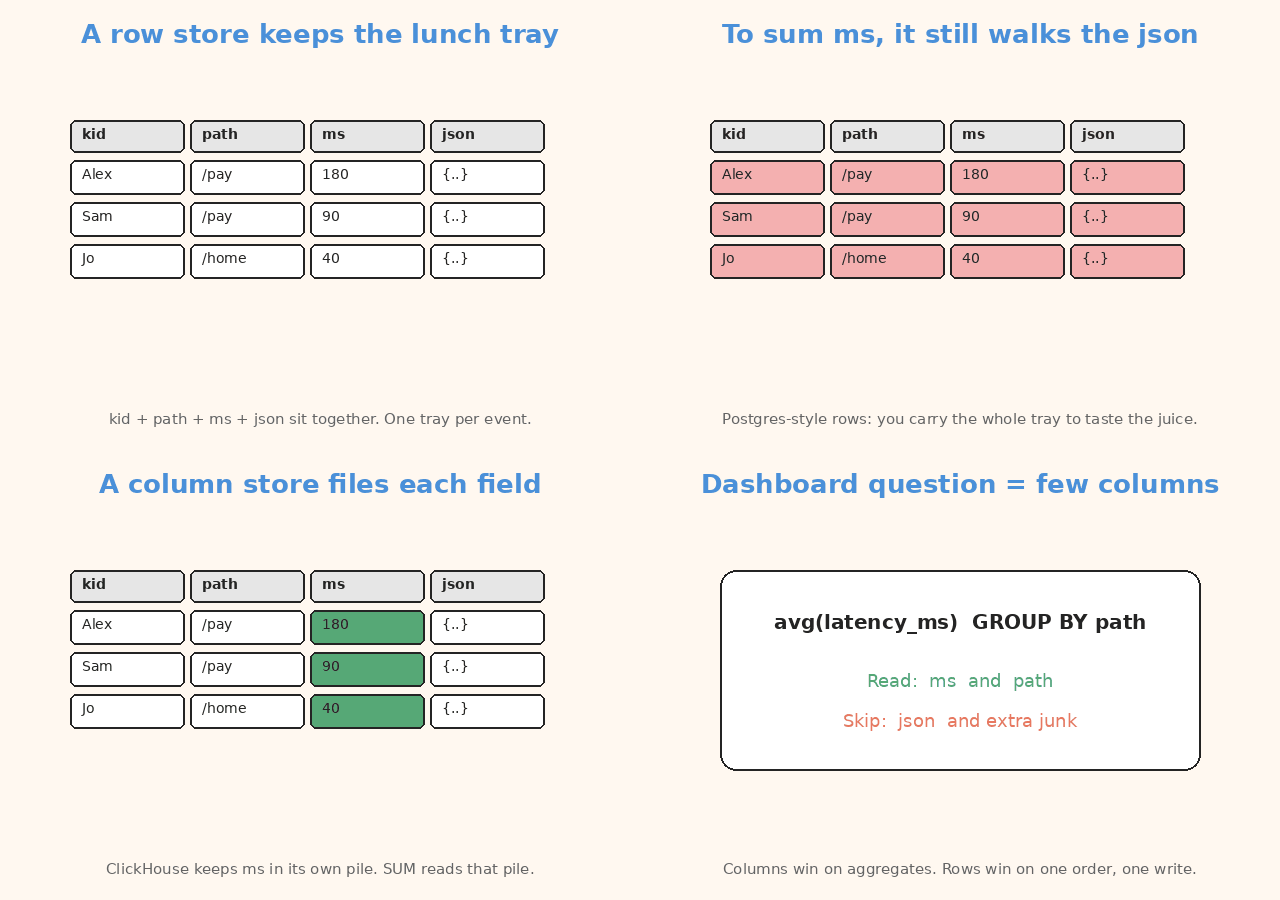
Columnar means it stores each column together on disk — all latency_ms values in one file, all path values in another. It compresses that file. It reads only the columns a query names.
That is why SUM / GROUP BY over a fat events table is the sweet spot — and why you should not replace Postgres with it for the checkout path.
flowchart TB
  subgraph write [Write path]
    A[App] --> B[Postgres]
    B --> C[CDC]
  end
  subgraph analytics [Analytics path]
    C --> D[ClickHouse]
    D --> E[Dashboards / ad-hoc SQL]
  end
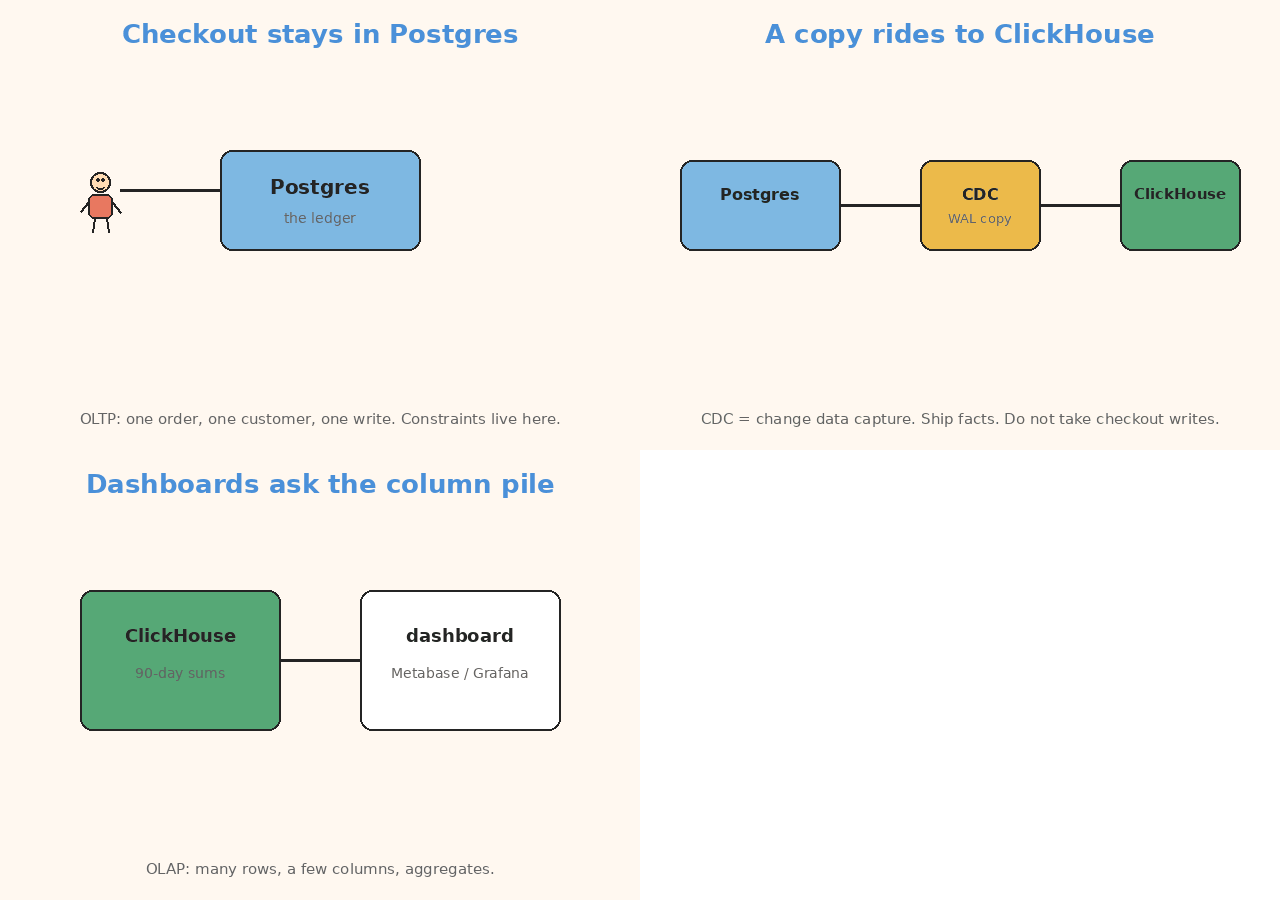
Keep the system of record where the transactions live. Ship a copy of the facts into ClickHouse for the questions that scan.
OLTP vs OLAP, without the brochure
| OLTP (Postgres) | OLAP (ClickHouse) | |
|---|---|---|
| Typical question | Fetch order 42 and update it |
Average latency by day and path |
| Shape | Few rows, many columns, random | Many rows, few columns, sequential |
| Writes | Small, concurrent, transactional | Append-heavy; updates are a design problem |
| Index instinct | B-tree to a row | Sparse index to a block of rows |
| Everyday picture | One order, make it right | Aggregate millions of events |
You can force either engine into the other job. You will pay for it.
- A wide
SELECT *of a single user in ClickHouse can be slower than Postgres. - A dashboard
GROUP BYon raweventsin Postgres will eventually become a 2 a.m.VACUUMconversation.
Postgres is the ledger. ClickHouse is the scan engine.
Why columns win on aggregates
Row stores write a row as one record: user_id, path, latency_ms, payload_json, all together.
To average latency_ms you still walk past the JSON. The whole row is stored as one unit.
Column stores write latency_ms in its own file (plus a matching file for day, for path, …). avg(latency_ms) reads that file — and the columns in GROUP BY — and skips the rest.
Compression likes this. A column of HTTP status codes or dates is repetitive. Run-length and dictionary encoding shrink it. Scanning a compressed integer column is the cheap work ClickHouse was built for.
The cost is the other direction: reconstructing a full wide row, or mutating one field in one event, is not the happy path.
MergeTree, kept light
Most tables you will create use the MergeTree family.
Mental model:
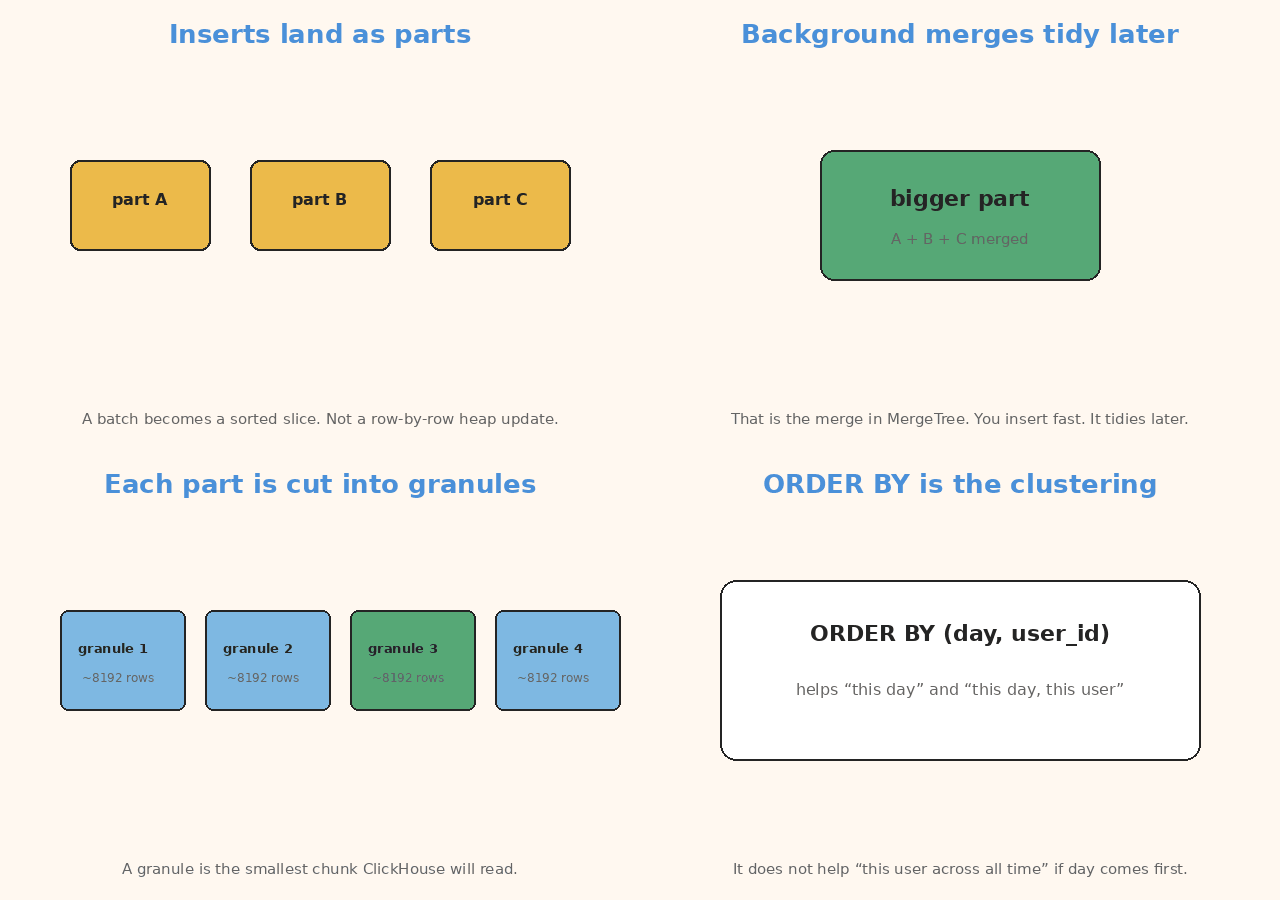
- Inserts land as parts. A batch becomes a sorted slice on disk, not a row-by-row heap update. A part is a sorted data slice.
- Background merges combine small parts into larger ones. That is the “merge” in the name. You insert fast; the engine tidies later.
- Each part is sorted by
ORDER BY(the clustering / primary-key columns). - Each part is cut into granules — by default about 8,192 rows. A granule is the smallest chunk ClickHouse will read.
- The primary index is sparse. One mark per granule: the primary-key values of the first row in that granule. The index stays small enough to sit in memory. It does not point at every row the way a Postgres B-tree does.
A B-tree points at rows. Great for “give me order 42.”
A sparse index points at granules. Tiny. Fast to keep in memory. Weak at “exactly this one row.”
A query on the primary key binary-searches those marks, skips granules that cannot match, and reads the rest. You may read extra rows inside a granule. That is the deal: a tiny index, good range scans, weak “give me exactly this primary key” behaviour compared with OLTP.
Choose ORDER BY for the filters you actually run.
(day, user_id)helps “this day, this user” and “this day.”- It does not help “this
user_idacross all time” unlessuser_idis a left prefix — it is not, ifdaycomes first.
Replicated and summing / aggregating / collapsing variants exist. You do not need them to understand the engine. Start with MergeTree.
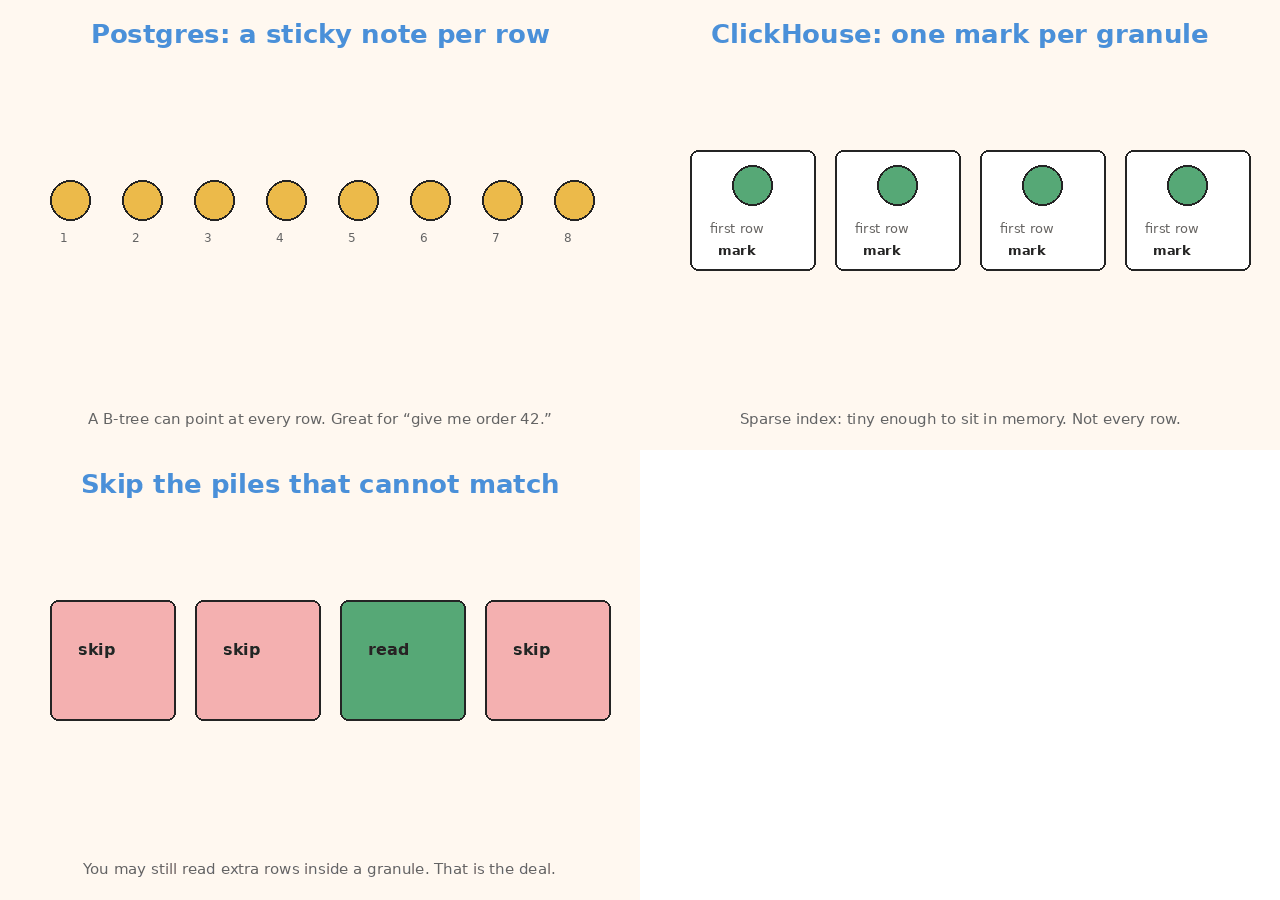
A granule is a block of rows. The index marks the first row in that block. Not every row.
A typical architecture
Do not take writes on ClickHouse and hope.
flowchart LR
  U[Users / checkout] --> P[(Postgres)]
  P -->|WAL / logical replication| C[CDC]
  C --> H[(ClickHouse)]
  H --> D[Metabase / Grafana / SQL]
  P --> T[Transactions stay here]
Postgres remains the source of truth: constraints, foreign keys, “this payment succeeded.”
CDC copies inserts and updates into ClickHouse. CDC means change data capture. It streams new facts from the OLTP database.
In ClickHouse Cloud the first-party path is ClickPipes Postgres CDC (PeerDB under the hood): snapshot, then WAL.
WAL is the write-ahead log. Postgres’s record of what just changed.
Self-managed teams use PeerDB, Debezium plus a sink, or a batch job if “T+1” is enough. T+1 means tomorrow is fine.
Point CDC at the database, not a pooler (PgBouncer, RDS Proxy, Supabase pooler). Logical replication needs the real endpoint.
Model the ClickHouse table for reads, not as a 1:1 clone of the OLTP schema.
- Drop wide JSON you never group by.
- Pick an
ORDER BYthat matches the dashboard. - Deduplicate CDC updates with the strategy you chose — ReplacingMergeTree, a version column, or a query-time
LIMIT 1 BY— and be explicit about it.
Silent duplicates are how “the dashboard disagrees with finance.”
Tiny toy SQL
CREATE TABLE events
(
    day        Date,
    user_id    UInt64,
    path       LowCardinality(String),
    latency_ms UInt32
)
ENGINE = MergeTree
ORDER BY (day, user_id);

INSERT INTO events VALUES
    ('2026-09-22', 42, '/checkout', 180),
    ('2026-09-22', 42, '/pay',      240),
    ('2026-09-22', 7,  '/checkout', 90);

SELECT
    count(),
    avg(latency_ms)
FROM events
WHERE day = '2026-09-22';
LowCardinality(String) is a dictionary for low-n unique values (path, status, country). It is not a magic index.
“/checkout” and “/pay” repeat a lot. Store the string once. Point at it.
You can add PARTITION BY toYYYYMM(day) later so drops and cold storage happen by month. Do not partition by high-cardinality user_id.
High-cardinality means too many unique values. One partition per user is a mess. One partition per month is fine.
When not to use ClickHouse
- The app’s primary store. No useful foreign keys, weak UPDATE/DELETE story, different transaction model. Keep Postgres (or whatever OLTP you already trust).
- Point lookups as the main load. “Give me user 42’s current row” is a B-tree job. Sparse granules will read a block to find one row.
- Frequent single-row mutations. ClickHouse can mutate. You will feel it. Prefer append + CDC, or a table engine that collapses versions in the background.
- Tiny data. A million rows in Postgres with a decent index does not need a second database.
- Need for serializable multi-table transactions. That is OLTP.
- You have not chosen an
ORDER BY. A MergeTree with a random key is a column store you cannot skip in. Measure withEXPLAINafter you pick the key; do not invent speedups.
ClickHouse Cloud, self-hosted, and the various MergeTree cousins are deployment details. The decision is: do we scan columns for analytics, or do we transact rows?
| Use Postgres when… | Use ClickHouse when… |
|---|---|
| One order, one write, constraints | Sum / group many events |
| “Give me user 42 right now” | “Average latency by day and path” |
| Updates and deletes are normal | Appends are the happy path |
| You need multi-table transactions | A CDC copy of the facts is enough |
| The table is still small | The dashboard scans tens of millions |
Official references:
Terms used in this post
You do not need this table to follow the architecture. It is only a quick lookup.
| Term | Meaning |
|---|---|
| OLTP | Transactional work: one row, constraints, updates |
| OLAP | Analytical work: scan many rows, aggregate a few columns |
| row store | Stores a full record together |
| column store / columnar | Stores each column together on disk |
| part | Sorted slice written by an insert batch |
| MergeTree | Engine that inserts parts, then merges them |
| granule | Smallest read chunk (~8,192 rows) |
| sparse primary index | One mark per granule, not per row |
| B-tree | Per-row index, typical in OLTP |
| CDC | Change data capture — copy inserts/updates into ClickHouse |
| WAL | Postgres write-ahead log |
| ClickPipes | ClickHouse Cloud CDC path (PeerDB under the hood) |
LowCardinality(String) |
Dictionary encoding for low-n strings |
PARTITION BY toYYYYMM(day) |
Monthly partitions for drops / cold storage |
| high-cardinality | Too many unique values for that key |
ReplacingMergeTree / version / LIMIT 1 BY |
Ways to collapse extra copies from CDC |
In short
Write events (or a CDC copy of them) into a MergeTree ordered by the filters you actually run. Leave the row that must be correct — and the transaction around it — in OLTP.
If this helped:

Discussion
Reactions and replies via GitHub Discussions. Sign in with GitHub to comment.