Postgres: Why My Writes Got Faster (Docker Demo)
A durable write can feel slow. I insert one row. I wait. I insert the next. I wait again.
I wanted numbers from this machine, not a story from someone else’s laptop. So I started Postgres 16 in Docker, made a toy lunch_notes table, and ran a small Python load script. I counted commits per minute (RPM) for 12 seconds at a time.
Before the stopwatch: what a write actually does.
Foundation — what happens on a write
A row does not go straight to disk.
First it lands in shared buffers — RAM that the whole instance shares.
From there, two jobs start at the same time. They do not wait for each other.
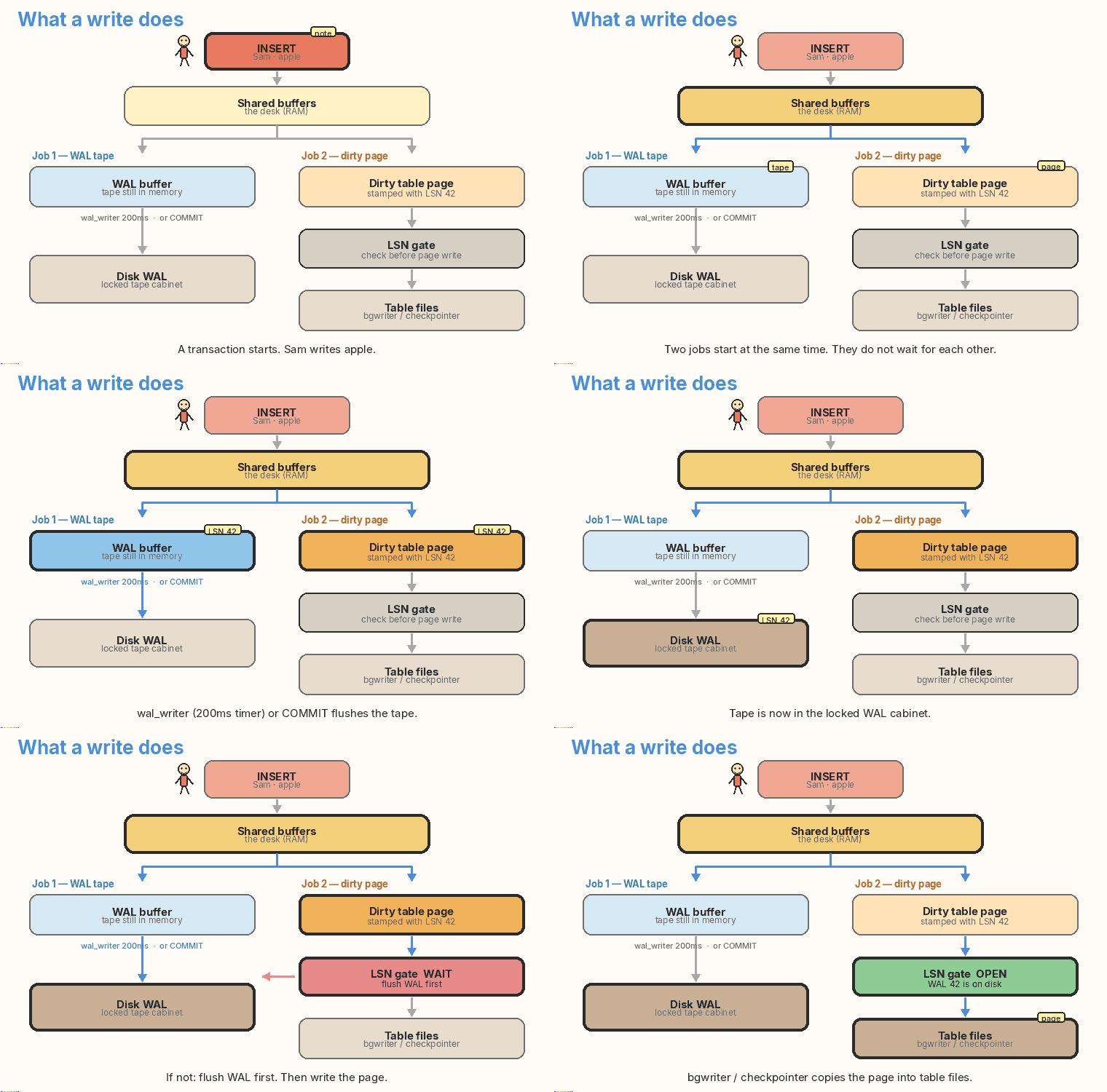
Job 1: WAL
- A WAL record is written into the WAL buffer — still memory.
- Later that record is flushed to the WAL on disk.
- A helper called
wal_writerwakes on a timer (wal_writer_delay, default 200 ms) and flushes what it can. COMMITcan also force a flush right now.
Job 2: the dirty page
- The table page in shared buffers is now dirty (it has a change that is not on disk yet).
- Later the background writer or the checkpointer copies that page into the table files.
- The background writer wakes every 200 ms (
bgwriter_delay). It also wakes when shared buffers are getting full (buffer pressure).
The LSN gate
The two jobs can run at different speeds. The on-disk order is still strict.
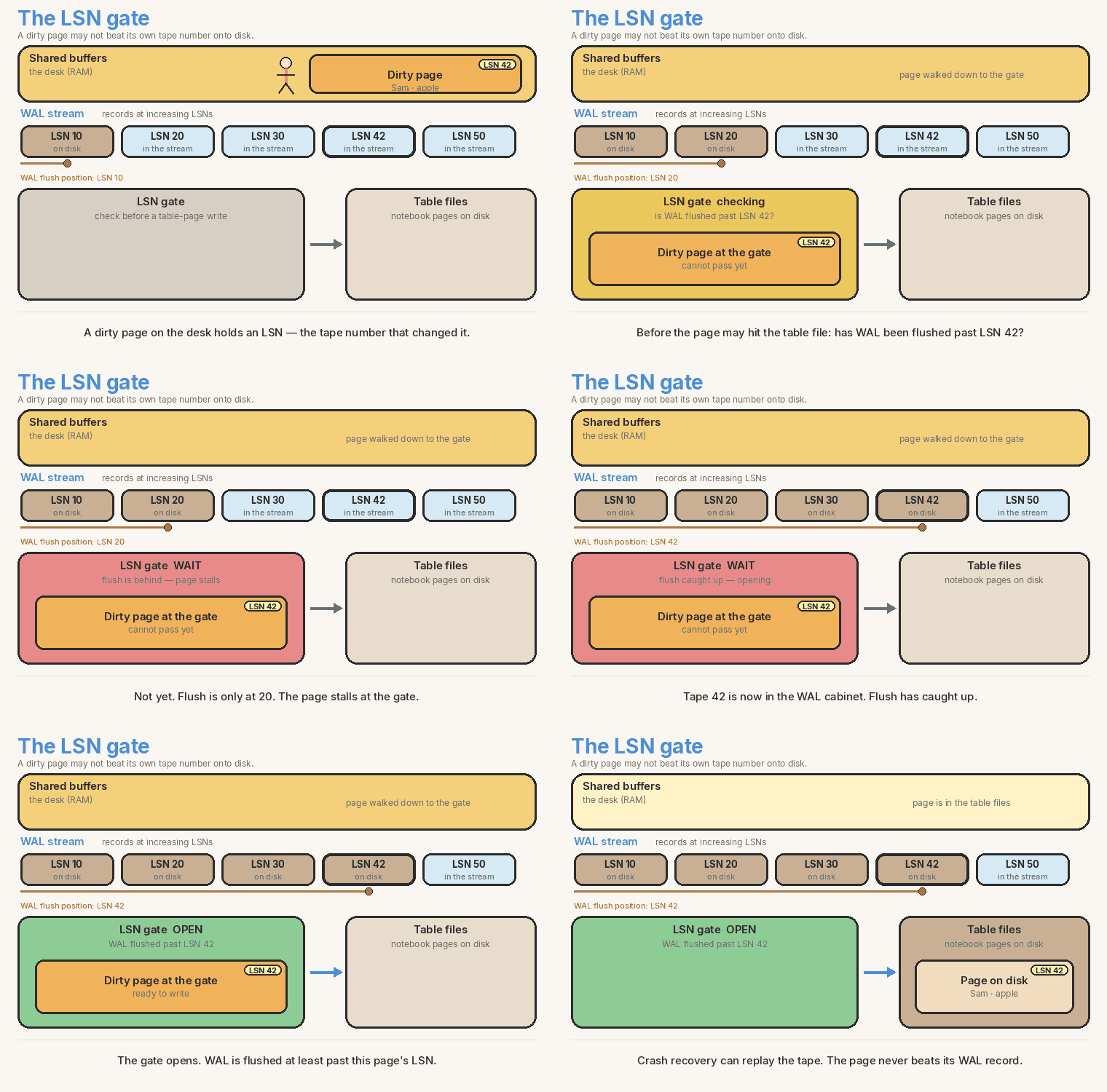
Postgres stamps every dirty page with an LSN — the WAL position of the record that changed it.
How the gate works:
- A dirty page in shared buffers holds an LSN. That is the WAL position of the record that changed it.
- The WAL stream is a line of records with increasing LSNs: 10, then 20, then 30, then 42…
- Before that page may be written to the table file on disk, Postgres asks one question: has WAL been flushed at least past this page’s LSN?
- If the flush is still behind, the page waits at the gate. It does not sneak into the table files.
- When the WAL flush catches up past that LSN, the gate opens. Then the page may hit the table files.
| At the gate | What it means |
|---|---|
| Page LSN | WAL position stamped on this dirty page |
| WAL flush position | how far WAL has been flushed to disk |
| Flush behind the page LSN | page waits |
| Flush past the page LSN | page may write to the table files |
Before the background writer or the checkpointer writes a page to the table files, it looks at the WAL flush position.
- If that LSN is already on disk in WAL: write the page.
- If it is not on disk yet: flush WAL first, then write the page.
You cannot write the table page to disk until the matching WAL record is already on disk. Crash recovery can replay WAL. It cannot invent a page that WAL never mentioned.
flowchart TB
  A[INSERT] --> B[Shared buffers]
  B --> C[WAL buffer]
  B --> D[Dirty table page + LSN stamp]
  C --> E["wal_writer 200ms or COMMIT"]
  E --> F[Disk WAL]
  D --> G{WAL flushed past this LSN?}
  G -->|not yet| E
  G -->|yes| H[bgwriter / checkpointer]
  H --> I[Table files]
Helpers at a glance
| Helper | When it wakes | What it writes |
|---|---|---|
wal_writer |
every 200 ms (wal_writer_delay), and COMMIT can force it |
WAL buffer → WAL on disk |
| background writer | every 200 ms (bgwriter_delay), and when shared buffers are full |
dirty pages → table files (after the LSN gate) |
| checkpointer | on its own checkpoint schedule | a bigger pile of dirty pages → table files (same LSN gate) |
The wait knob
synchronous_commit only changes whether you wait for WAL to reach disk.
| Knob | What COMMIT does |
|---|---|
| on | Wait until WAL is on disk. |
| off | Return now. COMMIT returns once the WAL record is in the OS page cache (memory). It does not wait for the disk flush. |
What off changes, and what it does not:
- The commit session no longer waits for WAL to reach disk.
- COMMIT returns once the WAL record is in the OS page cache (memory).
- This only affects the commit wait.
- The LSN gate between shared buffers and table files still applies exactly the same whether the knob is on or off. Dirty pages still cannot hit table files until WAL is flushed past their LSN.
Off is not “skip WAL.” WAL is still written. You just stop waiting. Think fire-and-forget, like UDP. If the machine crashes, the newest commits can vanish.
Why batching is cheaper
Each COMMIT can force a disk sync of WAL.
- 50 rows, 50 commits = 50 WAL flushes.
- 50 rows, one commit = one WAL flush.
Batching only groups WAL records. You get fewer, larger WAL disk writes — one COMMIT flush for many rows.
It does not batch how table pages (the heap) are written to disk. Those dirty pages still sit in shared buffers. The background writer still flushes them on its own schedule, one page at a time, and each of those writes still goes through the LSN gate.
The four runs below keep the durable wait on, then flip the knob, then put fifty rows in one commit.
What COMMIT waits for
You already saw shared buffers and the two disk paths. The four runs only flip one knob: does COMMIT wait for the WAL flush to disk?
flowchart TB
  A[My INSERT] --> B[Change sits in shared buffers]
  B --> C[WAL record is written]
  C --> D{synchronous_commit?}
  D -->|on| E[Wait for WAL flush to disk]
  D -->|off| F[Return now. Flush can happen later]
Off does not mean “no WAL.” WAL is still written. COMMIT just stops waiting for the disk flush. If the machine or the database crashes before the flush, you can lose the last commits. Crash recovery still works. The newest commits can still vanish.
Docker setup
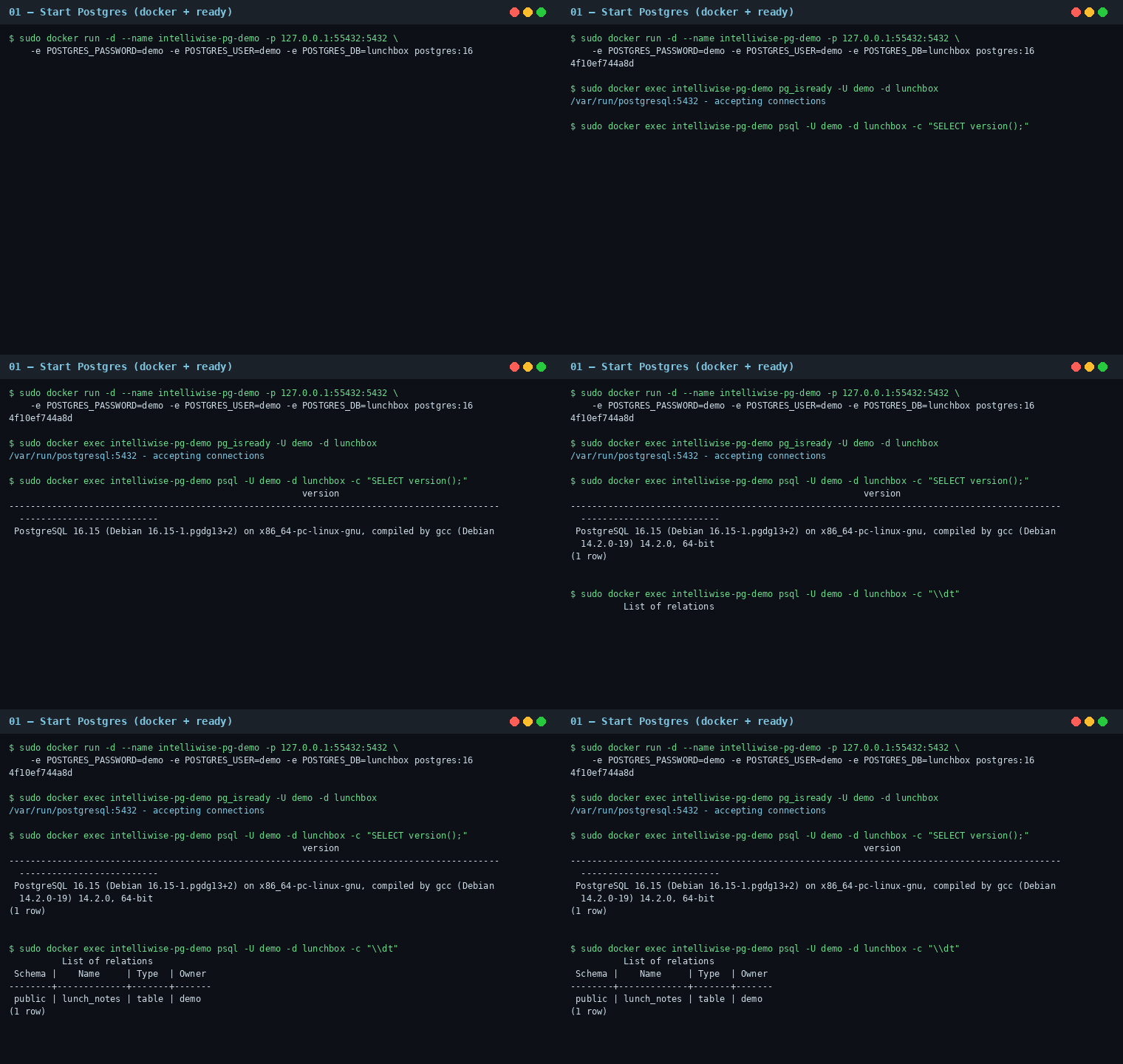
Port 5432 was already busy, so I bound the container to 127.0.0.1:55432.
Disposable login only: user demo, password demo, database lunchbox.
sudo docker run -d --name intelliwise-pg-demo \
  -p 127.0.0.1:55432:5432 \
  -e POSTGRES_PASSWORD=demo \
  -e POSTGRES_USER=demo \
  -e POSTGRES_DB=lunchbox \
  postgres:16
The image reported PostgreSQL 16.15. Default synchronous_commit was on. WAL level was replica.
Four runs
Same toy table. Same ~12 second window. One change at a time. Shared VM, Python client — this is my loop, not a promise for your laptop.
1. Baseline — wait for every WAL flush
synchronous_commit = on, 1 client, 1 row thenCOMMIT, 12.0 s- 49,892 commits (~4,157.6 a second)
- Every 2.0 s the script printed a window. Those bounced 235,995.8 to 271,250.4 RPM. I report the full 12.0 s run.
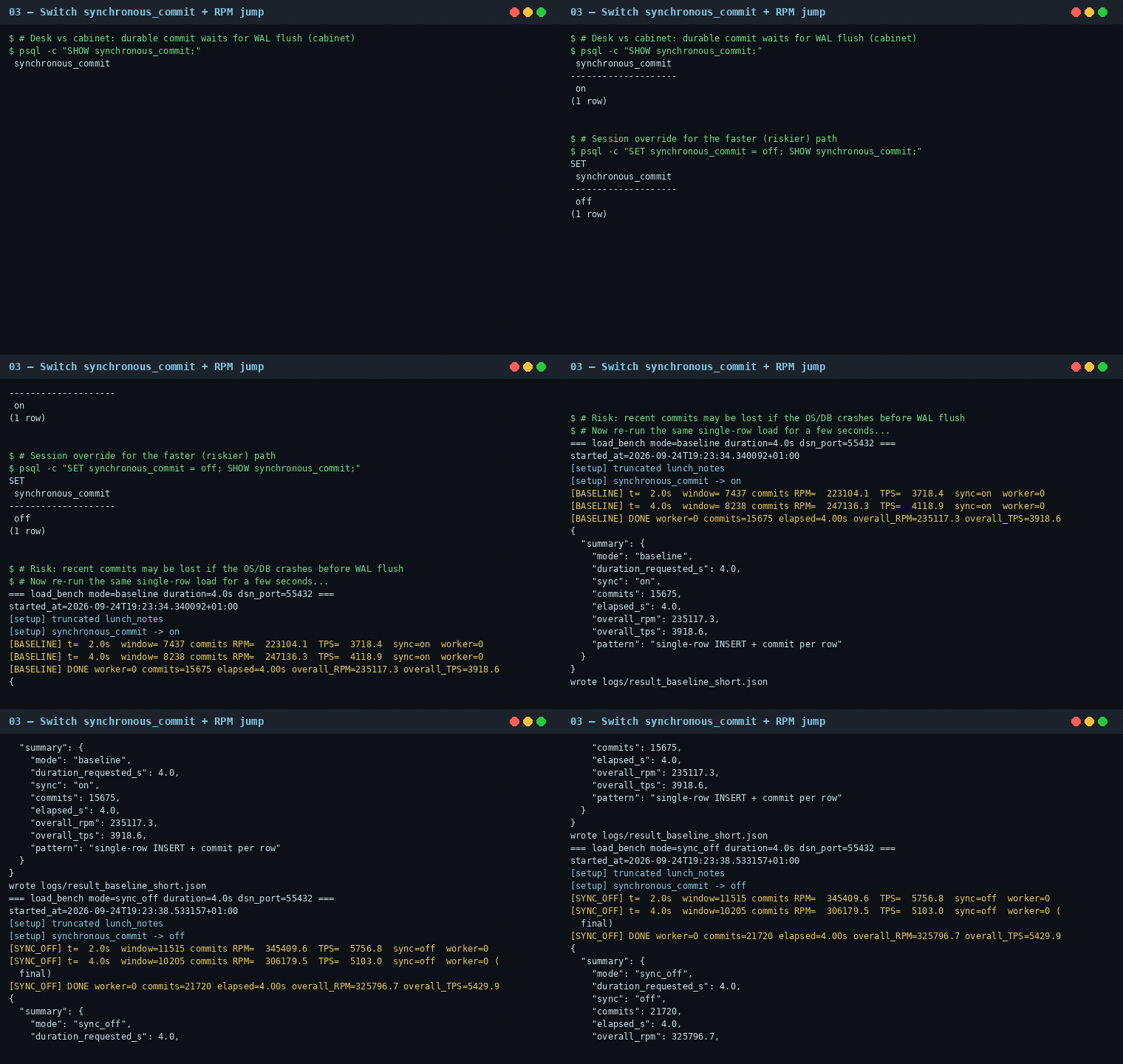
2. Wait knob off — same pattern, only the knob
SET synchronous_commit = off, 12.0 s- 56,593 commits
- Small lift. Talking from Python on localhost and back was already a wait. The disk flush was not the only wait. Fast Docker storage also makes the flush cheaper than a slow laptop disk.
- If the OS or the database crashes before WAL flush, those last commits can disappear.
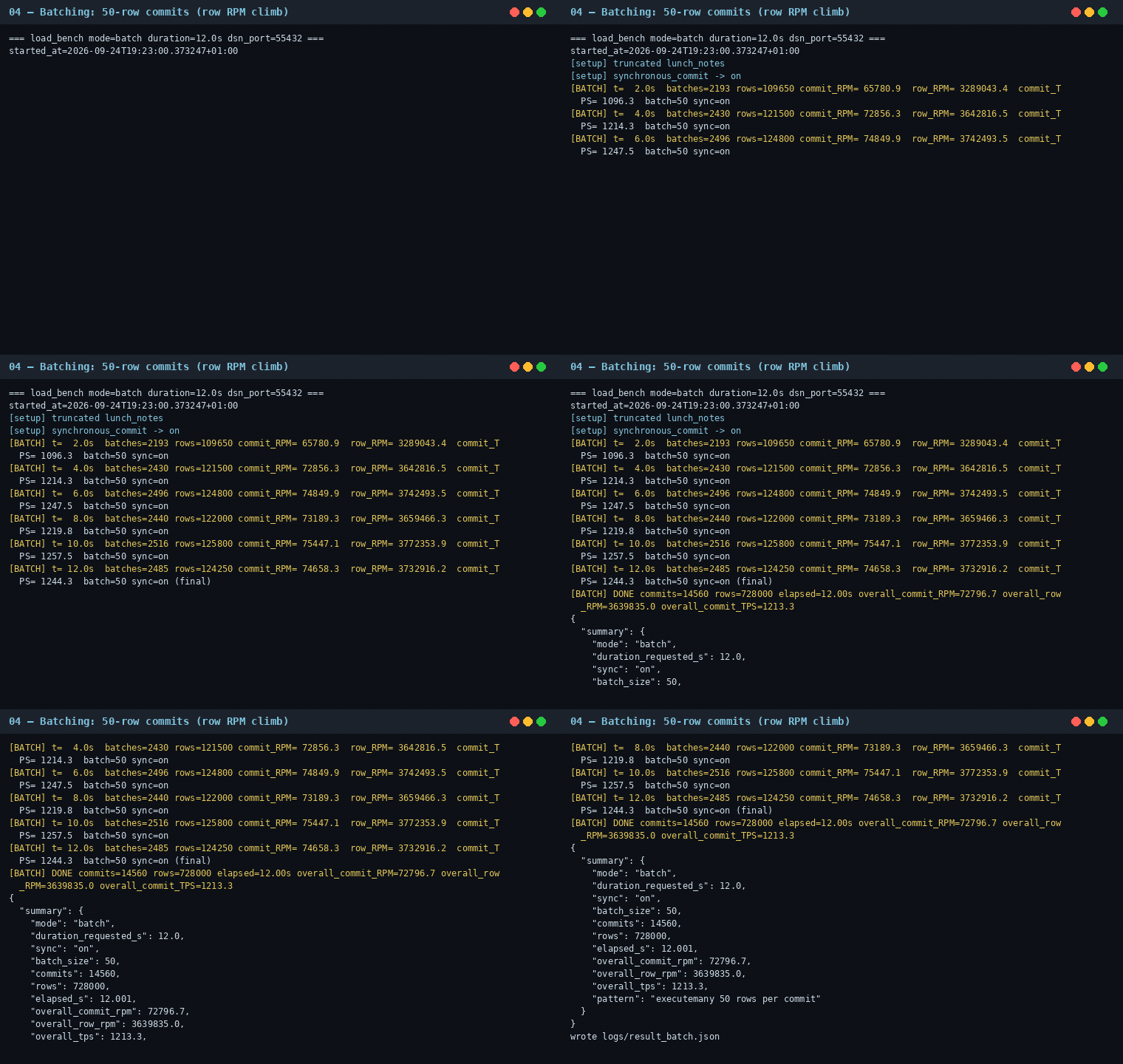
3. Batching — fifty rows, one commit
One row per commit pays the flush every time. Fifty rows in one commit pay it once.
synchronous_commit = on,executemany50 rows then oneCOMMIT, 12.001 s- 14,560 commits, 728,000 rows
- Row RPM was about 14.59× the baseline commit RPM. I did not make the flush free. I paid it once per batch.
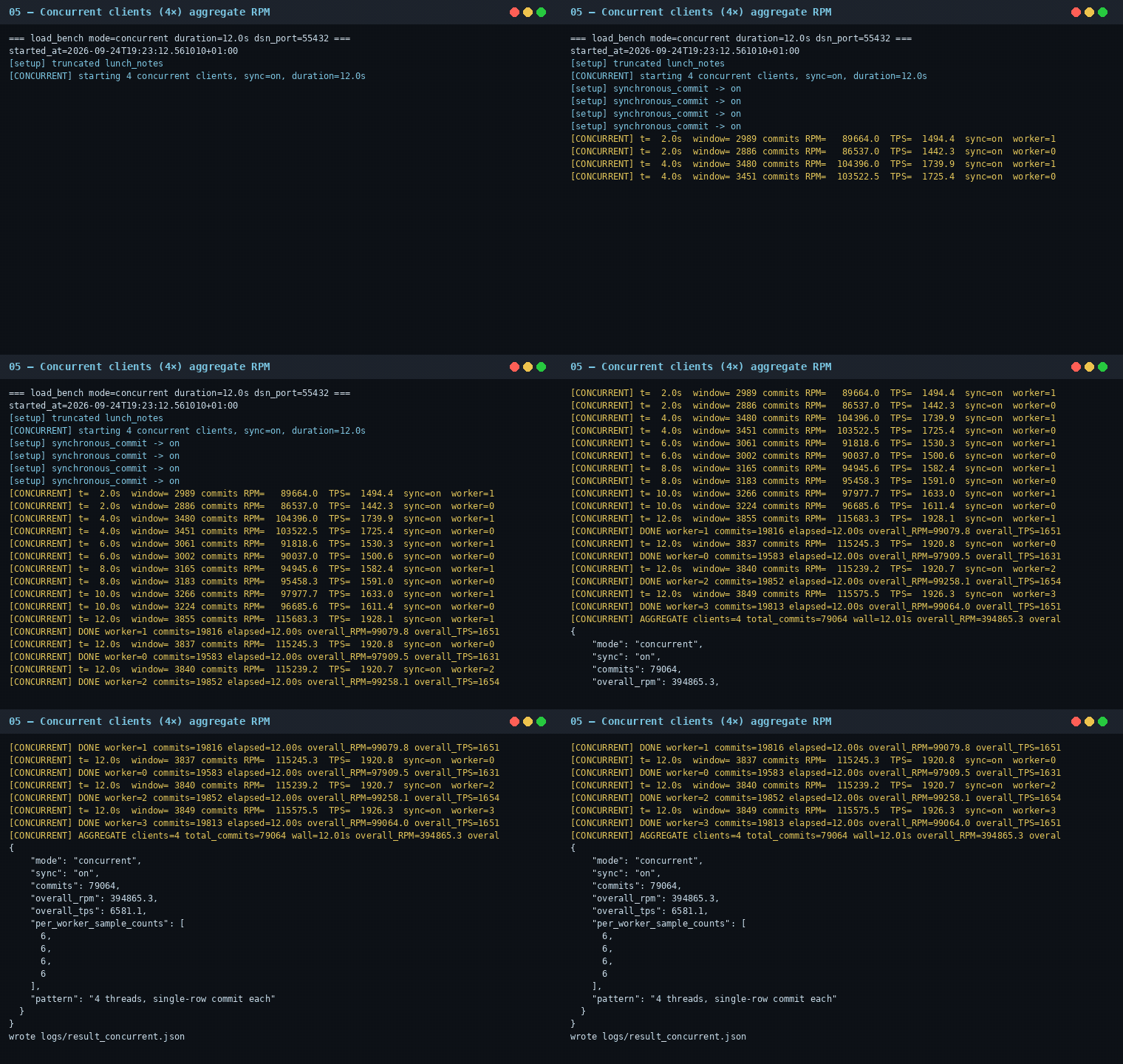
4. Four clients — wait still on, more writers
synchronous_commit = on, 4 Python clients, each still 1 row thenCOMMIT, 12.014 s- 79,064 commits together
- Four writers helped. They did not help like batching helped. Four loops still wait on each commit. Fifty rows in one commit skip most of those waits.
The 12-second card
| What I changed | Setting | What I counted | This run |
|---|---|---|---|
| Baseline | sync on, 1 row / commit, 1 client | commit RPM | 249,454.2 |
| Wait knob off | sync off, same pattern | commit RPM | 282,964.0 (~1.13×, 1.134×) |
| Batching | sync on, 50 rows / commit | row RPM | 3,639,835.0 |
| Batching (same) | (same) | commit RPM | 72,796.7 |
| Four clients | sync on, 4 clients, 1 row / commit | commit RPM | 394,865.3 (~1.58×, 1.583×) |
RPM means “this many a minute,” guessed from a short wall-clock window. For batching, the headline is rows per minute. The others are commits per minute.
Stats after the ladder
I asked pg_stat_bgwriter and pg_stat_database on lunchbox. I also asked EXPLAIN on a toy INSERT — the plan, not a new stopwatch.
| View | What I saw |
|---|---|
pg_stat_bgwriter |
timed checkpoints 0, requested checkpoints 1, buffers at checkpoint 923, buffers from backends 8,488, buffers allocated 11,739 |
pg_stat_database |
commits 237,574, rollbacks 8, rows inserted 951,005, block hits 3,258,591, block reads 238 |
Those counters are the whole afternoon on that database, not one 12-second mode. Lots of hits. Almost no reads. Shared buffers already had the pages.
Toy SQL
Toy names. No real people. No production schema.
CREATE TABLE lunch_notes (
  id bigserial PRIMARY KEY,
  kid text NOT NULL,
  snack text NOT NULL,
  noted_at timestamptz NOT NULL DEFAULT now()
);

-- 1. Baseline: wait for WAL flush, one row
SET synchronous_commit = on;
BEGIN;
INSERT INTO lunch_notes (kid, snack) VALUES ('Sam', 'apple');
COMMIT;

-- 2. Wait knob off (can lose recent commits on crash before WAL flush)
SET synchronous_commit = off;
BEGIN;
INSERT INTO lunch_notes (kid, snack) VALUES ('Sam', 'apple');
COMMIT;

-- 3. Fifty rows, one commit (I used Python executemany)
SET synchronous_commit = on;
BEGIN;
INSERT INTO lunch_notes (kid, snack) VALUES
  ('Sam', 'apple'),
  ('Alex', 'pear');
  -- ...48 more rows...
COMMIT;

-- Plan only. Not a load test.
EXPLAIN
INSERT INTO lunch_notes (kid, snack) VALUES ('Sam', 'apple');
These snippets match the settings I used. They are not a second stopwatch.
Honest caveats
- One run. Shared 8-CPU / 8-vCPU VM. 15.6 GiB RAM. Other containers were up. Expect the next run to wiggle.
- Port 5432 was already in use. The demo port was 127.0.0.1:55432.
- The client is Python 3.13 with psycopg 3.3.6. Talking from Python is part of the wait. That is why sync-off only reached about 1.13×.
- Local Docker storage was fast. A slow laptop disk can make the WAL flush wait look much bigger.
synchronous_commit = offcan lose recent work if the OS or the database crashes before WAL flush. Official docs say this. I still used it as a teaching knob.- Batching changed the unit. 3,639,835.0 is row RPM. Baseline 249,454.2 is commit RPM. Do not mix those two.
- RPM is guessed from 12-second windows printed every 2 seconds.
- Demo login is disposable.
demo/demo/lunchbox. Not a real password. Not a public server. - I am not promising these RPM numbers on your machine.
Terms used in this post
You do not need this table to follow the runs. It is only a quick lookup.
| Term | Meaning |
|---|---|
| Demo database | PostgreSQL 16 in Docker (postgres:16) |
| Port on my machine | 127.0.0.1:55432 → container 5432 |
| Shared buffers | RAM the instance uses for table pages |
| WAL | write-ahead log |
| WAL buffer | WAL still in RAM |
| OS page cache | memory the OS keeps for a file |
wal_writer |
WAL flush helper (wal_writer_delay, default 200 ms) |
| background writer | dirty-page helper (bgwriter_delay, default 200 ms) |
| checkpointer | larger flush of dirty pages |
| LSN | log sequence number — WAL position on a dirty page |
| LSN vs WAL flush position | “Has this WAL record reached disk yet?” |
| Table files | relation files on disk |
| WAL flush | durable write of WAL to disk |
synchronous_commit |
wait-for-WAL-flush knob |
| Batching | many rows, one commit / group commit |
| 4 client threads | four writers in parallel |
| RPM | commits (or rows) per minute |
| TPS | commits per second |
| EXPLAIN | the plan, no load test |
pg_stat_bgwriter |
background writer counters |
pg_stat_database |
database counters |
Official references (Postgres docs only):
- Write-Ahead Logging (WAL)
- WAL internals
synchronous_commitwal_writer_delaybgwriter_delay- WAL reliability
- EXPLAIN
- The Statistics Collector
In short
A write lands in shared buffers. Two jobs start at once: a WAL record, and a dirty page. The LSN gate will not write the page to the table files until that WAL position is on disk. That gate is the same with the wait knob on or off. COMMIT’s wait knob is only the WAL flush. Batching only groups WAL records, not table-page writes. On my Docker run, turning the wait off was a small lift (~1.13×). Putting 50 rows in one commit was the big climb (~3.64M row RPM). Four clients helped (~1.58×). These are my 12-second numbers on a shared VM — not a promise.
If this helped:

Discussion
Reactions and replies via GitHub Discussions. Sign in with GitHub to comment.