Five Things to Measure and Tune in a RAG System
A short working session. Riya is wiring an internal HR chatbot. Arjun has shipped this kind of retrieve-then-generate setup before. Same parental-leave question the whole way.
Riya
I built an HR bot. Someone types: Can I take part-time parental leave? It should look up the policy, then answer. That is RAG, right? Retrieve first. Generate second.
Arjun
Yes. Five numbers show up on every serious RAG project. Two are settings you tune. Three are scores you measure after a run. People mix them. That is how the bot starts quoting vacation pages.
| You tune | You measure |
|---|---|
| Top K — how many chunks to fetch | Recall@K — how many of the relevant chunks came back |
| Top P — how freely the model picks the next word | Precision@K — how many of the fetched chunks were useful |
| Temperature sits next to Top P | Cost per request — search compute + LLM tokens |
Riya
So Top K is not a quality score.
Arjun
Correct. Top K is how many paragraphs you send. Recall@K is whether the right ones came back. Top P is not a retrieval metric. It only changes how the model writes. Same four colours as Precision and Recall, in Colours You Will Remember. Green, orange, purple, grey. Same marks.
Colour legend (retrieved chunks):
✓ relevant retrieved useful hit ⚠ retrieved noise false alarm ✗ relevant missed miss · irrelevant not retrieved correct ignore
False alarms stay orange, not red, so you are not asked to tell red from green. Each cell also has a mark. The colour is a helper, not the only signal.
flowchart LR
  Q[Part-time parental leave?] --> R[Retrieve Top K chunks]
  R --> G[LLM writes the answer]
  G --> A[Reply to the employee]
The policy store
Arjun
The HR wiki is split into chunks. For this question I treat 10 of them as relevant. Eligibility, how to apply, how pay is calculated, notice, manager steps, benefits, duration, return-to-work, partner leave, and how it mixes with annual leave.
Riya
And vacation days sit right next to them in the ranking. Sick leave. Public holidays. Those are the usual false friends.
Arjun
Two teaching snapshots. Same store. Different retrieval quality.
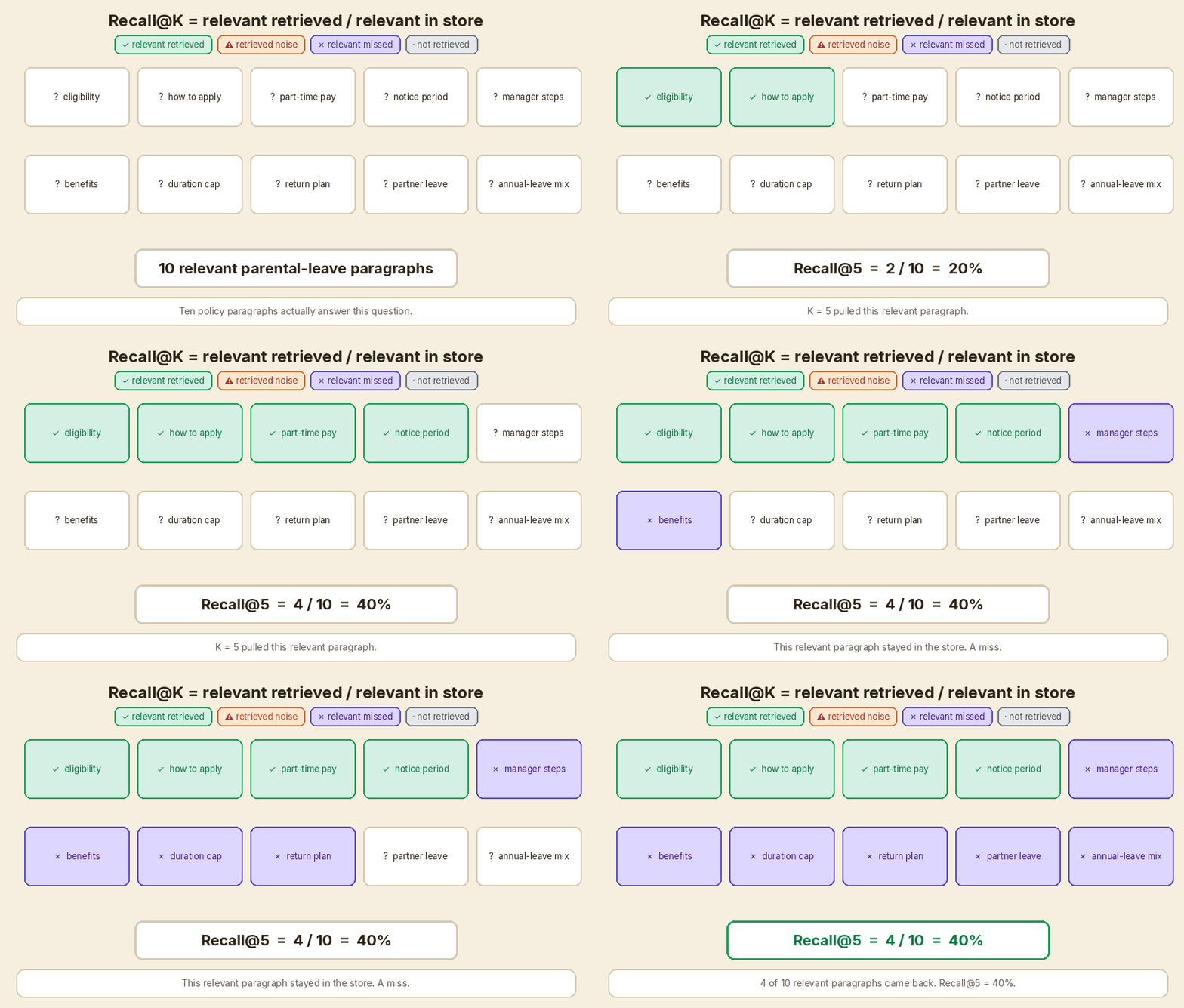
Recall picture: K = 5 pulls 4 of those 10 relevant paragraphs. Recall@5 = 4/10 = 40%.
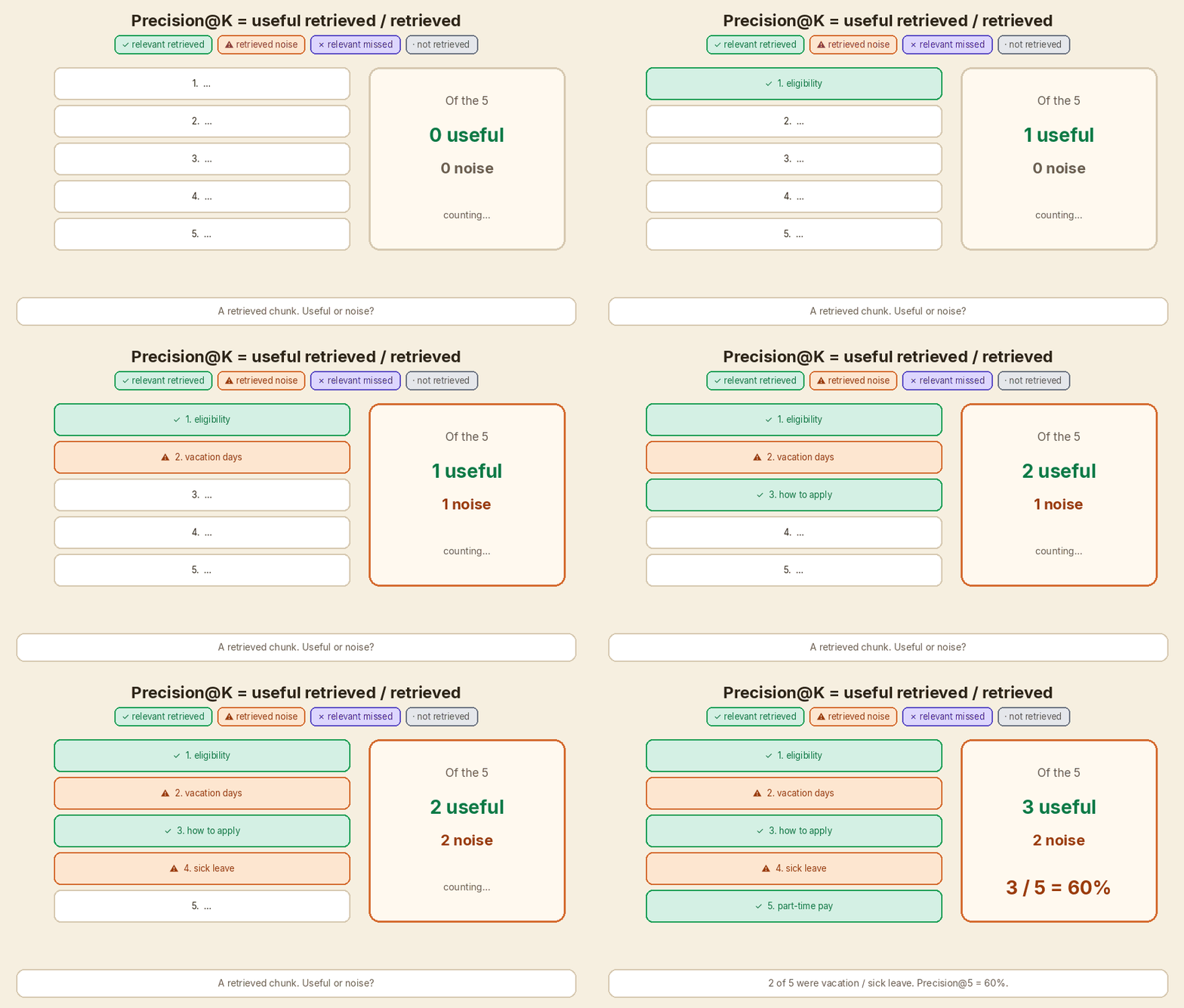
Precision picture: of the 5 chunks in the prompt, 2 are vacation / sick leave. Precision@5 = 3/5 = 60%.
Those two pictures do not have to be the same run. A better ranker can keep recall at 40% and lift precision to 4/5 = 80%. I use that cleaner run when I compare K = 5 with K = 20.
1. Top K — how many chunks go to the LLM
Riya
Where do I start with K?
Arjun
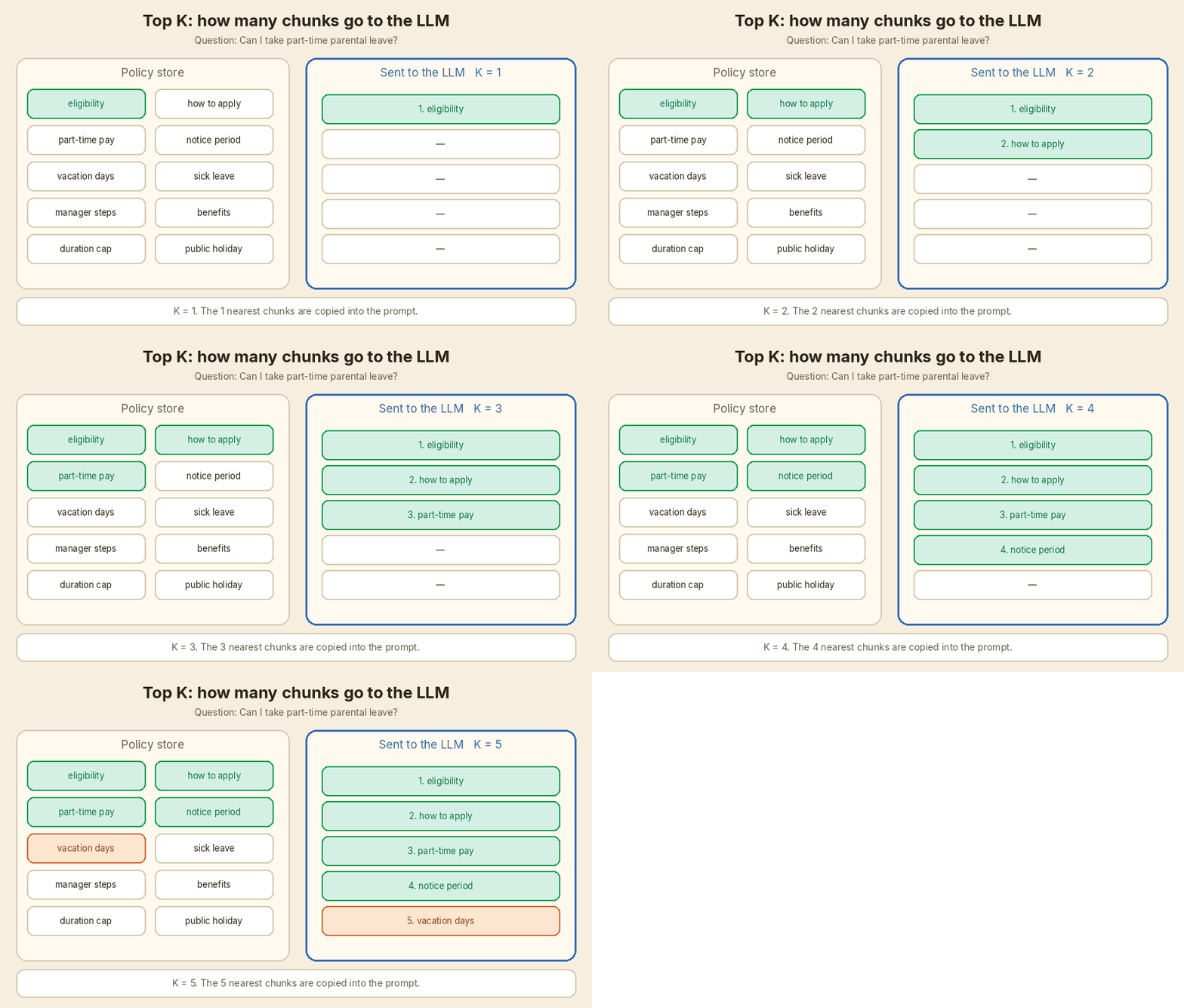
You pick it before search runs. The retriever scores every chunk against the question. Then it keeps the K nearest ones and pastes them into the prompt.
K = 1: only the single closest paragraph. K = 5: a common starting point. K = 20: a wide net. More chance you caught the rule. More tokens for the model to read.
Arjun
K does not tell you if those chunks are good. It only tells you how many you sent.
flowchart LR
  A[Score every chunk] --> B[Keep the top K]
  B --> C[Paste them into the prompt]
2. Recall@K — did we miss a fact?
Arjun
Recall@K is a measurement. You need labels. You cannot read it from the retriever score alone.
Recall@K = relevant retrieved / relevant in the store
- Sentence: of the paragraphs that actually answer this question, how many did search bring back?
- This picture: 10 relevant paragraphs exist. K = 5 pulls 4 of them. 4 / 10 = 40%.
- What the other 6 are: ✗ misses. The duration cap, the return-to-work plan, partner leave. Still in the store. Not in the prompt.
Riya
If the model never sees “you must apply 8 weeks ahead”, it cannot tell the employee that.
Arjun
That is the scary one for HR. High recall means fewer missed facts. Same idea as recall in the colour-coded precision and recall post. There it was the actually-positive row. Here the “positives” are the relevant chunks.
3. Precision@K — how much of the prompt is noise?
Arjun
Precision@K is also a measurement. Of the chunks we actually sent, how many were useful for this question?
Precision@K = useful retrieved / K chunks retrieved
- This picture: of 5, 2 are about normal vacation days or sick leave. 3 / 5 = 60%.
- What the 2 are: ⚠ retrieved noise. Close in wording (“leave”, “days”, “apply”). Wrong policy.
Riya
So the right answer is sitting next to the wrong one. The model has to ignore the vacation paragraph. Sometimes it does not.
Arjun
Same idea as precision in the earlier post. There it was the flagged column. Here the “flags” are the K chunks in the prompt.
flowchart TB
  subgraph rec ["Recall@K — look at what is really relevant"]
    R["relevant retrieved / relevant in store"]
  end
  subgraph prec ["Precision@K — look at what we fetched"]
    P["useful retrieved / K"]
  end
  classDef tp fill:#d4f0e4,stroke:#1a9e55,color:#0d7a45
  classDef fn fill:#ddd6fe,stroke:#5b4cc4,color:#4c1d95
  class P tp
  class R fn
Arjun
A memory trick that stays accurate. Recall looks at what is Really in the store. Precision looks at what you Pasted into the prompt. Both start with ✓ relevant retrieved. They divide by a different partner.
4. Top P — how freely the model picks the next word
Riya
Retrieval is done. The K chunks are in the prompt. Now the model writes. What is Top P doing here?
Arjun
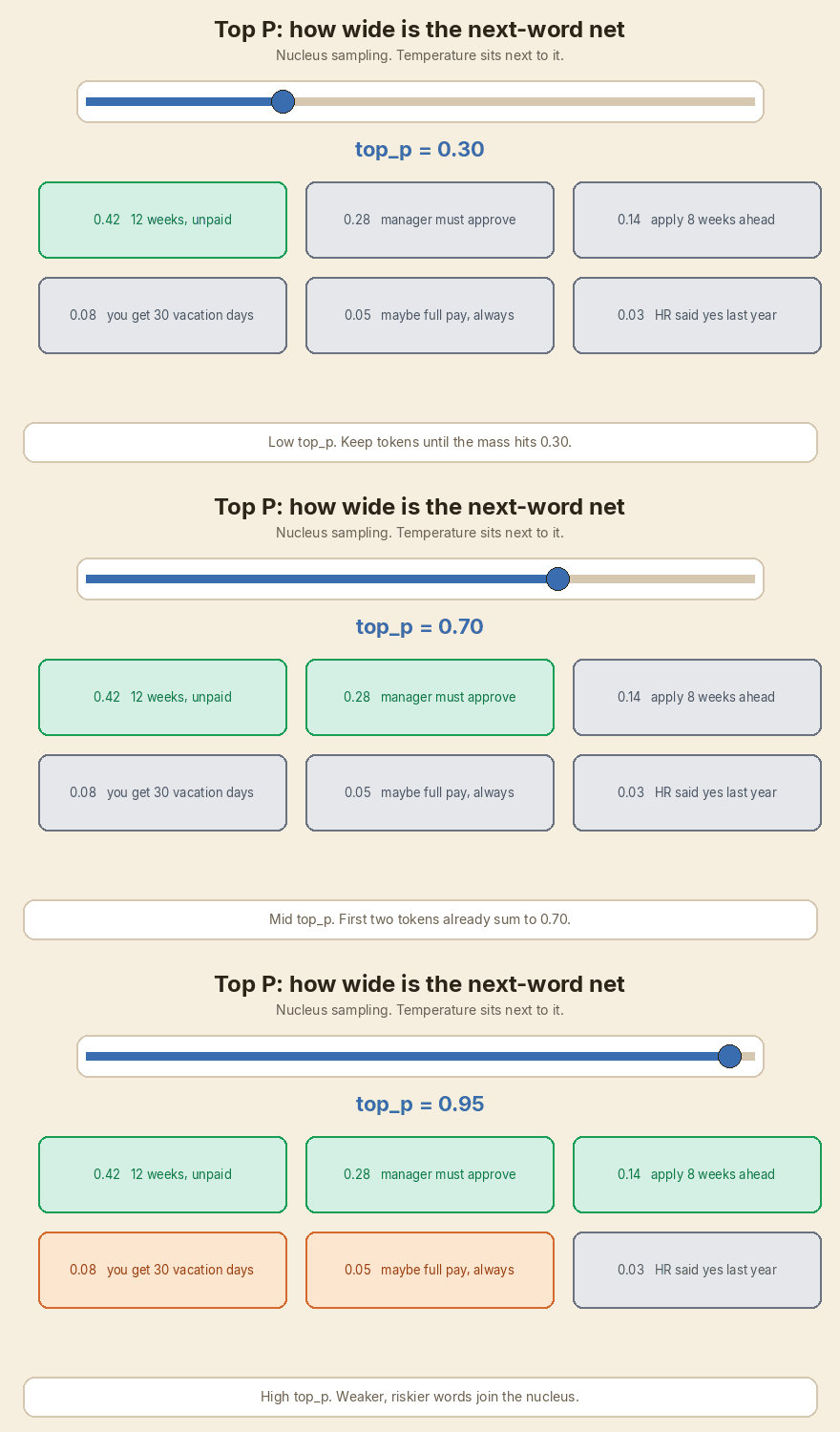
Nucleus sampling. It is a generation setting. Not a retrieval metric. At each next-word step the model has a list of possible tokens with probabilities. Top P keeps the smallest set whose probabilities add up to P. Then it samples from that set.
Low top_p, 0.1 to 0.3: only the most likely next words stay in. Answers stay focused and closer to the retrieved policy. High top_p, 0.9 to 1.0: weaker tokens join the nucleus. More variety. More chance of a confident wrong sentence.
Temperature sits next to it. It stretches or sharpens the same probability list before Top P cuts it. For a factual HR answer I keep both low. I do not want the bot inventing “full pay, always” because that phrase sounded natural.
Arjun
Top P does not fix a bad retriever. If the vacation chunk is in the prompt, a low top_p can still quote it. It only reduces how often the model wanders off the tokens that are already likely. Official note on the sampling idea: Hugging Face generation strategies (nucleus / top-p).
5. Cost per request
Arjun
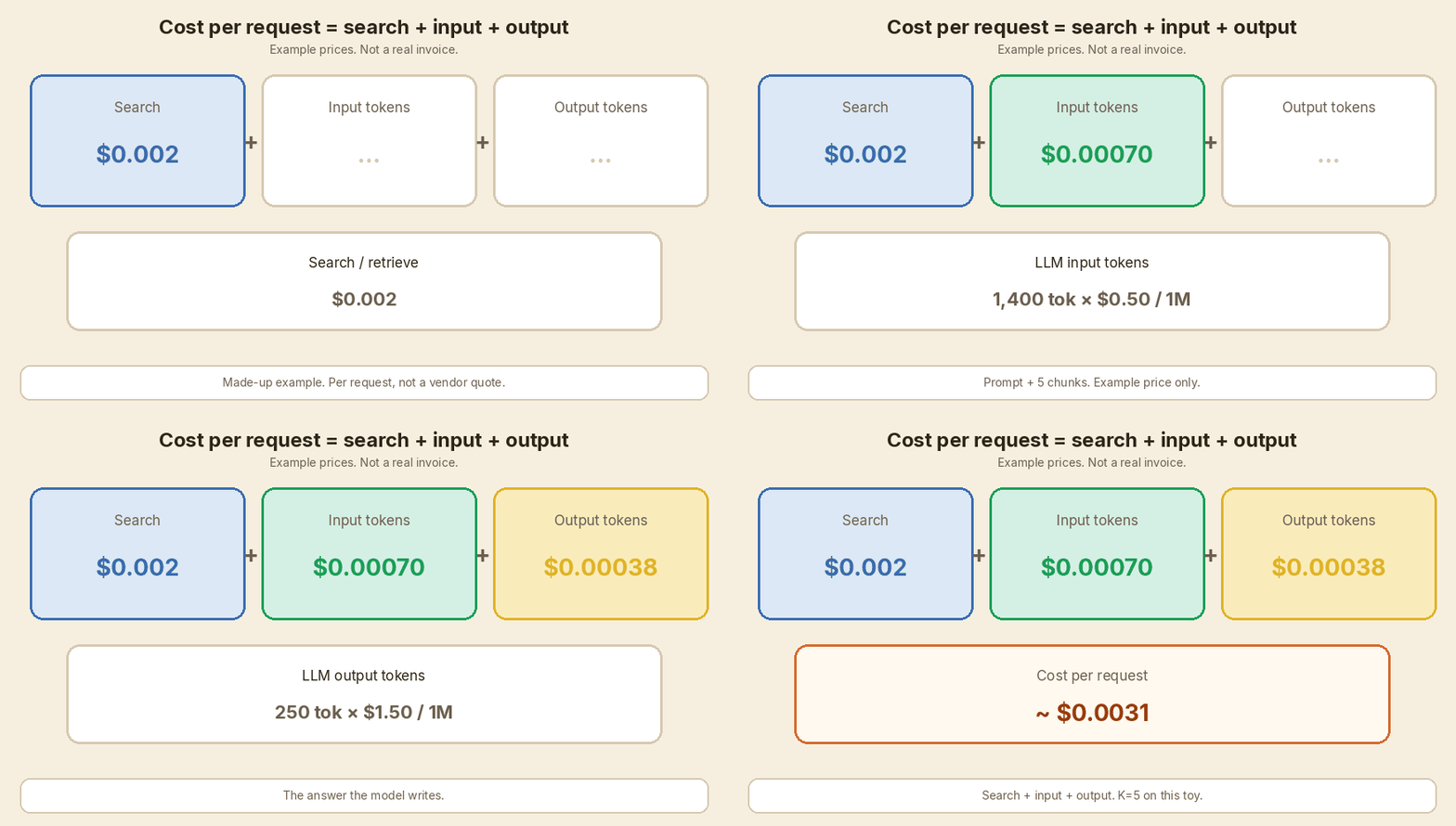
Cost is a measurement. You add two bills. Retrieval / search compute: embedding the question, scanning the index, maybe reranking. LLM token price: input tokens the model reads (system prompt + question + K chunks) plus output tokens it writes. Raising K mostly hits the input-token line.
The prices below are made-up teaching numbers. They are not a vendor quote. Round figures so the arithmetic stays in your head.
| Line | Example price (made up) | What I count on this question |
|---|---|---|
| Search | $0.002 per request | One embedding + one index lookup |
| LLM input | $0.50 per 1 million tokens | Prompt wrapper 400 + (K × 200) chunk tokens |
| LLM output | $1.50 per 1 million tokens | A 250-token answer |
K = 5 (example):
- Input tokens = 400 + 5 × 200 = 1,400
- Input cost = 1,400 / 1,000,000 × $0.50 = $0.00070
- Output cost = 250 / 1,000,000 × $1.50 = $0.000375
- Search = $0.002
- Total ≈ $0.0031 per request
K = 20, same question, search a bit heavier because more candidates are scored:
- Input tokens = 400 + 20 × 200 = 4,400
- Input cost = 4,400 / 1,000,000 × $0.50 = $0.00220
- Output cost = $0.000375 (same length answer)
- Search = $0.004
- Total ≈ $0.0066 per request, about 2.1× the K = 5 bill
Riya
On a quiet team this looks like nothing.
Arjun
At 20,000 questions a week, the K = 20 setting is the one you feel.
The trade-off: raising K from 5 to 20
Arjun
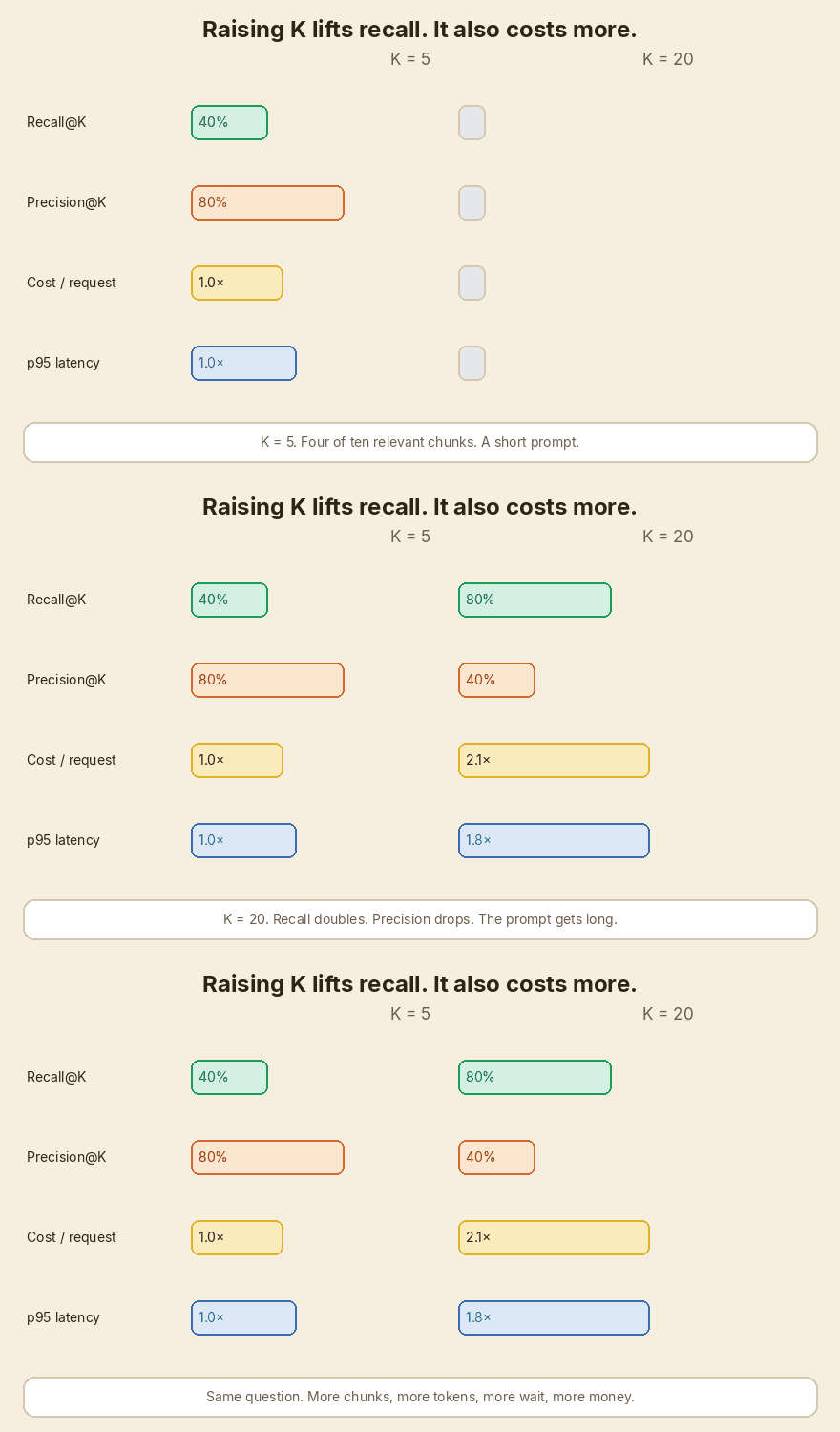
This is the decision I see most often. Same parental-leave question. Cleaner ranking this time: at K = 5 the top five are 4 relevant + 1 vacation chunk.
| K = 5 | K = 20 | |
|---|---|---|
| ✓ relevant retrieved | 4 | 8 |
| ⚠ retrieved noise | 1 | 12 |
| Recall@K | 4/10 = 40% | 8/10 = 80% |
| Precision@K | 4/5 = 80% | 8/20 = 40% |
| Input tokens (example) | 1,400 | 4,400 |
| Cost / request (example) | ~$0.0031 | ~$0.0066 |
| p95 latency | 1.0× | about 1.8× |
Riya
So I lift recall, and I pay with tokens, cost, latency, and more vacation pages in the prompt.
Arjun
Raising K from 5 to 20 usually lifts recall. The duration cap and the return-to-work plan can finally enter the prompt. It also adds input tokens. That raises cost and latency. And it often hurts precision, because the extra 15 chunks are not all about part-time parental leave.
flowchart LR
  A[Raise K 5 to 20] --> B[Recall usually up]
  A --> C[Precision often down]
  A --> D[Input tokens up]
  D --> E[Cost up]
  D --> F[Latency up]
Arjun
There is no universal winner. If a missed rule can send someone on the wrong leave, pay for a higher K or, better, retrieve wide and then cut.
What I actually do
Arjun
Habits on a working RAG service. Not a research checklist.
- Build a small labelled eval set. 30 to 50 real questions is enough to start. For each question, mark the chunk ids that should come back. Use the parental-leave style: one clear ask, a known gold set.
- Measure Recall@K and Precision@K across K. I usually try 1, 3, 5, 10, 20 on the same set. Plot both. Pick the K where recall is high enough and precision has not fallen off.
- Use a reranker. Retrieve 20 (cheap, wide). Keep the top 5 after a rerank model. You borrow the recall of K = 20 and aim for the precision of K = 5. The extra cost is the rerank pass, not 15 extra chunks in the LLM prompt.
- Keep chunk sizes sensible. I aim for about 200 to 500 tokens, with a little overlap. Tiny chunks lose the rule that sat in the next sentence. Huge chunks waste tokens and mix two policies in one blob.
- Keep top_p and temperature low for factual answers. HR, policy, finance. I do not want variety. I want the sentence that is already in the chunk.
- Track cost and p95 latency per request. Average latency hides the slow question. Cost per request tells you if last week’s K change actually moved the bill.
flowchart LR
  A[Retrieve 20] --> B[Rerank]
  B --> C[Keep top 5]
  C --> D[LLM]
A tiny check on the toy numbers
Arjun
Same idea as a unit test. Two labelled runs. I ran this. The printout below is the real output.
def recall_precision_at_k(relevant, retrieved):
    hits = sum(1 for chunk in retrieved if chunk in relevant)
    k = len(retrieved)
    recall = hits / len(relevant)
    precision = hits / k
    return hits, k, recall, precision


relevant = {
    "leave-pt-1",
    "leave-pt-2",
    "leave-pt-3",
    "leave-pt-4",
    "leave-pt-5",
    "leave-pt-6",
    "leave-pt-7",
    "leave-pt-8",
    "leave-pt-9",
    "leave-pt-10",
}

# Recall picture: 4 of 10 relevant, 1 vacation chunk.
hits, k, rec, prec = recall_precision_at_k(
    relevant,
    ["leave-pt-1", "leave-pt-2", "leave-pt-3", "leave-pt-4", "vacation-1"],
)
print(f"clean  Recall@{k} = {hits}/{len(relevant)} = {rec:.0%}")
print(f"clean  Precision@{k} = {hits}/{k} = {prec:.0%}")

# Precision picture: 3 useful, 2 noise.
hits, k, rec, prec = recall_precision_at_k(
    relevant,
    ["leave-pt-1", "vacation-1", "leave-pt-3", "sick-1", "leave-pt-7"],
)
print(f"noisy  Recall@{k} = {hits}/{len(relevant)} = {rec:.0%}")
print(f"noisy  Precision@{k} = {hits}/{k} = {prec:.0%}")
clean  Recall@5 = 4/10 = 40%
clean  Precision@5 = 4/5 = 80%
noisy  Recall@5 = 3/10 = 30%
noisy  Precision@5 = 3/5 = 60%
Arjun
The clean run is the K = 5 column in the trade-off table. The noisy run is the precision GIF.
RAG is retrieve, then generate. Top K and Top P are settings you turn. Recall@K, Precision@K, and cost per request are what you measure after the run. One HR question: part-time parental leave. 10 relevant chunks. Clean K = 5: Recall 40%, Precision 80%. Noisy K = 5: Recall 30%, Precision 60%. K = 20: Recall 80%, Precision 40%, about 2.1× the example bill, p95 about 1.8×. A reranker (retrieve 20, keep 5) is the usual way out. For a factual answer, keep top_p and temperature low. Label 30 to 50 questions, sweep K at 1, 3, 5, 10, 20, and watch cost and p95 per request. Colours match the precision and recall post.
Cheat sheet
| Name | Tune or measure? | Formula / setting | Question it answers |
|---|---|---|---|
| Top K | Tune | Keep the K nearest chunks | How many paragraphs does the LLM read? |
| Recall@K | Measure | ✓ / ( ✓ + ✗ ) | Of the relevant chunks, how many came back? |
| Precision@K | Measure | ✓ / ( ✓ + ⚠ ) | Of the chunks we sent, how many were useful? |
| Top P | Tune | Nucleus mass for the next word | How wide is the next-word net? |
| Temperature | Tune | Sharpen or flatten the same list | How peaked are those probabilities? |
| Cost / request | Measure | Search + input tokens + output tokens | What did this question cost? |
| Cell | Colour | Mark | In this RAG picture |
|---|---|---|---|
| Relevant retrieved | green #1a9e55 |
✓ | Parental-leave chunk that made the prompt |
| Retrieved noise | orange #d46a2e |
⚠ | Vacation / sick-leave chunk that also made the prompt |
| Relevant missed | purple #5b4cc4 |
✗ | Parental-leave chunk still sitting in the store |
| Irrelevant not retrieved | grey #6b7280 |
· | A payroll chunk nobody asked for |
If this helped:

Discussion
Reactions and replies via GitHub Discussions. Sign in with GitHub to comment.