Reverse Engineering the Cursor AI Agent — Architecture Patterns You Can Reuse
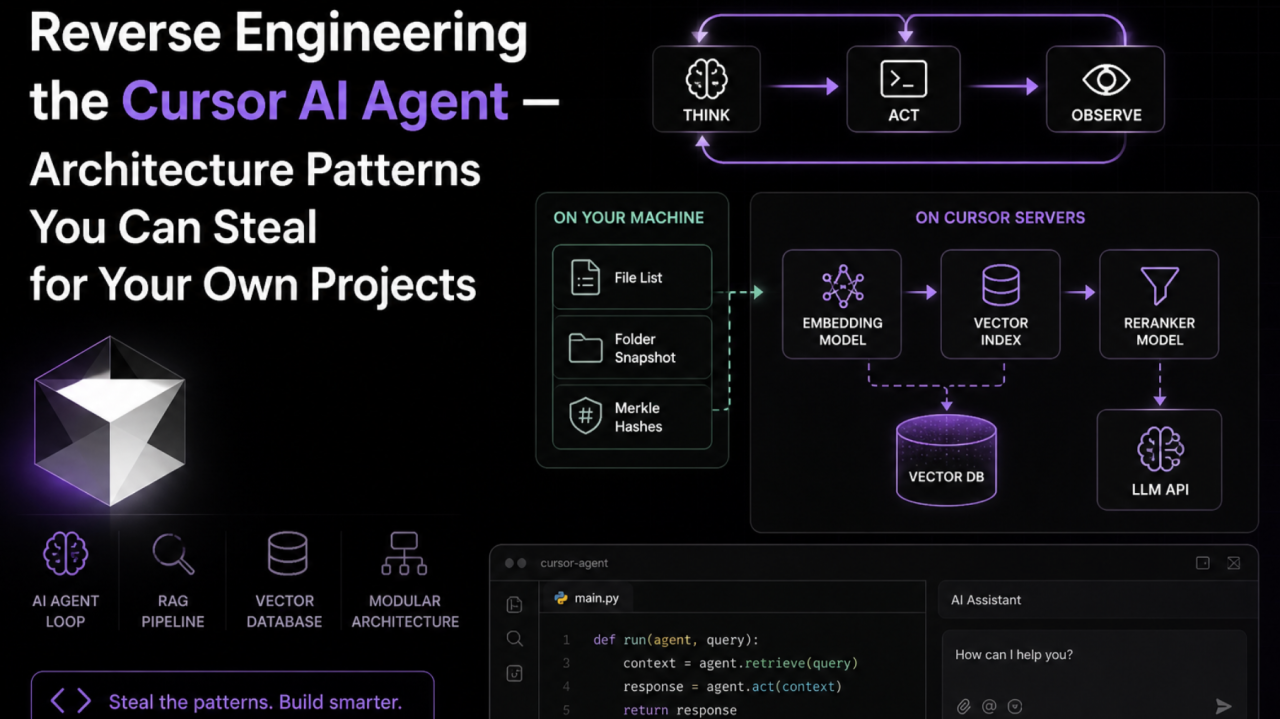
Cursor is a strong AI coding agent. Anysphere (the company behind it) has not published official architecture docs. So most of what we know comes from reverse engineering — blog posts, community research, and in my case, the files Cursor stores on disk.
I do not only want to explain how Cursor works. I want the design patterns, so you can reuse them when you build an agent — healthcare, legal, education, or anything else.
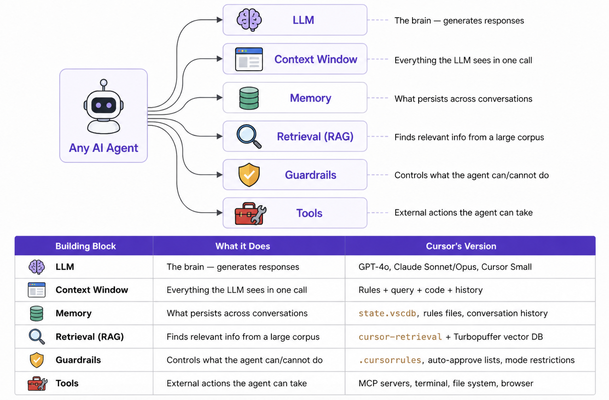
The building blocks of any AI agent
Before Cursor, it helps to see what every agent is made of. Once you see these blocks, you will spot them inside Cursor too.
Part 1: What happens when a new project is opened
When you open a folder in Cursor for the first time, a multi-step pipeline runs to make the project ready for the agent.
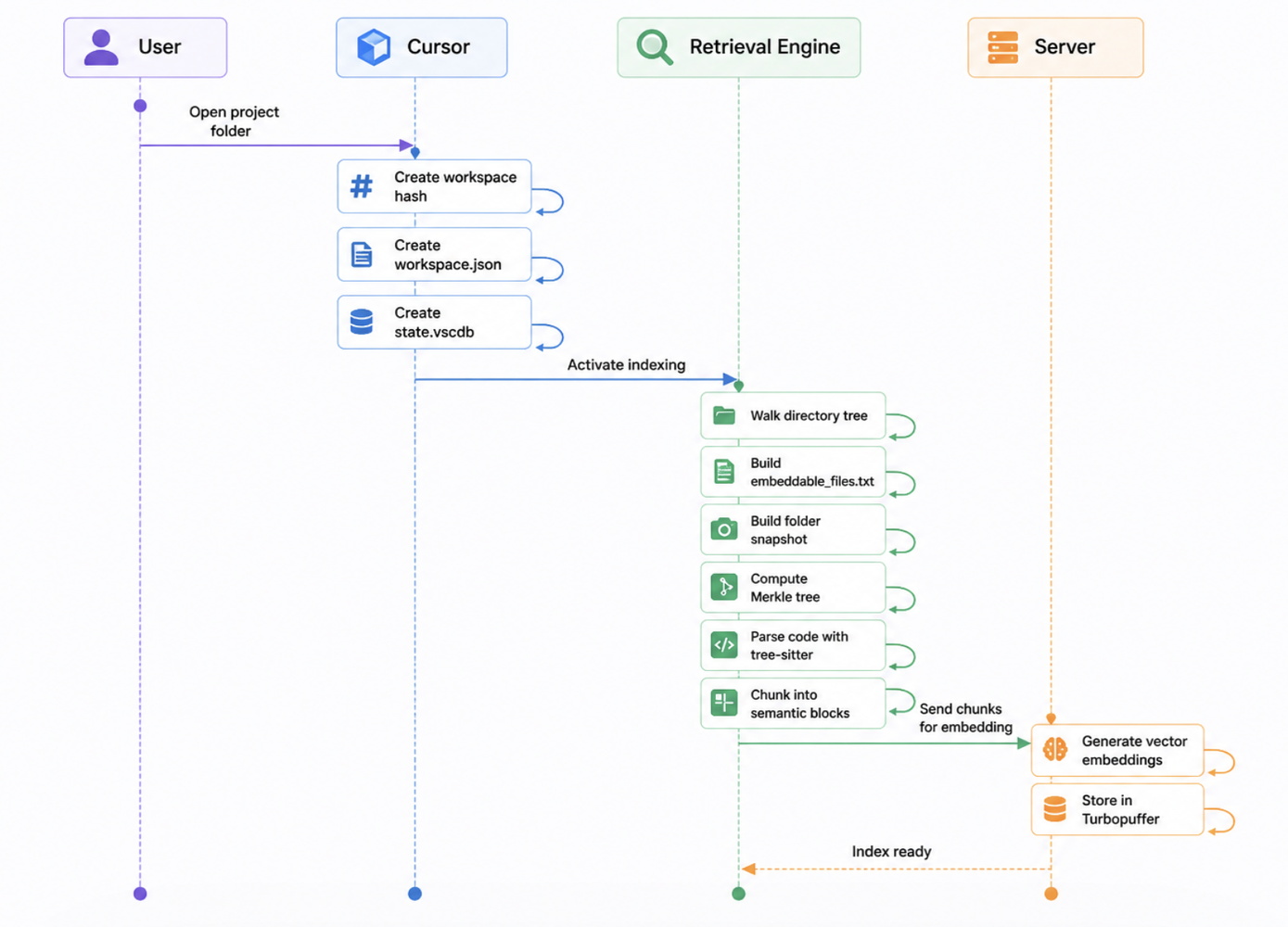
Step-by-step
Here is what each step actually does:
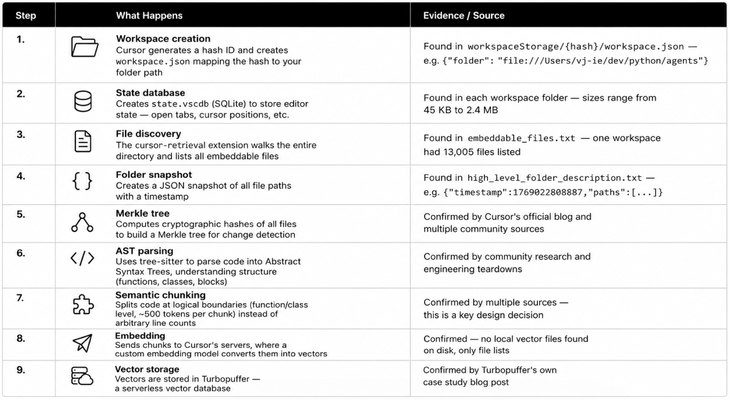
Design lesson: If a workspace has a Python virtual environment (
env/,venv/) ornode_modules/, Cursor will index those library files too — potentially thousands of files that are not your code. File filtering (.cursorignore) matters in any RAG system. Without an ignore list, noise drowns the signal.
Does indexing only happen once?
No. Indexing is incremental, not one-shot. Here is how it works:
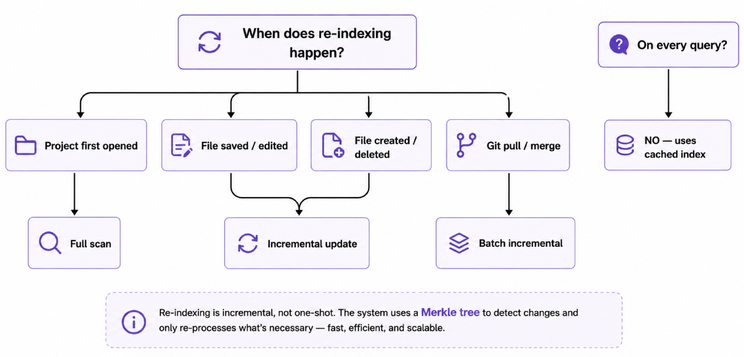
The Merkle tree is the important part:
- Cursor periodically compares the local Merkle root hash with the server’s version
- If they differ, it walks the tree to find exactly which files changed
- Only those files are re-chunked, re-embedded, and re-uploaded
- This is very similar to how Git detects changes — cheap and small
Pattern to reuse: If you index documents for RAG, use Merkle trees for change detection. It is cheaper than re-indexing everything on every change.
Part 2: What happens when a query is asked
This is where the agent behaviour shows up. When you type a question in Cursor, a layered pipeline processes it.
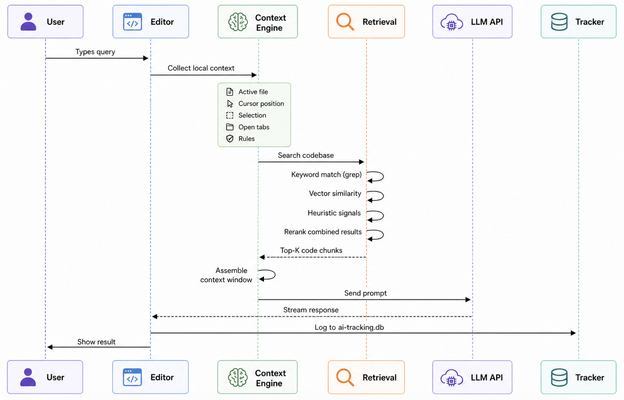
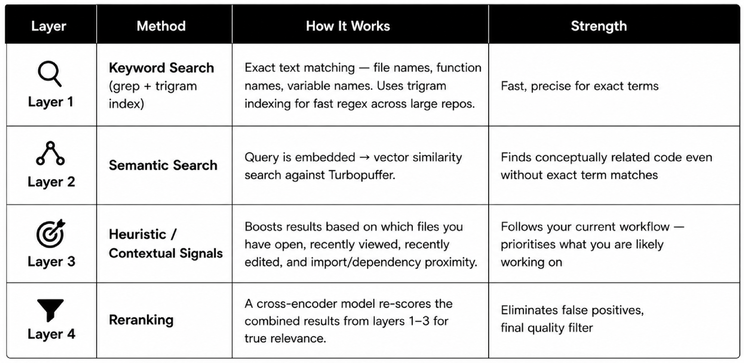
The four-layer retrieval strategy
Cursor does not rely on one search method. It uses four strategies together.
How heuristic signals work:
Cursor tracks a few contextual signals and uses them to boost or demote retrieval results:
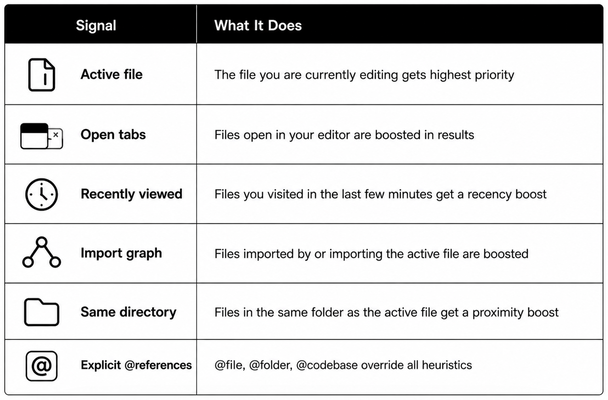
This matters because the same query can return different results depending on which file you have open when you ask it.
Example:
Query: "fix the database connection timeout"
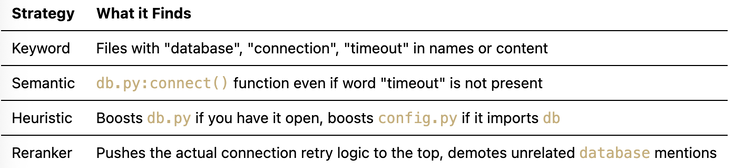
Pattern to reuse: Do not rely on one retrieval strategy. A hybrid retrieval + reranking pipeline (keyword → semantic → heuristic signals → cross-encoder reranker) is the usual production RAG setup. The heuristic layer is what follows the developer’s current focus.
Context window assembly
The context window is everything the LLM sees. Cursor assembles it in a strict priority order:
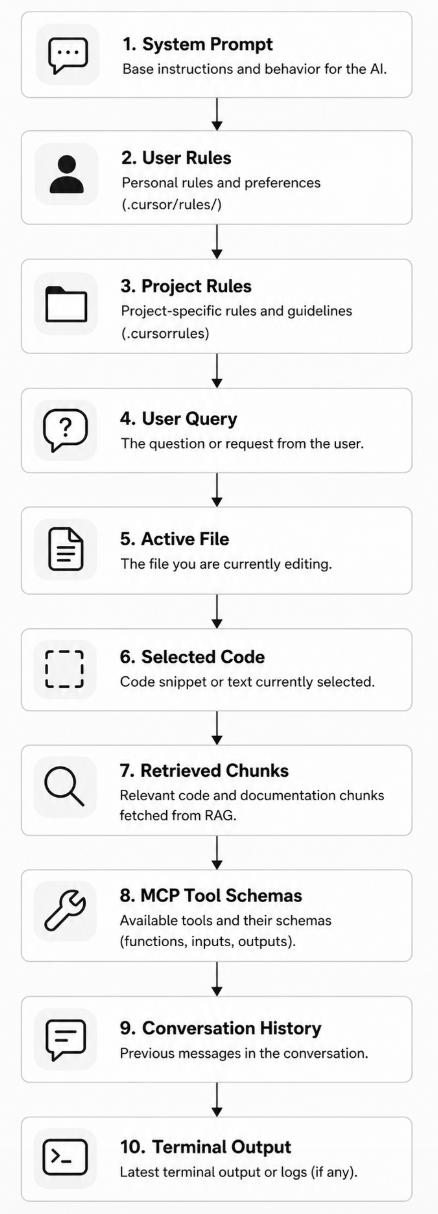
Truncation rule: When the total exceeds the model’s context limit, items are dropped from the bottom up — conversation history and less-relevant chunks go first. System prompt and user query are always kept.
Pattern to reuse: Define a clear priority order for context. High-priority items (instructions, user input) should never be truncated. Low-priority items (history, metadata) should go first.
Memory hierarchy
Cursor treats different types of information at different priority levels. This is a standard agent memory design.
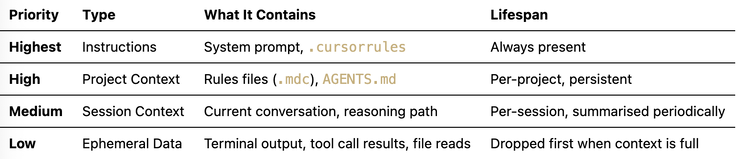
When a conversation gets very long, Cursor triggers a summarisation step — it compresses the earlier messages but keeps the raw history available as a “file” that the agent can search if needed.
Pattern to reuse: Use hierarchical memory with periodic summarisation. Keep raw history searchable, and keep a summary in the main context. That reduces the chance that an important detail disappears in a lossy summary.
Part 3: How the Cursor agent actually works
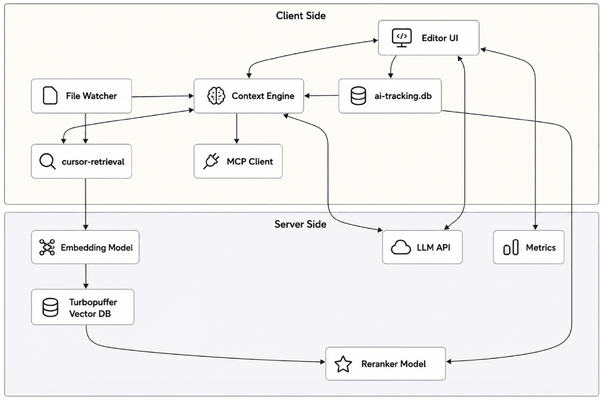
Now put it together. Here is the overall architecture.
Architecture overview
The Think-Act-Observe loop
In Agent/Composer mode, Cursor follows the classic AI agent loop:
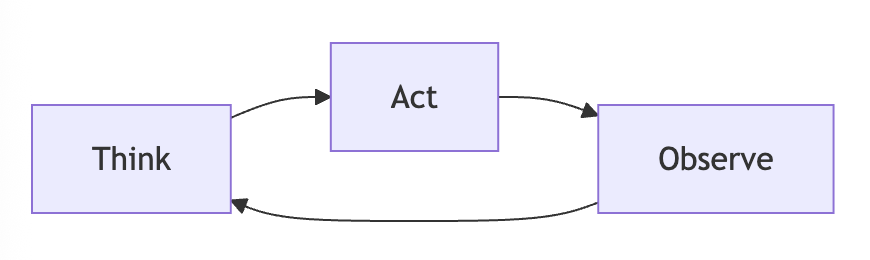
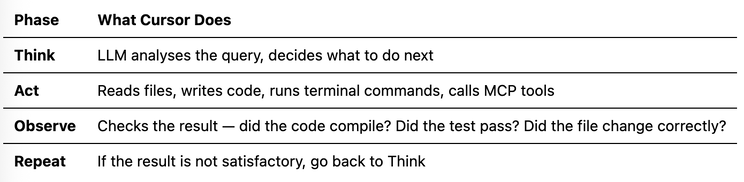
This loop continues until the task is complete or the agent decides it cannot proceed.
Pattern to reuse: The Think-Act-Observe loop is the base of most modern agents (ReAct). If you build an agent, give this loop clear exit conditions so it does not retry forever.
Tool system (MCP)
Cursor’s tool system uses the Model Context Protocol (MCP) — an open standard for connecting LLMs with external tools. MCP lets you plug in an external service so the agent can take real actions.
How MCP works in Cursor:
- You define MCP servers in
~/.cursor/mcp.json - Each server exposes a set of tools with JSON schemas
- These tool schemas are injected into the system prompt
- The LLM can then call these tools during a conversation
- Results from tool calls flow back into the conversation context
Common MCP integrations:
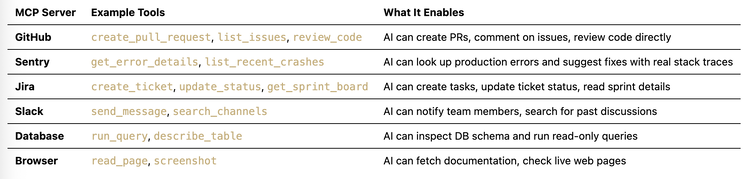
Example mcp.json configuration:
{
  "mcpServers": {
    "github-server": {
      "command": "npx",
      "args": ["@modelcontextprotocol/server-github"],
      "autoApprove": ["list_issues", "get_file_contents"],
      "disabled": false
    },
    "sentry-server": {
      "command": "npx",
      "args": ["@modelcontextprotocol/server-sentry"],
      "autoApprove": ["get_error_details"],
      "disabled": false
    }
  }
}
Guardrails for tools:
autoApprovelist — tools the AI can call without asking the user (use for read-only, safe tools)- Tools not in the list need explicit user approval before execution
- The
disabledflag can turn off entire MCP servers when they are not needed - Each tool schema adds tokens to every prompt, so only enable what you use
Pattern to reuse: Always have a permission layer for agent tools. Read-only tools (fetch data, list items) can be auto-approved. Write/delete tools (create PR, send message, run query) should need human confirmation. That is a basic guardrail against a runaway agent.
Guardrails in Cursor
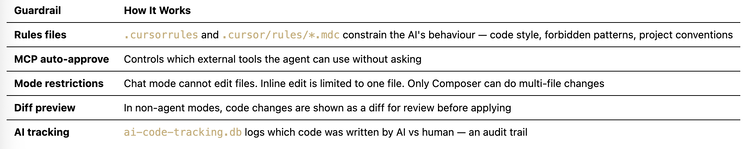
Pattern to reuse: Build guardrails at more than one level — input constraints (rules), tool permissions (auto-approve), action scoping (mode restrictions), and output review (diff preview). One layer is not enough.
Part 4: Design decisions worth reusing
Here are the architectural choices Cursor made that are worth studying for any AI agent project.
Decision 1: Server-side embeddings, client-side metadata
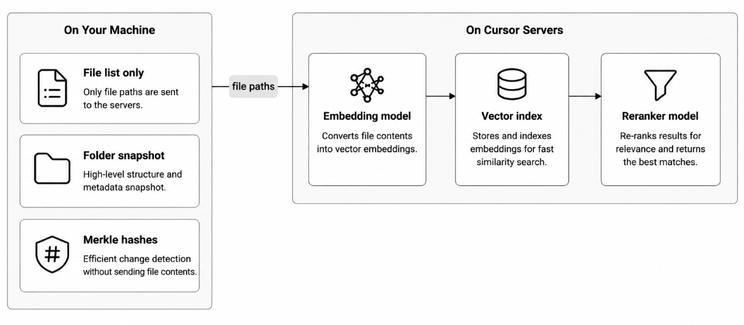
Why this matters:
- GPU inference for embeddings is expensive — doing it on the server with dedicated hardware is cheaper and faster
- The embedding model can be upgraded server-side without updating every client
- The downside: your code leaves your machine (privacy tradeoff)
When to use this pattern: When you control the server and your users accept the privacy tradeoff. For privacy-sensitive domains (healthcare, legal), consider local embedding.
Decision 2: Semantic chunking with Tree-sitter
Instead of naive chunking (split every 500 characters), Cursor:
- Parses code into an AST using tree-sitter
- Identifies logical boundaries (functions, classes, methods)
- Creates chunks that are semantically complete
Why this matters:
- A function split in half makes no sense to an embedding model
- Semantic chunks produce better embeddings, so retrieval is better
- It costs more to implement, but the quality jump is large
When to use this pattern: Always, when dealing with structured content (code, legal documents, medical records). For unstructured text (blog posts, emails), simpler chunking may be fine.
Decision 3: Merkle trees for change detection
Instead of re-indexing everything on a timer, Cursor computes a Merkle tree and only re-indexes what changed.
Why this matters:
- A large codebase might have 50,000 files but only 5 changed since last index
- Re-embedding 5 files is 10,000x cheaper than re-embedding 50,000
- The Merkle tree comparison is almost instant (just hash comparisons)
When to use this pattern: Any system that needs to keep an index in sync with a changing data source — document management, knowledge bases, monitoring systems.
Decision 4: Hybrid retrieval + heuristics + reranking
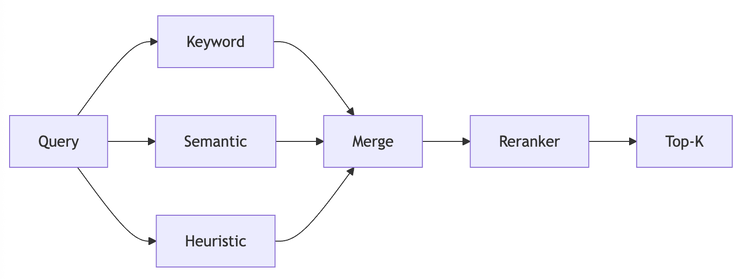
Why this matters:
- Keyword search alone misses conceptual relationships
- Vector search alone sometimes returns semantically similar but irrelevant results
- Heuristic signals (open files, recency, import graph) make the system follow the current working context
- The reranker is a final quality filter, re-scoring results with full query-document attention
- This four-stage approach is common for production RAG
When to use this pattern: Any RAG system where precision matters. The heuristic layer helps when users have a clear working context (open documents, recent edits). The extra latency of reranking (~50-100ms) is usually worth it for quality.
Decision 5: Hierarchical context priority
Cursor does not treat all context equally. It has a strict priority order and truncates from the bottom.
Why this matters:
- An LLM’s attention is not uniform — early tokens get more attention (in most architectures)
- Critical instructions (system prompt, rules) should never be dropped
- Conversation history is the least critical and can be summarised
When to use this pattern: Any system where the total context might exceed the model’s window. Define explicit priority tiers and implement automatic truncation.
Decision 6: Ephemeral data as files
Cursor treats terminal output, MCP tool responses, and even chat history as “virtual files” that the agent can read on demand, instead of stuffing everything into the context window.
Why this matters:
- A single MCP tool call might return 10,000 tokens of data
- Injecting all of that into the context wastes the token budget
- By writing it to a file, the agent can grep or search through it selectively
When to use this pattern: When your agent deals with large tool outputs (API responses, database query results, log files). Store them outside the prompt and let the agent pull only what it needs.
Summary: architecture patterns cheat sheet
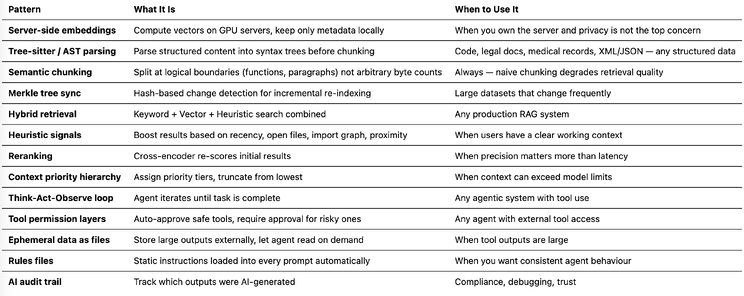
Final thoughts
Cursor is not just “VS Code with a chat box.” It is an agent system with RAG, multi-layer retrieval, hierarchical memory, tool integration, and guardrails. The patterns it uses — Merkle tree sync, semantic chunking, hybrid retrieval with reranking, context priority, Think-Act-Observe loops — transfer to other agents.
If you are building an agent for document analysis, customer support, code review, or another domain, start with these blocks. They work.
This analysis is based on examining Cursor v2.3.35’s file system on macOS, plus public information from the Cursor blog, Turbopuffer case studies, and community engineering teardowns. Cursor (Anysphere) has not published an official architecture document, so some server-side details are inferred from observed behaviour and third-party sources.
If this helped:

Discussion
Reactions and replies via GitHub Discussions. Sign in with GitHub to comment.