PEFT Made Simple: A Software Engineer's Guide to LoRA, QLoRA, Adapters & More
Coming from software development into AI/ML, you will hear these names a lot:
LoRA, QLoRA, Adapters, Prefix Tuning, Prompt Tuning, P-Tuning, IA3, BitFit…
The usual question is: why are there so many ways to fine-tune a model?
I will skip the matrices-first explanation. Think of an experienced engineer who already knows the job, then takes a short specialist course. That is closer to how we adapt a pretrained model.
This post is the first in a three-post series for full-stack engineers moving into AI work: cheaply specialise a model (this post), then give an agent memory, then cache repeated questions by meaning.
Also in this series: PEFT, LoRA, and QLoRA (this post) · AI agent memory · Semantic caching
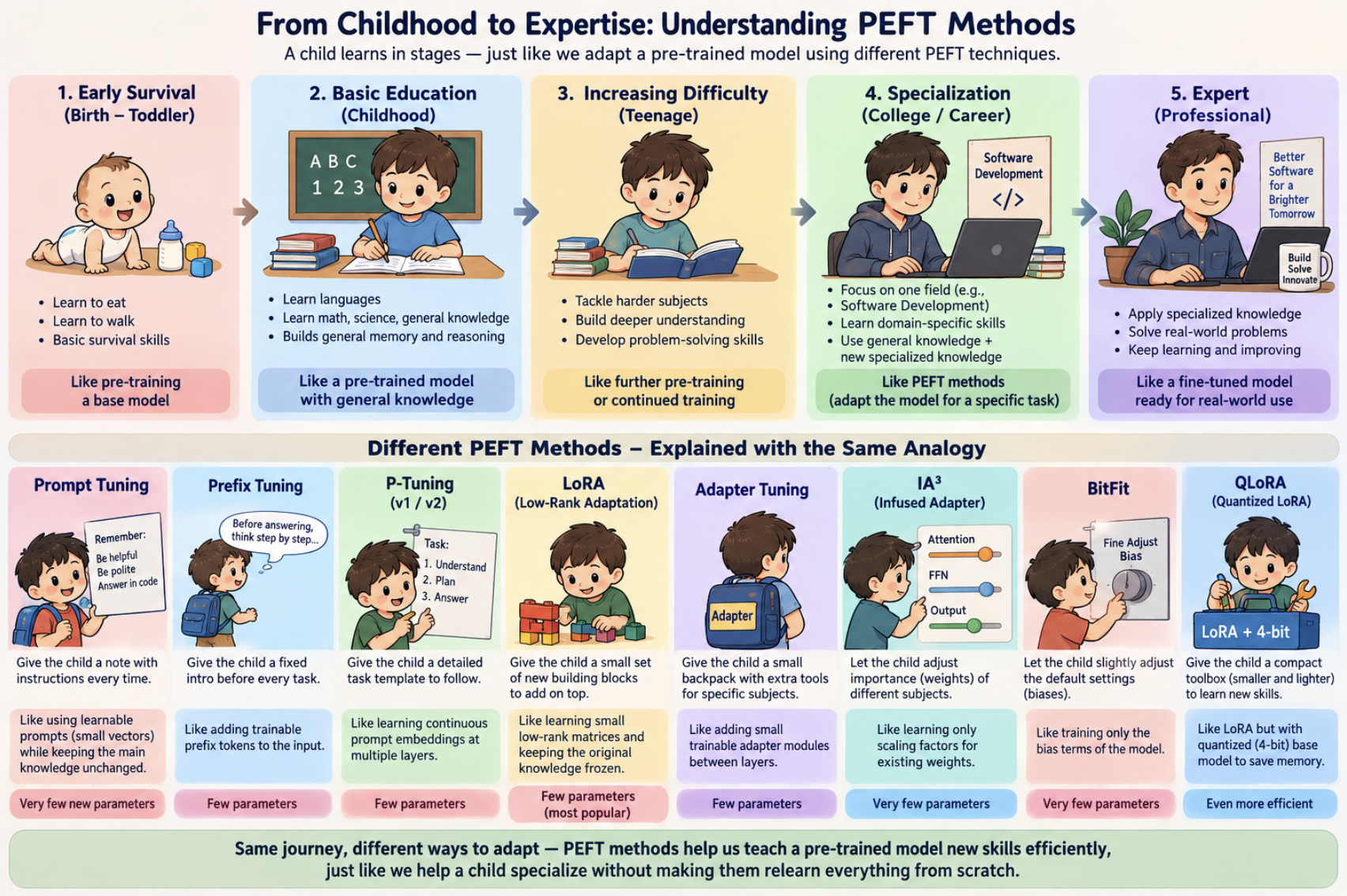
Who this is for — and when PEFT is the right tool
If you already ship APIs, you already know the pattern: don’t rebuild the whole service to change one behaviour. PEFT is that instinct applied to a pretrained model.
Use PEFT when:
- You have a strong base model and a real training set (hundreds to thousands of examples, not three Slack messages).
- You need a style, format, domain dialect, or tool-use habit that prompting and RAG keep missing.
- You want several specialisations of one base model (support, code review, internal docs) without storing a full copy each time.
- GPU memory is tight — especially for 30B+ models — and you still want to train something.
Do not start with PEFT when:
- You only have an API key. Closed APIs do not let you train LoRA, prompt-tuning vectors, or adapters. You prompt, retrieve, or fine-tune through the vendor’s own job API.
- The missing knowledge is in your documents. Try RAG first. It is cheaper to iterate than a training run.
- You need a one-off answer. That is a prompt, not a fine-tune.
Default choice: LoRA. If the base model will not fit in GPU memory, QLoRA. Everything else in this post is “know why it exists.”
Terms first
| Term | Plain English |
|---|---|
| Model | A program that has learned patterns from huge amounts of text/data. |
| Weights | The billions of numbers inside the model. Each number is a small piece of learned knowledge. |
| Parameters | Weights plus a few extras called biases. “A 7B model” means about 7 billion of these numbers. |
| Matrix | A grid of numbers, like a spreadsheet. Model weights live in lots of these grids. |
| Frozen | “Don’t touch these numbers.” Locked weights do not change during training. |
| Training | Adjusting numbers so the model gets better at a task. |
| Fine-tuning | Training a model that already knows a lot, for one specific job. A generalist becoming a specialist. |
| GPU / VRAM | A chip that is fast at maths on many numbers at once, plus its workspace. If the model does not fit in VRAM, you cannot train it the naive way. |
| Inference | Using the trained model — answering questions, generating text. Training is study; inference is the exam. |
| Layers | A stack of processing steps. Deeper layers tend to handle more abstract patterns. |
| Activations | The signals flowing through the model while it processes your input. |
| Vector / tensor | A list of numbers, or numbers organised as a list, grid, or cube. |
Rank (r) |
How much capacity a LoRA adapter has. Higher rank = more learning power and a bigger adapter. |
Alpha (lora_alpha) |
A scaling knob on the LoRA update. Common default: scale by alpha / r. |
| Target modules | Which layers get a LoRA add-on — often attention projections such as q_proj and v_proj. |
| Low-rank | Represent a huge grid of changes with two thin grids. Capture the important delta with far fewer numbers. |
| Quantisation | Storing each number with fewer bits. Rounding 3.14159 to 3.1: less space, a little less detail. |
| 4-bit / 16-bit | How many bits store each number. Fewer bits = less memory, slightly less precision. |
| Bias | A tiny default nudge added to a layer’s output. “Lean slightly towards yes.” |
| Embeddings | Numbers that represent words or concepts. Similar words get similar numbers. |
| Soft prompts | Learned instruction vectors (not readable words) prepended to the input. |
| Adapter | A small add-on that gives the model a new skill without rewriting the base. |
| Merging | Baking the adapter into the base weights so you no longer load a separate file. |
1. From general training to a specialist
%%{init: {"theme": "base", "themeVariables": {"fontSize": "14px"}, "flowchart": {"nodeSpacing": 20, "rankSpacing": 30}}}%%
flowchart LR
    A["Pre-training -- general patterns"]
    B["Foundation model -- useful as-is"]
    C["Adaptation -- task or domain data"]
    D["Specialist -- one product job"]

    A -->|grows| B -->|specialises| C -->|masters| D

    style A fill:#FFF3E0,stroke:#FB8C00,color:#333
    style B fill:#E8F5E9,stroke:#43A047,color:#333
    style C fill:#E3F2FD,stroke:#1E88E5,color:#333
    style D fill:#F3E5F5,stroke:#8E24AA,color:#333
The model does not throw away what it already knows. You add specialisation on top.
| Stage | What it means |
|---|---|
| Basic pattern learning | Pre-training |
| A useful general model | Pre-trained foundation model |
| Extra study on a domain | Continued training / adaptation |
| One product job | Fine-tuning for a specific task |
The overview figure uses the same idea: one general education, several PEFT specialist modules. The methods differ in where learning is allowed — input, inserted layers, weight updates, activations, or biases.
2. Full fine-tuning = update almost every weight
Want the model to become a medical imaging specialist?
One option: send it back through a full training run and update everything. That is full fine-tuning — you update almost all of the model’s parameters.
%%{init: {"theme": "base", "themeVariables": {"fontSize": "14px"}}}%%
flowchart TD
    A["Pre-trained Model - billions of parameters"]
    B["Update ALL weights"]
    C["Specialised Model"]

    A --> B --> C

    D["Needs huge GPU memory"]
    E["Slow and expensive"]
    F["One full copy per task"]

    B -.-> D
    B -.-> E
    B -.-> F

    style A fill:#E3F2FD,stroke:#1565C0,color:#333
    style B fill:#FFEBEE,stroke:#C62828,color:#333
    style C fill:#E8F5E9,stroke:#2E7D32,color:#333
    style D fill:#FFF8E1,stroke:#F9A825,color:#333
    style E fill:#FFF8E1,stroke:#F9A825,color:#333
    style F fill:#FFF8E1,stroke:#F9A825,color:#333
Costs you actually feel as an engineer:
- VRAM: optimiser states (Adam keeps extra tensors per parameter), gradients, and activations sit next to the weights. A model that serves on one GPU often will not train on that same GPU.
- Storage: one full checkpoint per specialisation.
- Ops: every task gets its own multi-gigabyte artefact to version, evaluate, and roll back.
When full fine-tuning is still the right call: huge compute budget, you need maximum flexibility, and the task is far from the model’s original training — for example, adapting a model heavily toward a low-resource language. For most product work, it is overkill. The LoRA paper is largely motivated by how impractical full updates become as models grow. (arXiv)
This is the problem PEFT solves.
3. PEFT = do not retrain the entire model
Parameter-Efficient Fine-Tuning (PEFT) in one sentence:
Keep most of the model’s numbers locked (frozen). Only train a tiny set of extra (or selected) numbers.
Hugging Face describes PEFT as training a small number of parameters on top of a pretrained model, cutting memory and optimisation cost. (Hugging Face)
Your engineer already knows programming, algorithms, and databases. You do not erase that. You hand them a small specialist training module.
LoRA is one technique inside PEFT. PEFT is the category; LoRA is the item you will actually use first.
4. The PEFT family at a glance
%%{init: {"theme": "base", "themeVariables": {"fontSize": "13px"}, "flowchart": {"nodeSpacing": 15, "rankSpacing": 25}}}%%
flowchart TD
    PEFT["PEFT - Parameter-Efficient Fine-Tuning"]

    subgraph A["1. Adapter-Based"]
        LO["1.1 LoRA - most popular"]
        AL["1.2 QLoRA"]
        AD["1.3 Adapters"]
        ADA["1.4 AdaLoRA and DoRA"]
    end

    subgraph P["2. Prompt-Based"]
        PT["2.1 Prompt Tuning"]
        PX["2.2 Prefix Tuning"]
        PG["2.3 P-Tuning"]
    end

    subgraph L["3. Layer and Param Tuning"]
        IA["3.1 IA3"]
        BF["3.2 BitFit"]
    end

    PEFT --> A
    PEFT --> P
    PEFT --> L

    QL["Note: QLoRA = 4-bit model + LoRA"]
    AL -.->|"quantised base + LoRA"| QL

    style PEFT fill:#7E57C2,stroke:#4527A0,color:#fff
    style A fill:#E8F5E9,stroke:#2E7D32,color:#333
    style P fill:#FFF3E0,stroke:#EF6C00,color:#333
    style L fill:#E3F2FD,stroke:#1565C0,color:#333
    style LO fill:#A5D6A7,stroke:#2E7D32,color:#333
    style AL fill:#C8E6C9,stroke:#388E3C,color:#333
    style AD fill:#C8E6C9,stroke:#388E3C,color:#333
    style ADA fill:#C8E6C9,stroke:#388E3C,color:#333
    style PT fill:#FFE0B2,stroke:#EF6C00,color:#333
    style PX fill:#FFE0B2,stroke:#EF6C00,color:#333
    style PG fill:#FFE0B2,stroke:#EF6C00,color:#333
    style IA fill:#BBDEFB,stroke:#1565C0,color:#333
    style BF fill:#BBDEFB,stroke:#1565C0,color:#333
    style QL fill:#F8BBD0,stroke:#AD1457,color:#333
QLoRA is not a separate PEFT method. It is LoRA on top of a frozen, compressed 4-bit base model. The QLoRA paper describes backpropagating through that frozen 4-bit model into small LoRA add-ons. (arXiv)
You will also see names such as LoHa, LoKr, OFT/BOFT, and LayerNorm-only tuning. Treat those as Level-3 “know they exist” until LoRA is boring.
5. Adapter-based methods
5.1 LoRA — Low-Rank Adaptation
The single most important PEFT technique. If you learn only one, learn this.
What it does
The model’s weights W are a massive spreadsheet. Full fine-tuning changes every cell. LoRA says: don’t touch the original spreadsheet. Create a small add-on of changes and lay it on top.
- Freeze
W. - Train two thin matrices
AandBonly. - At run time: W’ = W + B × A (often scaled by
alpha / r).
B × A is a low-rank stand-in for a full update matrix ΔW. You capture the useful change with far fewer trainable numbers than |W|. The original LoRA paper freezes pretrained weights and injects those trainable low-rank matrices into Transformer layers. (arXiv)
%%{init: {"theme": "base", "themeVariables": {"fontSize": "14px"}}}%%
flowchart TD
    W["W -- Original weights, frozen"]
    BA["B x A -- Small trainable matrices"]
    OUT["W-prime = W + BA -- Adapted output"]

    W --> OUT
    BA --> OUT

    style W fill:#E3F2FD,stroke:#1565C0,color:#333
    style BA fill:#FFF3E0,stroke:#E65100,color:#333
    style OUT fill:#E8F5E9,stroke:#2E7D32,color:#333
Engineer analogy: the experienced engineer gets a “Medical Imaging Expertise Module.” Programming, algorithms, and databases stay intact.
The knobs you will actually set
These are the names that show up in Hugging Face LoraConfig. Learn them before you tune anything else.
| Knob | What it means | Practical starting intuition |
|---|---|---|
r (rank) |
Thickness of the add-on. Capacity of A and B. |
Small r (8–16) for style/format; raise if the adapter underfits. Too large and you lose the efficiency win. |
lora_alpha |
Scales the update. Commonly alpha / r. Rank-stabilised LoRA uses alpha / sqrt(r) instead. |
Many configs start with alpha = 2r (for example r=16, alpha=32). Treat that as a convention, not a law. |
target_modules |
Which layers get adapters. | Attention projections first (q_proj, v_proj, sometimes k_proj / o_proj). all-linear is more capacity and more VRAM. |
lora_dropout |
Dropout on the adapter path. | A regulariser. Useful if the dataset is small and the adapter starts memorising. |
| Merge vs keep separate | Bake BA into W, or load base + adapter. |
Merge for one production skill and lower inference overhead. Keep separate to hot-swap many skills on one base. |
You still need a dataset, a loss, and an eval set. LoRA is cheaper training, not “training without data.”
When to use LoRA
- Teach a new skill or domain: legal tone, internal ticket style, a specific framework.
- You have hundreds to thousands of examples and at least one GPU (a consumer GPU can be enough for smaller bases).
- You want several specialisations of the same base — swap adapters instead of cloning 14GB files.
Worked product example: one general 7B–8B instruct model, 5,000 labelled support conversations, one LoRA for “our support voice,” another for “code review comments.” Same base weights on disk; two small adapter files. Serve by loading the adapter that matches the route.
| Pros | Cons |
|---|---|
| Few trainable params | Still requires real training data |
| Much lower memory than full FT | Rank and target-layer choice matters |
| Fast training, tiny artefacts | Can underfit if r is too low |
| Many adapters per base | Not guaranteed to match full FT |
| Can merge for inference | Separate adapters add a little inference cost until merged |
5.2 QLoRA — LoRA + compression
LoRA is great until the base model itself will not load. QLoRA compresses the frozen base first (typically 16-bit → 4-bit), then trains LoRA on top.
Think of a huge reference library. You keep a compressed copy (some fine print is gone, the knowledge is mostly there). Then you add the specialist module.
%%{init: {"theme": "base", "themeVariables": {"fontSize": "14px"}}}%%
flowchart TD
    A["Full Model -- 16-bit weights"]
    B["Quantise to 4-bit"]
    C["Frozen 4-bit Model"]
    D["LoRA Adapters -- trainable"]
    E["Fine-Tuned Model"]

    A --> B --> C
    C --> E
    D --> E

    style A fill:#E3F2FD,stroke:#1565C0,color:#333
    style B fill:#FFF3E0,stroke:#E65100,color:#333
    style C fill:#BBDEFB,stroke:#1565C0,color:#333
    style D fill:#FFCC80,stroke:#E65100,color:#333
    style E fill:#A5D6A7,stroke:#2E7D32,color:#333
The QLoRA paper showed fine-tuning a 65B-parameter model on a single 48GB GPU, and introduced three memory tricks worth knowing by name: (arXiv)
- NF4 (4-bit NormalFloat) — a 4-bit type chosen to match how neural net weights are usually distributed.
- Double quantisation — even the quantisation constants get compressed, shaving extra bits per parameter.
- Paged optimisers — when a training step spikes memory, optimiser state can page to CPU RAM instead of OOM-ing.
Important implementation detail: weights are stored in 4-bit; the actual matmuls still run in 16-bit (often BF16). You are not doing the whole forward pass in 4-bit arithmetic.
Remember: QLoRA = quantised frozen base + LoRA. Not a third religion.
When to use QLoRA
- LoRA is what you want, but VRAM cannot hold the full-precision base.
- You are targeting large models (30B, 65B, 70B-class) on one mid-range GPU.
- You accept a small quality tradeoff from compression, and you will eval it on your task.
Worked product example: you want a 70B-class specialist and only have a 24GB card. 4-bit weights plus LoRA adapters are the usual path. Whether a specific 70B + sequence length + batch size fits is a measurement, not a promise — activations and optimiser state still exist.
| Pros | Cons |
|---|---|
| Extremely memory efficient | More moving parts (bitsandbytes, NF4, paging) |
| Makes large-model FT feasible | Compression is an approximation |
| Same LoRA workflow on top | Config and stack versions matter |
5.3 Adapters — bolt-on specialist modules
Adapters insert tiny trainable modules between existing layers. The laptop stays the same; the USB accessory adds capability. This approach predates LoRA. The original adapter paper added a small fraction of parameters per NLP task while freezing the base. (Google Research)
Difference from LoRA: LoRA adds a low-rank update to existing weight matrices. Classic adapters add new mini-layers into the stack. Extra layers usually mean extra latency unless you merge them away.
%%{init: {"theme": "base", "themeVariables": {"fontSize": "14px"}}}%%
flowchart LR
    E["Base Engineer"]
    S["Security Toolbox"]
    J["Java Toolbox"]
    R1["Security Specialist"]
    R2["Java Specialist"]

    E --- S --> R1
    E --- J --> R2

    style E fill:#E3F2FD,stroke:#1565C0,color:#333
    style S fill:#FFCDD2,stroke:#C62828,color:#333
    style J fill:#FFF9C4,stroke:#F9A825,color:#333
    style R1 fill:#FFCDD2,stroke:#C62828,color:#333
    style R2 fill:#FFF9C4,stroke:#F9A825,color:#333
When to use adapters
- You already have an adapter-era NLP pipeline and need to keep it.
- You want a mentally simple “plug in a module” story for many tasks on one frozen base.
Worked product example: a multilingual classifier that loads a French, German, or Japanese adapter per request. Same backbone, swapped toolbox.
Today, LoRA is the default for LLM work. Hugging Face’s PEFT overview treats LoRA as the common low-rank formulation and notes that inserted adapters can add runtime overhead. (Hugging Face)
| Pros | Cons |
|---|---|
| Base frozen; small per-task modules | Extra layers → inference overhead |
| Easy multi-task mental model | Usually less efficient than LoRA |
| Mature older NLP tooling | LoRA has the current ecosystem |
5.4 LoRA variants: AdaLoRA and DoRA
Once LoRA is solid, you will meet relatives:
%%{init: {"theme": "base", "themeVariables": {"fontSize": "14px"}}}%%
flowchart TD
    LO["LoRA -- Standard"]
    ADA["AdaLoRA -- Adaptive budget allocation"]
    DORA["DoRA -- Decomposed weight adaptation"]

    LO --> ADA
    LO --> DORA

    style LO fill:#A5D6A7,stroke:#2E7D32,color:#333
    style ADA fill:#BBDEFB,stroke:#1565C0,color:#333
    style DORA fill:#CE93D8,stroke:#7B1FA2,color:#333
- AdaLoRA: do not spend the same rank budget on every layer. Put more capacity where the task actually needs it — like training security harder than UI chrome. (Hugging Face)
- DoRA: splits how a weight update is applied (magnitude vs direction) and aims to close some of the gap to full fine-tuning.
Both are LoRA family. Learn standard LoRA, ship something, then A/B a variant if eval is stuck.
6. Prompt-based methods
6.1 Prompt Tuning — learned instruction cards
Two different things people mash together:
- Prompting = writing instructions in English. No training.
- Prompt Tuning = training a small set of vectors that are silently prepended to every input.
Those “soft prompts” are not readable words. They are learned tensors. Hugging Face distinguishes hard (human-written) prompts from soft (optimised) prompts. (Hugging Face)
%%{init: {"theme": "base", "themeVariables": {"fontSize": "14px"}}}%%
flowchart LR
    SP["Learned Vectors -- trainable"]
    IN["Your Input"]
    M["Frozen Model"]
    O["Output"]

    SP --> M
    IN --> M
    M --> O

    style SP fill:#FFF3E0,stroke:#E65100,color:#333
    style IN fill:#E8F5E9,stroke:#2E7D32,color:#333
    style M fill:#E3F2FD,stroke:#1565C0,color:#333
    style O fill:#F3E5F5,stroke:#8E24AA,color:#333
Analogy: you do not retrain the engineer. Before every task you hand them a learned instruction card.
Important correction: prompt tuning needs gradients into those vectors. You cannot do this against a typical chat API that only accepts text. For an API model you write hard prompts (or use the vendor’s fine-tune product). Prompt tuning is for weights you can run locally (or a training stack that exposes embeddings).
When to use prompt tuning
- The model is already capable; you need a gentle, cheap steer.
- You want the smallest possible trained artefact — a handful of vectors per task.
- You will serve many light tasks on one frozen model you host yourself.
Worked product example: 50 internal classification heads (intent, topic, urgency) on one hosted model. Fifty tiny vector files instead of fifty LoRAs — if quality holds on your eval set.
| Pros | Cons |
|---|---|
| Extremely few params | Less expressive than LoRA |
| Base stays frozen | Soft prompts are unreadable |
| Tiny storage | Weak for big behaviour shifts |
| Soft prompt still occupies context tokens |
6.2 Prefix Tuning — learned context that follows you
Prompt tuning adds learned vectors at the input. Prefix tuning injects learned prefixes into layers / attention, so the extra context is present at more than one step.
- Prompt Tuning = instruction card once, at the start
- Prefix Tuning = specialist context through the whole problem
When to use: same situations as prompt tuning, when you need more steering — especially generation (summarisation, translation) that must stay consistent across tokens. Still less common than LoRA for LLM product work. (Hugging Face)
6.3 P-Tuning — smarter soft prompts
Same family: learned virtual tokens, but a small network generates those vectors instead of storing them as raw parameters. Try prompt tuning first; reach for P-Tuning if that underperforms and you are still committed to a prompt-based method.
7. Layer and parameter tuning
7.1 IA3 — amplify what matters
IA3 = Infused Adapter by Inhibiting and Amplifying Inner Activations.
It does not add a new skill so much as learn which existing signals to turn up or down. Tiny scaling vectors multiply attention and feed-forward activations. × 3.0 amplifies; × 0.5 quiets. (GitHub)
%%{init: {"theme": "base", "themeVariables": {"fontSize": "14px"}}}%%
flowchart TD
    ATT["Attention activations"]
    S1["x scale vector"]
    FF["Feed-forward activations"]
    S2["x scale vector"]
    OUT["Output"]

    ATT --> S1 --> FF --> S2 --> OUT

    style ATT fill:#E3F2FD,stroke:#1565C0,color:#333
    style S1 fill:#FFCC80,stroke:#E65100,color:#333
    style FF fill:#E3F2FD,stroke:#1565C0,color:#333
    style S2 fill:#FFCC80,stroke:#E65100,color:#333
    style OUT fill:#A5D6A7,stroke:#2E7D32,color:#333
Analogy: “For security reviews, pay 3× attention to auth. For performance reviews, 2× on DB queries.” No new toolbox — just a mixer board.
When to use: the model already knows the task; you need emphasis, few-shot data, and almost no extra inference cost (IA3 can be merged). Less expressive than LoRA; smaller ecosystem.
7.2 BitFit — just tweak the defaults
Train only the bias terms. Everything else stays frozen. You are adjusting default tendencies, not installing a skill.
When to use: tiny style/tone nudges, extreme compute limits, or a research baseline. Not a mainstream production LLM recipe.
| Pros | Cons |
|---|---|
| Dead simple, tiny footprint | Very limited expressiveness |
| Easy to reason about | Cannot carry a new domain |
8. Which method for which situation?
%%{init: {"theme": "base", "themeVariables": {"fontSize": "12px"}, "flowchart": {"nodeSpacing": 12, "rankSpacing": 18}}}%%
flowchart TD
    START["I want to adapt a pretrained model"]
    Q0{"Is the task far from pretraining\nAND you have a large GPU budget?"}
    Q1{"Do you need major\nbehaviour changes?"}
    Q2{"Can you load the full\nprecision model in VRAM?"}
    Q3{"Do you have a\ndecent training dataset?"}
    Q4{"Is this just\nminor steering?"}
    Q5{"How small must\nthe trained artefact be?"}

    R1["Full Fine-Tuning"]
    R2["LoRA -- best default"]
    R3["QLoRA -- LoRA on compressed model"]
    R4["Prompt or Prefix Tuning"]
    R5["IA3 -- scale existing knowledge"]
    R6["BitFit -- biases only"]

    START --> Q0
    Q0 -->|"Yes, radical shift + budget"| R1
    Q0 -->|"No -- typical product case"| Q1
    Q1 -->|"Yes, significant"| Q2
    Q1 -->|"No, just steering"| Q4
    Q2 -->|"Yes"| R2
    Q2 -->|"No, too big"| R3
    Q4 -->|"Yes, gentle nudge"| Q5
    Q4 -->|"No, moderate changes"| Q3
    Q3 -->|"Yes, hundreds+ examples"| R2
    Q3 -->|"Very few examples"| R5
    Q5 -->|"Ultra small, you host the model"| R4
    Q5 -->|"Minimal possible"| R6

    style START fill:#7E57C2,stroke:#4527A0,color:#fff
    style Q0 fill:#FFF3E0,stroke:#EF6C00,color:#333
    style Q1 fill:#FFF3E0,stroke:#EF6C00,color:#333
    style Q2 fill:#FFF3E0,stroke:#EF6C00,color:#333
    style Q3 fill:#FFF3E0,stroke:#EF6C00,color:#333
    style Q4 fill:#FFF3E0,stroke:#EF6C00,color:#333
    style Q5 fill:#FFF3E0,stroke:#EF6C00,color:#333
    style R1 fill:#FFCDD2,stroke:#C62828,color:#333
    style R2 fill:#A5D6A7,stroke:#2E7D32,color:#333
    style R3 fill:#C8E6C9,stroke:#388E3C,color:#333
    style R4 fill:#FFE0B2,stroke:#EF6C00,color:#333
    style R5 fill:#BBDEFB,stroke:#1565C0,color:#333
    style R6 fill:#E1BEE7,stroke:#8E24AA,color:#333
Unsure? Start with LoRA. If VRAM says no, QLoRA. If you only have an API, you are not in this flowchart yet.
Comparison
| Method | Best for | What gets trained | Efficiency (typical) |
|---|---|---|---|
| Full FT | Max flexibility, radical domain shift, big budget | Almost everything | Low |
| LoRA | Most product tasks — default | Low-rank ΔW |
High |
| QLoRA | Large models on small GPUs | LoRA on 4-bit frozen base | Very high (memory) |
| Adapters | Older NLP stacks, hot-swap modules | Inserted mini-layers | High, extra latency |
| Prompt Tuning | Many light tasks, hosted frozen model | Soft input vectors | Very high |
| Prefix Tuning | Generation that needs ongoing steer | Learned layer prefixes | Very high |
| IA3 | Emphasis shift, few-shot | Scaling vectors | Very high |
| BitFit | Tiny tweaks, baselines | Biases only | Very high |
| AdaLoRA / DoRA | LoRA + smarter / more expressive updates | LoRA-family matrices | High |
Efficiency and quality rankings are not universal. Fewer trainable parameters usually means less expressive adaptation; matching full fine-tuning is not guaranteed. (Hugging Face)
9. The simplest way to remember all methods
Do not memorise names. Ask: “Where is the model allowed to learn?”
%%{init: {"theme": "base", "themeVariables": {"fontSize": "13px"}, "flowchart": {"nodeSpacing": 12, "rankSpacing": 20}}}%%
flowchart TD
    Q["Where does learning happen?"]

    I["At the Input -- Learned vectors prepended"]
    M["Inside the Model -- Small modules inserted"]
    W["On the Weights -- Small delta-W added"]
    VA["On Activations -- Scale vectors learned"]
    B["On Biases Only -- Bias params tuned"]
    C["Compress First -- Quantise base, then LoRA"]

    Q --> I
    Q --> M
    Q --> W
    Q --> VA
    Q --> B
    Q --> C

    I1["Prompt Tuning, Prefix Tuning, P-Tuning"]
    M1["Adapters"]
    W1["LoRA"]
    A1["IA3"]
    B1["BitFit"]
    C1["QLoRA"]

    I --> I1
    M --> M1
    W --> W1
    VA --> A1
    B --> B1
    C --> C1

    style Q fill:#7E57C2,stroke:#4527A0,color:#fff
    style I fill:#FFF3E0,stroke:#EF6C00,color:#333
    style M fill:#E8F5E9,stroke:#2E7D32,color:#333
    style W fill:#E3F2FD,stroke:#1565C0,color:#333
    style VA fill:#FCE4EC,stroke:#C62828,color:#333
    style B fill:#F3E5F5,stroke:#8E24AA,color:#333
    style C fill:#FFF9C4,stroke:#F9A825,color:#333
    style I1 fill:#FFE0B2,stroke:#EF6C00,color:#333
    style M1 fill:#C8E6C9,stroke:#2E7D32,color:#333
    style W1 fill:#BBDEFB,stroke:#1565C0,color:#333
    style A1 fill:#FFCDD2,stroke:#C62828,color:#333
    style B1 fill:#E1BEE7,stroke:#8E24AA,color:#333
    style C1 fill:#FFF59D,stroke:#F9A825,color:#333
One distinction that saves weeks of confusion:
Quantisation is how the model is stored and computed. LoRA is how the model is adapted. QLoRA combines both.
10. What a full-stack engineer should actually learn
%%{init: {"theme": "base", "themeVariables": {"fontSize": "14px"}}}%%
flowchart TD
    L1["Level 1 -- Must Know"]
    L2["Level 2 -- Know Conceptually"]
    L3["Level 3 -- Know They Exist"]

    L1A["Full Fine-Tuning: why it is expensive"]
    L1B["PEFT: freeze most, train few"]
    L1C["LoRA: W-prime = W + BA, rank, alpha, targets, merge"]
    L1D["Quantisation: FP16/BF16 vs INT8/4"]
    L1E["QLoRA: NF4 + double quant + LoRA"]

    L2A["Adapters, Prompt / Prefix Tuning, IA3, BitFit"]

    L3A["AdaLoRA, DoRA, LoHa, LoKr, OFT/BOFT, others"]

    L1 --> L1A --> L1B --> L1C --> L1D --> L1E
    L2 --> L2A
    L3 --> L3A

    style L1 fill:#A5D6A7,stroke:#2E7D32,color:#333
    style L2 fill:#BBDEFB,stroke:#1565C0,color:#333
    style L3 fill:#E1BEE7,stroke:#8E24AA,color:#333
    style L1A fill:#C8E6C9,stroke:#388E3C,color:#333
    style L1B fill:#C8E6C9,stroke:#388E3C,color:#333
    style L1C fill:#C8E6C9,stroke:#388E3C,color:#333
    style L1D fill:#C8E6C9,stroke:#388E3C,color:#333
    style L1E fill:#C8E6C9,stroke:#388E3C,color:#333
    style L2A fill:#BBDEFB,stroke:#1565C0,color:#333
    style L3A fill:#E1BEE7,stroke:#8E24AA,color:#333
A sane study split for the transition: most of your time on LoRA + quantisation + QLoRA, some time on adapters / prompt methods / IA3 so you can explain them in a design review, and only a glance at the research variants. Hugging Face’s PEFT catalogue is large; memorising it is not useful. (Hugging Face)
A sane build order for a product:
- Prompt the hosted or API model. Measure failure modes.
- Add RAG if the failures are “doesn’t know our facts.”
- Collect a real dataset from those failures.
- Train LoRA (or QLoRA) on a model you can actually run.
- Eval on held-out tickets, not vibes. Keep the adapter separate until one skill wins, then decide merge vs multi-adapter serve.
That is the same instinct as shipping a feature flag before a rewrite.
11. Takeaways
A pretrained model is like an already-trained software engineer. PEFT specialises that engineer without making them relearn everything they already know.
| Method | The question it answers |
|---|---|
| LoRA | Can I add a small learned adjustment to existing knowledge? |
| Adapters | Can I plug in a specialist toolbox? |
| Prompt / Prefix / P-Tuning | Can I learn instructions or context that steer a frozen model? |
| IA3 | Can I amplify or suppress what it already knows? |
| BitFit | Can I get by changing only the default settings? |
| QLoRA | Can I compress the library first, then LoRA? |
Carry this into the next two posts: PEFT changes weights (or a tiny add-on to weights). Agent memory and semantic cache usually change what you store outside the model and put back into context. Those are different levers. Mixing them up is how teams fine-tune when they needed a database, or cache when they needed a preference store.
References
- LoRA: Low-Rank Adaptation of Large Language Models — arXiv
- Parameter-efficient fine-tuning - Hugging Face Transformers — Hugging Face
- QLoRA: Efficient Finetuning of Quantized LLMs — arXiv
- Parameter Efficient Transfer Learning for NLP — Google Research
- PEFT adapters — conceptual guide — Hugging Face PEFT
- IA3 - Hugging Face PEFT — Hugging Face
If this helped:

Discussion
Reactions and replies via GitHub Discussions. Sign in with GitHub to comment.